


Universal Semantic Layer overview: capabilities, features, use cases, and value by role
Universal Semantic Layer™ is a semantic layer platform from AtScale that connects business users and AI agents to live cloud data, enabling governed analytics and decision-making without moving or duplicating data.
Top capabilities of Universal Semantic Layer
Unified Semantic Modeling with Governed Metrics
Read detailsAtScale's Universal Semantic Layer gives teams one place to define metrics that every BI and AI tool then draws from consistently. Teams write KPI definitions once in open-source SML, with Git-based CI/CD handling versioning and change control. AtScale ingests existing models from dbt, Power BI, LookML, and other sources, pulling them under a single semantic layer rather than requiring teams to start from scratch.
Powered by: Universal Semantic Layer™
Business-Context Grounding for LLMs
Read detailsAtScale's Universal Semantic Layer connects LLMs and generative AI models to live, governed enterprise data with embedded business context. It is designed to enable retrieval-augmented generation (RAG) for accurate, explainable AI outputs, and customers report achieving 100% accuracy vs. 20% baseline when querying through it.
AI Agent & LLM Integration
Read detailsAtScale's Universal Semantic Layer connects AI systems, LLMs, and autonomous agents to governed metrics and business logic through MCP. Natural language queries resolve against defined semantic objects, so results stay consistent whether the consumer is an AI or a human.
Powered by: Universal Semantic Layer™
Semantic Aggregation & Query Performance Optimization
Read detailsAtScale's Universal Semantic Layer keeps AI and BI queries off raw fact tables by routing them through optimized aggregates instead. That design choice is what makes sub-second performance possible even on fact tables with hundreds of billions of rows. It also prevents the repeated full-table scans that drive runaway warehouse costs.
Native BI Tool Integration
Read detailsAtScale's Universal Semantic Layer connects Power BI, Tableau, Excel, Looker, and Jupyter Notebooks directly to live, governed semantic models, letting teams query and interact with data through the full functionality of their preferred tools without rebuilding or relearning anything.
Cross-Platform Metadata & Catalog Integration
Read detailsAtScale's Universal Semantic Layer keeps governed data discoverable and metrics consistent across the entire data stack. It connects to data catalogs such as Alation and Collibra so that governed data remains findable wherever teams look for it. It also bridges semantic languages including dbt, Power BI, and LookML to align metrics universally across the data stack.
Powered by: Universal Semantic Layer™
Federated Semantic Modeling
Read detailsAtScale's Universal Semantic Layer supports a federated semantic modeling architecture where teams can create their own data products based on centrally governed models. Reusable semantic objects — models, metrics, and dimensions — are shared across those products. A centralized hub maintains a single source of truth for core governance standards. --- *Fixing the dash-chain violation now:* AtScale's Universal Semantic Layer supports a federated semantic modeling architecture where teams can create their own data products based on centrally governed models. Reusable semantic objects are shared across those products, including models, metrics, and dimensions. A centralized hub maintains a single source of truth for core governance standards.
Virtualized Data Access
Read detailsAtScale's Universal Semantic Layer connects to multiple data sources without moving or duplicating data. It queries data in place through virtual semantic models. Those models power dashboards, spreadsheets, and agentic AI workflows, so every user or LLM draws from the same governed business logic against live cloud data.
Top features of Universal Semantic Layer
Consumption-Based Pricing
Read detailsAtScale's Universal Semantic Layer charges only for compute and queries, not per user. That makes it a practical fit for workloads where query volume is hard to predict, including high-throughput agentic AI use cases.
Open-Source Repository
Read detailsAtScale's Universal Semantic Layer ships with an open-source GitHub repository of pre-built semantic models. Users can access those models directly or contribute their own, which supports community-driven development and cuts the time needed to get started with governed semantic modeling.
Seamless Authentication
Read detailsAtScale integrates with existing enterprise credentials and BI tools to provide secure, seamless authentication, applying existing data access policies including RBAC, row-level security, and column masking to every query from any consumer.
Powered by: Universal Semantic Layer™
Sub-5-Minute Provisioning
Read detailsAtScale's Universal Semantic Layer provisions AI-ready infrastructure for high-throughput agentic AI workloads and real-time BI access, deployable in under 5 minutes. It runs on Kubernetes across public clouds, private clouds, or hybrid environments.
Object-Oriented Design
Read detailsAtScale's Universal Semantic Layer is built around an Object-Oriented Design that produces composable, reusable semantic objects. Shared libraries of pre-defined objects reduce redundancy and keep definitions consistent across teams and tools.
Error Reduction
Read detailsAtScale's Universal Semantic Layer lets you define KPIs, measures, and calculated fields once and reuse them consistently across teams, tools, and intelligent agents. The design intent is to minimize manual errors and reduce metric drift by aligning semantic models with business rules.
Remote Technical Support
Read detailsThe Universal Semantic Layer from AtScale comes backed by expert remote troubleshooting and problem-solving support, with experienced developer and analytics professionals handling customer inquiries in a timely and accurate manner.
Training and Courseware
Read detailsAtScale training comes to your location, covering essentials, cube design, and advanced administration — aimed at getting business intelligence, data science, and data engineering teams up to speed faster.
Customer Success Management
Read detailsAtScale's customer success team acts as the main point of contact for each Universal Semantic Layer implementation, keeping outcomes aligned with customer timelines through a holistic view of the engagement.
Star and Snowflake Schema Support
Read detailsAtScale's Universal Semantic Layer supports enterprise-grade modeling capabilities including star and snowflake schemas, hierarchical drilldowns, time intelligence, and many-to-many relationships. These capabilities supply the semantic context AI agents need to generate accurate, governed responses.
Certified Metrics Exposure
Read detailsAtScale's Universal Semantic Layer gives AI agents and LLMs a structured view of certified business data — meaning those systems work from approved metrics, dimensions, hierarchies, and business logic rather than inferring meaning from raw schema. Access controls travel with that same layer. The MCP integration is what connects AI systems to these definitions in practice.
Dimensions and Hierarchies Modeling
Read detailsThe Universal Semantic Layer organizes business concepts such as metrics, dimensions, entities, and policies through a knowledge graph. AtScale builds this model using measures, dimensions, and hierarchies to represent business-friendly semantics. That structured context gives AI systems a clear view of how business concepts relate to one another.
Multi-Protocol Query Support
Read detailsAtScale's Universal Semantic Layer keeps semantic definitions consistent across tools, agents, and applications by supporting multiple query protocols. AtScale accepts SQL, MDX, DAX, Python, REST, and MCP, so consumers can reach the same governed semantics through whichever interface they already use.
Top use cases for Universal Semantic Layer
Deliver consistent BI insights across all tools and teams
Read detailsAtScale's Universal Semantic Layer lets teams use the same governed metrics in Power BI, Tableau, Excel, and Looker without rebuilding models for each tool. IT keeps centralized control over business logic and access policies. Analysts and business decision-makers get self-service access to trusted KPIs.
AI Agent Workflow Automation
Read detailsAtScale's Universal Semantic Layer deploys AI agents to handle semantic model generation, relationship detection, and query optimization. Those same agents open the layer to external LLMs and AI tools, giving them governed, real-time access to certified business logic. The result is a foundation for agentic experiences such as AI copilots, self-service analytics bots, and automated executive summaries.
Deliver trusted AI analytics with governed business context
Read detailsAtScale's Universal Semantic Layer gives AI agents and LLMs governed business context by pairing with Model Context Protocol (MCP) integration. That context draws on certified metrics, dimensions, relationships, and access policies — all grounded in approved business logic rather than raw schema inference. The outcome is AI-generated analytics built to be accurate, consistent, and secure, spanning conversational queries, autonomous monitoring, and operational workflows.
Value delivered by role with Universal Semantic Layer
Business Users
Read detailsAtScale's Universal Semantic Layer gives business users self-serve access to governed metrics in tools such as Power BI and Tableau, with no SQL required. The same curated metrics that human analysts rely on also power AI-generated responses, extending trusted data to agentic workflows. As a leading home improvement retailer puts it, "we reduced complexity, sped up development, and gave business users the data access they needed, no SQL required."
Managing Director of Data and Technology
Read detailsAtScale's Universal Semantic Layer addresses the challenge that arises when every business function reads data in its own terms — making consistent measurement and shared trust across teams nearly impossible. It unifies business and technical teams around a common language for metrics, enabling consistent, governed measurement across the organization so that cross-functional alignment on high-priority metrics, starting with sales and margin, becomes achievable through a shared semantic foundation.
Analysts
Read detailsAtScale's Universal Semantic Layer keeps BI tools like Power BI and Tableau working from the same governed metrics. Business users can access consistent data without relying on analysts. AI-generated responses draw on those same curated metrics that human analysts use.
Leadership
Read detailsAtScale's Universal Semantic Layer establishes a unified layer of governed metrics designed to eliminate inconsistent definitions across business functions, surfacing consistent data through familiar BI tools — which is what builds organizational leadership's confidence in data.
BI Users
Read detailsAtScale's Universal Semantic Layer is designed to eliminate data silos, metric inconsistencies, and dashboard performance issues, enabling hundreds of users to access governed data daily through both human and agentic channels while keeping IT support load low.
Subject Matter Experts (SMEs)
Read detailsAtScale's Universal Semantic Layer uses cross-functional Subject Matter Experts to define high-priority metrics, beginning with sales and margin. Those shared definitions align measurement across business functions. Consistent definitions also build organizational trust in reported data.
What customers say about Universal Semantic Layer: ratings, outcomes and feedback
Universal Semantic Layer™ customer experience, as covered here, centers on what customers value in day-to-day use. The sections below address those aspects as reported by AtScale customers.
What works well
A leading home improvement retailer captures a common starting point: "We were slow to market, and the legacy technology was hard to support. It wasn't designed for cloud scale or modern analytics." That same retailer found that moving to Universal Semantic Layer changed how they approached enterprise AI, saying "Natural language to our semantic layer is by far the most reliable and the best foundation for enterprise AI." Not every experience has been seamless. One customer notes that AtScale could not meet their 10-second update requirements. On the business impact side, one customer's perspective sums it up plainly: semantic layers are business enablers, with data teams otherwise stuck managing chaos instead of delivering insights.
AtScale Virtual Data Warehouse Customer wins, Case studies
Cardinal Health - Hospital & Health Care - Very Large
bol.com - Retail - Large
Wayfair - Retail - Very Large
Frequently Asked Questions (FAQ)
What buyers ask before choosing AtScale Virtual Data Warehouse
Integrations What CRM integrations are available for AtScale Virtual Data Warehouse?
AtScale Virtual Data Warehouse offers several CRM integrations to enhance data accessibility and analytics capabilities. Notably, it integrates seamlessly with Salesforce, allowing users to leverage their CRM data for advanced analytics and reporting. Additionally, AtScale provides integration with HubSpot, enabling businesses to connect their marketing and sales data for a more comprehensive view of customer interactions. For organizations using Microsoft Dynamics 365, AtScale also supports integration, facilitating the use of CRM data in analytics workflows. These integrations empower businesses to derive actionable insights from their CRM systems, improving decision-making and operational efficiency. By connecting these CRM platforms with AtScale, users can ensure that their data is not only accessible but also optimized for performance and analysis.
Integrations How does AtScale connect with Salesforce and what are the setup steps?
AtScale connects with Salesforce by leveraging its robust data federation capabilities, allowing users to access and analyze Salesforce data alongside other data sources without the need for complex ETL processes. To set up this integration, first, ensure you have an active AtScale account and access to your Salesforce instance. Next, within the AtScale platform, navigate to the integration settings and select Salesforce as a data source. You will need to provide your Salesforce credentials and configure the necessary permissions to allow AtScale to access the data. Once connected, you can create semantic models that unify Salesforce data with other datasets, enabling seamless analysis through BI tools like Tableau or Power BI. This integration empowers users to derive insights from Salesforce data in real-time, enhancing decision-making processes across the organization.
Integrations How does AtScale Virtual Data Warehouse connect to Salesforce?
AtScale Virtual Data Warehouse connects to Salesforce through its robust integration capabilities, allowing businesses to leverage their Salesforce data seamlessly within their analytics workflows. This integration enables users to create a unified view of their data by combining Salesforce information with other data sources, facilitating comprehensive analysis and reporting. By utilizing AtScale's semantic layer, users can perform multi-dimensional analysis on Salesforce data without the need for complex data preparation or ETL processes. This connection enhances business intelligence initiatives by providing real-time insights and empowering users to make data-driven decisions using familiar BI tools like Tableau, Power BI, and Excel. For detailed implementation steps, businesses can refer to AtScale's documentation or support resources.
Integrations What API access options does AtScale Virtual Data Warehouse provide for integrations?
AtScale Virtual Data Warehouse offers robust API access options that facilitate seamless integrations with various platforms and tools. Specifically, it supports REST APIs, allowing developers to interact programmatically with the AtScale environment, enabling operations such as querying data, managing models, and retrieving results. Additionally, AtScale provides dialect-specific SQL support, which ensures that queries are optimized for the underlying data sources, enhancing performance and efficiency. This flexibility allows businesses to integrate AtScale with modern cloud data platforms like Snowflake, Databricks, Google BigQuery, and Redshift, as well as BI tools such as Tableau, Power BI, and Excel. By leveraging these API access options, organizations can effectively connect their data ecosystems and streamline their analytics processes.
Integrations What are the setup steps for integrating AtScale Virtual Data Warehouse with HubSpot?
To integrate AtScale Virtual Data Warehouse with HubSpot, start by ensuring you have access to both platforms and the necessary permissions. First, log into your AtScale account and navigate to the integration settings. Select HubSpot from the list of available integrations. You will need to provide your HubSpot API key, which can be obtained from your HubSpot account under the API settings. Once the API key is entered, configure the data mappings to align your HubSpot data fields with those in AtScale. After setting up the mappings, test the connection to ensure data flows correctly between the two platforms. Finally, save your settings and monitor the integration for any issues. This setup allows you to leverage your HubSpot data for enhanced analytics and reporting within AtScale.
Integrations How does data flow between AtScale and HubSpot during integration?
AtScale does not specifically mention integration with HubSpot in the provided context, so details about data flow between AtScale and HubSpot are not available. However, AtScale integrates with various cloud data platforms and BI tools, allowing for seamless data access and management. Typically, in integrations involving data platforms, data flows from the source (like a cloud data warehouse) into AtScale, where it is governed and structured through its semantic layer. This structured data can then be accessed by BI tools or applications, potentially including HubSpot, for analytics and reporting purposes. For precise integration capabilities with HubSpot, it is advisable to consult AtScale's official documentation or support resources.
Integrations Can AtScale Virtual Data Warehouse integrate with Marketo, and if so, how?
Yes, AtScale Virtual Data Warehouse can integrate with Marketo, allowing businesses to leverage their marketing data effectively. To integrate AtScale with Marketo, you can utilize AtScale's native integration capabilities, which facilitate seamless connections between your cloud data warehouse and Marketo. This integration enables you to create consistent business definitions and metrics that can be accessed across various BI tools, ensuring that your marketing analytics are accurate and reliable. By connecting AtScale with Marketo, you can eliminate data silos and enhance your marketing strategies through better insights derived from your data. For detailed steps on setting up the integration, refer to AtScale's documentation or support resources.
Integrations Are there any limitations when integrating AtScale with Marketo?
When integrating AtScale with Marketo, users may encounter some limitations primarily related to data synchronization and the complexity of data models. While AtScale provides a governed semantic layer that allows for structured access to enterprise data, ensuring that both Marketo and AtScale are aligned in terms of data definitions and metrics is crucial. Users should be aware that any discrepancies in data formats or definitions can lead to challenges in reporting and analytics. Additionally, while AtScale supports various BI tools and data sources, the integration may require careful configuration to ensure optimal performance and data flow. It's advisable to consult AtScale's documentation or support for specific guidance on best practices and potential pitfalls during the integration process.
Integrations What is the data flow between AtScale Virtual Data Warehouse and Dynamics 365?
The data flow between AtScale Virtual Data Warehouse and Dynamics 365 involves the seamless integration of data from various sources into a unified platform for analytics and reporting. AtScale acts as a virtual layer that connects to Dynamics 365, allowing users to access and analyze data without the need for physical data movement. This integration enables businesses to leverage real-time insights from their Dynamics 365 data while maintaining data governance and security. By utilizing AtScale's semantic models, organizations can create a consistent view of their data, facilitating better decision-making and enhancing business intelligence capabilities. This streamlined data flow ultimately supports more agile and informed business operations, driving efficiency and effectiveness in data-driven strategies.
Integrations What is the sync behavior of AtScale Virtual Data Warehouse with data providers?
The AtScale Virtual Data Warehouse employs a unique sync behavior that allows it to seamlessly integrate with various data providers while ensuring real-time access to data. This synchronization process eliminates data location constraints, enabling users to perform multi-dimensional analysis on Big Data without the need for data replication or movement. AtScale's architecture supports continuous updates from data sources, ensuring that business intelligence and analytics tools reflect the most current data available. This capability enhances agility and performance, allowing enterprises to make informed decisions based on up-to-date information. Additionally, AtScale's integration with popular tools like Microsoft Excel, Tableau, and QlikView ensures that users can leverage their existing workflows while benefiting from the latest data insights.
Integrations Are there any limitations to the API access for AtScale Virtual Data Warehouse integrations?
AtScale Virtual Data Warehouse provides robust API access for integrations, allowing users to connect various data sources and BI tools seamlessly. However, there are some limitations to consider. For instance, while the API supports a range of functionalities, such as querying data and managing models, it may have rate limits that restrict the number of requests within a given timeframe. Additionally, certain advanced features might not be fully exposed through the API, which could limit the extent of customization or automation possible. Users should also be aware of the need for proper authentication and authorization to ensure secure access. Overall, while AtScale's API is powerful, understanding these limitations is crucial for effective integration and utilization within your data ecosystem.
Features What does the AtScale semantic layer do?
The AtScale semantic layer serves as a centralized business logic layer that connects your data with various analytics tools and AI applications, ensuring consistent access to governed data. It defines metrics, hierarchies, and relationships, allowing both human users and intelligent agents to interact with data seamlessly without the need for extensive data movement or transformation. This functionality enhances interoperability across business intelligence dashboards, AI copilots, and large language model-powered agents, enabling organizations to leverage their data more effectively. By providing a unified framework for data modeling, AtScale empowers businesses to generate accurate insights, optimize analytics performance, and support AI-driven decision-making, ultimately driving better business outcomes.
Features What does the AtScale Virtual Data Warehouse feature do?
The AtScale Virtual Data Warehouse is a powerful feature designed to enable businesses to access and analyze data from multiple sources without the need for physical data movement or complex ETL processes. It acts as a semantic layer that simplifies data access, allowing users to create a unified view of their data across various platforms, such as cloud storage and on-premises databases. This capability enhances data governance and security while improving query performance, enabling faster insights and decision-making. By leveraging the AtScale Virtual Data Warehouse, organizations can optimize their analytics workflows, reduce costs associated with data duplication, and empower business users with self-service analytics capabilities, ultimately driving better business outcomes.
Features How do I configure the AtScale Virtual Data Warehouse for my data sources?
To configure the AtScale Virtual Data Warehouse for your data sources, start by accessing the AtScale platform and navigating to the data source configuration section. Here, you can connect to various data sources such as cloud storage, databases, or data lakes by selecting the appropriate connector for each source. Follow the prompts to enter the necessary credentials and connection details, ensuring that you have the correct permissions set up. Once connected, you can define your data models and semantic layers, allowing business users to perform multi-dimensional analysis using familiar tools like Microsoft Excel, Tableau, or QlikView. Finally, test the connections to ensure data is flowing correctly and make any adjustments as needed to optimize performance and security. For detailed guidance, refer to the AtScale documentation available on their website.
Features How do I configure the semantic layer in AtScale Virtual Data Warehouse?
To configure the semantic layer in AtScale's Virtual Data Warehouse, start by accessing the AtScale platform and navigating to the Semantic Layer section. You can utilize the drag-and-drop interface or write code using the Semantic Modeling Language (SML) to create your semantic definitions. Begin by defining your metrics and dimensions, ensuring to track lineage for governance purposes. The platform also offers automated modeling features to streamline this process. Once your model is built, you can test it through the interactive demo to ensure it meets your business needs. Finally, save and publish your model to make it accessible for analytics and reporting, enabling your organization to leverage accurate AI solutions effectively.
Features What features does AtScale offer for multi-dimensional analysis on Big Data?
AtScale offers a robust set of features designed for multi-dimensional analysis on Big Data, enabling business users to perform interactive and high-speed analytics using familiar tools like Microsoft Excel, Tableau Software, and QlikView. The AtScale Universal Semantic Layer allows enterprises to create a unified set of business-oriented data models, ensuring a single source of truth across various analytics platforms. Additionally, AtScale orchestrates aggregate creation dynamically within cloud environments like Google BigQuery, eliminating the need for data extraction and pre-calculation of cube structures. This capability delivers the speed-of-thought query performance typical of traditional OLAP systems while avoiding the complexities and costs associated with legacy solutions. Overall, AtScale empowers organizations to interrogate their data effectively, addressing their most pressing analytical needs.
Features What functionalities does AtScale provide for multi-dimensional analysis on Big Data?
AtScale provides robust functionalities for multi-dimensional analysis on Big Data, enabling business users to perform interactive and high-speed data interrogation using familiar tools such as Microsoft Excel, Tableau Software, and QlikView. The platform features a Universal Semantic Layer that allows users to access and analyze data across various sources seamlessly, ensuring that they can derive insights without being hindered by the limitations of traditional BI tools. This capability is particularly valuable for organizations that rely on analytics to address pressing business challenges, as it empowers users to explore complex datasets in a way that is intuitive and efficient. By leveraging AtScale, enterprises can enhance their decision-making processes and maximize the value of their Big Data investments.
Features How can I use AtScale to connect live data from Cloudera to my BI tools?
To connect live data from Cloudera to your BI tools using AtScale, you can leverage AtScale's semantic layer, which simplifies and accelerates business intelligence and data science programs. Start by integrating AtScale with your Cloudera infrastructure, allowing you to create a universal set of business-oriented data models that establish a single source of truth. Once integrated, you can connect live Cloudera data clouds to your preferred analysis tools, such as Power BI, Tableau, Looker, Excel, or Jupyter Notebooks. This setup enables you to perform interactive and multi-dimensional analysis directly on your data without the need for data movement, imports, or pre-processing, ensuring that you can query billions of rows efficiently and effectively.
Features How can I use AtScale to connect live data from Cloudera to my analysis tools?
To connect live data from Cloudera to your analysis tools using AtScale, you can leverage the AtScale semantic layer, which simplifies the integration process. First, ensure that your Cloudera data is accessible through the AtScale platform. Once set up, you can connect AtScale to your preferred analysis tools, such as Power BI, Tableau, Looker, Excel, or Jupyter Notebooks. This allows you to perform interactive, multi-dimensional analysis directly on your live Cloudera data without the need for data movement or complex coding. By utilizing AtScale, you can maintain consistent business definitions across your BI tools, enabling both business users and AI agents to query the same trusted metrics, thereby enhancing decision-making and operational efficiency.
Features What is the 'no-data-movement' architecture in AtScale and how does it work?
The 'no-data-movement' architecture in AtScale refers to a design approach that allows enterprises to access and analyze data without physically moving it from its original location. This architecture leverages a semantic layer that connects various data sources, enabling users to perform analytics directly on the data where it resides, whether in cloud platforms or on-premises systems. By eliminating the need for data duplication or migration, AtScale enhances agility, reduces costs, and minimizes the risk of data inconsistencies. This approach supports seamless integration with existing tools and workflows, allowing business intelligence and AI initiatives to operate efficiently while maintaining centralized governance and security. Ultimately, the 'no-data-movement' architecture empowers organizations to modernize their data strategies without disrupting their operations.
Features What are the steps to create a data model diagram using AtScale Virtual Data Warehouse?
To create a data model diagram using AtScale Virtual Data Warehouse, start by logging into your AtScale account and navigating to the data modeling section. Begin by selecting the option to create a new diagram, where you can choose the type of data model you wish to design, such as conceptual, logical, or physical. Utilize the drag-and-drop interface to add entities, attributes, and relationships, ensuring that you accurately represent the data structure. You can customize the diagram by adjusting the layout and adding annotations for clarity. Once your diagram is complete, save your work and export it in your preferred format for sharing or further analysis. This process allows you to visualize complex data relationships effectively, enhancing your data management and reporting capabilities.
Features How do I create a data model using AtScale's tools?
To create a data model using AtScale's tools, you can utilize the One-Click Modeling feature, which allows you to build a semantic model with minimal manual effort. Start by accessing the AtScale platform and selecting the One-Click Modeling option, where you can either drag-and-drop to define your model or use the Standard Semantic Modeling Language (SML) for more complex requirements. This process simplifies the creation of complex data models and ensures tracked lineage for governance. Additionally, you can integrate your models with popular BI tools like Power BI, Tableau, and Excel, enabling seamless analysis and reporting. For a hands-on experience, consider participating in the interactive demo available on the AtScale website to familiarize yourself with the modeling capabilities.
Features How does AtScale facilitate seamless implementations for business intelligence applications?
AtScale facilitates seamless implementations for business intelligence (BI) applications by providing a universal semantic platform that integrates natively with leading BI tools such as Power BI, Tableau, and Excel. This integration allows for live connections to cloud data warehouses, ensuring consistent business definitions across all platforms. By eliminating data silos and metric inconsistencies, AtScale empowers BI users to self-serve trusted data while maintaining IT control, which enhances collaboration and efficiency. Additionally, AtScale employs intelligent query optimization, aggregate awareness, and caching to significantly improve dashboard performance, even with massive datasets. This combination of user-friendly interfaces and robust security controls ensures that both business users and IT can access analytics without compromise, paving the way for agile and effective BI implementations.
ROI & pricing What are the key benefits of using AtScale Virtual Data Warehouse for businesses?
The AtScale Virtual Data Warehouse offers several key benefits for businesses looking to enhance their business intelligence (BI) capabilities. Firstly, it enables interactive and multi-dimensional analysis directly on Big Data, allowing users to leverage familiar tools like Microsoft Excel, Tableau, and QlikView without the need for complex data preparation. This integration fosters a seamless experience and accelerates decision-making processes. Additionally, AtScale addresses common challenges such as data silos and metric inconsistencies, ensuring that all users work with a single source of truth. By providing consistent business definitions and live connections to cloud data warehouses, AtScale enhances dashboard performance and empowers BI teams to derive actionable insights quickly. Ultimately, these features contribute to improved operational efficiency and a stronger competitive edge in the market.
ROI & pricing What are the business benefits of using AtScale Virtual Data Warehouse?
The AtScale Virtual Data Warehouse offers several significant business benefits that enhance data analytics and decision-making processes. By providing a unified semantic layer, it allows organizations to access and analyze data from disparate sources without the need for complex data integration, thereby reducing time and costs associated with data preparation. This virtualization capability enables real-time insights, empowering teams to make informed decisions quickly. Additionally, AtScale enhances query performance and scalability, accommodating growing data volumes and user demands efficiently. The platform also supports advanced analytics and business intelligence tools, facilitating seamless integration with popular applications like Microsoft Power BI and Tableau. Ultimately, these features contribute to improved operational efficiency, better resource allocation, and a stronger competitive edge in the market.
ROI & pricing How does AtScale Virtual Data Warehouse impact ROI for organizations?
AtScale Virtual Data Warehouse significantly impacts ROI for organizations by streamlining business intelligence processes and enhancing data accessibility. By eliminating data silos and ensuring consistent metrics across various BI tools like Microsoft Excel, Tableau, and QlikView, AtScale empowers users to make data-driven decisions more efficiently. This leads to faster insights and reduced time spent on data preparation, ultimately lowering operational costs. Additionally, AtScale's ability to integrate with cloud data warehouses allows organizations to leverage their existing data infrastructure without the need for extensive reconfiguration, further maximizing their investment. The platform also supports AI agents, ensuring that both human and machine queries utilize the same trusted metrics, which enhances overall data governance and reliability, contributing to a higher return on investment.
ROI & pricing How does AtScale Virtual Data Warehouse impact ROI for businesses?
AtScale Virtual Data Warehouse significantly impacts ROI for businesses by enabling efficient data analysis and decision-making processes. By providing a semantic layer that allows users to interact with big data using familiar business intelligence tools like Microsoft Excel, Tableau, and QlikView, AtScale enhances productivity and reduces the time spent on data preparation. This streamlined access to data insights leads to faster, more informed decisions, ultimately driving revenue growth. Additionally, the ability to scale analytics without the need for extensive infrastructure investments minimizes operational costs. Companies leveraging AtScale can expect improved data governance and compliance, further reducing risks associated with data management. Overall, the combination of enhanced analytics capabilities and cost savings contributes to a strong return on investment for businesses utilizing AtScale.
ROI & pricing What pricing plans are available for AtScale Virtual Data Warehouse?
AtScale Virtual Data Warehouse offers three distinct pricing plans designed to cater to various organizational needs: Growth, Standard, and Enterprise. The Growth plan is ideal for teams looking to quickly implement governed metrics and enhance business intelligence performance for a single tool. The Standard plan allows for scaling analytics across the organization, promoting collaboration among different functional areas, and centralizing semantic data definitions across multiple analytics tools. For larger enterprises, the Enterprise plan provides advanced features, including self-service capabilities and extensive support for complex data environments. Each plan is tailored to support teams of all sizes, ensuring that users can choose the right features and support based on their specific requirements. For detailed pricing information, it's best to visit the AtScale pricing page directly.
ROI & pricing What is the total cost of ownership for AtScale Virtual Data Warehouse?
The total cost of ownership (TCO) for AtScale Virtual Data Warehouse encompasses various factors, including initial licensing fees, ongoing subscription costs, and potential expenses for additional data source objects (DSOs) consumed beyond your commitment. While specific pricing details may vary based on the chosen plan and tier, it is essential to consider costs associated with implementation, training, and any professional services required for optimal usage. Additionally, organizations should factor in the potential ROI from improved data analytics capabilities and operational efficiencies that AtScale provides. To get a precise estimate tailored to your business needs, it is advisable to consult with your account team, who can provide detailed pricing information and help you understand the long-term financial implications of adopting AtScale Virtual Data Warehouse.
ROI & pricing How quickly can businesses expect to see value from implementing AtScale Virtual Data Warehouse?
Businesses can expect to see value from implementing AtScale Virtual Data Warehouse relatively quickly, often within weeks of deployment. AtScale's approach leverages documented best practices from numerous successful deployments, which accelerates the time-to-delivery for organizations. By providing a holistic view of the implementation and access to an extended project team, AtScale ensures that businesses can scale and adapt to both immediate and long-term demands efficiently. Additionally, the platform enables interactive and multi-dimensional analysis capabilities directly on Big Data, allowing users to utilize familiar tools like Microsoft Excel, Tableau, and QlikView. This immediate access to actionable insights helps organizations measure the positive business impact of their Big Data analytics projects, ultimately driving faster decision-making and improved outcomes.
ROI & pricing How quickly can businesses expect to see value from AtScale Virtual Data Warehouse?
Businesses can expect to see value from AtScale Virtual Data Warehouse relatively quickly, often within weeks of implementation. The platform is designed to enable interactive and multi-dimensional analysis of big data using familiar business intelligence tools like Microsoft Excel, Tableau, and QlikView. This ease of integration allows users to leverage existing data without extensive training or a steep learning curve. Additionally, AtScale's capabilities in data virtualization streamline access to disparate data sources, enhancing decision-making processes and accelerating insights. As organizations begin to utilize AtScale, they can quickly realize improvements in data analytics efficiency, leading to faster and more informed business decisions, ultimately driving better outcomes and ROI.
ROI & pricing What cost savings can companies achieve by using AtScale Virtual Data Warehouse?
Companies using AtScale Virtual Data Warehouse can achieve significant cost savings by optimizing their data management and analytics processes. By enabling business intelligence (BI) tools to work directly on Big Data without the need for extensive data preparation or duplication, AtScale reduces the time and resources spent on data handling. This efficiency allows organizations to leverage existing tools like Microsoft Excel, Tableau, and QlikView, minimizing the need for additional software investments. Furthermore, the ability to perform interactive and multi-dimensional analysis at high speeds enhances decision-making capabilities, leading to faster insights and improved operational efficiency. Overall, these factors contribute to lower operational costs and a higher return on investment (ROI) for companies adopting AtScale.
ROI & pricing What cost savings can be achieved by implementing AtScale Virtual Data Warehouse?
Implementing AtScale Virtual Data Warehouse can lead to significant cost savings for businesses by optimizing data management and analytics processes. By providing a unified semantic layer, AtScale enables organizations to access and analyze data from multiple sources without the need for extensive data duplication or complex ETL processes, which can be costly and time-consuming. This streamlined approach reduces infrastructure costs associated with maintaining multiple data warehouses and minimizes the need for specialized data engineering resources. Additionally, the ability to perform real-time analytics allows businesses to make quicker, data-driven decisions, potentially leading to increased revenue and reduced operational costs. Overall, the efficiency gained through AtScale can translate into substantial financial benefits over time.
Capabilities What capabilities does AtScale Virtual Data Warehouse offer for data federation?
AtScale's Virtual Data Warehouse offers robust capabilities for data federation, enabling enterprises to create a unified view of their data across various storage locations, including data warehouses, data lakes, and cloud platforms. This solution eliminates data location constraints, allowing organizations to seamlessly integrate disparate data sources without disrupting existing operations. With features like True Delegation™, AtScale ensures that every query is associated with the end-user, enhancing data governance and compliance. Additionally, it supports integration with leading business intelligence tools such as Power BI, Tableau, and Excel, facilitating live connections to cloud data warehouses while maintaining consistent business definitions. This empowers organizations to accelerate their business intelligence, A.I., and machine learning initiatives, ultimately driving better decision-making and operational efficiency.
Capabilities Can AtScale Virtual Data Warehouse support multi-cloud and multi-platform deployments?
Yes, AtScale's Virtual Data Warehouse is specifically designed to support multi-cloud and multi-platform deployments, making it an ideal solution for enterprises looking to modernize their data architecture. By providing a universal semantic layer, AtScale enables organizations to create a single view of their data, regardless of whether it resides in data warehouses, data lakes, or various cloud platforms. This capability eliminates data silos and allows for seamless integration with leading cloud data platforms such as Snowflake, Databricks, Google BigQuery, Redshift, and Azure Synapse. Additionally, AtScale's architecture ensures that businesses can leverage their existing BI tools like Tableau, Power BI, and Excel without disruption, thereby accelerating their business intelligence, AI, and machine learning initiatives across diverse environments.
Capabilities Can AtScale Virtual Data Warehouse support multi-cloud deployments?
Yes, AtScale Virtual Data Warehouse is designed to support multi-cloud deployments, enabling enterprises to leverage data across various cloud platforms seamlessly. By eliminating data location constraints, AtScale facilitates the integration of disparate data sources, allowing businesses to modernize their application architectures without being tied to a single cloud provider. This capability enhances agility, performance, and security, making it easier for organizations to adopt multi-platform strategies. With AtScale, users can connect to their cloud data warehouses and utilize a universal semantic layer, ensuring consistent business definitions across different environments. This flexibility not only accelerates business intelligence initiatives but also supports advanced analytics and machine learning efforts across multiple cloud infrastructures.
Capabilities Does AtScale Virtual Data Warehouse provide enterprise-grade security and compliance features?
Yes, AtScale Virtual Data Warehouse provides enterprise-grade security and compliance features designed to protect sensitive data and ensure regulatory adherence. It enforces centralized governance through its semantic layer, which allows for consistent business logic, access controls, and metric definitions across all users and tools, including AI agents. This means that AtScale applies existing data access policies, ensuring that only authorized users can view and interact with data. Additionally, AtScale integrates with data catalogs like Alation and Collibra, enhancing data discoverability while maintaining governance. These features collectively support organizations in meeting their security and compliance requirements, making AtScale a robust choice for enterprises looking to manage big data securely.
Capabilities Does AtScale Virtual Data Warehouse provide security features for enterprise data?
Yes, AtScale Virtual Data Warehouse provides robust security features designed to protect enterprise data. It incorporates advanced data security measures that ensure compliance with industry standards and regulations, safeguarding sensitive information from unauthorized access. The platform supports data governance practices, allowing organizations to manage data access and usage effectively. Additionally, AtScale's architecture is built to facilitate secure data integration from various sources, ensuring that data remains protected throughout its lifecycle. By leveraging AtScale, enterprises can confidently analyze and derive insights from their data while maintaining strict security protocols, thus enhancing their overall data management strategy.
Capabilities What performance enhancements does AtScale Virtual Data Warehouse deliver for business intelligence applications?
AtScale's Virtual Data Warehouse significantly enhances performance for business intelligence applications by enabling lightning-fast queries on live cloud data without the need for data movement. This capability allows business users to interactively query billions of rows of data in real-time, ensuring that they can access insights quickly and efficiently. By eliminating data silos and metric inconsistencies, AtScale provides a unified set of business-oriented data models, establishing a single source of truth. Additionally, its integration with popular BI tools like Power BI, Tableau, and Excel ensures that users can leverage familiar interfaces while benefiting from maximum speed and performance. This combination of features empowers organizations to make data-driven decisions faster and more effectively, ultimately driving better business outcomes.
Capabilities Can AtScale Virtual Data Warehouse facilitate governed self-service for business users?
Yes, AtScale's Virtual Data Warehouse is designed to facilitate governed self-service for business users by providing a centralized semantic layer that enforces consistent business logic, access controls, and metric definitions across all tools and users. This means that business users can access trusted data without compromising governance, allowing them to perform their own analyses and generate insights independently. AtScale empowers users with self-service capabilities while ensuring that IT maintains control over data governance and security policies. By eliminating data silos and metric inconsistencies, AtScale enables business users to confidently explore data and make informed decisions, all while adhering to the organization’s established data governance framework.
Capabilities Can AtScale Virtual Data Warehouse integrate with various data sources like data lakes and data marts?
Yes, AtScale Virtual Data Warehouse can integrate with various data sources, including data lakes and data marts. It is designed to connect seamlessly with modern cloud data platforms such as Snowflake, Databricks, Google BigQuery, Redshift, and Azure Synapse, enabling organizations to unify their disparate data sources into a single, governed semantic layer. This integration allows businesses to eliminate data silos and ensure consistent access to trusted metrics across their analytics and business intelligence tools. By leveraging AtScale, companies can enhance their data analytics capabilities, streamline reporting processes, and empower users to derive insights from a comprehensive view of their data landscape, ultimately driving better decision-making and operational efficiency.
Capabilities Does AtScale Virtual Data Warehouse enable integration with emerging cloud data platforms?
Yes, AtScale Virtual Data Warehouse enables integration with emerging cloud data platforms, allowing enterprises to leverage a unified view of their data regardless of its storage location. AtScale supports deep, native integrations with modern cloud data platforms such as Snowflake, Databricks, Google BigQuery, Redshift, and Azure Synapse. This capability facilitates seamless data federation and transformation, empowering organizations to implement business intelligence, AI, and machine learning initiatives without disrupting existing workflows. By connecting directly to these cloud data platforms, AtScale builds live semantic models that optimize query performance and ensure that users have access to real-time, governed data. This integration not only enhances agility and performance but also helps eliminate data silos, providing a single source of truth for metrics across various business applications.
Capabilities Does AtScale Virtual Data Warehouse facilitate compliance with data governance standards?
Yes, AtScale Virtual Data Warehouse facilitates compliance with data governance standards by enforcing centralized governance through its semantic layer. This approach ensures consistent business logic, access controls, and metric definitions across all tools and users, including AI agents. By applying existing data access policies, AtScale guarantees that both human and autonomous consumers interact with data under the same governance rules, which is crucial for maintaining compliance with industry standards such as HIPAA, SOC 2, and GDPR. Additionally, AtScale's architecture is designed to support enterprise-grade compliance needs based on your deployment model, making it a reliable choice for organizations looking to adhere to stringent data governance requirements while leveraging their data effectively.
Use cases How can SDRs leverage AtScale Virtual Data Warehouse for better lead scoring?
Sales Development Representatives (SDRs) can leverage AtScale's Virtual Data Warehouse to enhance lead scoring by utilizing its governed semantic layer, which provides structured access to real-time enterprise data. By integrating AtScale with their existing CRM systems, such as Salesforce, SDRs can analyze various data points, including customer interactions, demographics, and engagement metrics, to create a more accurate lead scoring model. AtScale enables SDRs to ask natural language questions about lead quality and automatically translates these inquiries into optimized queries, ensuring that the insights derived are both timely and trustworthy. This capability allows SDRs to prioritize leads more effectively, focusing their efforts on those most likely to convert, ultimately improving sales efficiency and outcomes.
Use cases How can SDRs leverage AtScale Virtual Data Warehouse to improve lead scoring and prioritization?
Sales Development Representatives (SDRs) can leverage AtScale Virtual Data Warehouse to enhance lead scoring and prioritization by utilizing its governed semantic layer, which provides real-time access to structured enterprise data. By integrating various data sources without the need for data movement, SDRs can analyze customer interactions, engagement metrics, and demographic information to create a comprehensive view of potential leads. AtScale enables SDRs to generate optimized queries that translate natural language questions into actionable insights, allowing them to identify high-value leads more effectively. This data-driven approach not only improves the accuracy of lead scoring but also helps SDRs prioritize their outreach efforts, ultimately increasing conversion rates and driving sales success.
Use cases What are the best practices for marketers using AtScale Virtual Data Warehouse to analyze campaign performance?
To effectively analyze campaign performance using AtScale Virtual Data Warehouse, marketers should adopt several best practices. First, ensure that data is accurately modeled and integrated from various sources, such as Salesforce and Google Analytics, to create a comprehensive view of campaign metrics. Utilize AtScale's capabilities to define clear KPIs and metrics that align with campaign objectives, enabling precise tracking and reporting. Leverage the platform's data governance features to maintain data quality and consistency, which is crucial for reliable analysis. Additionally, employ advanced analytics techniques, such as predictive scoring and segmentation, to gain deeper insights into customer behavior and campaign effectiveness. Regularly review and adjust your data models based on performance insights to optimize future campaigns, ensuring continuous improvement in marketing strategies.
Use cases What are the best practices for marketers using AtScale Virtual Data Warehouse to analyze customer behavior data?
Best practices for marketers using AtScale Virtual Data Warehouse to analyze customer behavior data include leveraging its semantic layer to create a unified view of data across various sources, which enhances data accessibility and understanding. Marketers should focus on defining clear metrics and KPIs that align with their business objectives, ensuring that the data models reflect these goals. Utilizing AtScale's data modeling techniques can help in structuring data effectively for analysis, while integrating with BI tools like Power BI or Tableau can facilitate advanced visualizations and insights. Regularly reviewing and refining data governance practices is also crucial to maintain data quality and compliance. Lastly, conducting A/B testing on marketing strategies based on insights derived from the data can lead to more informed decision-making and improved customer engagement.
Use cases In what scenarios should RevOps teams implement AtScale Virtual Data Warehouse for operational reporting?
RevOps teams should consider implementing AtScale Virtual Data Warehouse for operational reporting in scenarios where they require real-time insights from diverse data sources without the complexity of traditional data warehousing. This solution is particularly beneficial for organizations that need to streamline their reporting processes, enhance data accessibility, and improve decision-making efficiency across departments. For instance, if a company is facing challenges in consolidating data from various operational systems or requires advanced analytics capabilities for marketing intelligence and predictive scoring, AtScale can provide a unified view of data, enabling teams to generate actionable reports quickly. Additionally, its integration capabilities with tools like Salesforce and Slack facilitate seamless collaboration and data sharing, making it an ideal choice for RevOps teams aiming to optimize their operational reporting efforts.
Use cases In what scenarios should RevOps teams implement AtScale Virtual Data Warehouse for optimizing revenue forecasting?
RevOps teams should consider implementing AtScale Virtual Data Warehouse in scenarios where they need to unify disparate data sources for comprehensive revenue forecasting. This solution is particularly beneficial when organizations face challenges in scaling data analytics, ensuring data governance, or integrating various business intelligence tools. By leveraging AtScale's capabilities, teams can create a semantic layer that simplifies data access and enhances analytical performance, allowing for more accurate and timely forecasting. Additionally, if the organization is dealing with complex data models or requires industry-specific insights, AtScale can streamline the process, enabling teams to focus on strategic decision-making rather than data management. Ultimately, AtScale empowers RevOps teams to optimize their revenue forecasting efforts through improved data accessibility and analytical efficiency.
Use cases How can sales leaders utilize AtScale Virtual Data Warehouse to gain insights into sales performance metrics?
Sales leaders can utilize AtScale Virtual Data Warehouse to gain valuable insights into sales performance metrics by leveraging its ability to create a unified view of data across various sources without the need for complex ETL processes. By integrating AtScale with existing BI tools like Power BI, Tableau, or Excel, sales teams can perform live queries on their cloud data warehouse, enabling them to analyze billions of rows of data in real-time. This capability eliminates data silos and ensures consistent metrics, allowing sales leaders to track key performance indicators such as conversion rates, sales cycle length, and revenue forecasts. Additionally, AtScale's data modeling features empower sales leaders to establish a single source of truth, facilitating informed decision-making and strategic planning based on accurate and timely sales insights.
Use cases How can sales leaders utilize AtScale Virtual Data Warehouse to gain insights from complex sales data models?
Sales leaders can utilize AtScale Virtual Data Warehouse to gain valuable insights from complex sales data models by leveraging its data virtualization capabilities, which allow for seamless integration of disparate data sources without the need for extensive data movement. By creating a unified view of sales data, leaders can analyze performance metrics, customer behaviors, and sales trends in real-time. AtScale's platform supports advanced analytics and business intelligence tools, enabling sales teams to generate actionable insights through intuitive dashboards and reports. Additionally, the ability to model complex data structures helps sales leaders identify opportunities for growth and optimize their strategies based on data-driven decisions, ultimately enhancing sales performance and driving revenue.
Use cases What workflows can data analysts establish with AtScale Virtual Data Warehouse for big data modeling?
Data analysts can establish a variety of workflows with AtScale Virtual Data Warehouse to enhance big data modeling. By leveraging AtScale's capabilities, analysts can create interactive and multi-dimensional analyses directly on large datasets, enabling them to derive insights quickly and efficiently. They can integrate familiar BI tools such as Microsoft Excel, Tableau, and QlikView, allowing for seamless data exploration and visualization. Analysts can also utilize big data modeling techniques to design and implement predictive analytics models, ensuring that they can analyze trends and make data-driven decisions. Additionally, AtScale supports the creation of data relationship diagrams and entity-relationship models, which are essential for structuring data effectively. Overall, AtScale empowers data analysts to streamline their workflows, improve collaboration, and enhance the overall quality of their data analysis processes.
Use cases What workflows can data analysts establish with AtScale Virtual Data Warehouse to streamline data visualization processes?
Data analysts can establish several workflows with AtScale Virtual Data Warehouse to streamline data visualization processes effectively. By leveraging AtScale's ability to query live cloud data without the need for data movement, analysts can create dynamic dashboards that reflect real-time insights, enhancing decision-making speed. They can integrate disparate data sources seamlessly, allowing for a unified view of business metrics. Additionally, analysts can build and manage business-oriented data models that serve as a single source of truth, ensuring consistency across visualizations. With AtScale's compatibility with various BI tools, such as Klipfolio, analysts can automate reporting and visualization tasks, reducing manual effort and increasing accuracy. This streamlined approach not only saves time but also empowers analysts to focus on deriving actionable insights from the data.
Use cases When is it most beneficial for a business to adopt AtScale Virtual Data Warehouse for predictive analytics?
Adopting AtScale's Virtual Data Warehouse for predictive analytics is most beneficial when a business is dealing with large volumes of data across multiple sources and requires real-time insights to drive decision-making. This platform excels in eliminating data silos and ensuring consistent metrics, which is crucial for accurate predictive modeling. Businesses should consider implementing AtScale when they aim to enhance their business intelligence capabilities using familiar tools like Microsoft Excel, Power BI, or Tableau, as it integrates seamlessly with these applications. Additionally, organizations looking to modernize their analytics infrastructure and leverage AI and machine learning initiatives will find AtScale invaluable, as it accelerates cloud transformation and improves performance without disrupting existing operations. By adopting AtScale, businesses can achieve faster time-to-insight and better data-driven strategies.
Use cases When is it most beneficial for a business to adopt AtScale Virtual Data Warehouse for big data management?
Adopting AtScale Virtual Data Warehouse is most beneficial for a business when it seeks to leverage big data for enhanced business intelligence (BI) without the complexity of traditional data management systems. Companies that require interactive and multi-dimensional analysis capabilities on large datasets will find AtScale particularly advantageous, especially if they already use familiar BI tools like Microsoft Excel, Power BI, Tableau, or QlikView. Additionally, businesses undergoing digital transformation or those looking to optimize their data lake environments can significantly benefit from AtScale's universal semantic platform, which streamlines data access and analysis. By implementing AtScale, organizations can achieve faster insights, improve decision-making processes, and ultimately drive better business outcomes, making it a strategic choice for data-driven enterprises.
Alternatives Dremio vs AtScale Virtual Data Warehouse: Which is better for data federation?
When comparing Dremio and AtScale Virtual Data Warehouse for data federation, both platforms offer unique strengths. Dremio excels in its ability to provide a self-service data platform that simplifies data access and integrates various data sources seamlessly, making it ideal for organizations looking for quick insights without heavy IT involvement. On the other hand, AtScale focuses on delivering a semantic layer that enhances data governance and analytics performance, allowing users to create a unified view of their data across different sources. The choice between the two largely depends on your organization's specific needs: if you prioritize ease of access and speed, Dremio may be the better option, while AtScale is preferable for those needing robust data governance and analytical capabilities.
Alternatives Starburst vs AtScale Virtual Data Warehouse: What are the key differences?
Starburst and AtScale Virtual Data Warehouse are both powerful solutions for data analytics, but they cater to different needs. Starburst is designed to provide a fast, flexible SQL query engine that allows users to access and analyze data across various sources without needing to move it, making it ideal for organizations looking for high-performance data federation. In contrast, AtScale focuses on creating a semantic layer that simplifies data access and enhances business intelligence by allowing users to interact with data in a more intuitive way. While Starburst excels in query performance and data integration, AtScale offers robust modeling capabilities and governance features. Ultimately, the choice between them depends on whether your priority is speed and flexibility (Starburst) or ease of use and semantic modeling (AtScale).
Alternatives AtScale Virtual Data Warehouse vs Looker: Which tool offers better data visualization?
When comparing AtScale Virtual Data Warehouse and Looker for data visualization, it's essential to understand their distinct functionalities. Looker excels in creating modern dashboards and data visualizations, providing users with an intuitive interface for exploring data insights. It focuses on user-friendly visual representation and interactive reporting. On the other hand, AtScale serves as a semantic layer that enhances data accessibility and performance across various BI tools, including Looker. While AtScale allows users to query live cloud data without moving it, Looker leverages this data for visualization purposes. Ultimately, the choice depends on your specific needs: if you prioritize advanced visualization capabilities, Looker may be the better option, whereas if you require a robust semantic layer for data management, AtScale could be more beneficial.
Alternatives AtScale Virtual Data Warehouse vs Looker: Which tool offers better analytics capabilities?
When comparing AtScale Virtual Data Warehouse and Looker, both tools offer distinct analytics capabilities tailored to different business needs. AtScale serves as a semantic layer that enables interactive, multi-dimensional analysis directly on Big Data, allowing users to query vast datasets without moving them, which enhances speed and efficiency. It integrates seamlessly with familiar tools like Microsoft Excel, Tableau, and QlikView. On the other hand, Looker focuses on modern data visualization and dashboarding, providing a user-friendly interface for creating insightful reports. While Looker excels in visual analytics and user engagement, AtScale's strength lies in its ability to handle complex data environments and deliver live data access. Ultimately, the choice between the two depends on whether your priority is advanced data handling (AtScale) or intuitive visualization (Looker).
Alternatives Microsoft Power BI vs AtScale Virtual Data Warehouse: Why choose one over the other?
When comparing Microsoft Power BI and AtScale Virtual Data Warehouse, it's essential to understand their distinct roles in data analytics. Power BI is a powerful business intelligence tool that excels in data visualization and reporting, allowing users to create interactive dashboards and reports. In contrast, AtScale acts as a semantic layer that enhances query performance and data modeling capabilities across various BI tools, including Power BI. Choosing Power BI is ideal for organizations focused on intuitive data visualization, while AtScale is beneficial for those needing to manage complex data models and ensure consistent metrics across different platforms. Ultimately, many businesses find value in using both together, leveraging AtScale's capabilities to optimize Power BI's performance on cloud data sources, thus enhancing overall data-driven decision-making.
Alternatives Amazon Redshift vs AtScale Virtual Data Warehouse: Why choose one over the other?
When comparing Amazon Redshift and AtScale Virtual Data Warehouse, it's essential to understand their distinct functionalities and use cases. Amazon Redshift is a fully managed data warehouse service designed for large-scale data storage and analytics, providing robust performance for complex queries. In contrast, AtScale Virtual Data Warehouse acts as a semantic layer that enhances data accessibility and usability across various BI tools, enabling users to perform interactive, multi-dimensional analysis on big data without needing to move or replicate data. Choosing Amazon Redshift may be ideal for organizations seeking a powerful data storage solution, while AtScale is better suited for businesses that prioritize seamless integration with existing analytics tools like Tableau and Microsoft Excel, allowing for faster insights and decision-making. Ultimately, the choice depends on whether the focus is on data storage capabilities or enhanced analytics performance.
Alternatives Amazon Redshift vs AtScale Virtual Data Warehouse: What are the unique strengths of each?
Amazon Redshift and AtScale Virtual Data Warehouse each offer unique strengths tailored to different business needs. Amazon Redshift is a powerful cloud data warehouse solution that excels in handling large-scale data storage and processing, making it ideal for organizations looking for robust data analytics capabilities. It provides fast query performance and integrates seamlessly with various AWS services. In contrast, AtScale Virtual Data Warehouse enhances Redshift by adding a semantic layer that simplifies data access for business intelligence tools like Tableau, Microsoft Excel, and QlikView. This allows users to perform interactive, multi-dimensional analysis on big data without needing extensive technical expertise. While Redshift focuses on data warehousing, AtScale empowers users with enhanced analytics capabilities, making it a valuable addition for businesses aiming to democratize data access and accelerate insights.
Alternatives What are the best alternatives to AtScale Virtual Data Warehouse?
When considering alternatives to AtScale Virtual Data Warehouse, several notable options stand out. Amazon Redshift is a popular choice, offering robust data warehousing capabilities with seamless integration into the AWS ecosystem, making it ideal for businesses already using Amazon services. Google BigQuery is another strong contender, known for its serverless architecture and ability to handle large datasets efficiently, which is beneficial for organizations focused on big data analytics. Additionally, Dremio provides a unique approach with its data-as-a-service model, allowing users to query data from various sources without the need for extensive ETL processes. Lastly, Starburst offers a powerful SQL query engine that enables businesses to analyze data across multiple platforms, enhancing flexibility and performance. Each of these alternatives has its strengths, so the best choice will depend on your specific business needs and existing infrastructure.
Alternatives Best alternatives to AtScale Virtual Data Warehouse: What should I consider?
When considering alternatives to AtScale Virtual Data Warehouse, it's essential to evaluate several key factors such as scalability, integration capabilities, and pricing. Notable competitors include Amazon Redshift, which offers robust data warehousing solutions with strong integration into the AWS ecosystem, and Google BigQuery, known for its serverless architecture and powerful analytics capabilities. Dremio is another alternative that focuses on data lakehouse architecture, providing fast query performance and easy data access. Additionally, Starburst offers a unique approach by enabling SQL queries across various data sources, enhancing flexibility. Each of these alternatives has its strengths, so it's crucial to assess your specific business needs, existing infrastructure, and budget to determine the best fit for your organization.
Alternatives Tableau vs AtScale Virtual Data Warehouse: Which provides superior data visualization?
When comparing Tableau and AtScale Virtual Data Warehouse for data visualization, it's essential to understand their distinct roles. Tableau is a powerful business intelligence tool renowned for its intuitive interface and robust visualization capabilities, allowing users to create interactive dashboards and reports from various data sources. In contrast, AtScale acts as a virtual data warehouse that enhances Tableau's functionality by enabling users to perform multi-dimensional analysis directly on Big Data without moving it. This integration allows Tableau users to access and visualize vast datasets efficiently while maintaining consistent metrics across dashboards. Ultimately, while Tableau excels in visualization, AtScale enhances the data experience by providing a seamless connection to Big Data, making them complementary rather than directly competitive.
Who uses Universal Semantic Layer: customer base, geography, and industries
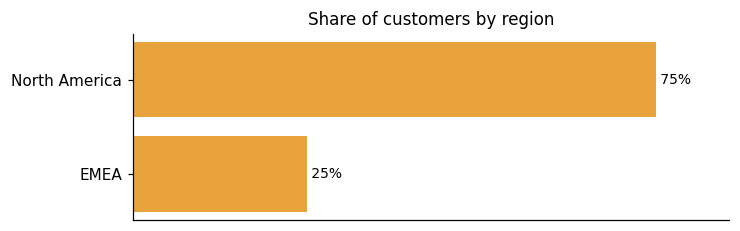
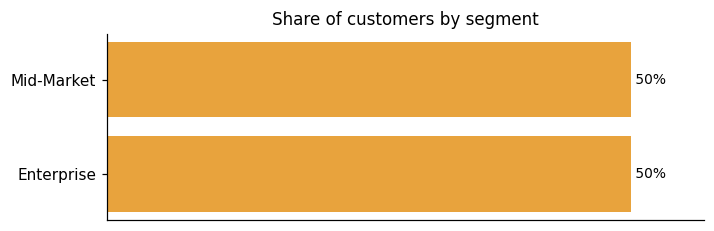
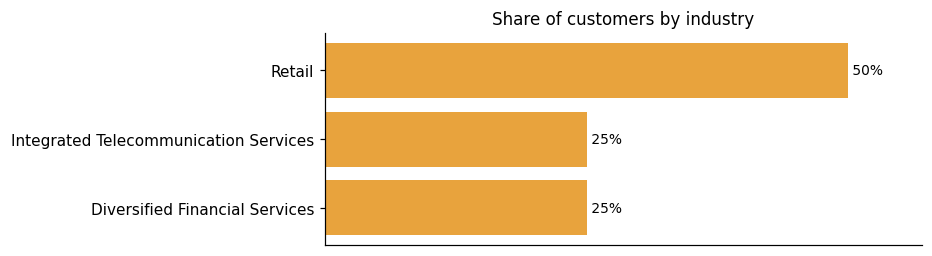
Universal Semantic Layer™'s known customer base spans North America and EMEA, with North America accounting for three of the four identified regions. Where industry is known, Retail leads with two customers, followed by Diversified Financial Services and Integrated Telecommunication Services. Representative customers include Bluemercury and Freddie Mac in North America and Vodafone Portugal in EMEA.
Representative customers: Bluemercury, Freddie Mac, Vodafone Portugal
How Universal Semantic Layer uses AI in practice
Universal Semantic Layer™ lets generative AI models, LLMs, and AI agents connect to enterprise data through the same governed layer already used for BI and analytics. AtScale provides live, structured access to enterprise data without data movement or manual prep, translating natural language questions into optimized, secure queries. For AI agents specifically, Universal Semantic Layer exposes governed metrics and logic through MCP so AI systems execute analytics deterministically.
Generative AI
Read detailsAtScale connects generative AI models and LLMs to governed enterprise semantic models through MCP, so natural language queries resolve against certified business metrics and logic rather than raw, ungoverned data. The design intent is to reduce hallucinations and remove the need for fine-tuning by routing AI queries through the Universal Semantic Layer.
Agentic AI
Read detailsThe Universal Semantic Layer is AtScale's answer to a specific governance problem: AI agents and co-pilots that query live data can act outside sanctioned boundaries unless the rules are enforced at the data layer itself. AtScale positions the Universal Semantic Layer as that enforcement point. Access controls, metric definitions, and data policies are applied consistently. Agents retrieve only authorized outputs that can be traced and explained. The vendor is direct about the intent: even co-pilots querying data independently operate within bounds the enterprise has set, not as free-ranging actors.
Universal Semantic Layer pricing and value: plans, costs and ROI
Universal Semantic Layer™ prices on the number of deployed semantic objects, not on users, queries, or data size. Two tiers carry published rates: Growth at $10 per deployed semantic object per month (starting at $2,500/month) and Standard at $28 per deployed semantic object per month (starting at $7,000/month); Enterprise pricing is available on request. The consumption-based model includes volume discounting, so per-object prices decrease as the number of deployed semantic objects grows. Every employee, customer, or supplier can query the AtScale Semantic Model against the largest cloud data set available under the same subscription. Professional services packages covering training, implementation, and resident solutions architects are available through the account team.
ROI signals
- Unlimited Users, Queries & Data Sizes
- We do not bill for data size, number of users, or number of queries. Have every employee, customer, or supplier query the AtScale Semantic Model against the largest data set you have in the cloud.
- As Deployed Semantic Objects Increase, Semantic Object Prices Decrease
- The more deployed semantic objects you commit to using, the lower the price per object.
Who it fits: value by company size
AtScale's plans for all types of teams span from individual contributors up through large enterprises. The entry point is a Developer tier for individuals who want to build public semantic models. From there, a Growth tier offers a faster way to start with governed metrics and better BI performance, while higher tiers are designed to scale analytics, enable collaboration, and centralize semantic data across tools. The tiered structure means a solo analyst and a large enterprise team are both nominally in scope.
Growth ($10/deployed semantic object/month, starting at $2,500/month) and Standard ($28/deployed semantic object/month, starting at $7,000/month) tiers have published prices; Enterprise tier is sales-gated (Custom, Request a Demo).
Developer
For individuals who want to build public semantic models. Connectivity to 1 of the following query dialects:MDXDAXSQLAvailable Certified Tools MDX DAX SQL
Growth
The fastest way to start with AtScale for governed metrics and better BI performance. $10 /deployed semantic object/ monthStarting at $2,500 / month Unlimited Users Unlimited Queries 1 Production Environment
Standard
Scale analytics, enable collaboration, and centralize semantic data across tools. $28 /deployed semantic object/ monthStarting at $7,000 / month Unlimited Users Unlimited Queries 1 Production Environment 1 Pre-Production Environment
Enterprise
Self-service analytics across complex enterprise environments. Custom Unlimited Users Unlimited Queries 1 Production Environment 2 Pre-Production Environments
Plans as published by the vendor on Pricing | AtScale.
Universal Semantic Layer enterprise readiness: security, compliance, and migration
Universal Semantic Layer™, built by AtScale, addresses enterprise readiness across three dimensions: security, compliance, and migration.
Security controls and assurance
The Universal Semantic Layer holds SOC 2 attestation. On the architectural side, AtScale never stores or moves your data, querying it in place and inheriting the security protocols of the underlying data warehouse. Existing data access policies travel with every query. That means role-based access control, row-level security, and column masking apply whether the request comes from a dashboard, an analyst, or an LLM-powered agent, as documented in AtScale's data access policies coverage. Granular row and column-level security lets teams enforce detailed access controls to safeguard sensitive data. Audit logging rounds out the governance layer, so there is a record of who accessed what. AtScale ensures that only authorized data is exposed even when the consumer is an AI agent rather than a person.
Compliance and data protection
Universal Semantic Layer holds SOC 2 attestation and is designed to comply with GDPR and HIPAA, with the applicable standards varying by deployment model. Agentic AI use is intended to stay within these same compliance boundaries. On the operational side, dynamic policy enforcement is designed to apply controls in real time without interrupting workflows. Auditability runs through the platform at two levels: full visibility into metric definitions, usage, and access — including traceability for AI agents — and auditable change management that tracks modifications for compliance and data lineage purposes.
Migration from competing platforms
AtScale is built to preserve multidimensional workflows when teams migrate away from SSAS or legacy cube architectures. For SSAS specifically, AtScale offers a cloud-native, compatible alternative that shifts computation into Snowflake rather than requiring teams to rebuild analytical logic from scratch. Rakuten took this path to move legacy Microsoft SSAS-based OLAP to a cloud-first infrastructure, with Tableau handling visualization. AtScale is designed to run a full dimensional analysis engine on live data without data extracts. Removing extracts and manual cube rebuilds is intended to drive a 30–70% TCO improvement.
AtScale Virtual Data Warehouse Alternatives


Connect Universal Semantic Layer with your stack: integrations and partner ecosystem
Universal Semantic Layer™, developed by AtScale, connects to 15 native integrations and 37 integration partnerships spanning 28 partner categories. Those categories range from cloud data platforms and cloud data warehouses to AI/ML platforms, reflecting how broadly the integration footprint extends across the modern data stack.
AtScale's Universal Semantic Layer connects Snowflake, Microsoft Power BI, and Excel into a single live query environment. AtScale serves as Snowflake's strategic semantic partner, with the Universal Semantic Layer running natively on the Snowflake Data Cloud. On the Microsoft side, AtScale and Microsoft jointly developed a DAX connector, letting AtScale communicate natively with Power BI for full multi-dimensional query support on live cloud data. Native DAX covers 1,600+ functions used in complex Power BI models. Native MDX support extends the same connectivity to Excel PivotTables and CUBE formulas. At enterprise scale, the architecture is designed to deliver up to 14× concurrency gains.
| Partner category | Integration partners | Native count | Flow direction |
|---|---|---|---|
| cloud data platform | Snowflake, Cloudera | 0 | Upstream |
| cloud data warehouse | Google BigQuery, Amazon Redshift | 1 | Upstream |
| AI/ML platform | DataRobot, Dataiku, H2O.ai | 0 | Bidirectional |
| AI/Machine Learning | Beyond Limits | 0 | Unknown |
| B2B Media & Research | TechTarget | 0 | Unknown |
| Data Analytics | Jethro, Starburst, Tiger Analytics | 0 | Unknown |
| Data Platform | MapR Technologies | 0 | Unknown |
| Data Visualization | Apache Superset (superset.io) | 0 | Unknown |
| Identity & Access Management | Okta | 0 | Unknown |
| Management Consulting | Accenture, Deloitte | 0 | Unknown |
| Other | APPEX, DAS42, EVT, Hex Digital, LEIT DATA, Momentum Consulting Corporation, PT Mastersystem Infotama, StrategyCore K.K., Triade LLC, intelia | 0 | Unknown |
| business intelligence | Apache Superset (superset.apache.org), Google Looker, MicroStrategy, Microsoft Power BI, Qlik, Tableau, ThoughtSpot | 2 | Downstream |
| business intelligence / dashboard | Klipfolio | 1 | Downstream |
| cloud data platform / data lakehouse | Databricks | 0 | Upstream |
| cloud platform / data warehouse | Microsoft Azure | 1 | Upstream |
| data application framework | Streamlit | 1 | Downstream |
| data catalog | Alation, Atlan | 1 | Bidirectional |
| data catalog / data governance | Collibra | 1 | Bidirectional |
| data platform | InterSystems | 0 | Upstream |
| data processing framework | Apache Spark | 1 | Upstream |
| data science / analytics platform | KNIME | 1 | Bidirectional |
| data science / collaborative notebook | Hex | 0 | Downstream |
| data science library | pandas | 1 | Downstream |
| data science notebook | Jupyter | 1 | Downstream |
| data transformation / analytics engineering | dbt | 1 | Upstream |
| relational database | PostgreSQL | 0 | Upstream |
| source code repository / DevOps | GitHub | 1 | Upstream |
| spreadsheet | Google Sheets | 0 | Downstream |
| spreadsheet / business intelligence | Microsoft Excel | 1 | Downstream |
What's new in Universal Semantic Layer
Universal Semantic Layer™, from AtScale, has seen no product updates in the last nine months. In that same window, two partnerships or integrations were announced. The product has also received two awards in the last 24 months.
AtScale Joins OSI to Advance Open Semantic Standards for AI
AtScale is now part of the Open Semantic Interchange (OSI), an open source initiative led by Snowflake aimed at creating a vendor-neutral specification for standardizing fragmented data definitions. The OSI works toward a shared, open semantic model specification. AtScale's Universal Semantic Layer participates in this broader collaboration.
Read more →Semantic Layer for Databricks MCP Marketplace | AtScale
AtScale now connects its Universal Semantic Layer to the Databricks MCP Marketplace, letting organizations build AI agents through Databricks Agent Bricks that draw on governed semantic models. Those agents are designed to support accurate, trusted business decisions at enterprise scale.
Read more →Recent awards for Universal Semantic Layer
AtScale's Universal Semantic Layer has received 2 awards in the last 24 months, recognized as a Leader and Fast Mover in the 2025 GigaOm Radar Report for Semantic Layers and as a Leader and Forward Mover in the GigaOm Sonar Report for Semantic Layers.
- Leader and Fast Mover in the 2025 GigaOm Radar Report for Semantic Layers and Metric Stores (2025-09-25) →
- Leader and Forward Mover in the GigaOm Sonar Report for Semantic Layers and Metric Stores (2024-09-19) →
AtScale Announces Integration for Snowflake Semantic Views to Extend Governed Metrics to Power BI and Excel
AtScale announced the integration of its XMLA Endpoint for Snowflake Semantic Views, allowing Power BI and Excel users to access governed metrics directly from Snowflake. This integration eliminates the need for data mirroring and ensures consistent business metrics across various platforms, enhancing data analytics and business intelligence capabilities.
AtScale and Snowflake Inc. Announce Integration For Snowflake Semantic ...
AtScale and Snowflake Inc. have announced an integration to enhance Snowflake's semantic capabilities. This collaboration aims to improve data analytics and business intelligence by enabling seamless semantic data integration.
AtScale Appoints Mark Palmer CMSO for Enterprise AI
AtScale has appointed Mark Palmer as Chief Marketing and Strategy Officer to drive its enterprise AI strategy. Palmer, a recognized leader in data and analytics, will focus on enhancing AtScale's position as a governed semantic layer provider. His role includes global marketing and strategic positioning to emphasize AtScale's capability in delivering accurate, AI-ready analytics without vendor lock-in.
Atscale, INC. Profile
HQ Location
#800 400 S El Camino Real San Mateo, CA 94402
Employees
11-50
Social


Financials
SERIES D