Folloze buyer experience and content experience platform summary
Folloze is a no-code B2B buyer experience platform built for ABM-grade personalization across landing pages, microsites, and digital sales rooms. Teams use first-party engagement signals and AI to stand up on-brand experiences quickly, then guide accounts with intent-aware content and measurable impact. A long-standing strength is content management and organization—governance, asset control, and reuse—so marketers can curate consistent, compliant journeys at speed. Folloze operates as the content experience layer between upstream intent/ABM platforms and downstream CRM and sales engagement tools.
Top features
Top use-cases
Value proposition to different roles
Capability evolution
Recent execution centers on faster activation, deeper analytics, and tighter ABM alignment via partner signals. Programs that pair 6sense intent with Folloze experiences report higher known engagement, more qualified accounts, and pipeline lift while reducing paid media exposure. At the same time, the platform’s roots in content organization, governance, and asset reuse continue to anchor execution as AI-assisted activation expands.
Market footprint for Folloze
Representative customers visible in the supplied material include Cisco, Autodesk, FireEye, Walker & Dunlop, Celent, and Oracle. These stories span enterprise technology, cybersecurity, software, financial services, and advisory segments—illustrating how buyer experiences, ABM programs, and event hubs are adapted to each context.
Folloze Platform Customer wins, Customer success stories, Case studies
Celent - Financial Services
Walker & Dunlop - Financial Services
FireEye - Computer & Network Security
Oracle - Education
Autodesk - Computer Software
Celent - Information Services
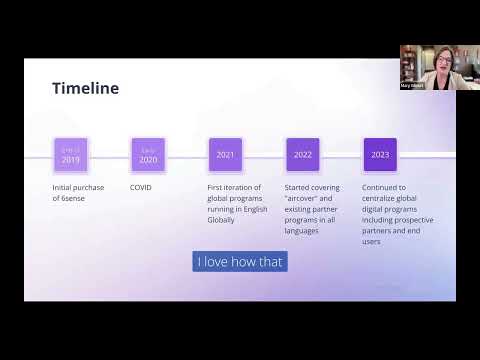
WatchGuard's Winning Playbook: Epic Marketing in Any Language with Folloze + 6sense
Frequently Asked Questions(FAQ)
for Folloze Platform
What CRM integrations are available for the software?
The software offers a variety of CRM integrations to enhance your business processes and streamline customer relationship management. Key integrations include Salesforce, which allows for seamless data synchronization and improved sales tracking, and HubSpot, enabling effective marketing automation and lead management. Additionally, the software can integrate with Zoho CRM for comprehensive customer insights and Microsoft Dynamics 365 for robust analytics and reporting capabilities. These integrations facilitate better communication between sales and marketing teams, improve customer engagement, and ultimately drive sales growth. By leveraging these CRM integrations, businesses can ensure that their customer data is centralized, accessible, and actionable, leading to more informed decision-making and enhanced customer experiences.
Which marketing automation platforms can be integrated with the software?
While the specific software in question is not mentioned, many marketing automation platforms commonly integrate with various B2B software solutions. Popular options include HubSpot, which offers a comprehensive suite for inbound marketing, Salesforce, known for its robust CRM capabilities, and Marketo, which specializes in lead management and email marketing. These integrations allow businesses to streamline their marketing efforts, automate repetitive tasks, and enhance customer engagement by syncing data across platforms. Additionally, tools like Mailchimp and ActiveCampaign can also be integrated, providing further options for email marketing and customer relationship management. When selecting a marketing automation platform, consider your specific business needs, the ease of integration, and the features that will best support your marketing strategy.
What data providers can be connected to the software?
The software allows integration with a variety of data providers to enhance its functionality and data analysis capabilities. While specific data providers may vary based on the software's version and updates, common integrations typically include platforms like Salesforce for customer relationship management, HubSpot for marketing automation, and various data analytics tools. These connections enable businesses to pull in valuable data from multiple sources, streamline workflows, and gain deeper insights into their operations. By leveraging these integrations, users can ensure that their software is equipped with the most relevant and up-to-date information, ultimately driving better decision-making and improving overall business performance. For the most accurate and current list of supported data providers, it is advisable to consult the software's official documentation or support resources.
How does the integration with Salesforce work?
The integration with Salesforce allows businesses to seamlessly connect their existing workflows and data with the Salesforce platform, enhancing customer relationship management (CRM) capabilities. This integration typically involves using APIs or pre-built connectors that facilitate data synchronization between your software and Salesforce. Users can automate processes such as lead management, sales tracking, and customer support by ensuring that information flows smoothly between systems. For instance, when a new lead is generated in your software, it can automatically be added to Salesforce, allowing sales teams to act quickly. Additionally, this integration can provide valuable insights by combining data from both platforms, enabling better decision-making and improved customer engagement. Overall, integrating with Salesforce streamlines operations and enhances the effectiveness of your sales and marketing efforts.
Can I integrate HubSpot with the software, and if so, how?
Yes, you can integrate HubSpot with the software to enhance your marketing and sales processes. To do this, first, ensure you have access to both your HubSpot account and the software you wish to integrate. Navigate to the software's integration settings, where you should find an option to connect with HubSpot. You will typically need to authenticate your HubSpot account by logging in and granting the necessary permissions. Once connected, you can sync data such as contacts, leads, and marketing campaigns between the two platforms. This integration allows for streamlined workflows, improved lead management, and better tracking of customer interactions, ultimately driving more effective marketing strategies and sales conversions. Always refer to the specific integration documentation provided by the software for detailed steps and troubleshooting tips.
What are the steps to set up the API for the software?
To set up the API for the software, start by reviewing the API documentation provided by the software vendor, which outlines the necessary endpoints and authentication methods. Next, create an account or obtain an API key if required. Once you have your API key, configure your development environment by installing any necessary libraries or SDKs that facilitate API calls. After that, write your initial code to make a simple request to the API, ensuring you include the API key in the headers for authentication. Test the connection to verify that you can successfully retrieve data or perform actions as intended. Finally, implement error handling and logging to manage any issues that may arise during API interactions, ensuring a smooth integration with your existing systems.
How do I configure the software to work with third-party applications?
To configure the software to work with third-party applications, start by identifying the specific applications you want to integrate with, such as Salesforce, HubSpot, or Marketo. Next, access the software's settings or integration section, where you can find options for connecting to external platforms. Follow the provided instructions to authenticate and authorize the connection, which may involve entering API keys or login credentials for the third-party application. Ensure that you map any necessary data fields between the software and the third-party application to facilitate seamless data transfer. Finally, test the integration to confirm that data flows correctly and that both systems are communicating as intended. If you encounter any issues, consult the software's support documentation or reach out to their customer support for assistance.
What features does the software offer for lead management?
The software offers a comprehensive suite of features for lead management designed to streamline the process of capturing, nurturing, and converting leads. Key functionalities include automated lead capture from various sources, such as web forms and social media, ensuring no potential customer is overlooked. The software also provides robust lead scoring capabilities, allowing businesses to prioritize leads based on their engagement and likelihood to convert. Additionally, it includes customizable workflows for lead nurturing, enabling personalized communication through email campaigns and follow-ups. Integration with CRM platforms like Salesforce and HubSpot enhances the lead management process by centralizing data and facilitating seamless communication across teams. Overall, these features empower businesses to effectively manage their leads, improve conversion rates, and ultimately drive revenue growth.
How does the reporting feature help in tracking sales performance?
The reporting feature in our B2B software is essential for tracking sales performance as it provides comprehensive insights into various metrics such as sales volume, conversion rates, and customer acquisition costs. By generating detailed reports, businesses can analyze trends over time, identify high-performing sales strategies, and pinpoint areas needing improvement. This data-driven approach enables sales teams to make informed decisions, optimize their efforts, and ultimately drive revenue growth. Additionally, the reporting feature often includes customizable dashboards that allow users to visualize key performance indicators (KPIs) at a glance, facilitating quicker assessments and strategic adjustments. Overall, leveraging the reporting feature empowers organizations to enhance their sales processes and achieve better outcomes.
What capabilities does the software have for data synchronization?
The software offers robust data synchronization capabilities that ensure seamless integration and real-time data updates across various platforms. It allows users to synchronize data between different systems, such as CRM tools, ERP systems, and marketing platforms, ensuring that all stakeholders have access to the most current information. This capability enhances data accuracy and consistency, reducing the risk of errors that can arise from manual data entry. Additionally, the software supports automated synchronization processes, which can be scheduled or triggered by specific events, streamlining workflows and improving operational efficiency. By leveraging these data synchronization features, businesses can enhance collaboration, make informed decisions based on up-to-date information, and ultimately drive better outcomes.
How can I use the software's API to automate tasks?
To automate tasks using the software's API, you first need to familiarize yourself with the API documentation, which provides detailed information on available endpoints, authentication methods, and data formats. Start by obtaining your API key, which is essential for authenticating your requests. Next, identify the specific tasks you want to automate, such as data retrieval, updates, or integrations with other applications. You can use programming languages like Python or JavaScript to write scripts that interact with the API, sending requests to perform actions like creating, reading, updating, or deleting data. Additionally, consider using automation tools like Zapier or Integromat, which can simplify the process by allowing you to connect the software's API with other services without extensive coding. By leveraging the API effectively, you can streamline workflows, reduce manual effort, and enhance overall productivity.
What are the benefits of integrating with a CRM system?
Integrating with a CRM system offers numerous benefits that can significantly enhance business operations. A CRM integration allows for seamless data flow between your software and the CRM, ensuring that customer information is always up-to-date and accessible. This leads to improved customer relationship management, as sales and marketing teams can easily track interactions and tailor their strategies accordingly. Additionally, it streamlines processes by automating data entry and reducing the risk of errors, which saves time and increases productivity. Enhanced reporting capabilities also arise from integration, providing valuable insights into customer behavior and sales performance. Ultimately, integrating with a CRM system fosters better collaboration among teams, leading to more informed decision-making and improved customer satisfaction, which can drive revenue growth.
How does the software handle data import from external sources?
The software facilitates data import from external sources through a user-friendly interface that supports various file formats, including CSV, Excel, and JSON. Users can easily upload their data by navigating to the import section, where they can select the desired file and map the fields to ensure accurate data integration. Additionally, the software offers API integrations, allowing for seamless data transfer from popular platforms such as Salesforce and HubSpot. This capability not only streamlines the onboarding process but also enhances data accuracy and consistency across systems, ultimately saving time and reducing manual entry errors. By efficiently handling data imports, the software empowers businesses to leverage existing data for better decision-making and operational efficiency.
What specific features assist SDRs in their daily tasks?
Sales Development Representatives (SDRs) benefit from a variety of features designed to streamline their daily tasks and enhance productivity. Key features include automated lead scoring, which helps prioritize prospects based on engagement and fit, and integrated communication tools that facilitate seamless outreach via email, calls, or messaging. Additionally, CRM integration allows SDRs to track interactions and manage relationships effectively, while analytics dashboards provide insights into performance metrics and campaign effectiveness. Task management features enable SDRs to organize their daily activities and follow-ups efficiently. Furthermore, templates for emails and outreach messages save time and ensure consistency in communication. These features collectively empower SDRs to focus on high-value activities, ultimately driving better results in lead generation and conversion.
How does the software's analytics feature improve decision-making?
The software's analytics feature enhances decision-making by providing businesses with actionable insights derived from data analysis. By aggregating and visualizing key performance indicators (KPIs), the analytics tool allows users to identify trends, monitor performance, and uncover areas for improvement. This data-driven approach enables decision-makers to make informed choices based on real-time information rather than intuition alone. Additionally, the software can segment data to reveal insights specific to different departments or customer demographics, facilitating targeted strategies. By leveraging these analytics, organizations can optimize operations, improve customer satisfaction, and ultimately drive revenue growth, ensuring that decisions are aligned with strategic goals and market demands.
Can I customize the integration settings for different data providers?
Yes, you can customize the integration settings for different data providers within our software. This flexibility allows you to tailor the data flow and synchronization processes according to the specific requirements of each provider. By accessing the integration settings, you can configure parameters such as data mapping, frequency of updates, and specific fields to include or exclude. This customization ensures that you can optimize the data exchange to align with your business processes and improve overall efficiency. Additionally, our platform supports various data providers, enabling you to create a seamless experience that meets your unique operational needs. If you require assistance with the customization process, our support team is available to guide you through the steps.
What is the process for setting up webhooks in the software?
Setting up webhooks in the software typically involves a few key steps to ensure seamless integration and real-time data transfer. First, navigate to the settings or integrations section of the software where webhooks are managed. Next, create a new webhook by specifying the target URL where you want the data to be sent. This URL should be an endpoint capable of receiving and processing the incoming data. After that, select the specific events that will trigger the webhook, such as user actions or data updates. Finally, test the webhook to confirm that it is functioning correctly and that the data is being received as expected. This process enhances your software's capabilities by allowing it to communicate with other applications or services in real-time, improving overall efficiency and responsiveness.
How does the software support multi-channel marketing campaigns?
The software supports multi-channel marketing campaigns by providing a unified platform that integrates various marketing channels, such as email, social media, and digital advertising. This allows businesses to create cohesive campaigns that reach their audience across multiple touchpoints, ensuring consistent messaging and branding. With features like automated workflows, analytics, and audience segmentation, users can tailor their marketing efforts to specific demographics and track performance in real-time. Additionally, the software facilitates seamless collaboration among teams, enabling them to coordinate efforts across channels effectively. By leveraging these capabilities, businesses can enhance customer engagement, improve conversion rates, and ultimately drive better ROI from their marketing initiatives.
What are the key features of the software for managing customer relationships?
Customer relationship management (CRM) software is designed to help businesses manage interactions with current and potential customers, enhancing relationships and driving sales growth. Key features typically include contact management, which allows users to store and organize customer information; sales automation tools that streamline the sales process; and lead management capabilities to track and nurture prospects. Additionally, CRM software often includes reporting and analytics features to provide insights into customer behavior and sales performance, as well as marketing automation tools to facilitate targeted campaigns. Integration with other platforms, such as email services and social media, further enhances its functionality, enabling businesses to create a cohesive strategy for customer engagement. Overall, these features empower organizations to improve customer satisfaction, increase retention rates, and ultimately boost revenue.
How does the software's integration with Google Analytics work?
The software's integration with Google Analytics allows businesses to track and analyze user interactions and behaviors on their website effectively. By connecting the software to Google Analytics, users can automatically import data related to website traffic, user demographics, and conversion rates, enabling them to gain insights into how their audience engages with their content. This integration typically involves setting up tracking codes within the software, which then communicates with Google Analytics to provide real-time data. The business value lies in the ability to make data-driven decisions, optimize marketing strategies, and enhance user experience based on comprehensive analytics. Additionally, users can create customized reports and dashboards within Google Analytics to monitor key performance indicators relevant to their business goals, ensuring they stay informed and agile in their marketing efforts.
What technical requirements are needed for API integration?
API integration typically requires a few key technical components to ensure seamless connectivity between systems. First, you need a stable internet connection to facilitate data exchange. The API itself must be accessible, which often involves having the correct endpoint URLs and authentication credentials, such as API keys or OAuth tokens. Additionally, familiarity with programming languages like JavaScript, Python, or Java is essential for implementing the integration, as well as understanding data formats like JSON or XML for data interchange. It's also important to have a solid grasp of the API documentation provided by the software you are integrating with, as it outlines specific requirements and limitations. Finally, ensure that your server or application environment meets any necessary software dependencies or version requirements to support the API integration effectively.
How can I troubleshoot integration issues with the software?
To troubleshoot integration issues with the software, start by verifying that all necessary credentials and permissions are correctly configured for the integration. Check the integration settings within the software to ensure they match the requirements of the connected platform, such as Salesforce or HubSpot. Next, review any error messages or logs generated during the integration process, as these can provide specific insights into what might be going wrong. Additionally, ensure that both the software and the integrated platform are updated to their latest versions, as compatibility issues can arise from outdated software. If problems persist, consult the software's support documentation or reach out to customer support for further assistance, as they can provide tailored guidance based on your specific integration scenario.
What role does the software play in enhancing customer engagement?
The software plays a crucial role in enhancing customer engagement by providing tools that facilitate personalized communication, streamline interactions, and gather valuable insights into customer behavior. By leveraging features such as automated messaging, customer segmentation, and analytics, businesses can tailor their outreach efforts to meet the specific needs and preferences of their audience. This not only fosters a more meaningful connection with customers but also encourages loyalty and repeat business. Additionally, the software can integrate with platforms like Salesforce or HubSpot, allowing for a seamless flow of information that enhances the overall customer experience. Ultimately, by utilizing this software, companies can create a more engaging and responsive environment that drives customer satisfaction and long-term success.
How does the software's automation feature streamline workflows?
The software's automation feature streamlines workflows by reducing manual tasks and minimizing human error, allowing teams to focus on more strategic activities. By automating repetitive processes such as data entry, email notifications, and report generation, the software enhances efficiency and accelerates project timelines. Users can set up triggers and workflows that automatically execute actions based on specific conditions, ensuring that tasks are completed consistently and on time. This not only saves valuable time but also improves accuracy and accountability within teams. Additionally, the automation feature can integrate with other platforms like Salesforce or HubSpot, enabling seamless data flow and collaboration across different tools, further enhancing overall productivity and operational effectiveness.
What are the use cases for integrating the software with a data provider?
Integrating software with a data provider can significantly enhance business operations by enabling access to real-time data, improving decision-making, and streamlining processes. Common use cases include enriching customer profiles with external data to enhance marketing efforts, automating data entry to reduce manual errors, and leveraging analytics for better insights into market trends. For instance, a CRM system integrated with a data provider can automatically update contact information and provide insights into customer behavior, leading to more targeted sales strategies. Additionally, businesses can use this integration to ensure compliance by accessing up-to-date regulatory information. Overall, such integrations empower organizations to harness external data effectively, driving efficiency and competitive advantage.
How does the software facilitate collaboration between sales and marketing teams?
The software facilitates collaboration between sales and marketing teams by providing a unified platform that streamlines communication and data sharing. It integrates essential tools such as CRM systems, email marketing platforms, and analytics dashboards, allowing both teams to access real-time insights and customer data. This transparency helps align marketing campaigns with sales strategies, ensuring that both teams are working towards common goals. Additionally, features like shared project management boards and collaborative content creation tools enable seamless interaction, fostering a culture of teamwork. By breaking down silos and enhancing visibility into each other's activities, the software empowers sales and marketing teams to coordinate efforts more effectively, ultimately driving better lead generation and conversion rates.
What specific features are available for tracking customer interactions?
Tracking customer interactions is crucial for understanding engagement and improving customer relationships. Many B2B software solutions offer specific features for this purpose. For instance, customer relationship management (CRM) systems like Salesforce and HubSpot provide tools for logging calls, emails, and meetings, allowing businesses to maintain a comprehensive history of interactions. Additionally, features such as activity tracking, which monitors customer behavior on websites and applications, help identify engagement patterns. Some platforms also include analytics dashboards that visualize interaction data, enabling teams to assess the effectiveness of their outreach efforts. Furthermore, integration with marketing automation tools can enhance tracking capabilities by linking customer interactions with campaign performance, providing a holistic view of customer journeys. These features collectively empower businesses to tailor their strategies and improve customer satisfaction.
How can I leverage the software's features for better lead scoring?
To leverage the software's features for better lead scoring, start by utilizing its built-in analytics tools to track and analyze user behavior on your website. Implement lead scoring models that assign values to leads based on their interactions, such as page visits, downloads, and email engagement. Customize the scoring criteria to align with your business goals, focusing on attributes like demographic information and engagement levels. Use automation features to streamline the scoring process, ensuring that leads are updated in real-time as they interact with your content. Additionally, integrate the software with your CRM system, such as Salesforce or HubSpot, to enhance data accuracy and facilitate seamless communication between marketing and sales teams. By effectively utilizing these features, you can prioritize high-quality leads and improve conversion rates.
What is the impact of the software's integration on data accuracy?
The impact of software integration on data accuracy is significant, as it facilitates seamless data flow between different systems, reducing the likelihood of errors that can occur during manual data entry. When software integrates effectively, it ensures that data is consistently updated across platforms, which enhances the reliability of the information used for decision-making. For instance, integrating customer relationship management (CRM) tools like Salesforce with marketing automation platforms such as HubSpot can lead to more accurate customer profiles and insights. This integration minimizes discrepancies and ensures that all teams are working with the same, up-to-date information. Ultimately, improved data accuracy leads to better business outcomes, as organizations can trust their data for strategic planning and operational efficiency.
How does the software support real-time data updates?
The software supports real-time data updates through its robust data synchronization capabilities, which ensure that all users have access to the most current information without delays. This is achieved by leveraging advanced APIs that facilitate seamless communication between the software and various data sources, allowing for instant updates as changes occur. Additionally, the software employs webhooks to trigger notifications and updates in real-time, ensuring that all stakeholders are informed immediately of any changes. This capability enhances decision-making processes, improves collaboration among teams, and increases overall operational efficiency, as users can rely on accurate and up-to-date data for their tasks. By integrating with platforms like Salesforce and HubSpot, the software further enhances its real-time data capabilities, making it an invaluable tool for businesses that require timely information to stay competitive.
What are the key business benefits of implementing this software?
Implementing our software offers several key business benefits that can significantly enhance operational efficiency and drive growth. Firstly, it automates routine tasks, reducing manual effort and minimizing errors, which leads to increased productivity. Secondly, the software provides real-time data analytics, enabling informed decision-making and strategic planning based on accurate insights. Additionally, it enhances collaboration among teams by streamlining communication and project management, fostering a more cohesive work environment. The software also supports scalability, allowing businesses to adapt to changing demands without significant additional investment. Finally, by improving customer engagement through personalized experiences, it can lead to higher customer satisfaction and retention rates, ultimately driving revenue growth. Overall, these benefits contribute to a more agile and competitive business landscape.
How can I measure the ROI of this software solution?
To measure the ROI of a software solution, start by identifying key performance indicators (KPIs) that align with your business goals, such as increased revenue, cost savings, or improved efficiency. Next, calculate the total costs associated with the software, including subscription fees, implementation costs, and any additional resources required. Then, quantify the benefits gained from using the software, such as time saved, increased sales, or reduced operational costs. The ROI can be calculated using the formula: (Net Profit / Total Costs) x 100. Regularly review these metrics over time to assess the ongoing value of the software solution, ensuring that it continues to meet your business needs and delivers a positive return on investment.
What cost savings can I expect from using this software?
The cost savings you can expect from using our software largely depend on your specific business needs and operational efficiencies. By automating routine tasks, reducing manual errors, and streamlining workflows, our software can significantly lower labor costs and increase productivity. Additionally, you may see savings from improved resource allocation, as the software helps identify underutilized assets and optimize their use. Many users report a reduction in overhead costs due to enhanced collaboration and communication features, which can lead to fewer meetings and less time spent on project management. Overall, the software not only helps in cutting costs but also drives revenue growth by enabling better decision-making and faster response times to market changes.
How does this software impact revenue generation for my business?
The software significantly impacts revenue generation for your business by streamlining operations, enhancing customer engagement, and providing valuable insights through data analytics. By automating repetitive tasks, it allows your team to focus on high-value activities, ultimately increasing productivity and efficiency. Additionally, the software can improve customer relationship management by offering personalized experiences, which can lead to higher conversion rates and customer retention. The analytics features enable you to identify trends and opportunities, allowing for informed decision-making that can drive sales growth. Overall, by optimizing processes and enhancing customer interactions, the software serves as a powerful tool to boost your revenue generation efforts.
What pricing plans are available for this software?
To provide accurate information regarding the pricing plans available for this software, it is essential to visit the official website or contact the sales team directly, as pricing can vary based on factors such as the size of your business, the number of users, and specific features required. Typically, software solutions offer tiered pricing plans, which may include options like a basic plan for small teams, a professional plan for growing businesses, and an enterprise plan for larger organizations with advanced needs. Additionally, many software providers offer free trials or freemium models to allow potential customers to test the software before committing to a paid plan. For the most current and detailed pricing information, checking the software's pricing page or reaching out to their customer support is recommended.
Are there different tiers of pricing for this software, and what do they include?
Yes, there are typically different tiers of pricing for B2B software, which often include various features and levels of support tailored to meet the needs of different businesses. For instance, a basic tier may offer essential functionalities suitable for small businesses, while a mid-tier option might include additional features such as advanced analytics and integrations with platforms like Salesforce or HubSpot. The highest tier often provides comprehensive capabilities, including premium support, custom integrations, and enhanced security features, catering to larger enterprises with more complex requirements. It's important to review the specific offerings of each tier to determine which best aligns with your business goals and budget, as well as to consider any potential long-term savings or benefits associated with higher-tier plans.
What is the total cost of ownership for this software over three years?
The total cost of ownership (TCO) for software over three years encompasses all direct and indirect costs associated with acquiring, deploying, and maintaining the software. This includes the initial purchase price or subscription fees, implementation costs, training expenses, ongoing maintenance, and support fees, as well as any potential costs for upgrades or additional features. To calculate the TCO, you should gather estimates for each of these components and sum them over the three-year period. Additionally, consider any potential savings or revenue generated from using the software, as these can offset the total costs. Understanding the TCO is crucial for businesses to evaluate the long-term financial impact of the software and make informed decisions about their investments.
How quickly can I expect to see value from this software after implementation?
The timeline for realizing value from software implementation can vary based on several factors, including the complexity of the software, the size of your organization, and the specific use cases you are addressing. Generally, businesses can expect to see initial benefits within a few weeks to a couple of months post-implementation, particularly if the software is user-friendly and integrates well with existing systems. For example, if you are using a CRM like Salesforce, you might quickly notice improvements in lead tracking and customer engagement. However, achieving full value often requires ongoing training, user adoption, and optimization of processes, which can take several months. To maximize your return on investment, it's essential to set clear goals and continuously assess the software's impact on your business operations.
What are the implementation costs associated with this software?
The implementation costs associated with our software can vary based on several factors, including the size of your organization, the complexity of your existing systems, and the specific features you choose to utilize. Typically, these costs may include initial setup fees, customization expenses, training for your team, and ongoing support. It's essential to consider both direct costs, such as licensing fees, and indirect costs, like the time spent on integration and employee training. To get a more accurate estimate tailored to your needs, we recommend reaching out to our sales team for a detailed consultation. They can provide a comprehensive breakdown of potential costs and help you understand the return on investment you can expect from implementing our software.
Can this software help reduce operational costs in my business?
Yes, this software can significantly help reduce operational costs in your business by streamlining processes, automating repetitive tasks, and improving overall efficiency. By implementing features such as real-time data analytics and reporting, you can identify areas where resources are being wasted and make informed decisions to optimize spending. Additionally, the software can enhance collaboration among teams, reducing the time and effort required to complete projects, which translates to lower labor costs. Furthermore, by minimizing errors and improving accuracy in operations, you can avoid costly mistakes that can impact your bottom line. Overall, leveraging this software not only enhances productivity but also contributes to substantial cost savings over time.
What metrics should I track to evaluate the success of this software?
To evaluate the success of your software, it's essential to track several key metrics that reflect its performance and impact on your business. Start by monitoring user engagement metrics, such as active users, session duration, and feature usage, to understand how effectively your team is utilizing the software. Additionally, assess productivity metrics, including task completion rates and time saved, to gauge improvements in efficiency. Customer satisfaction scores, such as Net Promoter Score (NPS) or Customer Satisfaction Score (CSAT), can provide insights into user sentiment and areas for improvement. Finally, track return on investment (ROI) by comparing the software's costs against the financial benefits it generates, such as increased revenue or reduced operational costs. By analyzing these metrics, you can make informed decisions about optimizing the software and enhancing its value to your organization.
How does this software improve efficiency in business processes?
This software improves efficiency in business processes by automating repetitive tasks, streamlining workflows, and enhancing collaboration among team members. By integrating with existing tools such as Salesforce and HubSpot, it allows for seamless data sharing and reduces the time spent on manual data entry. The software also provides real-time analytics and reporting features, enabling businesses to make informed decisions quickly and identify bottlenecks in their processes. Additionally, customizable dashboards and user-friendly interfaces facilitate better task management and prioritization, ensuring that teams can focus on high-impact activities. Overall, by minimizing errors and optimizing resource allocation, this software significantly boosts productivity and operational efficiency, leading to improved business outcomes.
What is the average payback period for this software investment?
The average payback period for a software investment can vary significantly based on several factors, including the type of software, the size of the business, and the specific use case. Generally, businesses can expect a payback period ranging from 6 months to 3 years. For instance, software that automates processes or enhances productivity may yield quicker returns, while more complex systems might take longer to show financial benefits. To calculate the payback period, businesses should assess the total investment cost, including licensing fees and implementation expenses, and compare it to the expected annual savings or revenue generated by the software. Understanding this metric helps organizations make informed decisions about their software investments and ensures they align with their financial goals.
Are there any hidden costs associated with this software?
When considering any software, including ours, it's essential to evaluate potential hidden costs that may arise beyond the initial pricing. While our software is designed to be transparent with its pricing structure, users should be aware of possible additional expenses such as implementation fees, training costs, or ongoing support charges that may not be included in the base price. Additionally, if your organization requires integrations with other platforms like Salesforce or HubSpot, there may be costs associated with those integrations. To avoid surprises, we recommend reviewing the pricing details thoroughly and discussing any specific needs with our sales team to ensure a clear understanding of the total cost of ownership. This proactive approach will help you budget effectively and maximize the value of our software for your business.
How does this software contribute to long-term business growth?
This software contributes to long-term business growth by streamlining operations, enhancing productivity, and providing valuable insights through data analytics. By automating routine tasks, it allows teams to focus on strategic initiatives that drive innovation and customer engagement. The software's ability to integrate with existing tools, such as CRM systems and marketing platforms, ensures a seamless flow of information, which improves decision-making and responsiveness to market changes. Additionally, its scalability means that as your business grows, the software can adapt to increasing demands without requiring a complete overhaul. Ultimately, by fostering efficiency and informed decision-making, this software positions businesses to capitalize on opportunities and sustain growth over time.
What kind of support is included in the pricing plans for this software?
The support included in the pricing plans for this software typically encompasses a range of services designed to assist users effectively. Most plans offer access to a dedicated support team via email and live chat, ensuring that users can receive timely assistance with any issues they encounter. Additionally, many pricing tiers include access to a comprehensive knowledge base, which features tutorials, FAQs, and troubleshooting guides to help users navigate the software independently. Higher-tier plans may also provide priority support, allowing for faster response times and more personalized assistance. Overall, the support structure is designed to enhance user experience and ensure that businesses can maximize the value of the software.
How scalable is this software as my business grows?
The scalability of our software is designed to accommodate the growth of your business seamlessly. As your operations expand, our platform can easily adapt to increased user demands, data volume, and additional features without compromising performance. This is achieved through a flexible architecture that supports both vertical and horizontal scaling, allowing you to add resources as needed. Furthermore, our software integrates with various tools and platforms, ensuring that as your business evolves, you can incorporate new functionalities and maintain efficiency. This scalability not only supports your current needs but also positions your business for future growth, enabling you to focus on strategic initiatives rather than technical limitations.
What are the potential revenue impacts of using this software?
The potential revenue impacts of using this software can be significant, as it often enhances operational efficiency, improves customer engagement, and streamlines processes. By automating routine tasks, businesses can reduce labor costs and allocate resources more effectively, leading to increased productivity. Additionally, the software may provide valuable insights through data analytics, enabling companies to make informed decisions that drive sales and optimize marketing strategies. Improved customer relationship management can lead to higher customer retention rates and increased upselling opportunities, ultimately boosting revenue. Furthermore, by integrating with platforms like Salesforce or HubSpot, the software can enhance lead generation and conversion rates, further contributing to revenue growth. Overall, the strategic implementation of this software can create a positive impact on a company's bottom line.
How does this software compare in pricing to similar solutions?
To provide a comprehensive comparison of pricing for this software against similar solutions, it's essential to consider various factors such as features, scalability, and target market. Typically, pricing can vary significantly based on the specific functionalities offered, with some competitors providing tiered pricing models based on usage or number of users. For instance, while some solutions may offer a lower entry price, they might lack advanced features that this software provides, which could justify a higher cost. Additionally, consider the total cost of ownership, including potential hidden fees for integrations or support. To make an informed decision, it's advisable to evaluate not just the base price but also the overall value delivered by the software in terms of efficiency and ROI compared to alternatives like Salesforce, HubSpot, or Marketo.
What factors should I consider when evaluating the ROI of this software?
When evaluating the ROI of software, several key factors should be considered to ensure a comprehensive analysis. First, assess the initial costs, including licensing fees, implementation expenses, and any necessary hardware upgrades. Next, evaluate ongoing operational costs, such as maintenance, support, and training. It's also crucial to measure the software's impact on productivity and efficiency, as well as any potential revenue increases it may facilitate. Consider qualitative benefits, such as improved customer satisfaction or enhanced decision-making capabilities, which can indirectly contribute to ROI. Additionally, analyze the time frame for realizing returns, as some software may yield benefits quickly while others may take longer. By weighing these factors, you can gain a clearer understanding of the software's overall value to your business.
Is there a free trial or demo available for this software?
Yes, there is a free trial available for this software, allowing potential users to explore its features and functionalities before committing to a purchase. The free trial typically lasts for a specified period, during which users can access all the core features and experience the software's capabilities firsthand. This trial period is an excellent opportunity for businesses to evaluate how the software can meet their specific needs and improve their operations. Additionally, many companies offer demos, either live or recorded, to showcase the software's benefits and answer any questions prospective users may have. To take advantage of the free trial or schedule a demo, simply visit the software's official website and follow the instructions provided.
What are the most common use cases for this software in businesses?
The most common use cases for B2B software typically revolve around enhancing operational efficiency, improving customer relationship management, and streamlining communication. Businesses often utilize this software for automating repetitive tasks, such as invoicing and reporting, which saves time and reduces errors. Additionally, many companies leverage B2B software for managing customer interactions, enabling sales teams to track leads and nurture relationships effectively. Another prevalent use case is data analytics, where businesses analyze trends and performance metrics to make informed decisions. Furthermore, B2B software can facilitate project management, allowing teams to collaborate seamlessly and monitor progress in real-time. Overall, these use cases contribute to increased productivity, better customer satisfaction, and ultimately, higher profitability for businesses.
How does the pricing structure of this software align with my budget?
To understand how the pricing structure of our software aligns with your budget, it's essential to consider the various pricing tiers we offer, which are designed to accommodate different business sizes and needs. Our pricing typically includes a subscription model with monthly or annual payment options, allowing you to choose a plan that fits your financial strategy. Additionally, we provide a detailed breakdown of features included at each tier, ensuring you can select a plan that offers the best value for your investment. We also offer a free trial period, enabling you to assess the software's capabilities before committing financially. By evaluating your specific requirements and comparing them with our pricing options, you can determine the most cost-effective solution that aligns with your budget while maximizing your return on investment.
What are the expected timeframes for implementation of this software?
The expected timeframes for the implementation of our software can vary based on several factors, including the complexity of your business processes, the size of your organization, and the specific features you wish to utilize. Generally, a typical implementation can take anywhere from a few weeks to several months. For smaller businesses with straightforward needs, implementation may be completed in 4 to 6 weeks, while larger enterprises with more complex requirements might expect a timeframe of 3 to 6 months. To ensure a smooth implementation, we recommend engaging with our dedicated support team early in the process, as they can provide tailored guidance and resources to help streamline the setup and integration phases.
How can this software help in achieving cost efficiency?
This software can help achieve cost efficiency by streamlining operations, automating repetitive tasks, and reducing manual errors, which ultimately lowers labor costs and increases productivity. By providing real-time analytics and insights, it enables businesses to identify inefficiencies and optimize resource allocation, ensuring that funds are directed towards high-impact areas. Additionally, the software often includes features that facilitate better inventory management and forecasting, which can minimize excess stock and reduce waste. By integrating with existing systems such as ERP or CRM platforms, it enhances overall workflow and communication, further driving down operational costs. Ultimately, leveraging this software allows organizations to make informed decisions that lead to significant savings and improved financial performance.
What are the customer satisfaction ratings for this software?
To determine the customer satisfaction ratings for our software, we recommend checking reputable review platforms such as G2, Capterra, or Trustpilot, where users share their experiences and rate the software based on various criteria, including usability, support, and features. These ratings can provide valuable insights into how well the software meets customer needs and expectations. Additionally, you can explore testimonials on our website or reach out to current users through forums or social media to gather firsthand feedback. Understanding customer satisfaction ratings is crucial as it reflects the software's reliability and effectiveness, helping you make an informed decision about whether it aligns with your business requirements.
How does this software enhance decision-making in my organization?
This software enhances decision-making in your organization by providing data-driven insights and analytics that empower leaders to make informed choices. By aggregating and analyzing relevant data from various sources, the software enables users to identify trends, forecast outcomes, and evaluate the impact of different scenarios. This capability allows teams to base their decisions on empirical evidence rather than intuition, reducing risks and improving overall effectiveness. Additionally, the software often includes visualization tools that present complex data in an easily digestible format, facilitating better communication and collaboration among stakeholders. Ultimately, by streamlining the decision-making process and ensuring that all relevant information is readily available, this software helps organizations respond more swiftly and strategically to changing market conditions and internal challenges.
What are the training costs associated with implementing this software?
The training costs associated with implementing our software can vary based on several factors, including the size of your team, the complexity of the software, and the level of training required. Typically, businesses can expect to invest in initial training sessions, which may include on-site workshops, online courses, or one-on-one coaching. Additionally, ongoing support and refresher courses may be necessary as your team becomes more familiar with the software. It's essential to consider these costs as part of your overall budget for implementation, as effective training can significantly enhance user adoption and maximize the software's value. For a more precise estimate tailored to your specific needs, we recommend contacting our sales team for a detailed consultation.
How does this software integrate with existing systems in my business?
To understand how this software integrates with existing systems in your business, it's essential to consider the specific integration capabilities it offers. Typically, this software can connect with popular platforms such as Salesforce, HubSpot, and Marketo, allowing for seamless data transfer and workflow automation. Integration often involves using APIs or pre-built connectors that facilitate communication between systems, ensuring that data is synchronized in real-time. To implement these integrations, you would typically start by identifying the systems you wish to connect, then follow the software's integration guidelines, which may include configuring settings within both the software and the existing systems. This process enhances operational efficiency, reduces manual data entry, and improves overall data accuracy, ultimately driving better decision-making and productivity within your organization.
What are the risks of not investing in this software?
Not investing in this software can expose your business to several significant risks. Firstly, you may face operational inefficiencies due to outdated processes, leading to increased costs and reduced productivity. Without the software, your team might struggle with manual tasks that could be automated, resulting in errors and delays. Additionally, lacking advanced analytics and reporting capabilities can hinder your ability to make data-driven decisions, putting you at a competitive disadvantage. Security risks also increase, as many modern software solutions offer enhanced protection against data breaches that manual systems lack. Ultimately, not adopting this software could limit your growth potential, reduce customer satisfaction, and impact your overall market position, making it crucial to consider the long-term implications of your investment decisions.
What are the best alternatives to Software A?
When considering alternatives to Software A, it's essential to evaluate options that meet your specific business needs. Some of the best alternatives include Software B, which offers robust features for project management and collaboration, and Software C, known for its user-friendly interface and strong customer support. Additionally, Software D provides advanced analytics capabilities, making it suitable for data-driven organizations. Each of these alternatives has its strengths; for instance, Software B excels in integration with tools like Salesforce and HubSpot, while Software C is often praised for its ease of use. Ultimately, the best choice will depend on your organization's requirements, budget, and the specific functionalities you prioritize.
How does Software A compare to Software B?
To effectively compare Software A and Software B, it's essential to evaluate their key features, pricing, user experience, and customer support. Software A may offer advanced analytics and a more intuitive user interface, making it suitable for businesses that prioritize data-driven decision-making and ease of use. In contrast, Software B might excel in integration capabilities with platforms like Salesforce and HubSpot, appealing to organizations that require seamless connectivity with existing tools. Additionally, consider the pricing models; Software A may have a subscription-based approach, while Software B could offer a one-time purchase option. Ultimately, the choice between Software A and Software B will depend on your specific business needs, budget constraints, and the importance of features like analytics versus integration capabilities.
What are the key differentiators between Software A and Software C?
To effectively compare Software A and Software C, it's essential to consider several key differentiators. Software A is known for its user-friendly interface and robust customer support, making it ideal for small to medium-sized businesses that prioritize ease of use and quick onboarding. In contrast, Software C offers advanced analytics and customization options, catering to larger enterprises that require in-depth data insights and tailored solutions. Additionally, Software A typically features a more straightforward pricing model, while Software C may have a tiered pricing structure based on the level of features utilized. Ultimately, the choice between Software A and Software C will depend on your organization's specific needs, such as the size of your business, the complexity of your operations, and your budget constraints.
Why should I choose Software A over Software D?
Choosing Software A over Software D can depend on several factors that align with your business needs. Software A may offer superior features such as enhanced user interface, better customer support, or more robust integration capabilities with platforms like Salesforce and HubSpot, which can streamline your operations. Additionally, if Software A provides more competitive pricing or flexible subscription models, it could be a more cost-effective solution for your organization. On the other hand, Software D might excel in specific functionalities or have a more established reputation in certain industries, which could be beneficial depending on your requirements. Ultimately, evaluating the unique features, pricing, and support options of both Software A and Software D will help you make an informed decision that best suits your business objectives.
What makes Software A a better option than Software E?
To determine what makes Software A a better option than Software E, it's essential to consider several factors such as features, user experience, pricing, and customer support. Software A may offer advanced functionalities that cater specifically to your business needs, such as enhanced analytics, better integration capabilities with platforms like Salesforce or HubSpot, and a more intuitive user interface. Additionally, if Software A provides superior customer service and support, this can significantly impact user satisfaction and productivity. On the other hand, Software E might excel in areas like cost-effectiveness or specific niche features that could be beneficial for certain businesses. Ultimately, the choice between Software A and Software E should be based on a thorough assessment of your organization's unique requirements and how each software aligns with those needs.
How does Software F stack up against Software G?
To effectively compare Software F and Software G, it's essential to evaluate their features, usability, pricing, and customer support. Software F is known for its robust analytics capabilities and user-friendly interface, making it ideal for businesses that prioritize data-driven decision-making. In contrast, Software G offers extensive customization options and integration with various platforms, which can be beneficial for companies with specific workflow requirements. Pricing models also differ, with Software F typically offering a subscription-based plan that may appeal to smaller businesses, while Software G might provide tiered pricing that scales with larger enterprises. Ultimately, the choice between Software F and Software G will depend on your organization's specific needs, such as the importance of analytics versus customization, and your budget constraints.
What are the unique strengths of Software H compared to Software I?
Software H offers several unique strengths compared to Software I that can significantly benefit businesses. One of the standout features of Software H is its advanced analytics capabilities, which provide deeper insights into user behavior and operational efficiency, allowing companies to make data-driven decisions. Additionally, Software H boasts a more intuitive user interface, making it easier for teams to adopt and utilize effectively without extensive training. In contrast, Software I may offer more robust customization options, which can be advantageous for businesses with specific needs but may come at the cost of a steeper learning curve. Furthermore, Software H typically provides superior customer support, ensuring that users can quickly resolve issues and maximize their software investment. Ultimately, the choice between Software H and Software I will depend on a company's specific requirements and priorities.
Is Software J a better choice than Software K for small businesses?
Determining whether Software J is a better choice than Software K for small businesses depends on specific needs and use cases. Software J may offer features that are particularly beneficial for small businesses, such as user-friendly interfaces, cost-effective pricing plans, and tailored customer support, which can enhance productivity and streamline operations. On the other hand, Software K might excel in scalability and advanced functionalities that could be advantageous for businesses anticipating growth or requiring more complex solutions. It's essential for small businesses to evaluate their unique requirements, budget constraints, and long-term goals when choosing between the two. Conducting trials or seeking demos can also provide valuable insights into which software aligns better with their operational needs.
What are the main differences between Software L and Software M?
Without specific details about Software L and Software M, I can provide a general framework for comparing two software products. Typically, the main differences between two software solutions can include features, pricing, user interface, customer support, and integration capabilities. For instance, Software L may offer advanced analytics and reporting tools, making it ideal for data-driven businesses, while Software M might focus on user-friendly design and ease of use, appealing to smaller teams or less tech-savvy users. Additionally, pricing structures can vary significantly; Software L might operate on a subscription model, whereas Software M could offer a one-time purchase option. Understanding these differences is crucial for businesses to choose the software that best aligns with their operational needs and budget constraints. For a more tailored comparison, please provide specific details about Software L and Software M.
Why would I switch from Software N to Software O?
Switching from Software N to Software O can offer several advantages that enhance your business operations. Software O may provide improved features, such as better user interface design, advanced analytics capabilities, or more robust customer support, which can lead to increased productivity and efficiency. Additionally, if Software O integrates seamlessly with other tools you use, like Salesforce or HubSpot, it can streamline your workflows and reduce the time spent on manual data entry. Furthermore, consider the pricing structure; Software O might offer more flexible plans or better value for the features you need. Ultimately, the decision should be based on a thorough evaluation of how Software O aligns with your specific business needs and goals compared to Software N.
What are the advantages of using Software P over Software Q?
When comparing Software P and Software Q, several advantages of Software P stand out. Software P typically offers enhanced user experience with a more intuitive interface, making it easier for teams to adopt and utilize effectively. Additionally, Software P may provide superior customer support, ensuring that users can resolve issues quickly and efficiently. It often includes more robust integration capabilities with popular platforms like Salesforce and HubSpot, allowing for seamless data flow and improved workflow automation. Furthermore, Software P might offer advanced analytics and reporting features that empower businesses to make data-driven decisions. On the other hand, Software Q may excel in specific functionalities or pricing structures that could be more appealing depending on the unique needs of a business. Ultimately, the choice between Software P and Software Q should be based on the specific requirements and priorities of your organization.
How does Software R compare with Software S in terms of features?
To effectively compare Software R and Software S in terms of features, it's essential to evaluate their core functionalities and user benefits. Software R typically excels in user interface design and offers robust analytics tools, making it ideal for businesses focused on data-driven decision-making. In contrast, Software S may provide superior integration capabilities with platforms like Salesforce and HubSpot, which can enhance workflow efficiency for teams already using those systems. Additionally, Software R might include advanced customization options, while Software S could offer more comprehensive customer support features. Ultimately, the choice between Software R and Software S will depend on your specific business needs, such as the importance of user experience versus integration capabilities.
What are the best alternatives to Software T for project management?
When considering alternatives to Software T for project management, several robust options are available that cater to various business needs. Notable competitors include Asana, which offers a user-friendly interface and strong collaboration features, making it ideal for teams focused on task management. Trello is another popular choice, known for its visual Kanban boards that simplify project tracking and organization. For more comprehensive project management capabilities, Microsoft Project provides advanced scheduling and resource management tools, suitable for larger enterprises. Additionally, Monday.com offers customizable workflows and automation features that enhance team productivity. Each of these alternatives has unique strengths, so the best choice will depend on your specific project requirements, team size, and preferred management style.
How does Software U differ from Software V in pricing?
Software U and Software V differ significantly in their pricing structures, catering to various business needs and budgets. Software U typically offers a subscription-based model with tiered pricing, allowing businesses to choose a plan that aligns with their size and usage requirements. This model often includes features that scale with the subscription level, providing flexibility for growing companies. In contrast, Software V may utilize a one-time licensing fee or a pay-per-use model, which can be more cost-effective for businesses with fluctuating needs or those that prefer a capital expenditure approach. Additionally, Software V might offer fewer ongoing costs but could require higher upfront investment. Ultimately, the choice between Software U and Software V will depend on your organization's financial strategy and how you plan to utilize the software over time.
What are the unique features of Software W that Software X lacks?
Software W offers several unique features that distinguish it from Software X, enhancing its appeal for specific business needs. One notable feature of Software W is its advanced analytics dashboard, which provides real-time insights and customizable reporting options that are not available in Software X. Additionally, Software W includes an integrated project management tool that allows teams to collaborate seamlessly within the platform, whereas Software X requires third-party integrations for similar functionality. Furthermore, Software W supports a wider range of integrations with popular tools like Salesforce and HubSpot, making it easier for businesses to streamline their workflows. These features collectively enhance productivity and decision-making, providing significant value to organizations looking for comprehensive software solutions.
Why is Software Y preferred over Software Z by industry leaders?
While there are no specific details provided about Software Y and Software Z, industry leaders often prefer one software over another based on several key factors such as functionality, user experience, scalability, and customer support. Software Y may offer advanced features that align better with the needs of businesses, such as enhanced analytics, integration capabilities with platforms like Salesforce or HubSpot, or superior customization options. Additionally, if Software Y has a reputation for better customer service or a more intuitive user interface, these aspects can significantly influence preference. On the other hand, Software Z might be more cost-effective or simpler to implement, appealing to smaller organizations or those with less complex needs. Ultimately, the choice between Software Y and Software Z will depend on the specific requirements and priorities of the organization in question.
What are the pros and cons of Software A versus Software B?
When comparing Software A and Software B, it's essential to evaluate their respective strengths and weaknesses. Software A may offer superior user interface design and customer support, making it easier for teams to adopt and utilize effectively. Additionally, it might provide more robust analytics features, allowing businesses to gain deeper insights into their operations. However, Software A could be more expensive, which may not fit all budgets. On the other hand, Software B might be more cost-effective and offer essential functionalities that meet basic needs without the frills, but it may lack advanced features and have a steeper learning curve. Ultimately, the choice between Software A and Software B should be based on specific business requirements, budget constraints, and the desired level of functionality.
How does Software C perform compared to Software D in user reviews?
Without specific user reviews or comparative data for Software C and Software D, it's challenging to provide a direct performance comparison. Generally, user reviews can highlight various aspects such as ease of use, customer support, features, and overall satisfaction. To effectively compare Software C and Software D, potential users should look for reviews on trusted platforms like G2, Capterra, or Trustpilot, where users share their experiences. Additionally, consider factors such as the specific needs of your business, the scalability of each software, and the types of integrations they offer with other tools like Salesforce or HubSpot. Ultimately, the best choice will depend on your unique requirements and the specific strengths of each software as reflected in user feedback.
What are the top reasons to choose Software E instead of Software F?
When considering Software E over Software F, several key advantages may influence your decision. Software E typically offers a more user-friendly interface, which can lead to quicker onboarding and higher productivity for your team. Additionally, it often provides superior customer support, ensuring that any issues are resolved promptly, which is crucial for maintaining business operations. Furthermore, Software E may include more robust integration capabilities with popular platforms like Salesforce and HubSpot, allowing for seamless data flow and enhanced functionality. On the other hand, Software F might excel in specific features or pricing structures that could be beneficial depending on your unique business needs. Ultimately, the choice between Software E and Software F should be based on your organization's specific requirements and priorities.
What makes Software G stand out against Software H?
Software G stands out against Software H primarily due to its user-friendly interface and advanced analytics capabilities. While Software H offers robust features, it can be complex and overwhelming for new users, which may hinder adoption. In contrast, Software G prioritizes ease of use, allowing teams to quickly onboard and utilize its functionalities without extensive training. Additionally, Software G provides superior data visualization tools that enable businesses to derive actionable insights more efficiently, enhancing decision-making processes. Furthermore, Software G's customer support is often highlighted as more responsive and helpful compared to Software H, ensuring that users receive timely assistance when needed. Overall, these factors contribute to Software G's reputation as a more accessible and effective solution for businesses looking to optimize their operations.
How does Software I compare to Software J in terms of customer support?
When comparing Software I and Software J in terms of customer support, it's essential to consider several factors such as response time, availability of support channels, and user satisfaction. Software I typically offers 24/7 customer support through multiple channels, including live chat, email, and phone, which can be advantageous for businesses needing immediate assistance. In contrast, Software J may provide limited support hours and primarily relies on email and a knowledge base, which could lead to longer resolution times. Additionally, user reviews often highlight Software I's proactive support team, while Software J may receive mixed feedback regarding responsiveness. Ultimately, the choice between Software I and Software J will depend on your specific support needs and the urgency of assistance required for your business operations.
What are the best alternatives to Software K for data analytics?
When considering alternatives to Software K for data analytics, several robust options are available that cater to various business needs. Notable competitors include Tableau, which excels in data visualization and user-friendly dashboards, and Microsoft Power BI, known for its integration with other Microsoft products and strong data modeling capabilities. Another alternative is Google Data Studio, which offers a free solution with seamless integration with Google services, making it ideal for businesses already using Google Workspace. Additionally, Qlik Sense provides powerful associative data indexing, allowing users to explore data freely. Each of these alternatives has unique strengths, so the best choice will depend on your specific requirements, such as budget, existing tools, and the complexity of your data analytics needs.
How does Software L compare with Software M for scalability?
When comparing Software L and Software M for scalability, it's essential to consider their architecture and performance under increased loads. Software L is designed with a microservices architecture, allowing it to scale horizontally by adding more instances as demand grows, which can lead to improved performance and flexibility. In contrast, Software M typically utilizes a monolithic architecture, which may face challenges in scaling efficiently as it requires the entire system to be upgraded or expanded, potentially leading to downtime. Businesses looking for a solution that can adapt to fluctuating workloads may find Software L more advantageous due to its ability to seamlessly integrate additional resources. However, Software M may be simpler to manage for smaller operations with stable workloads. Ultimately, the choice between the two will depend on your specific scalability needs and growth projections.
What are the key benefits of switching from Software N to Software O?
Switching from Software N to Software O can offer several key benefits that enhance operational efficiency and user experience. Software O typically provides improved functionality, such as advanced analytics and reporting features that allow for better data-driven decision-making. Additionally, it may offer a more intuitive user interface, reducing the learning curve for new users and increasing overall productivity. Enhanced integration capabilities with popular platforms like Salesforce or HubSpot can streamline workflows and improve collaboration across teams. Furthermore, Software O may provide superior customer support and regular updates, ensuring that your business stays current with the latest technology trends. Ultimately, transitioning to Software O can lead to cost savings, increased scalability, and a more robust solution tailored to your business needs.
Why is Software P considered superior to Software Q for collaboration?
Software P is often considered superior to Software Q for collaboration due to its advanced features that enhance team communication and project management. Software P offers real-time collaboration tools, such as integrated chat and video conferencing, which facilitate immediate feedback and decision-making among team members. Additionally, it provides a more intuitive user interface, making it easier for teams to adopt and utilize effectively. Software P also includes robust file-sharing capabilities and seamless integration with popular platforms like Slack and Microsoft Teams, which streamline workflows. In contrast, Software Q may lack some of these collaborative features or have a steeper learning curve, potentially hindering team productivity. Ultimately, the choice between Software P and Software Q will depend on specific team needs, but Software P's comprehensive collaboration tools often give it an edge in fostering effective teamwork.
What are the differences between Software R and Software S in functionality?
Without specific details about Software R and Software S, I can provide a general framework for comparing software functionalities. Typically, the differences between two software products can include aspects such as user interface design, feature sets, integration capabilities, and target audience. For instance, Software R may offer advanced analytics and reporting features, making it ideal for data-driven businesses, while Software S might focus on user-friendly design and ease of use, catering to small businesses or non-technical users. Additionally, integration options can vary; Software R might integrate seamlessly with platforms like Salesforce and HubSpot, whereas Software S could prioritize compatibility with tools like Slack or Trello. Understanding these differences helps businesses choose the right software based on their specific needs and operational goals.
How does Software T compare to Software U in user experience?
When comparing Software T and Software U in terms of user experience, both platforms offer distinct advantages tailored to different user needs. Software T is known for its intuitive interface and streamlined navigation, making it particularly user-friendly for beginners and those who prioritize ease of use. It features customizable dashboards and quick access to essential tools, enhancing overall productivity. On the other hand, Software U provides a more robust set of features that cater to advanced users, offering extensive customization options and powerful analytics capabilities. While this can lead to a steeper learning curve, many users appreciate the depth of functionality available. Ultimately, the choice between Software T and Software U will depend on the specific requirements of your team and the level of complexity you are comfortable managing in your daily operations.
What are the unique selling points of Software V over Software W?
Software V offers several unique selling points compared to Software W that can significantly benefit businesses. Firstly, Software V is known for its user-friendly interface, which allows for quicker onboarding and less training time for employees, enhancing productivity. Additionally, it provides advanced analytics and reporting features that enable businesses to gain deeper insights into their operations, facilitating data-driven decision-making. In contrast, Software W may have a steeper learning curve and fewer customization options, which can limit its adaptability to specific business needs. Furthermore, Software V often includes superior customer support and a more robust community for troubleshooting and best practices, making it a more attractive option for companies seeking reliable assistance. Ultimately, the choice between Software V and Software W will depend on the specific requirements and priorities of the business.
Why should I consider Software X instead of Software Y?
When considering Software X over Software Y, it's essential to evaluate the specific features and benefits that align with your business needs. Software X may offer superior user experience, enhanced customer support, or unique functionalities that directly address your operational challenges. For instance, if Software X provides better integration capabilities with platforms like Salesforce or HubSpot, it could streamline your workflows more effectively than Software Y. Additionally, consider factors such as pricing, scalability, and user reviews, as these can significantly impact your decision. Ultimately, the choice between Software X and Software Y should be based on which solution best supports your strategic goals and enhances your team's productivity.
What are the best alternatives to Software Z for CRM solutions?
When considering alternatives to Software Z for CRM solutions, several robust options are available that cater to various business needs. Salesforce is a leading choice, known for its extensive customization capabilities and a wide range of integrations, making it suitable for large enterprises. HubSpot CRM offers a user-friendly interface and is particularly beneficial for small to medium-sized businesses, providing a free tier with essential features. Zoho CRM is another strong contender, offering a comprehensive suite of tools at competitive pricing, ideal for businesses looking for affordability without sacrificing functionality. Additionally, Microsoft Dynamics 365 integrates seamlessly with other Microsoft products, making it a great option for organizations already using the Microsoft ecosystem. Each of these alternatives has unique strengths, so the best choice will depend on your specific requirements and budget.
How does Folloze Platform address your Engagement Management Challenges?
What benefits does Folloze Platform offer for Account Management?
What makes Folloze Platform ideal for Content Management?
How does Folloze Platform address your Campaign Management Challenges?
How efficiently Does Folloze Platform manage your Channel Marketing?
Competitive landscape for Folloze
Established ABM/revenue platforms operate upstream (e.g., 6sense, Demandbase One, ZoomInfo, AdRoll ABM (formerly RollWorks)), while Folloze provides the content experience layer that governs assets and captures first-party engagement for sales. Adjacent intent leaders include TechTarget and Bombora.
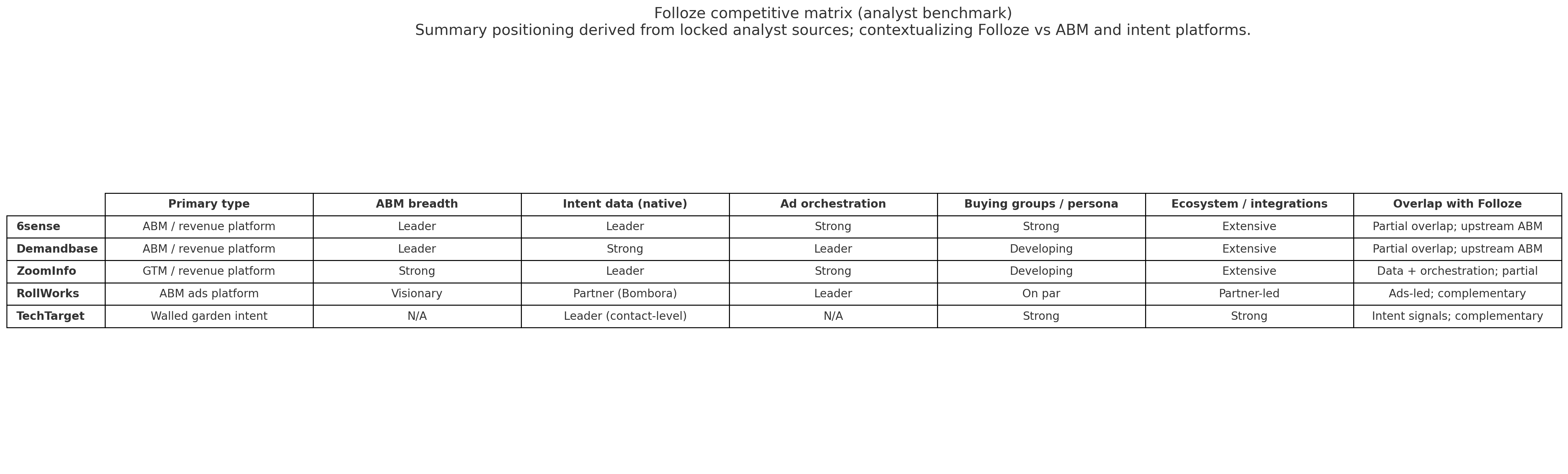
Integrations & partner ecosystem: connect your stack with Folloze
The Folloze integrations catalog combines native connectors and technology alliances to operationalize ABM-grade personalization. Upstream platforms (e.g., 6sense, Demandbase, Cyance, Metadata, NextRoll) supply audience and intent signals. Folloze—acting as the content experience layer—governs assets, curates journeys, and captures first-party engagement. Downstream systems (e.g., Salesforce, Outreach, Salesloft) receive those signals for follow-up and pipeline progression.
Category coverage spans ABM, lead generation, CRM, sales engagement, cross-channel advertising, identity/SSO, data providers, and collaboration/file tools—supporting solution bundles and co-sell partners where appropriate.
Folloze Platform integrates with a wide range of software applications through its robust data import and export capabilities.
Enterprise readiness: security, compliance, integrations, migration & support in Folloze
Security controls and assurance. Locked MCI indicates access management (SSO/2FA) and on-brand publishing controls; no named security certifications were present in the locked data.
Compliance and privacy. No explicit privacy/compliance certifications were found in the supplied sources. Governance—brand control, role-based access, and controlled sharing—underpins how teams deploy content experiences across regions and business units.
Integrations — what works well. Stacks frequently connect 6sense and Demandbase upstream for targeting, with Salesforce, Outreach, and Salesloft downstream to action engagement and hand off to sales. “We used signals with curated experiences to lift known engagement and qualify more accounts.” Evidence
Migration. Customers describe moving key campaigns and event hubs from slower, developer-dependent websites to Folloze, citing speed, brand control, and measurable engagement. Celent case study
Customer support. Locked MCI highlights guided activation and enablement (playbooks, workshop-style support, analytics coaching) to ramp teams and sustain adoption.
Folloze pricing & licensing
| Tier | Buying segment | Pricing model |
|---|---|---|
| Core | Mid-market teams standing up content experiences with governance (SSO/2FA) and standard Folloze integrations | N/A — structure inferred from category patterns (analyst benchmark): base experience package with optional add-ons |
| Program | Growth teams running multi-motion ABM and demand gen with upstream signals (e.g., 6sense/Demandbase) and downstream sales engagement | N/A — analyst benchmark suggests modular add-ons (orchestration/email/ads) layered on a core license |
| Enterprise | Global programs needing brand governance, role-based access, and broad partner ecosystem coverage | N/A — likely enterprise packaging with module gating; exact model not provided |
Notes: Structure reflects locked insights only. Prices and exact licensing terms are not provided here. Entries marked “analyst benchmark” indicate directional category patterns, not vendor-stated terms.
ROI insights
Customer evidence highlights faster time to value and program lift when Folloze experiences run with upstream intent signals and downstream CRM handoff. One documented program reported a 1,244% rise in known engagement, a 192% increase in 6QA volume, and a 43% pipeline increase while reducing paid media exposure. Read the case evidence
What’s new with Folloze
Teams advancing signal-driven ABM with 6sense + Folloze report higher known engagement, more qualified accounts, and pipeline gains while spending less on paid media (no results numbers quoted here by design).
Folloze Announces the General Availability of Generator Agents to Deliver Highly Personalized Buyer Experiences in Real Time
Folloze has launched its new AI-powered Generator Agents, enhancing its B2B Buyer Experience Platform. These agents enable marketers to create hyper-personalized, on-brand microsites and content quickly and efficiently. The suite includes tools for creating microsite copy, personalizing experiences, translating content, and producing videos. This launch aims to address modern marketing challenges by delivering personalized buyer experiences at scale.
Folloze Rolls Out Advanced Engagement Analytics Engine, Impact Dashboard - Demand Gen Report
Folloze introduces the 'Impact Dashboard,' a new tool to enhance engagement analytics for users.
Folloze Rolls Out Impact Dashboard, an Advanced Engagement Analytics Engine That Unlocks Powerful Insights and Revenue Potential - Business Wire
Folloze introduces the Impact Dashboard, a new analytics tool providing insights to boost engagement and revenue.
Folloze, Inc Profile
Company Name
Folloze, Inc
Company Website
https://www.folloze.com/HQ Location
950 Tower Lane, #750, Foster City, California 94404, US
Employees
11-50
Social
Financials
SERIES A