


Lumar overview: capabilities, features, use cases, and value by role
Lumar is a website optimization platform that brings together technical SEO, AI brand visibility (GEO/AEO), site speed, web accessibility, and web analytics into a single tool built for enterprise teams.
Top capabilities of Lumar
Lumar Protect
Read detailsLumar Protect catches problematic site changes before they go live by running automated QA testing across SEO (including GEO), site speed, and accessibility. It ships with more than 350 out-of-the-box tests. Quality thresholds are configurable, and the tool integrates with CI/CD pipelines to block failing changes from being deployed.
Our Website Crawler
Read detailsLumar's serverless, enterprise-grade crawling engine traverses website pages to collect raw data for technical SEO, site speed, accessibility, and custom analytics. It reaches crawl speeds up to 450 URLs/second for non-rendered pages and 350 URLs/second for rendered pages. The engine uses Google Chrome's rendering engine to handle JavaScript pages and stays continuously updated to reflect the latest Google Search crawling behaviors.
GEO (AI Search) Metrics
Read detailsLumar's GEO (AI Search) Metrics capability lets website teams track, prioritize, and act on issues blocking brand content from appearing in AI search results and LLM-generated answers, delivering dedicated GEO health scores, data visualizations, crawlability and content analysis reporting, and an AI governance plan — with the underlying crawler reaching up to 450 URLs/s in lab tests to support analysis at scale.
Lumar Monitor
Read detailsLumar Monitor brings site health tracking for SEO, GEO, site speed, web accessibility, and custom metrics together in one platform — across multiple domains or site sections at once. Customizable dashboards give teams a clear view across all their properties. When new issues surface, push notifications reach the team through email, Slack, or Teams so they can act quickly.
Technical SEO Metrics
Read detailsLumar's Technical SEO Metrics capability covers deep, scalable technical SEO analytics through 250+ built-in reports, customizable crawl segmentation, SEO traffic funnel visualizations, website health scores, and dedicated GEO analysis. Crawls run at up to 450 pages/sec, analyzing SEO, site structure, indexability, and page experience across millions of URLs. Together, these tools give website teams the data to monitor key metrics, fix problems, and demonstrate the value of their SEO strategy.
Site Speed Metrics
Read detailsLumar's Site Speed Metrics capability combines full Lighthouse performance reporting at scale with origin-level CrUX field data to surface speed and user experience issues across an entire site. Health scores give teams a quick read on overall performance, while high-level dashboards and granular drill-down reports supply the detail needed to prioritize and fix specific improvements.
Web Accessibility Metrics
Read detailsLumar's Web Accessibility Metrics capability helps website teams identify, prioritize, and fix accessibility issues mapped to WCAG 2.2 (Levels A through AAA), with AI-generated suggested solutions and code fixes delivered through logical issue grouping, trend tracking, and automated QA testing. Color contrast testing is handled with fewer false positives, reducing manual color contrast tests by up to 89%. The capability also supports ADA and EAA compliance alongside WCAG standards.
Custom Website Analytics
Read detailsLumar's Custom Website Analytics capability gives teams full control over how they measure site performance — from static metric extraction and dynamic user-flow analysis to external data integration. Teams can build their own metrics using AI-assisted code generation, or commission more complex bespoke analytics directly from Lumar's team.
Lumar Impact
Read detailsLumar Impact translates SEO and website optimization work into business terms — through website health scores, competitive industry benchmarks, funnel-based prioritization visualizations, and shareable reports built to communicate ROI and secure stakeholder buy-in for optimization projects.
JavaScript rendering / technical health analysis
Read detailsLumar's Page Rendering Service (PRS) runs the crawler through a full JavaScript execution environment powered by the most up-to-date version of Google Chrome, uncovering client-side rendered links and content that a standard crawler would miss. It supports custom script injection, JavaScript redirect detection, and alignment with Googlebot's web rendering service specifications to surface rendering issues that may affect search performance.
Enhanced reporting
Read detailsLumar's enhanced reporting capability cuts false positives in accessibility issue detection, particularly for color contrast, by overlaying Lumar's technology onto the leading digital accessibility library. This keeps teams focused on genuine issues rather than spurious alerts.
Top features of Lumar
Notifications and Alerts
Read detailsLumar Monitor gives teams a way to catch new issues the moment they appear. Users can set customized alerts that notify the right team member immediately. Alerts arrive in-app or by push notification, and they can be delivered through email, Slack, or Teams.
Custom Metric and Extraction Builder
Read detailsLumar lets teams go further than its 250+ built-in reports by building fully customized metrics and custom extractions to track bespoke issues across their site.
Customizable Dashboards
Read detailsLumar Monitor centers on visibility across an entire web portfolio. It provides fully customizable dashboards with site segmentation options and multi-site capabilities, bringing all sites or key site segments into a single view so teams can focus on what matters most for their business.
AI-Generated Ticket Content
Read detailsLumar's AI-Generated Ticket Content feature produces first drafts of developer delivery tickets in seconds by combining crawl issue details with extensive guidance, so developers have the information they need to act quickly.
Built-In Technical SEO and Optimization Reports
Read detailsLumar's single technical SEO health view draws on more than 250 built-in reports. Those reports span canonical tags, HTTP status, hreflang, redirect chains, metadata, link structure, and broken resources.
Customizable Crawl Segmentation
Read detailsLumar's customizable crawl segmentation targets crawls at specific site sections, geographies, or content types through precision crawl controls, enabling focused analysis of priority areas.
Granular Issue Drill-Down and Resolution Guidance
Read detailsLumar's site speed tools show granular issue-level details for every problem they detect. Each issue comes with a clear explanation of how to fix it, along with estimates of the potential time and byte savings.
CI/CD Pipeline Integration for QA
Read detailsLumar automates QA testing by integrating directly with CI/CD pipelines, so teams can catch bugs before they ever go live. Regular template testing runs as part of the pipeline, which means issues are flagged early rather than discovered after publishing.
AI Referral Source Tracking
Read detailsLumar's GEO toolkit tracks which AI platforms are driving traffic to a site, situating that data within a broader analysis of content reliability and visibility.
Website Health Scores and Dashboard Overviews
Read detailsLumar Protect keeps a continuous watch on technical health across SEO (including GEO), site speed, and accessibility — no matter how frequently new code ships. Health scores and high-level dashboard overviews give teams a baseline view of technical health excellence on their website, all backed by 350+ built-in automated QA tests.
Crawl Progress Screen
Read detailsLumar's crawl progress screen surfaces real-time data — requests per second, failure rate, and URL counts by status code — during an active crawl, with crawl speeds of up to 450 pages per second ensuring that monitoring stays meaningful at scale.
Scalable URL Crawling
Read detailsLumar's website crawler handles millions of URLs at speeds up to 450 URLs per second in lab tests, supporting fast, large-scale GEO and SEO analytics for enterprise websites.
Ad-Hoc Crawls
Read detailsLumar Analyze supports ad-hoc, targeted crawls that teams can run on demand. Those crawls can focus on specific site sections or geographies, outside of scheduled crawl cycles. This lets teams reach the insights they need without waiting for the next scheduled run.
Developer Warnings for SEO or Accessibility Regressions
Read detailsLumar Protect enables configurable warnings that alert developers when proposed updates may introduce minor accessibility issues or negatively affect SEO efforts, search performance, traffic, and conversions before a build is deployed.
Build Deployment Blocking on Threshold Breach
Read detailsLumar Protect brings quality control into the deployment pipeline itself, where teams can set QA thresholds that automatically block a build from going live if it falls short of the chosen technical health standard.
WCAG Compliance Checking
Read detailsLumar Protect catches accessibility non-compliance before it reaches production by running automated QA tests against WCAG standards on every website update.
Stakeholder Benchmarking and Reporting
Read detailsLumar combines SEO traffic funnel data visualizations with website health scores so teams can quickly spot high-impact SEO opportunities and report progress to key stakeholders, including benchmarking against industry averages.
On-Platform Data Analysis
Read detailsLumar Monitor keeps issue and trend tracking inside the Lumar platform itself, covering multiple domains without requiring spreadsheet downloads or manual data manipulation.
Health Score Trend Visualization
Read detailsLumar Impact tracks website health over time through easy-to-understand scores that span technical SEO, site speed, and web accessibility, showing improvements and regressions at a glance.
Traffic Data Integration for Prioritization
Read detailsLumar's accessibility tools connect traffic data with WCAG 2.2 issue groupings and trend tracking so teams can identify, prioritize, and fix accessibility issues according to their actual traffic impact.
Raw vs Rendered HTML Reporting
Read detailsLumar's GEO toolkit covers reporting on raw versus rendered HTML differences, helping teams spot the technical barriers that block AI systems from finding, accessing, and indexing their content.
Robots.txt and Nosnippet Issue Reporting
Read detailsLumar's GEO toolkit targets two specific technical barriers — robots.txt issues and nosnippet directives — that can prevent AI systems from crawling and indexing content. Dedicated reporting on both helps teams pinpoint and resolve those problems quickly.
Structured Data Reporting
Read detailsLumar's GEO toolkit is built around structured data issues specifically, producing focused reporting on the factors that affect how AI systems read and interpret a brand's content. That focus is backed by ongoing research from Lumar experts to surface the most actionable signals.
Screenshot and HTML Storage for SEO Crawls
Read detailsLumar Analyze captures screenshots and HTML during SEO crawls, storing them so teams have additional context when investigating anomalies in crawl data.
Task Priority Level and Deadline Assignment
Read detailsLumar Analyze's Task Manager supports technical health project management by letting users define a task's priority level and deadline, assign it to a team member, and track progress with every crawl.
Top use cases for Lumar
Site Migrations
Read detailsSEO and development teams use Lumar to plan and execute site migrations safely. The workflow covers comparing technical health metrics between staging and live environments, running automated SEO QA tests to catch risks before go-live, and monitoring ongoing changes post-migration. Drill-down issue diagnosis and cross-team alignment via Lumar Protect support in-depth technical analytics throughout the process. Access to professional services SEO expertise helps prevent drops in organic traffic and revenue.
SEO Strategy
Read detailsLumar gives SEO and digital marketing teams a single workflow for building and protecting long-term organic search strategies. It combines technical health analytics, ongoing site monitoring, and automated QA testing so that new issues don't quietly erode search performance. The workflow moves through three tools in a logical sequence. Lumar Analyze identifies current SEO issues. Lumar Monitor watches for new concerns as they emerge. Lumar Protect prevents regressions before they reach production. Teams that want additional support can also engage Lumar's professional services team for bespoke strategy guidance.
AI Search Optimization [GEO]
Read detailsLumar brings GEO analysis into a structured workflow that takes teams from technical diagnosis all the way to stakeholder reporting. The process starts with at-scale crawling to surface technical issues that block AI bots from finding and understanding content. From there, simplified prioritization and health-score dashboards help teams decide what to fix first. AI-supported ticket generation then moves findings into action. Ongoing expert research keeps teams current as the AI Search landscape shifts. Throughout, Lumar supports communication of status and progress to the stakeholders who need to know.
Website Monitoring
Read detailsLumar keeps SEO and marketing teams ahead of technical problems by continuously monitoring website health across one or multiple domains. Customizable dashboards, tailored alerts by issue or team member, in-app trend analysis, and stakeholder reporting work together to surface problems early. Teams receive immediate alerts when issues arise and can track trends over time to prevent traffic loss or WCAG non-compliance before those issues become critical.
Website QA Testing
Read detailsLumar integrates automated QA testing directly into CI/CD workflows, triggering crawls and tests at specific release stages to stop SEO and accessibility errors before they reach a live site. The workflow draws on 200+ built-in tests covering SEO best practices and WCAG 2.2 guidelines, paired with custom extraction capabilities, configurable pass/fail thresholds, and cross-team alignment tools.
Web Accessibility Audits
Read detailsLumar helps accessibility and SEO teams identify, prioritize, and fix website accessibility issues faster. It combines its crawler with a leading digital accessibility library to reduce false positives and surface WCAG-categorized issues. The workflow adds AI-powered suggested code fixes, custom alerts via email, Slack, or Teams, flexible site crawling with segmentation, and access to professional accessibility services through Quality Logic.
Content Evaluation for AI Search
Read detailsLumar's GEO Content Evaluator supports content and SEO teams in assessing and optimizing website content for inclusion in generative AI search results and LLM outputs. The workflow follows a structured, repeatable framework grounded in real user data. It spans mapping GSC queries to LLM prompts, scoring semantic relevance, tracking AI brand mentions and sentiment, identifying competitive content gaps, auditing authoritativeness signals, and generating AI-powered action plans.
Site Speed Audits
Read detailsLumar lets website and SEO teams identify and prioritize site speed issues across an entire site using aggregated issue views, sorting and filtering options, CrUX data, and custom alerts. Teams can write clear acceptance criteria for developer tickets. Custom alerts reach developers through email, Slack, or Teams. Flexible crawling with segmentation keeps attention on priority areas, reducing the risk of lost traffic and revenue from slow pages.
Technical SEO Audits
Read detailsLumar is built for enterprise teams that need to crawl thousands or millions of pages and surface the technical issues affecting both user experience and search performance. Automated scheduling and custom alerts keep the work moving after the initial crawl. Integrations with analytics platforms connect findings to the broader data environment. Hundreds of built-in reports, custom extractions, and data integrations give teams what they need to build and maintain a technically optimized site.
Value delivered by role with Lumar
SEO
Read detailsLumar gives enterprise SEO teams a single source of truth for prioritizing fixes, surfacing underlying problems, and reporting progress to stakeholders — built on ultra-fast crawling, deep audit reporting, health scores, and an SEO traffic funnel. Cox Automotive saw a 17% year-on-year increase in organic visits attributable to SEO improvements made with Lumar's insights. As Arriva UK Bus puts it, Lumarのおかげで、膨大な時間を節約することができました。もしこのツールがなければ、Lumarで表示される広範かつ深いSEOの分析や洞察を行うために、ITチームにもう1人フルタイムのメンバーを入れる必要があったと思います. Arriva UK Bus also notes that Lumarは我々に欠かせないSEOツールとなっている現状を考えると、Lumarを活用してサイト管理を行ったことは、我々SEOチームとArrivaにとって膨大なベネフィットだったと言えるでしょう.
Marketing
Read detailsLumar is an SEO and website intelligence platform built for marketing teams, focused on surfacing and fixing the technical issues that hurt search visibility, conversions, and the customer journey. Acting on Lumar's insights, marketing leaders can achieve outcomes such as a +10% increase in search engine visibility and 50% growth in digital conversions. The platform also supports cross-team collaboration, helping marketing teams communicate website health and progress to leadership and stakeholders.
Web Developers
Read detailsLumar brings automated QA testing for SEO, site speed, and accessibility directly into CI/CD pipelines, catching issues before they reach production. Development teams get a shared view of crawl data alongside prioritized issue reports that can be downloaded and worked on collaboratively with SEO and other teams. That automation delivers a 10x increase in productivity for development workflows.
Accessibility Teams
Read detailsLumar's accessibility tools cover both compliance tracking and team collaboration in a single workflow. Teams can run automated audits, download prioritized issue reports, and share findings directly with developers to resolve problems and track progress together. Lumar's Analyze capability has delivered a 10x increase in productivity for accessibility audit workflows. Results can also be communicated clearly to senior stakeholders.
Digital Operations
Read detailsLumar is a website intelligence platform built for digital operations teams managing large-scale properties, covering technical SEO, accessibility, and site performance monitoring in one place. It pairs ultra-fast crawling with alerting capabilities so teams can catch issues early. That combination is designed to keep complex digital environments running efficiently.
Solutions by team Archive - Lumar
Read detailsLumar's by-team solutions hub centralizes platform capabilities for SEO, marketing, web developer, digital operations, and accessibility teams, mapping each feature to the workflows and goals specific to that group. Each team can quickly identify the use cases most relevant to their website's performance and health.
What customers say about Lumar: ratings, outcomes and feedback
Lumar's customer experience centers on two concrete areas: what customers value in day-to-day use, and where they see room for improvement. Both dimensions are covered in the subsections below.
What works well
Peak Ace describes daily reliance on Lumar across multiple years: as Peak Ace puts it, "Peak Aceでは日々Lumar(旧DeepCrawl)を使っており、何年もDeepCrawlを信頼して利用しています。私個人の体験で言えば、サイトを観察する上でいつもLumarのお世話になっており、間違いなく業務の中で欠かせないツールの1つとなっています。" Cox Automotive notes that calls with Lumar deliver extra insights, and that Lumar's team is willing to speak directly with their engineers. That engagement has contributed to gains in efficiency, collaboration, and organic search performance. Gulf News leaned on Lumar through a complex site migration, using it to mitigate risk and grow organic traffic at the same time.
Where customers see room for improvement
it does a much better job than other tools as to showing you how the issue is presented source
Lumar (formerly Deepcrawl) Customer wins, Case studies
Frequently Asked Questions (FAQ)
What buyers ask before choosing Lumar (formerly Deepcrawl)
Integrations What CRM integrations are available for Lumar (formerly Deepcrawl)?
Lumar (formerly Deepcrawl) offers several CRM integrations to enhance its functionality and streamline workflows for users. Specifically, it integrates with popular platforms such as Dynamics 365, Marketo, Pardot, Salesloft, and Outreach. These integrations allow businesses to connect their SEO insights and website performance data directly with their customer relationship management systems, facilitating better marketing strategies and customer engagement. By leveraging these integrations, users can automate data sharing, improve lead tracking, and enhance overall marketing effectiveness, making Lumar a valuable tool for digital marketing professionals looking to optimize their SEO efforts while maintaining a cohesive CRM strategy.
Integrations How does Lumar connect to Salesforce and what are the setup steps?
Lumar connects to Salesforce through its integration capabilities, allowing users to streamline their SEO workflows and enhance data reporting. To set up the integration, first, ensure you have administrative access to both Lumar and Salesforce. Begin by navigating to the integrations section within your Lumar dashboard and selecting Salesforce from the list of available integrations. Follow the prompts to authenticate your Salesforce account, which may involve entering your Salesforce credentials and granting necessary permissions. Once connected, you can configure specific settings to tailor the integration to your needs, such as selecting which data points to sync. Finally, test the integration to ensure that data flows correctly between Lumar and Salesforce, enabling you to leverage SEO insights directly within your Salesforce environment for improved decision-making and reporting.
Integrations Can Lumar integrate with HubSpot and what is the sync behavior?
Yes, Lumar can integrate with HubSpot, allowing users to streamline their SEO and marketing efforts. The sync behavior typically involves the automatic transfer of data between Lumar and HubSpot, enabling teams to leverage insights from Lumar's website optimization platform directly within their HubSpot environment. This integration helps in aligning marketing strategies with technical SEO insights, ensuring that teams can act on data-driven recommendations without manual intervention. By utilizing this integration, businesses can enhance their marketing campaigns, improve lead generation, and ultimately drive better conversion rates, as they can easily access and analyze website performance metrics alongside their marketing data.
Integrations What API access options does Lumar provide for data integrations?
Lumar provides robust API access options that facilitate seamless data integrations for users looking to enhance their website optimization efforts. The API allows for custom dashboards, reporting, and monitoring, enabling businesses to tailor their data visualization and analysis according to specific needs. Additionally, Lumar's API supports integrations with various platforms, including Google Analytics, Marketo, and Dynamics 365, which streamline workflows and enhance data accessibility. This flexibility ensures that teams can efficiently manage their SEO strategies and technical site health while leveraging the insights gained from Lumar's comprehensive crawling and analysis capabilities. By utilizing Lumar's API, organizations can automate processes and improve collaboration across departments, ultimately driving better business outcomes.
Integrations How does data flow between Lumar and Marketo, and are there any integration limitations?
Data flows between Lumar and Marketo through a seamless integration that allows for the synchronization of website performance metrics and marketing automation efforts. Lumar's platform can send SEO insights and site health data directly to Marketo, enabling marketers to leverage this information for targeted campaigns and improved lead nurturing. However, there may be some integration limitations, such as the need for proper configuration to ensure data accuracy and the potential for delays in data updates depending on the volume of information being processed. It's essential for users to monitor the integration settings and ensure that both platforms are aligned to maximize the effectiveness of their marketing strategies.
Integrations What are the configuration steps for integrating Lumar with Pardot?
To integrate Lumar (formerly Deepcrawl) with Pardot, start by ensuring you have administrative access to both platforms. First, log into your Lumar account and navigate to the integrations section. Select Pardot from the list of available integrations. You will need to provide your Pardot API key, which can be found in your Pardot account settings under API credentials. Once you enter the API key, configure the data sync settings according to your needs, such as specifying which SEO reports or metrics you want to send to Pardot. Finally, test the integration to ensure data flows correctly between Lumar and Pardot, allowing you to leverage SEO insights within your marketing automation workflows. This integration enhances your ability to align SEO efforts with marketing campaigns effectively.
Features What does the Lumar custom dashboards feature do?
The Lumar custom dashboards feature allows users to create tailored visualizations that present key SEO metrics and website performance data in a way that suits their specific needs. This feature enhances the user experience by enabling teams to monitor critical aspects of their website's health, such as crawl errors, site speed, and accessibility issues, all in one centralized location. By customizing dashboards, businesses can prioritize the most relevant data for their objectives, facilitating quicker decision-making and more effective SEO strategies. This capability not only streamlines reporting but also fosters collaboration among team members, as they can easily share insights and track progress over time, ultimately driving better results for their online presence.
Features How do I set up alerts in Lumar?
To set up alerts in Lumar, start by logging into your Lumar account and navigating to the "Alerts" section within the dashboard. From there, you can create a new alert by selecting the specific criteria you want to monitor, such as technical issues, site health scores, or crawl errors. Customize the alert settings by choosing the frequency of notifications and the channels through which you want to receive them, such as email or Slack. Once configured, save your settings, and Lumar will automatically notify you whenever the specified conditions are met, ensuring you stay informed about your website's performance and any critical issues that arise. This proactive approach helps maintain optimal site health and enhances your overall SEO strategy.
Features What is the purpose of the Lumar monitoring feature?
The Lumar monitoring feature is designed to provide continuous oversight of a website's technical health and SEO performance. By conducting scheduled crawls, Lumar identifies and outlines technical issues, such as broken links, unexpected redirects, and accessibility problems, allowing businesses to address these concerns proactively. This feature enhances SEO prioritization by offering clear visualizations and health scores, which help teams quickly pinpoint and resolve issues. Additionally, Lumar integrates with tools like Google Analytics and Search Console, streamlining the SEO workflow and enabling faster decision-making. Ultimately, the monitoring feature empowers organizations to maintain optimal website performance, improve user experience, and enhance their search engine visibility, driving better business outcomes.
Features How can I use Lumar's reporting functionality?
To effectively use Lumar's reporting functionality, start by accessing the platform's dashboard, where you can customize reports based on your specific SEO needs. Utilize the scheduled crawls feature to gather data on your website's health and performance over time. Lumar's reporting tools allow you to visualize key metrics, such as health scores and technical issues, making it easier to identify areas for improvement. You can also integrate Lumar with Google Analytics and Search Console to enhance your reporting capabilities, providing a comprehensive view of your SEO efforts. Once your reports are generated, share them with your team to facilitate collaboration and prioritize fixes based on the outlined opportunities. This streamlined approach not only saves time but also enhances your overall SEO strategy.
Features What does the Lumar security feature include?
Lumar's security feature, known as Lumar Protect, is designed to enhance website security by integrating seamlessly with a company's CI/CD pipeline. This feature proactively identifies and alerts teams to potential issues, allowing for rapid response and resolution. By catching security vulnerabilities early, Lumar Protect helps prevent costly breaches and downtime. Additionally, it sends alerts directly to communication platforms like Slack, ensuring that the relevant team members are informed in real-time. This proactive approach not only safeguards the website but also improves overall site health and performance, contributing to a more secure and reliable user experience. Overall, Lumar Protect is an essential tool for businesses looking to maintain robust security standards while managing their online presence effectively.
Features How do I configure the scheduling feature in Lumar?
To configure the scheduling feature in Lumar, start by logging into your Lumar account and navigating to the "Crawls" section. Here, you can create a new crawl by selecting the "Schedule Crawl" option. You'll need to specify the URL of the site you want to crawl and set the frequency of the crawls, such as daily, weekly, or monthly, depending on your needs. Additionally, you can customize the crawl settings to focus on specific areas of your site or to include certain parameters. Once you've configured these settings, save your changes, and Lumar will automatically run the scheduled crawls, providing you with regular updates on your site's health and SEO performance. This feature helps ensure that you stay on top of any technical issues that may arise over time.
ROI & pricing What measurable business value can Lumar (formerly Deepcrawl) provide for my company?
Lumar, formerly known as Deepcrawl, provides measurable business value by enhancing your website's crawlability and indexability, which are crucial for improving search engine rankings. By utilizing Lumar's comprehensive SEO analysis tools, your company can identify and rectify technical SEO issues, leading to increased organic traffic and better user experience. The platform's intuitive interface simplifies the process of gaining actionable insights, allowing your team to make informed decisions quickly. Additionally, Lumar's ability to generate sitemaps efficiently saves time, enabling your marketing team to focus on strategic initiatives rather than manual tasks. Ultimately, by optimizing your website's performance and visibility, Lumar can contribute to higher conversion rates and improved ROI for your digital marketing efforts.
ROI & pricing How can I calculate the ROI of using Lumar (formerly Deepcrawl) for my SEO strategy?
To calculate the ROI of using Lumar (formerly Deepcrawl) for your SEO strategy, start by identifying the key metrics that matter to your business, such as increased organic traffic, conversion rates, and revenue generated from SEO efforts. First, track the baseline performance of your website before implementing Lumar's comprehensive SEO analysis and technical crawling features. After utilizing Lumar for a set period, compare the changes in these metrics to your baseline. Calculate the total cost of using Lumar, including subscription fees and any additional resources, and then measure the financial gains from improved traffic and conversions. Finally, use the formula ROI = (Net Profit / Cost of Investment) x 100 to express your ROI as a percentage, helping you assess the effectiveness of Lumar in enhancing your SEO strategy.
ROI & pricing What are the different pricing plans available for Lumar (formerly Deepcrawl) and what do they include?
Lumar, formerly known as Deepcrawl, offers various pricing plans tailored to meet the needs of different businesses, though specific pricing details are not publicly disclosed on their website. Typically, their plans include features such as comprehensive website crawling, SEO audits, and actionable insights to optimize site performance. The plans may vary based on the size of the website, the number of crawls per month, and additional features like custom reporting and integrations with tools like Google Search Console and Google Analytics. For precise pricing and to understand which plan best suits your business needs, it is recommended to contact Lumar directly for a personalized quote and detailed breakdown of what each plan includes.
ROI & pricing What is the total cost of ownership when using Lumar (formerly Deepcrawl) for website optimization?
The total cost of ownership when using Lumar (formerly Deepcrawl) for website optimization includes several factors beyond just the subscription fee. While specific pricing details are not provided, users should consider the initial setup costs, which may involve time and resources for configuring crawlers and integrating with other tools. Additionally, ongoing costs may arise from the need for regular audits and potential upgrades to more advanced features. Businesses should also factor in the time saved on SEO tasks, as Lumar's intuitive interface and comprehensive insights can lead to more efficient optimization efforts. Ultimately, the value derived from improved website performance and search engine rankings can significantly outweigh these costs, making Lumar a worthwhile investment for many organizations.
ROI & pricing How quickly can I expect to see results after implementing Lumar (formerly Deepcrawl)?
After implementing Lumar (formerly Deepcrawl), the time it takes to see results can vary based on several factors, including the size of your website and the specific optimizations you apply. Generally, users report that while the initial setup and crawling process may take some time—especially for larger sites—the insights gained can lead to noticeable improvements in SEO performance within a few weeks. The tool provides actionable recommendations that can help you optimize your website effectively, but the actual timeline for results will depend on how quickly you implement these suggestions and the current state of your website's SEO. Regular monitoring and adjustments based on Lumar's insights can further accelerate your results, making it a valuable tool for ongoing SEO efforts.
ROI & pricing What cost savings can I anticipate by using Lumar (formerly Deepcrawl) compared to traditional SEO methods?
By using Lumar (formerly Deepcrawl), businesses can anticipate significant cost savings compared to traditional SEO methods primarily due to its automated website auditing capabilities. Traditional SEO often involves manual checks and extensive labor hours to analyze website performance, which can be time-consuming and costly. Lumar streamlines this process by providing comprehensive SEO audits and insights through its advanced crawling technology, allowing teams to identify issues and optimize their websites more efficiently. This not only reduces the need for extensive manual labor but also minimizes the risk of human error, leading to more effective SEO strategies. Additionally, Lumar's intuitive interface and actionable insights can help teams prioritize tasks, ultimately saving time and resources that can be redirected towards other critical business initiatives.
Capabilities What can Lumar do for SEO analysis?
Lumar, formerly known as Deepcrawl, is a powerful SEO analysis tool designed to enhance your website's search engine optimization strategy. It provides comprehensive technical crawling of large sites, allowing users to identify and fix SEO issues effectively. Lumar outlines SEO opportunities in a clear format, making it easier to prioritize tasks. The platform's scheduled crawls and integrations with Google Analytics and Search Console streamline the SEO workflow, enabling teams to manage complex site migrations and improve overall site health. With features like visualizations and health scores, Lumar helps businesses quickly spot and resolve issues, ultimately driving organic traffic and improving search rankings. This makes Lumar an invaluable asset for any organization looking to optimize its online presence.
Capabilities Can Lumar perform a comprehensive SEO audit?
Yes, Lumar (formerly Deepcrawl) can perform a comprehensive SEO audit, making it an excellent choice for businesses looking to enhance their online presence. The platform excels in identifying technical issues across large websites and provides detailed insights into SEO opportunities. Lumar's automated SEO audit features include scheduled crawls, which allow for regular monitoring of site health, and a clear presentation of issues, making it easier for users to understand and address them. Additionally, Lumar offers tools for analyzing keywords, backlinks, and overall site performance, ensuring a thorough evaluation of your website's SEO status. This comprehensive approach not only helps in identifying problems but also aids in strategizing improvements, ultimately driving better search engine rankings and user engagement.
Capabilities Does Lumar support structured data analysis?
Yes, Lumar (formerly Deepcrawl) supports structured data analysis, making it a valuable tool for businesses looking to optimize their SEO efforts. The platform includes features for validating structured data, such as JSON-LD schema validation and hreflang validation, which help ensure that your website's structured data is correctly implemented and compliant with search engine guidelines. This capability is crucial for enhancing visibility in search results, as properly structured data can improve how search engines interpret your content. By using Lumar's structured data analysis tools, businesses can identify and rectify issues, ultimately leading to better search performance and user experience.
Capabilities Can Lumar monitor core web vitals for my website?
Yes, Lumar can monitor Core Web Vitals for your website as part of its comprehensive site speed metrics feature. By utilizing Lumar's website intelligence platform, users gain access to centralized, actionable insights that include monitoring key performance indicators related to user experience, such as loading speed, interactivity, and visual stability. This capability allows businesses to streamline their website health workflows and prioritize technical SEO improvements effectively. With Lumar's weekly site crawls and integrations with tools like Google Analytics, you can continuously track and optimize your Core Web Vitals, ensuring that your website meets performance standards that enhance user experience and potentially improve search engine rankings.
Capabilities What security features does Lumar offer for enterprise users?
Lumar offers several robust security features tailored for enterprise users to ensure the integrity and safety of their website data. One key feature is Lumar Protect, which integrates seamlessly with CI/CD pipelines to catch issues quickly and send alerts via Slack, allowing teams to respond promptly to potential security threats. Additionally, Lumar's platform supports regular site crawls, which help identify vulnerabilities and maintain compliance with security standards. The use of health scores and clear reporting further aids in prioritizing security fixes, ensuring that enterprises can effectively manage their website's security posture. By leveraging these features, organizations can enhance their overall security strategy while minimizing risks associated with website management.
Capabilities Does Lumar provide alerts for SEO performance issues?
Yes, Lumar provides alerts for SEO performance issues, allowing users to stay informed about critical changes and potential problems on their websites. The platform's scheduled crawls and technical crawling capabilities enable it to continuously monitor site performance, identifying issues such as unexpected redirects or other technical SEO problems. Users can receive notifications when significant changes occur, ensuring they can address issues promptly. This proactive approach not only helps maintain optimal SEO health but also enhances overall site performance. By integrating with tools like Google Analytics and Search Console, Lumar streamlines the SEO workflow, making it easier for teams to prioritize and resolve issues effectively.
Use cases How can SDRs use Lumar to improve their lead generation efforts?
Sales Development Representatives (SDRs) can leverage Lumar to enhance their lead generation efforts by utilizing its comprehensive website optimization tools to improve the overall health and performance of their company's website. By conducting regular site crawls with Lumar Analyze, SDRs can identify and rectify technical SEO issues that may hinder site visibility, ensuring that potential leads can easily find the website. Additionally, Lumar's integration with platforms like Google Analytics allows SDRs to track user behavior and engagement metrics, helping them understand which content resonates most with visitors. This data can inform targeted outreach strategies, enabling SDRs to engage leads more effectively. Furthermore, by optimizing internal linking and enhancing user experience, SDRs can increase conversion rates, ultimately driving more qualified leads into the sales funnel.
Use cases What are the best practices for marketers to implement Lumar in their SEO strategy?
To effectively implement Lumar in your SEO strategy, marketers should start by conducting a comprehensive site audit using Lumar's technical SEO tools to identify and prioritize issues such as broken links, URL structure, and meta tag optimization. Regular scheduled crawls will help maintain site health and catch new issues promptly. Marketers should leverage Lumar's clear visualizations and health scores to communicate findings with their teams, facilitating collaboration on fixes. Integrating Lumar with platforms like Google Analytics and Search Console can streamline data analysis and reporting. Additionally, utilizing Lumar's GEO toolkit can enhance AI visibility, ensuring your site is optimized for AI-generated responses. By focusing on these best practices, marketers can significantly improve their site's performance and organic search rankings.
Use cases In what scenarios should RevOps teams utilize Lumar for data analysis and reporting?
RevOps teams should utilize Lumar for data analysis and reporting in scenarios where they need to enhance website performance, improve SEO, and streamline collaboration across departments. For instance, Lumar's platform is particularly beneficial when managing complex site migrations, as it helps identify and resolve technical issues quickly, allowing teams to focus on strategic improvements. Additionally, Lumar's integration with tools like Google Analytics and BigQuery provides valuable insights for executive reporting, enabling data-driven decision-making. Regular crawls and health scores from Lumar Analyze can help prioritize fixes and track progress, ensuring that RevOps teams can effectively monitor website health and optimize user experience. By leveraging Lumar, teams can achieve significant productivity boosts and drive better business outcomes through informed data analysis.
Use cases How can sales leaders leverage Lumar to enhance their team's website performance insights?
Sales leaders can leverage Lumar to enhance their team's website performance insights by utilizing its comprehensive website optimization platform, which provides clear visualizations and health scores to identify and resolve technical SEO issues. By implementing scheduled crawls, Lumar allows teams to continuously monitor site health and quickly address any problems that arise, ensuring optimal performance. The integration with tools like Google Analytics and Search Console streamlines the SEO workflow, enabling sales leaders to access actionable insights that can inform their strategies. Additionally, Lumar's ability to outline SEO opportunities in a clear format helps sales teams prioritize efforts that can lead to increased organic traffic and conversions, ultimately driving revenue growth. By focusing on these insights, sales leaders can make data-driven decisions that enhance their overall sales performance.
Use cases What specific workflows can benefit from using Lumar for technical SEO audits?
Lumar is particularly beneficial for workflows focused on technical SEO audits, as it provides comprehensive site crawls that identify and prioritize issues such as unexpected redirects, broken links, and accessibility problems. For example, teams can schedule regular crawls to monitor site health and track improvements over time, which is crucial during complex site migrations or architecture changes. Lumar's clear visualizations and health scores enable teams to quickly pinpoint areas needing attention, streamlining the resolution process. Additionally, its integrations with tools like Google Analytics and Search Console enhance data analysis, allowing for a more informed SEO strategy. This structured approach not only improves site performance but also boosts organic search visibility and user experience, making Lumar an essential tool for any technical SEO workflow.
Use cases When is the ideal time for a marketing team to adopt Lumar for monitoring website health?
The ideal time for a marketing team to adopt Lumar for monitoring website health is during significant website changes, such as migrations, redesigns, or when launching new features. Implementing Lumar at these critical junctures allows teams to proactively identify and resolve technical SEO issues, ensuring a smooth transition and maintaining site performance. Additionally, adopting Lumar early in the website development process enables teams to establish a baseline for site health, facilitating ongoing monitoring and optimization. Regular use of Lumar's features, such as scheduled crawls and clear visualizations, can help teams continuously improve site performance and user experience, ultimately driving better organic traffic and conversions. By integrating Lumar into their workflow, marketing teams can streamline their SEO efforts and enhance collaboration across departments.
Alternatives What are the best alternatives to Lumar (formerly Deepcrawl)?
Some of the best alternatives to Lumar (formerly Deepcrawl) include Screaming Frog, Sitebulb, and Oncrawl. Screaming Frog is known for its robust desktop application that provides comprehensive website crawling capabilities, making it ideal for SEO professionals who prefer a downloadable tool. Sitebulb offers a user-friendly interface with visual reports, which can be beneficial for teams looking to present data clearly. Oncrawl focuses on data analysis and integrates well with Google Analytics and Google Search Console, providing deeper insights into website performance. Each of these tools has unique features and pricing structures, so businesses should evaluate their specific needs and budget when considering alternatives to Lumar for web crawling and SEO analysis.
Alternatives How does Screaming Frog compare to Lumar (formerly Deepcrawl)?
Screaming Frog and Lumar (formerly Deepcrawl) are both powerful SEO tools, but they cater to different needs and user preferences. Screaming Frog is primarily a desktop-based crawler that excels in providing detailed insights into on-page SEO elements, making it ideal for smaller websites or users who prefer a hands-on approach. It offers a user-friendly interface and is known for its speed in crawling. In contrast, Lumar is a cloud-based solution designed for larger websites and enterprises, offering comprehensive site audits, advanced reporting features, and the ability to analyze multiple sites simultaneously. Lumar's strength lies in its scalability and collaboration features, making it suitable for teams. Ultimately, the choice between the two depends on the size of your website and the specific SEO needs of your business.
Alternatives What are the key differences between Lumar (formerly Deepcrawl) and Sitebulb?
Lumar (formerly Deepcrawl) and Sitebulb are both powerful SEO tools, but they cater to different needs and preferences. Lumar excels in technical SEO, offering features like scheduled crawls, detailed technical issue identification, and a comprehensive outline of SEO opportunities, making it ideal for larger sites and in-depth analysis. Its intuitive interface helps users quickly understand and address issues. In contrast, Sitebulb focuses on providing a visually engaging report format, which can be particularly useful for presenting findings to clients or stakeholders. While Lumar may require more initial setup time, it offers extensive crawling capabilities, whereas Sitebulb is praised for its user-friendly design and ease of use. Ultimately, the choice between Lumar and Sitebulb depends on whether you prioritize technical depth or visual reporting.
Alternatives Is Oncrawl a better option than Lumar (formerly Deepcrawl)?
When comparing Oncrawl and Lumar (formerly Deepcrawl), both tools offer robust website crawling and SEO analysis capabilities, but they cater to slightly different needs. Oncrawl is known for its advanced data analysis features and customizable reporting, making it a strong choice for data-driven SEO professionals who require in-depth insights. In contrast, Lumar excels in providing an intuitive user interface and quick setup, which can be advantageous for teams looking for a straightforward solution to optimize their websites efficiently. Ultimately, the better option depends on your specific requirements: if you prioritize detailed analytics and customization, Oncrawl may be preferable, while Lumar is ideal for those seeking ease of use and effective site audits.
Alternatives How does Botify stack up against Lumar (formerly Deepcrawl)?
When comparing Botify and Lumar (formerly Deepcrawl), both tools offer robust web crawling capabilities tailored for SEO optimization, but they have distinct features. Lumar is known for its user-friendly interface and comprehensive insights, making it easier for digital marketers to analyze site performance and identify optimization opportunities. It excels in generating sitemaps and providing actionable recommendations. On the other hand, Botify focuses on advanced data analysis and offers powerful features for large-scale websites, including log file analysis and real-time data processing. While Lumar is often praised for its intuitive layout, Botify is favored for its depth of analysis and scalability. Ultimately, the choice between the two depends on specific business needs, such as the size of the website and the complexity of SEO strategies being implemented.
Alternatives What makes Sitebulb a strong competitor to Lumar (formerly Deepcrawl)?
Sitebulb is a strong competitor to Lumar (formerly Deepcrawl) due to its user-friendly interface and robust visual reporting capabilities, which make it accessible for both SEO professionals and beginners. Sitebulb excels in providing clear, actionable insights into website performance, highlighting technical issues and optimization opportunities in an intuitive format. Additionally, its ability to generate comprehensive audits quickly allows users to identify and address problems efficiently. While Lumar offers extensive features for large-scale technical crawling and detailed SEO analysis, Sitebulb's focus on ease of use and visual clarity can appeal to teams looking for straightforward solutions without sacrificing depth. Ultimately, the choice between Sitebulb and Lumar may depend on specific user needs, such as the complexity of the site and the level of detail required in reporting.
Who uses Lumar: customer base, geography, and industries
Among the 23 customers we looked at, adoption is concentrated in EMEA, which accounts for 13 of the 20 customers where region is known, with Global and North America each contributing 3 more. The segment skews toward Enterprise, making up 9 of the 15 customers where segment is known. Where industry is known, Retail appears most frequently, followed by Digital Marketing Agency, Advertising, and Apparel Retail; representative customers include Arriva UK Bus, Brave Bison, Bulk, Cox Automotive, and a European Fashion Retailer. Lumar itself markets to E-Commerce, Media & Publishing, Agencies.
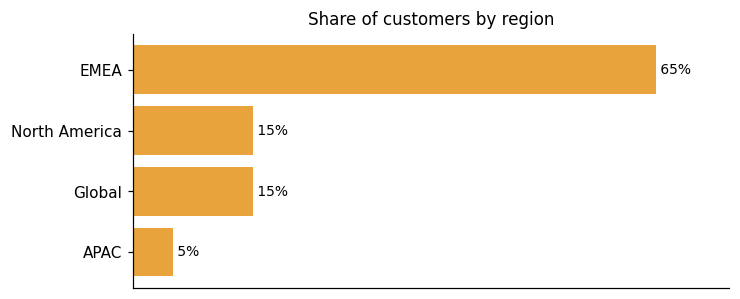
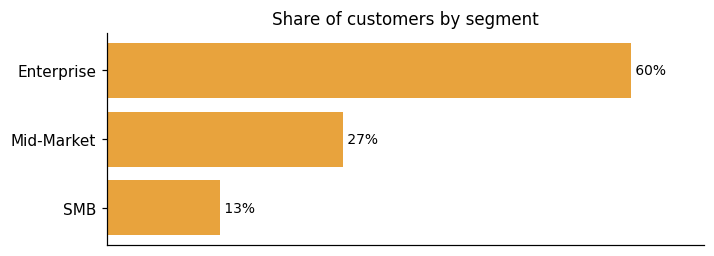
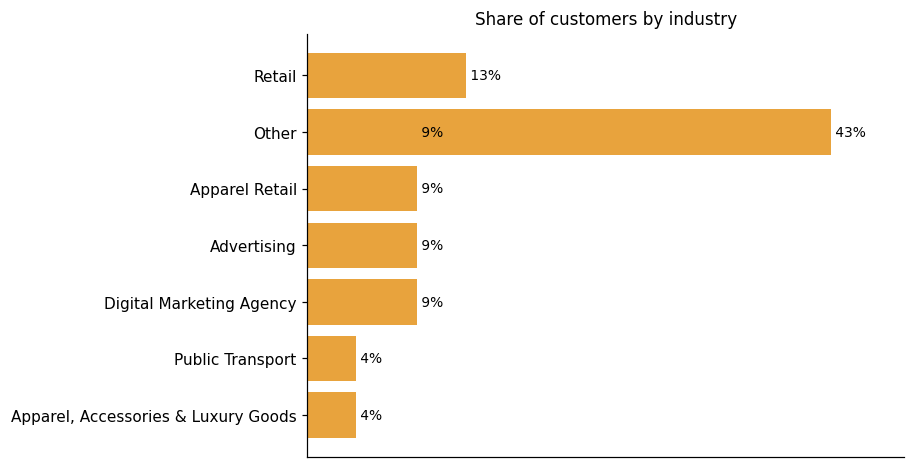
Representative customers: Arriva UK Bus, Brave Bison, Bulk, Catena Media, Cox Automotive, Digital Case Media & Tatildekirala, European Fashion Retailer
How Lumar uses AI in practice
Lumar weaves AI into its technical SEO and website optimization platform across several distinct workflows rather than offering it as a separate layer. The core crawling and analytics capabilities stand on their own, and AI builds on top of that foundation in targeted ways. One area is search visibility: Lumar covers AI search & LLM visibility optimization, tracking how large language models and semantic search affect discoverability. Another is accessibility: Lumar generates fix suggestions automatically to help teams fix WCAG & digital accessibility compliance issues faster. AI also assists with code generation for custom analytics. It produces developer ticket content as well, helping move technical fixes forward through existing engineering workflows.
Generative AI
Read detailsLumar applies generative AI across four distinct workflows. It drafts developer tickets drawn from crawl issue data, and suggests code fixes tailored to the user's site for accessibility. It also writes custom metric code on demand. For GEO content optimization, it generates action plans using LLM-as-a-Judge frameworks to evaluate content quality.
Anomaly / Pattern Detection
Read detailsLumar's crawler gives teams a clear picture of the technical barriers stopping AI systems from finding, accessing, and indexing their content. It checks robots.txt issues, nosnippet directives, and differences between raw and rendered HTML. It also picks up AI bot interaction signals. All of this surfaces as health scores and prioritized reports, so teams can see exactly what needs attention and act on it.
Lumar pricing and value: quote-based costs, ROI and fit
Lumar does not publish set prices — buyers submit a form to receive a custom quote. The ROI evidence on record is focused but concrete. Gulf News used Lumar during a complex migration not only to mitigate risk but to grow organic traffic in the process. Impression found that project management became much more efficient as a result, and the number of keywords ranking in the top three increased by 14 times in the period following the migration.
ROI evidence from 1 customers
Who it fits: value by company size
Lumar is used across company sizes, but at least one cost concern has surfaced: in one customer's words, there is a pay per use issue and it is quite expensive. That affordability signal is worth factoring in when comparing options.
The Lumar pricing page publishes no specific prices; it routes visitors to fill out a form to receive a price quote.
Lumar enterprise readiness: security, compliance, migration, and support
Lumar's enterprise readiness covers four dimensions: security, compliance, migration, and customer support.
Security controls and assurance
Lumar holds SOC 2 Type 2 certification, an independent audit attestation that confirms its controls around data security and privacy meet a sustained standard over time. The certification covers website health data managed across the platform, including when that data is accessed through third-party integrations. Beyond the attestation itself, Lumar keeps customer data secure across whichever platforms teams use to access it, as reflected in its ongoing commitment to data security and privacy. No specific regulatory compliance frameworks — such as GDPR or CCPA — are documented in the available facts.
Compliance and data protection
Lumar's compliance posture centers on web accessibility. The platform targets WCAG 2.2 A through AAA standards, covering the full range of conformance levels in a single toolset. Issues are surfaced through logical grouping with data visualizations and trend tracking, with traffic data folded in to help teams identify and prioritize what to fix. Color contrast testing is designed to produce fewer false positives, which reduces noise in the remediation queue. For teams that need guidance on how to fix what they find, Lumar provides AI-generated suggested solutions drawn from curated accessibility documentation including the WCAG guidelines. The overall shape is a focused accessibility compliance workflow rather than a broad multi-framework compliance suite.
Migration from competing platforms
Site migrations carry real risk — a poorly handled move to a new domain, CMS, or site structure can trigger dramatic drops in organic traffic that take months to recover. Lumar approaches this by combining pre-migration analysis, automated testing, and ongoing monitoring into a single workflow. Before a migration goes live, teams can compare health metrics on staging against the live site to surface technical SEO, site speed, and UX issues early. Automated SEO QA tests are designed to catch potential SEO risks before they go live on the migrated site. Post-launch, the platform continues monitoring changes to keep the transition on track. For teams that want hands-on support, Lumar offers a professional services option — a monthly contract covering bespoke guidance, ongoing crawl reviews, and tailored SEO strategies. The grounding available covers what Lumar enables during a migration; no documented limitations or failure scenarios are surfaced in the available facts.
Customer support experience
"The extra insights we get from our calls with Lumar have been really valuable. The support we get really is like having an extension of our internal team." Chris Nichols, Senior Manager, Enterprise SEO & Product Management at Cox Automotive source
Lumar vs. Conductor, Semrush, Botify and other platforms
Lumar competes in the Search Engine Optimization Solutions category, which covers platforms that help marketers automate and improve site health and content across technical SEO, content SEO, local SEO, and international SEO, including AI-integrated search. The market is moving toward end-to-end platforms that bring together historically separate SEO specialties into a single practitioner workflow. Lumar's grounded strengths sit in three areas. Its crawler is an enterprise-grade serverless engine running 350+ automated technical SEO tests, deep technical SEO analytics, Lighthouse-scale site speed reporting, and GEO/AI search tracking. Lumar Monitor extends that foundation by tracking site health trends and delivering customized alerts across SEO, GEO, site speed, accessibility, and custom metrics for multiple domains or site sections. Custom Website Analytics rounds this out with fully customized reporting that covers static extraction, dynamic user-flow analysis, and multi-domain reporting — going beyond standard out-of-the-box reports. Where Lumar trails the broader category, the grounding points to content SEO, local SEO, and international SEO workflows, which are named pillars of the category definition but are not reflected in Lumar's documented strengths. The comparison table below shows where Lumar, Conductor, Semrush, Botify, and seoClarity differ most from one another. It is a differentiation view, not a complete feature-by-feature breakdown, and should be read that way.
Search Engine Optimization Solutions
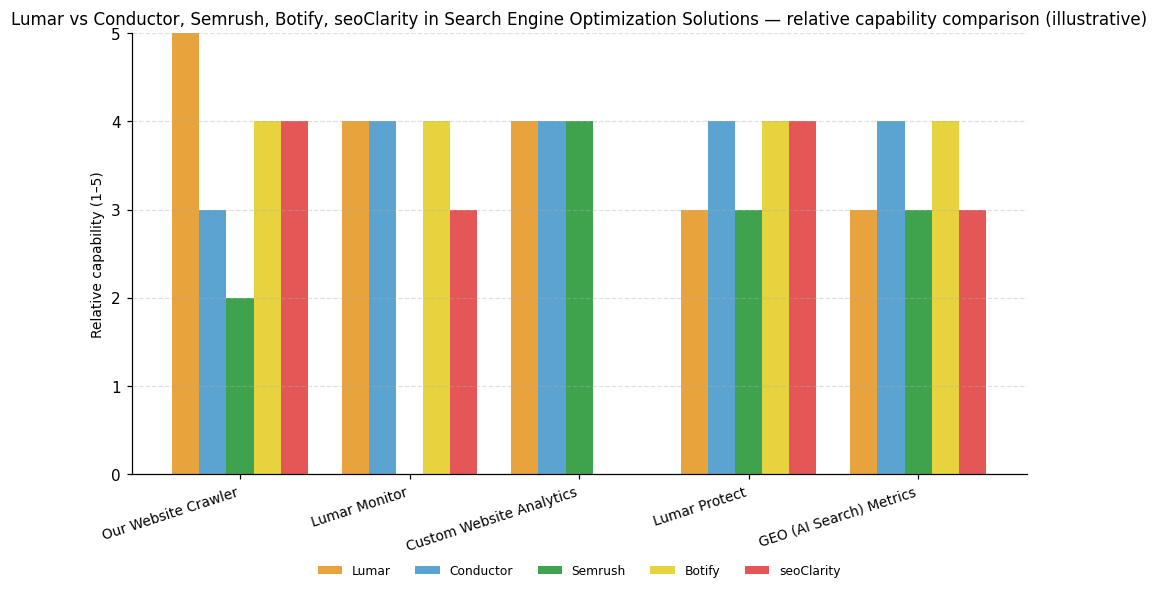
| Capability | Lumar | Conductor | Semrush | Botify | seoClarity |
|---|---|---|---|---|---|
| Our Website Crawler | 5 | 3 | 2 | 4 | 4 |
| Lumar Monitor | 4 | 4 | — | 4 | 3 |
| Custom Website Analytics | 4 | 4 | 4 | — | — |
| Lumar Protect | 3 | 4 | 3 | 4 | 4 |
| GEO (AI Search) Metrics | 3 | 4 | 3 | 4 | 3 |
Lumar
Our Website Crawler: Enterprise-grade serverless crawler, 350+ automated technical SEO tests, deep technical SEO analytics, Lighthouse-scale site speed reporting, and GEO/AI search tracking constitute a purpose-built technical SEO platform.; Lumar Monitor: Lumar Monitor tracks site health trends and delivers customized alerts across SEO, GEO, site speed, accessibility, and custom metrics for multiple domains or site sections.; Custom Website Analytics: Custom Website Analytics capability enables fully customized analytics beyond standard reports, covering static extraction, dynamic user-flow analysis, and multi-domain reporting.
Conductor
Lumar Monitor: Excellent service unlocks value from monitoring capabilities, rated strong.; Custom Website Analytics: Holistic reporting is a named pillar of Conductor's superior current offering, rated strong.; Lumar Protect: Platform automation and AI help various stakeholders quickly implement impactful recommendations across content, IT, and paid media.; GEO (AI Search) Metrics: AI helps various stakeholders quickly implement impactful recommendations across the platform, rated strong.
Semrush
Custom Website Analytics: Robust analytics backed by proprietary data depth is a named strength, rated strong.
Botify
Our Website Crawler: Technical SEO is a named core strength of the platform, rated strong.; Lumar Monitor: Excels at monitoring and alerting as a named strength, rated strong.; Lumar Protect: Botify Assist applies AI to accelerate various SEO tasks within an automation-first platform.; GEO (AI Search) Metrics: Botify Assist applies leading-edge AI to accelerate various SEO tasks, rated strong.
seoClarity
Our Website Crawler: Technical SEO is the platform's primary strength, paired with continuous auditing, rated strong.; Lumar Protect: Platform is described as flexible and highly automated, geared toward accelerating end-to-end SEO.


Connect Lumar with your stack: integrations and partner ecosystem
Lumar offers 8 native integrations spanning 7 partner categories, ranging from Data Warehouse to Team Messaging & Collaboration to Business Intelligence & Data Visualization.
Lumar's integration layer spans its own API, named BI tool connectors, and compatibility with data science environments. The freedom to write applications in any programming language and on any platform means technical teams are not locked into a specific stack. The API itself runs on GraphQL technology, which underpins its speed and reliability. For business intelligence workflows, Lumar connects directly to BigQuery and Google Data Studio. From there, teams can pull data into science tools such as Python Pandas, Jupyter, and Dataiku. That path also makes it straightforward to combine data from other parts of the tech stack, including other business intelligence platforms. The result is that website technical health data can flow into the same reporting and visualization workflows executives already use.
| Partner category | Integration partners | Native count | Flow direction |
|---|---|---|---|
| Data Warehouse | Google BigQuery | 1 | Downstream |
| Team Messaging & Collaboration | Slack, Microsoft Teams | 2 | Downstream |
| Business Intelligence & Data Visualization | Looker Studio | 1 | Downstream |
| Data Science & Machine Learning Platform | Dataiku | 1 | Downstream |
| SEO Backlink Analysis | Majestic | 1 | Upstream |
| Search Analytics & SEO Tools | Google Search Console | 1 | Upstream |
| Web Analytics | Google Analytics | 1 | Upstream |
Deepcrawl Limited News
Lumar Presents 4-Pillar GEO Strategy Framework
Lumar introduces a 4-Pillar GEO Strategy Framework aimed at enhancing brand visibility in AI-driven search results. The framework focuses on optimizing brand mentions and citations to improve outcomes in AI-powered search environments.
November 2025 SEO & AI Search Industry News: Gemini 3, Perplexity Updates, New GSC Tools, & More
Lumar has introduced its GEO toolkit aimed at optimizing websites for AI-driven search visibility. This toolkit provides data-driven insights to enhance brand visibility across large language models (LLMs) and improve AI citations. It is part of Lumar's broader strategy to help businesses navigate the evolving landscape of AI search.
Optimize for AI Visibility with Lumars New GEO Toolkit
Lumar has launched a new GEO toolkit to enhance AI visibility for websites. This toolkit provides dashboards and reports to optimize sites for AI discovery, understanding, and inclusion. It offers insights into AI crawlability, rendering, and indexability, helping brands improve their presence in AI-generated responses and AI search features. The toolkit aims to transition from guesswork to data-driven analysis for better AI search visibility.
Deepcrawl Limited Profile
Company Name
Deepcrawl Limited
Company Website
https://www.lumar.io/HQ Location
Employees
51-100
Financials
SERIES B