


Pyramid Decision Intelligence Platform overview: capabilities, features, use cases, and value by role
Pyramid Decision Intelligence Platform is a business and AI analytics platform that unifies Data Preparation, Business Analytics, and Data Science in a single Analytics and Business Intelligence environment, making enterprise data accessible across the modern workforce.
Top capabilities of Pyramid Decision Intelligence Platform
Data Prep
Read detailsPyramid Decision Intelligence Platform tackles data preparation before analysis begins, letting users of all skill levels clean, blend, and prepare data without extracting or duplicating it. The built-in, no-code capability combines self-service data wrangling, machine learning algorithms, data lineage tracking, and a universal semantic layer. All of this works directly on top of existing data infrastructure.
Data Science
Read detailsPyramid Decision Intelligence Platform gives both trained data scientists and business users a single environment to build and operationalize machine learning models — covering everything from pattern discovery and anomaly detection to prediction and decision optimization. No-code drag-and-drop model building handles the simpler end of that spectrum. For more demanding work, Pyramid supports full Python and R scripting. A marketplace of pre-built ML scripts means teams don't always have to start from scratch, and integrated model monitoring keeps deployed models under observation over time.
Business Analytics
Read detailsPyramid Decision Intelligence Platform covers the full analytics spectrum, from descriptive data exploration to prescriptive decision modeling. A no-code, AI-driven interface makes that range accessible without engineering support. The platform delivers over 200 visualization types, natural language querying, formula building, interactive storyboards, geospatial analysis, and enterprise-wide reporting.
governed self-service
Read detailsPyramid Decision Intelligence Platform brings governed self-service analytics together in one framework — enforcing role-based permissions, data consistency, and standardized metrics across every user, regardless of skill level. Data preparation, modeling, visualization, and collaboration all run within that same governed environment. Users can independently access, explore, and analyze data without IT intervention, while central controls remain intact throughout.
PYRANA direct query engine
Read detailsPYRANA is Pyramid Decision Intelligence Platform's high-performance direct query engine. It enables in-place analytics by querying data where it lives, without downloading, moving, or copying it. PYRANA supports direct querying across almost any SQL or MDX compliant data technology. It also includes an extensive analytical function set covering advanced, cross-dimensional, hierarchical, and semi-additive calculations.
AI-Powered Analytics
Read detailsThe Pyramid Decision Intelligence Platform puts AI-driven analysis in the hands of non-technical users — no coding required. Auto Discover, Smart Insights, and AI-driven Explain work together to surface correlations, anomalies, and trends automatically. Smart Modeling handles data preparation so users don't have to. A natural language querying chatbot lets anyone ask questions directly of their data in plain language.
Generative BI
Read detailsGenerative BI is the conversational analytics capability built into Pyramid Decision Intelligence Platform. It combines generative AI with the analytics engine so users can explore data, build dashboards, and generate reports using plain-language text or speech in any language. The feature connects directly to existing data sources without moving data, supports a multi-LLM strategy, and keeps actual data away from third-party LLM providers. 72% of data teams that tested Pyramid use it today, with insights available within 30 Seconds.
Embedded Analytics
Read detailsPyramid Decision Intelligence Platform puts enterprise-grade, white-labeled analytics inside your own applications and websites — fully customizable, no deep technical expertise required. The embedding itself is lightweight. Teams inject it via JavaScript, Angular, or React code. The analytics layer includes AI-powered insights and Generative BI, so end users get intelligent analysis without leaving the host application. PYRANA technology handles the infrastructure side: elastic scaling and multi-tenant deployments. Visual customization covers 100% of look and feel.
Smart Discover
Read detailsSmart Discover puts machine learning to work finding insights that users would not have spotted on their own — without requiring any technical skill to operate. It is part of the Pyramid Decision Intelligence Platform. Augmentation engines run automatically in the background, surfacing unexpected patterns so non-technical users can build analytical content through AI-driven heuristics rather than manual analysis. One-click features like Explain and Explain the Difference use ML to deconstruct results on demand. A natural language querying chatbot rounds out the experience, letting users explore data through ordinary conversation.
Amazon AWS
Read detailsPyramid Decision Intelligence Platform runs entirely inside a customer's own AWS virtual private cloud, keeping data within that governed environment from end to end. For compute and orchestration, it uses EC2 and Elastic Kubernetes Services. Procurement runs through AWS Marketplace. The platform queries Amazon Redshift, RDS, and S3 directly, and it integrates with both AWS CloudFormation and AppFlow. Pyramid also participates in the RISE with SAP on AWS initiative. Teams using this deployment path have seen the time it takes to get updated day-of-data into reports decrease by 50-75%.
multi-LLM strategy
Read detailsPyramid Decision Intelligence Platform takes a flexible approach to AI by letting organizations match specific large language models to the right analytical task rather than forcing a single model across everything. Each task can use whichever LLM is best suited for it. Integration with IBM Watsonx extends this to on-premises or private cloud deployments. Data privacy is maintained by passing only plain-language requests and context to the LLM, without sharing actual data.
Reports & dashboards
Read detailsPyramid Decision Intelligence Platform handles both live, interactive analytics and static scheduled reporting from one shared template — personalizing the output for each stakeholder along the way. That single-template approach means a report built once can be distributed differently depending on who receives it. Real-time dashboards coexist with scheduled delivery, so the same platform serves both exploratory analysis and routine reporting cycles. Export options cover PDF, Word, Excel, PowerPoint, JSON, and image files. Full branding customization is available throughout.
embedded machine learning in data pipelines
Read detailsPyramid Decision Intelligence Platform automates data cleansing, transformation, and enrichment directly within the data flow, with no manual coding required. The embedded machine learning handles each of these steps as data moves through the pipeline. Preparation happens inside the flow itself, not as a separate upstream task.
Top features of Pyramid Decision Intelligence Platform
Report Bursting and Scheduled Distribution
Read detailsPyramid Decision Intelligence Platform's Publish feature automates the distribution of personalized reports from a single template, outputting to PDF, Word, or PowerPoint. Users can schedule that distribution rather than run it manually. The output is pixel-perfect across all three formats. Grand Rapids Community College puts it this way: "Easy of use to add data metrics and demission - Easy to publish and distribute - Advanced graphics"
Spreadsheet Formula Support in Browser-Based Modeling
Read detailsPyramid Decision Intelligence Platform includes Tabulate, a browser-based virtual spreadsheet interface that brings familiar formula-driven analysis to live data through query mashups, multi-query visualization, and flexible formatting — letting users build blended visualizations and business models from multiple data sources.
Descriptive and Diagnostic Analysis with Data Driver Display
Read detailsThe AI-driven 'Explain' and 'Explain the Difference' features let users select any data points within a visualization. Pyramid then dives into the underlying data model to surface holistic insights, flag anomalies, and deliver descriptive and diagnostic analysis. Data drivers are displayed alongside clear explanations of why any two selected data points differ.
Centralized Business Logic Library
Read detailsPyramid Decision Intelligence Platform gives every report and dashboard in an organization a single, consistent analytics language — one that comes from a governed business logic library rather than from fragmented or conflicting formulas. The library centralizes key calculations, metrics, and definitions, so the numbers mean the same thing wherever they appear.
Forecasting
Read detailsPyramid Decision Intelligence Platform's Forecasting feature is built for one purpose: helping users anticipate future trends from historical patterns. It lives inside the platform's analysis environment as part of the advanced analytics toolset, sitting alongside functions like Outliers and regression.
Platform Usage Monitoring
Read detailsPyramid Decision Intelligence Platform's usage monitoring surfaces deep insights into resource consumption and how individuals and teams interact with the platform. Administrators can track adoption and identify power users. They can also uncover areas where additional training or support may be needed.
Complex Multi-Step Analysis Automation
Read detailsPyramid Decision Intelligence Platform is built around a single automated engine that takes a dataset from raw preparation all the way through published analysis — without asking users to do any of the work themselves. That engine is Generative BI (GenBI). GenBI handles data preparation, analysis, and publishing as one continuous process. It accepts complex, multi-part requests in any language. Once results appear, users can ask follow-up questions to probe any finding further.
Logic Waterfalls, Conditions, and Decision Points
Read detailsPyramid Tabulate is a spreadsheet-like modeling tool for building business and decision models that encode complex logic waterfalls, conditions, and decision points directly within its interface.
Custom KPI and Formula Builder (Formulate)
Read detailsPyramid Decision Intelligence Platform's Formulate feature puts custom calculation building in the hands of any user, through a visual, drag-and-drop interface. Users can create custom KPIs, member lists, formulas, and scripts, then share them for use in reports and dashboards. Formulate also supports dynamic elements driven by runtime parameters, as well as complex, context-aware calculations.
Data Interactions Between Images and Content Items
Read detailsPyramid Decision Intelligence Platform's Illustrate feature turns static images into data-driven visuals by letting users configure interactions between images, text, and a selected content item. Those interactions produce dynamic visuals that add meaning and context to storyboards and publications. Infographics built with Illustrate can change color, shape, position, and size at runtime based on query results.
No-Data-Replication Virtual Modeling
Read detailsPyramid Decision Intelligence Platform keeps your data exactly where it is — connecting to any source through virtual semantic models that act as a lightweight layer, with no ingestion or duplication required. Through that same layer, users can add and edit complex functions: joins, hierarchies, and additive or semi-additive measures.
Master Flow Data Pipeline Builder
Read detailsPyramid Decision Intelligence Platform's Master Flow feature lets users build and manage multiple data flows across different models using fully customizable conditions and success criteria. It supports both a point-and-click interface and PQL scripting, covering everything from simple to complex workflows.
Natural Language Formula and Query Building
Read detailsPyramid's Chat Bot handles report-building and data discovery through natural language, removing the need for traditional analytics and BI actions. Users can alter visualizations, drill, dice, swap, filter, and sort data using convenient prompts drawn from key elements in the data model.
Outlier Detection
Read detailsThe Pyramid Decision Intelligence Platform flags anomalies automatically — the Outliers feature identifies data points that fall significantly outside expected ranges, and it sits directly alongside Forecasting and regression functions within the advanced analytics toolset for deeper data exploration.
Dashboard Annotations, Comments, and Data Snapshots
Read detailsPyramid Decision Intelligence Platform supports in-context collaboration through built-in annotations and commenting features. Team members can leave comments directly on dashboards or on specific data points to share context, ask questions, or flag insights in real time. When commenting on a data point, users can attach a snapshot so colleagues see exactly what was visible at that moment.
Cell-Level Permission Controls
Read detailsPyramid Decision Intelligence Platform puts data access under precise, layered control — down to a single cell in a database. Permissions can be scoped to an entire dataset, an individual report, or that single-cell level. These controls can be configured to align with an organization's data policies and security requirements.
Reusable Python Source Code Library
Read detailsThe Pyramid Marketplace bundles a library of free, reusable Python source code and pre-built ML scripts. These cover data cleansing, data prep, transformation tasks, statistical analysis, and classic ML tasks such as forecasting, clustering, sentiment analysis, and market basket analysis. Non-technical analysts can access predefined functions directly, and existing scripts can be customized further to meet specific business requirements.
Pyramid Tabulate App (Spreadsheet-Formula-Based Blended Modeling)
Read detailsPyramid Tabulate puts a browser-based virtual spreadsheet inside the Pyramid Decision Intelligence Platform, so teams can build business and decision models using familiar spreadsheet formulas while drawing on data from multiple sources. The interface is simple yet powerful, and it surfaces machine-generated prescriptive analytics on Redshift. Data stays within the secure AWS cloud throughout.
Elastic Kubernetes Services with Elastic Container Registry (ECR)
Read detailsPyramid Decision Intelligence Platform runs its containerized infrastructure on Amazon's Cloud, using AWS Elastic Kubernetes Services and Elastic Container Registry (ECR) to scale analytics compute elastically on demand.
Pareto, Categorical, and Trend Analysis
Read detailsPyramid Decision Intelligence Platform runs AI/ML algorithms automatically across data to surface correlations, commonalities, and anomalies, and performs Pareto, categorical, and trend analysis in seconds through the Auto Discover and Smart Insights features.
200+ Visualization Types
Read detailsPyramid Decision Intelligence Platform puts a drag-and-drop query builder at its center, where users place attributes and measures into dedicated zones to drive over 200 types of visualization. Extensive formatting and layout options come with those visualizations. No-code context menus handle slicing, dicing, and drilling into data without requiring any technical input from users.
Condition-Based Trigger Alerts
Read detailsPyramid Decision Intelligence Platform handles proactive monitoring through its trigger alerts feature. The feature automatically notifies the right people in real time when key events occur based on custom conditions. Those conditions can include hitting a sales milestone or a sudden spike or drop in performance. Users set up these alerts in advance, keeping teams informed without manual monitoring.
Export to Multiple File Formats
Read detailsPyramid Decision Intelligence Platform covers export formats spanning PDF, Word, Excel, PowerPoint, JSON, and image files, giving teams the flexibility to deliver pixel-perfect reports for polished presentations, detailed spreadsheets, or raw data integration across clients and stakeholders.
PQL Scripting
Read detailsPQL scripting, available within the Pyramid Decision Intelligence Platform's Master Flow feature, lets advanced users define complex data pipeline workflows programmatically, complementing the point-and-click interface to handle workflows ranging from simple to complex.
Machine Learning Model Training and Scheduling
Read detailsPyramid Decision Intelligence Platform's data science workbench supports building and training ML models through learn and predict scripts or regular scripts, drawing on libraries such as Weka, MLIB, TensorFlow, and DL4J; completed models can be saved, scheduled, and run directly on Pyramid, with output monitored for performance degradation and drift.
Feature Access from External Platforms via API
Read detailsPyramid Decision Intelligence Platform's Feature Engineering capability allows data scientists and business analysts to transform raw data into features suitable for ML models, pull features from external platforms like Databricks that provide API access, and share engineered features across other applications via REST APIs.
Model Explainability (Variable Importance, LIME, SHAP)
Read detailsPyramid Decision Intelligence Platform makes the inner workings of machine learning models visible to analysts, covering techniques such as variable importance, dependence plots, LIME, and SHAP. With these tools, analysts can understand how ML models arrive at their predictions and decisions.
IBM Watsonx Sandboxed LLM Integration
Read detailsPyramid Decision Intelligence Platform integrates with IBM Watsonx sandboxed LLMs, supporting on-premises, private cloud, or hybrid deployments. This sits within a multi-LLM strategy that lets customers attach specific LLMs to the right data problem. The GenBI framework enables fine-tuned and vertically-targeted LLMs for focused use cases.
Multi-Source Data Connectivity and Direct Query Access
Read detailsThe Pyramid Decision Intelligence Platform connects directly to AWS cloud data sources — including Amazon Redshift, RDS, and S3 — and blends them with relational, OLAP, data lake sources, and files of any format. The PYRANA direct query engine handles these connections while preserving the business logic and rules defined in the source data.
AWS CloudFormation Template Launch
Read detailsPyramid Decision Intelligence Platform runs entirely within a customer's existing AWS environment — never outside it. Deployment happens through an AWS CloudFormation template inside a virtual private cloud, which means data stays within the secured, governed cloud at all times. Because the platform lives inside that environment, it automatically operates under the access management, data governance, and compliance policies the customer already has in place for their AWS cloud services.
Kubernetes Auto-Scaling Deployment
Read detailsPyramid Decision Intelligence Platform is built on a mini-services architecture designed for real containerized Kubernetes deployments. The platform automatically scales its cluster up or down as user counts and workloads shift, keeping performance and response times predictable throughout.
Native Windows and Linux Server Installation
Read detailsPyramid Decision Intelligence Platform keeps deployment fully self-hosted by supporting native installation on Windows or Linux servers. This means confidential data stays within the organization's control, and security management of the analytics framework remains internal.
Prescriptive Analytics and What-If Simulation
Read detailsThrough the Tabulate and Solve tools, Pyramid Decision Intelligence Platform delivers machine-generated prescriptive analytics that answer both "what should I do" questions and "what if" simulations against live data via a straightforward UI.
Heuristic-Based Model Relationship Determination
Read detailsPyramid Decision Intelligence Platform handles model design automatically — its heuristic engines select the best model structures and identify relationships between models in a few clicks, with no complex data transformation or data cleansing required.
AI-Generated Query Generation (SQL, DAX, MDX)
Read detailsPyramid Decision Intelligence Platform puts natural language at the center of its query and machine-learning workflow. Users can type a question in plain English, and Pyramid translates it automatically into SQL, DAX, or MDX — no manual coding required. That translation layer runs on ChatGPT. The same OpenAI integration also generates Python and R logic for machine-learning tasks.
AI-Generated Content and Graphic Designs
Read detailsPyramid Decision Intelligence Platform brings ChatGPT directly into its Present module, so users can generate visual designs and graphics for storyboarding and publications through natural language prompts rather than manual design work.
Automatic Geocoding for Spatial Datasets
Read detailsPyramid Decision Intelligence Platform turns raw spatial data into maps without requiring users to pre-process location fields — automatic geocoding handles that step regardless of whether the data model uses geolocation hierarchies or plain latitude and longitude coordinates. It reads most geospatial formats natively. From there, users can build bubble maps, shape maps, geo heat maps, and custom maps across four base styles: flat, topology, satellite, and street.
No-Code Wizard-Driven Analysis Reuse
Read detailsThe Pyramid Decision Intelligence Platform puts advanced analysis within reach of non-technical users through a combination of wizards, no-code tools, and AI-driven automation. Smart Discover applies machine learning and AI techniques to auto-analyze data. It uses augmentation engines and heuristics to help non-technical users build analytical content and uncover unexpected insights. Analyses built through these tools can be reused across the platform.
Data Cleansing, Enrichment, and Standardization
Read detailsPyramid Decision Intelligence Platform handles data preparation without requiring any coding. Users can cleanse, enrich, and standardize non-curated external data sources through an intuitive interface. The built-in module reduces hours spent on manual preparation and lowers total cost of ownership.
Machine Learning Algorithms for Data Prep
Read detailsPyramid Decision Intelligence Platform puts machine learning within reach of non-technical users by embedding it directly into a no-code data preparation environment. Heuristic engines automatically guess the best model designs, so users never need to configure algorithms manually. Those algorithms sit alongside familiar blend, join, and column operations, making the full toolset accessible to anyone regardless of technical background.
Sub-30-Second Insight Delivery
Read detailsPyramid Decision Intelligence Platform's GenBI answers plain-language requests, including vague or relative terms, and returns analytical insights in under 30 seconds. Business users receive results that make sense to them without needing to understand the underlying data structures.
Auto-Generated Embed Code (JavaScript, Angular, React)
Read detailsPyramid Decision Intelligence Platform cuts the usual complexity out of embedding analytics: it automatically generates lightweight JavaScript, Angular, or React code, so developers can drop dashboards or individual visuals into applications in minutes without deep expertise or iFrames.
AI-Recommended Visualizations
Read detailsPyramid Decision Intelligence Platform embeds an AI engine into every interaction. It automatically recommends the most appropriate visualization for data in natural-language questions through a Smart Visualization engine. The same engine suggests next steps for analysis and explains causality as part of the embedded analytics experience.
Top use cases for Pyramid Decision Intelligence Platform
Forecast costs and simulate business scenarios
Read detailsPyramid Decision Intelligence Platform lets health insurance teams run their own scenario modeling and forecasting without leaning on manual data processes — replacing slow, hands-on work with self-service discovery that supports cost-effective decisions at the negotiating table. Budget negotiators and analysts are the primary users. They use the platform to simulate new charging systems and to forecast how costs will develop over time. Both capabilities come together during contract negotiations, where teams need to move quickly and stay within quality requirements.
Build and deploy machine learning models
Read detailsData scientists, citizen data scientists, and business analysts share a single workbench inside the Pyramid Decision Intelligence Platform. From that environment, teams prepare data, engineer features, build and train ML models, generate predictions, and deploy them to production. Drag-and-drop visual flows, Python/R scripting, and pre-built marketplace algorithms are all available in one place to support better business decisions.
Conversational data discovery with generative AI
Read detailsBusiness users, data teams, and product managers can interact with Pyramid Decision Intelligence Platform's Generative BI capability using plain-language text or speech. From that input, the platform discovers data insights, creates dashboards on the fly, and generates formatted reports — all in under 30 seconds. Behind the scenes, multi-LLM routing, direct data source connectivity, and governed AI processing handle the analytical complexity without any user involvement in the underlying steps.
Run enterprise analytics on cloud infrastructure
Read detailsEnterprise IT and analytics teams get a single, governed environment for data preparation, business analytics, and data science when they deploy Pyramid Decision Intelligence Platform on AWS. The platform integrates with EC2 and Elastic Kubernetes Services, and it is available through AWS Marketplace procurement. The PYRANA direct-query engine keeps data within a secure AWS environment, so nothing needs to move out to be analyzed.
Embed analytics into customer-facing applications
Read detailsProduct managers and developers can embed fully governed, white-labeled, AI-powered analytics — including Generative BI — directly into their own applications or websites using the Pyramid Decision Intelligence Platform. The integration relies on lightweight JavaScript, Angular, or React code injection alongside Pyramid's PYRANA direct-query engine. This combination scales to tens of thousands of users without compromising performance.
Self-service data exploration and visualization
Read detailsThe Pyramid Decision Intelligence Platform puts data exploration, visualization, and dashboard creation directly in the hands of business users — no technical expertise required. Tools like Discover, Formulate, Present, and AI-driven Smart Discover move users from raw data to finished analytical content inside a no-code environment. The platform handles both descriptive and prescriptive analysis within that same space.
Deliver insights as a managed data product to clients
Read detailsData and insights teams at market intelligence firms use Pyramid Decision Intelligence Platform to replace manual PowerPoint-based workflows and deliver self-service dashboards and reports directly to hundreds of external clients. The platform brings together data modeling, Discover, Present, and publication capabilities in one orchestrated workflow. That combination turns complex, disparate survey and market data into a commercially differentiating, indispensable data product.
Improve student outcomes with data-driven interventions
Read detailsHigher education teams rely on Pyramid Decision Intelligence Platform to connect LMS, student information, and survey platforms into a single view. Descriptive and predictive analytics then flag at-risk students early enough for timely intervention. Executive leadership can act on those findings to drive institution-wide, data-informed decisions and improve student success rates.
Value delivered by role with Pyramid Decision Intelligence Platform
sales reps
Read detailsPyramid Decision Intelligence Platform gives sales teams a single source of truth from one end-to-end platform. As Videndum Production Solutions puts it, "By the time the sales team got them, the information was out of date" — and Pyramid addresses that directly by replacing stale data with current insights. Reps spend less time on data-related work. They also gain the ability to spot new sales opportunities and uncover e-commerce cross-sell opportunities for additional revenue.
finance team
Read detailsPyramid Decision Intelligence Platform lets finance teams retire manual ERP extractions and Excel reconciliation in favor of consistent, governed reporting — built around a single source of truth so that everyone works from the same calculations, date ranges, and sales figures.
Insurance agents
Read detailsPyramid Decision Intelligence Platform brings self-service analytics into a single experience, replacing fragmented legacy systems for insurance agents. Agents receive monthly email reports covering the state of their business, giving them the personalized, decision-ready information they need for day-to-day work.
VP of Business Strategy and Analytics
Read detailsPyramid Decision Intelligence Platform consolidates all reporting automation and distribution into one platform, letting VPs of Business Strategy and Analytics automate the rebuilding and exporting of reports and deliver them in a cleaner format.
Head of Information Technology
Read detailsPyramid Decision Intelligence Platform consolidates disparate analytics solutions into a single platform, replacing static PDFs and Excel spreadsheets with interactive analytics that can drive adoption across the organization.
case managers
Read detailsThe Pyramid Decision Intelligence Platform ties together automated patient flow, reduced re-admissions, and connected siloed systems into a single set of streamlined operations. Case managers gain automated patient flow processes that work to reduce re-admissions. Operational stakeholders can maintain efficient patient flow, and decision-makers have what they need to manage health systems more effectively.
Operational teams
Read detailsPyramid Decision Intelligence Platform removes the bottleneck of submitting reporting requests and waiting for results. Operational teams gain self-service access to the data they need to drive performance, efficiency, and cost savings. Access that was once limited to technical users is democratized across the organization.
vice chancellor
Read detailsPyramid Decision Intelligence Platform equips university vice chancellors with analytics and assessment products focused on student and program success. It delivers a single view of each student's academic journey to advisors and staff, giving institutional leadership a foundation for data-driven strategies.
National Accounts team
Read detailsPyramid Decision Intelligence Platform keeps data quality in check for National Accounts and statistical teams by catching what goes wrong before it compounds. It identifies anomalies in reporting, detects coding flaws so they can be corrected, and continually improves accuracy and reporting integrity.
Data & Product Strategy Director
Read detailsPyramid Decision Intelligence Platform stands out for displaying data in formats other platforms struggle to deliver — a capability that, in one customer's words, amounts to a competitive advantage. Data and product strategy directors rely on it for exactly that reason. Pyramid's modeling function accelerates getting data structures right, which speeds up delivery of insight products and drives client adoption.
Global BI Manager
Read detailsPyramid Decision Intelligence Platform cuts the time to get updated day-of-data into reports by 50–75%, while delivering significantly better data integrity and consistency — so clients and stakeholders can act on insights much faster.
executive leadership team
Read detailsPyramid Decision Intelligence Platform consolidates real-time KPI access and modeling capabilities for executive leadership into a single cross-organizational view. For health systems where executives once lacked realtime, consolidated access to KPI's across 29 hospitals and 1,100+ providers, it replaces fragmented legacy reporting and supports performance reporting to national stakeholders, including during critical events such as the COVID pandemic.
Faculty Student Advisors
Read detailsThe Pyramid Decision Intelligence Platform compresses what once took days of course-insight work into results delivered in minutes, giving faculty and student advisors a unified view of each student's academic journey.
data scientists
Read detailsThe Pyramid Decision Intelligence Platform supports data scientists in building, training, applying, and deploying machine learning models against data sets. This enables pattern discovery, anomaly detection, prediction, and decision optimization through Pyramid's data science workbench. Data scientists can work in Python or R to build custom models, and collaborate with analysts and non-technical end users within one application.
actuaries
Read detailsThe Pyramid Decision Intelligence Platform pulls Python analysis and data visualization into one place, removing the need to switch between separate tools and making it easier for actuaries to collaborate with others across the organization.
data visualization team
Read detailsThe Pyramid Decision Intelligence Platform frees data visualization teams from routine report-building tasks, enabling end-users to access visualized data and make simple report changes independently so the visualization team can focus on more value-adding activities.
Vice President of Operations
Read detailsFor VPs of Operations, Pyramid Decision Intelligence Platform serves as a technology partner built for forward-looking functionality and collaborative implementation. It offers a strong technological fit for complex healthcare and operational environments.
machine learning coders
Read detailsThe Pyramid Decision Intelligence Platform keeps data scientists and business users working in the same environment, rather than splitting them across separate tools. Technical professionals can build custom models in Python or R without leaving the platform. That same platform also serves no-code and low-code users, so colleagues at every skill level share one workspace.
Database administrators
Read detailsDatabase administrators become active contributors to analytics development in Pyramid Decision Intelligence Platform. They can use their knowledge of data structures to build prototypes directly in the platform. Testing those prototypes reveals which structures work best for specific types of analysis. This shortens the path to well-structured insight products.
Senior Department Manager in charge of BI Projects
Read detailsPyramid Decision Intelligence Platform consolidates analytics delivery and data governance into one platform, replacing the fragmented multi-tool environments that senior BI project managers typically inherit in complex, large-scale data environments.
general manager
Read detailsFor general managers at software companies, the Pyramid Decision Intelligence Platform covers both generative AI and embedded analytics capabilities, allowing software vendors to meet client expectations by giving end-users new ways to explore and act on their data.
Deputy Director of eLearning
Read detailsPyramid Decision Intelligence Platform sits at the center of how education leaders connect day-to-day operational decisions to longer-term institutional reporting strategies. For Deputy Directors of eLearning, it serves as the foundation for student success and institutional data-driven approaches. The platform enables education leaders to deliver analytics that inform both operational decisions and strategic institutional reporting.
business users
Read detailsThe Pyramid Decision Intelligence Platform serves business users who can describe their needs in plain language, even using vague or relative terms, and receive answers in under 30 seconds. That speed drives high adoption rates across the organization. Users can build analytical content spanning the full range from data exploration and visualization for descriptive analysis through to decision modeling for prescriptive analytics, all without requiring technical expertise.
product managers
Read detailsProduct managers embedding analytics into their products have a path to a ChatGPT-like experience for their clients through the Pyramid Decision Intelligence Platform, using AI-driven analytics capabilities to differentiate their offerings.
Business Analysts
Read detailsBusiness analysts rank among the highest-recognized user groups for the Pyramid Decision Intelligence Platform, according to Gartner. The platform provides out-of-the-box pre-built algorithms that analysts can apply directly within a drag-and-drop flow interface. This allows them to perform sophisticated machine-learning tasks without any coding and without relying on data science teams.
data teams
Read detailsPyramid Decision Intelligence Platform helps data teams deliver sophisticated analytics use cases quickly while reducing the support burden on those same teams. Full governance and security are built in. Because the platform works on top of existing data infrastructure, teams can serve the broader organization more efficiently.
citizen data scientists
Read detailsPyramid Decision Intelligence Platform is built for two very different users at once: citizen data scientists who need no coding experience, and advanced data scientists who work in Python or R. The citizen data scientist side relies on a drag-and-drop interface with guided model building. That combination means non-technical professionals can apply machine learning models without writing a line of code. Both user types work alongside each other on the same platform.
non-technical users
Read detailsSmart Discover puts AI to work so non-technical users can build analytical content and surface unexpected insights on their own. It is a feature of the Pyramid Decision Intelligence Platform. Rather than requiring technical skills, Smart Discover relies on augmentation engines and heuristics to do the heavy lifting.
What customers say about Pyramid Decision Intelligence Platform: ratings, outcomes and feedback
Customer experience with the Pyramid Decision Intelligence Platform centers on two aspects: what customers value in day-to-day use and where they see room for improvement. Pyramid Analytics customers speak to both the practical strengths they rely on and the friction points they encounter.
What works well
MuscleFood describes the platform's ability to handle varying operational scale: "We needed a solution where we could run multiple stores — whether that's three stores, 10 stores or 50 stores." The Foschini Group (TFG) speaks to integration and speed, saying "Pyramid was significantly faster than anything else out there. It integrated easily with Analysis Services cubes and is great at bringing different data sets together." Stakeholders can access data through an underlying security access model 24 hours a day, seven days a week. One customer describes how manual reporting used to create friction: before, pulling out the data and putting it into PowerPoint was painful and not very efficient, and now it is automated with dashboards in Pyramid, saving a considerable amount of time.
Where customers see room for improvement
Pyramid Decision Intelligence Platform earns mostly positive reactions, but several recurring friction points come up across customer feedback. Here is what buying teams should know before committing. Bugs and feature deprecations are one concern. Mid-Market customers note occasionally there are some features which have new bugs or been depracated, such as specific guage visualisations in the last 2020 update. Onboarding is still a work in progress. Grand Rapids Community College points to Training on the product (I think they are coming out with this soon) - Bootcamp for users to attend as things still coming together. For teams without a data background, Pyramid can be difficult to comprehend at first, and the framework can feel opaque for users with limited coding experience. Stability under heavy data loads is a practical concern, with crashes reported when data volumes run large. On the mobile side, customers wish that there is also a mobile app for on-the-go access. Better integration with a wider range of business data sources is another area customers want to see improved.
Pyramid Analytics Customer wins, Case studies
Pyramid Analytics Accelerates Expansion in Japan with Strategic Partnerships and Growing Enterprise Adoption - News - Pyramid Analytics
Frequently Asked Questions (FAQ)
What buyers ask before choosing Pyramid Analytics
Integrations What CRM integrations are available for Pyramid Analytics?
Pyramid Analytics offers several CRM integrations to enhance its Business Intelligence capabilities. Notably, it integrates with Salesforce, allowing users to leverage customer data for deeper insights and analytics. This integration facilitates seamless data flow between the CRM and Pyramid Analytics, enabling users to create comprehensive reports and dashboards that reflect customer interactions and trends. Additionally, Pyramid Analytics can connect with other platforms such as HubSpot and Marketo, providing businesses with the flexibility to analyze marketing and sales data in one unified environment. These integrations empower organizations to make data-driven decisions, improve customer engagement, and streamline their reporting processes, ultimately enhancing overall operational efficiency.
Integrations How does Pyramid Analytics connect to Salesforce and HubSpot?
Pyramid Analytics connects to Salesforce and HubSpot through its robust integration capabilities, allowing users to unify data from these platforms for comprehensive analytics. By leveraging Pyramid's Decision Intelligence platform, organizations can pull data directly from Salesforce and HubSpot, enabling real-time access to critical business insights. This integration facilitates the creation of customized dashboards and reports, empowering teams to analyze sales performance, marketing effectiveness, and customer engagement in one centralized location. Users benefit from streamlined data workflows, as Pyramid Analytics automates the reporting process and reduces the reliance on manual data entry. This seamless connectivity not only enhances decision-making but also improves overall business visibility, making it easier for teams to respond to market changes and optimize their strategies effectively.
Integrations What are the setup steps for integrating Pyramid Analytics with Marketo?
To integrate Pyramid Analytics with Marketo, start by ensuring you have the necessary credentials for both platforms. First, log into your Pyramid Analytics account and navigate to the integration settings. Here, select Marketo from the list of available integrations. You will need to input your Marketo API credentials, which include the client ID and client secret, to establish a secure connection. Once the connection is established, configure the data synchronization settings to determine which data sets you want to pull from Marketo into Pyramid Analytics. Finally, test the integration to ensure data flows correctly and that you can generate reports based on the imported data. This integration allows for enhanced analytics capabilities, enabling better decision-making based on marketing data.
Integrations What are the setup steps for integrating Pyramid Analytics with Snowflake?
To integrate Pyramid Analytics with Snowflake, begin by ensuring you have the necessary credentials for your Snowflake account, including your account name, username, password, and the warehouse you intend to use. Next, open Pyramid Analytics and navigate to the data connection settings. Select Snowflake as your data source and input the required credentials. After establishing the connection, you can configure the data model by selecting the specific tables or views you want to analyze. It’s also advisable to test the connection to ensure everything is set up correctly. Once the integration is complete, you can leverage Pyramid Analytics' capabilities to create interactive dashboards and reports using data from Snowflake, enhancing your decision-making processes.
Integrations Can Pyramid Analytics sync data with Snowflake and BigQuery?
Yes, Pyramid Analytics can sync data with both Snowflake and BigQuery, providing seamless integration for users looking to leverage these powerful data platforms. With Pyramid's capabilities, organizations can connect to Snowflake and BigQuery to access and analyze large datasets efficiently. This integration allows users to create interactive dashboards and reports while ensuring that data is up-to-date and readily available for decision-making. By utilizing Pyramid Analytics with Snowflake and BigQuery, businesses can streamline their data workflows, enhance self-service analytics, and improve overall data accessibility across teams. This functionality is particularly beneficial for organizations that require real-time insights and want to consolidate data from multiple sources into a single, user-friendly interface.
Integrations Can Pyramid Analytics sync data with BigQuery, and what is the sync behavior?
Yes, Pyramid Analytics can sync data with BigQuery, allowing users to leverage the power of Google Cloud's data warehouse for their analytics needs. The sync behavior typically involves establishing a connection between Pyramid and BigQuery, enabling users to access and analyze data stored in BigQuery directly within the Pyramid platform. This integration supports real-time data access, ensuring that users can work with the most current data available. Additionally, Pyramid Analytics allows for flexible data modeling and visualization, empowering users to create insightful reports and dashboards based on the synced data. This capability enhances decision-making processes by providing a unified view of data from multiple sources, including BigQuery, which is particularly beneficial for organizations looking to streamline their analytics workflows.
Integrations What are the limitations of data flow between Pyramid Analytics and external data providers?
While Pyramid Analytics offers robust integration capabilities with various external data providers, there are some limitations to consider. For instance, the platform may face challenges in real-time data synchronization, which can lead to delays in data updates from sources like Snowflake or BigQuery. Additionally, the complexity of certain data structures from external providers might require additional configuration or transformation before they can be effectively utilized within Pyramid Analytics. Users may also encounter limitations in the types of data formats supported, which could restrict the seamless flow of information. Furthermore, while Pyramid Analytics supports a wide range of integrations, specific connectors may not be available for all external data sources, potentially necessitating custom solutions for certain use cases. Understanding these limitations can help organizations better plan their data integration strategies.
Integrations What are the limitations of data flow between Pyramid Analytics and LinkedIn Ads?
While Pyramid Analytics offers integration with LinkedIn Ads, there are some limitations to consider regarding data flow. One potential limitation is the granularity of data that can be pulled from LinkedIn Ads; users may find that not all metrics or dimensions are available for analysis, which could restrict the depth of insights. Additionally, the integration may require specific configurations to ensure seamless data transfer, which could pose challenges for non-technical users. Furthermore, real-time data updates might not be fully supported, leading to delays in reporting and analysis. Despite these limitations, the integration still provides valuable capabilities for marketers looking to analyze their LinkedIn Ads performance alongside other data sources within Pyramid Analytics, enhancing overall decision-making.
Integrations Is there API access for configuring integrations with Pyramid Analytics?
Yes, Pyramid Analytics offers API access that facilitates the configuration of integrations with its platform. This capability allows businesses to connect Pyramid Analytics with various data sources and applications, enhancing the overall functionality and usability of the platform. Users can leverage the API to automate data workflows, integrate with tools like Snowflake and BigQuery, and streamline reporting processes. The API access is particularly beneficial for organizations looking to customize their analytics environment and ensure seamless data flow between Pyramid Analytics and other systems. By utilizing the API, companies can enhance their decision intelligence capabilities and improve operational efficiency, making it a valuable feature for businesses aiming to maximize their data analytics efforts.
Features What does the self-service analytics feature in Pyramid Analytics do?
The self-service analytics feature in Pyramid Analytics empowers users to access and analyze data independently, without relying on IT or data specialists. This functionality allows end-users to create custom reports and dashboards tailored to their specific needs, facilitating faster decision-making and enhancing overall productivity. By providing a user-friendly interface and intuitive tools, Pyramid Analytics enables individuals across various departments to pull data from multiple sources, visualize it, and derive insights in real-time. This capability not only streamlines the reporting process—reducing the time taken from days to minutes—but also fosters a data-driven culture within organizations, as users can explore data on their own terms and make informed decisions quickly.
Features How do I create and share reports using Pyramid Analytics?
To create and share reports using Pyramid Analytics, start by logging into the platform and accessing the data sources you need. Use the intuitive drag-and-drop interface to select the relevant data fields and metrics, allowing you to build your report visually. You can customize the layout and design to suit your needs, incorporating charts, tables, and other visual elements. Once your report is ready, save it and utilize the sharing options available within Pyramid Analytics to distribute it to your team or stakeholders. You can share reports via email or generate a link for web-based access, ensuring that users can view the report anytime. Additionally, the platform supports collaboration, allowing multiple users to interact with and modify reports as needed, enhancing decision-making across your organization.
Features What functionalities does the dashboard automation feature in Pyramid Analytics provide?
The dashboard automation feature in Pyramid Analytics provides a robust set of functionalities designed to streamline the reporting process and enhance user experience. It allows users to automate the creation and distribution of dashboards, significantly reducing the time required to generate reports from days to mere minutes. This feature supports self-service analytics, enabling non-technical users to easily build and customize dashboards without needing extensive training. Additionally, Pyramid Analytics integrates data from multiple sources, ensuring that users have access to real-time insights and accurate information. The platform's flexible user interface and strong vendor support further empower teams to make data-driven decisions quickly and efficiently, ultimately improving overall productivity and decision-making across the organization.
Features What are the steps to automate dashboards in Pyramid Analytics?
To automate dashboards in Pyramid Analytics, start by accessing the Pyramid Decision Intelligence Platform and selecting the data sources you want to include in your dashboard. Use the intuitive drag-and-drop interface to design your dashboard layout, incorporating various visualizations that best represent your data. Next, leverage the platform's modeling tools to define metrics and calculations that will automatically update as new data comes in. Set up scheduled refreshes to ensure your dashboard reflects the latest information without manual intervention. Finally, utilize the sharing features to distribute the dashboard to relevant stakeholders, allowing them to interact with the data in real-time. By following these steps, you can streamline reporting processes and enhance data accessibility for users across your organization.
Features How can I use the modeling tools in Pyramid Analytics to improve data accuracy?
To improve data accuracy using the modeling tools in Pyramid Analytics, start by leveraging its robust data modeling capabilities to create a unified semantic layer that integrates data from multiple sources. This allows you to establish consistent definitions and calculations across your datasets, reducing discrepancies. Utilize the platform's self-service features to empower users to build their own models and reports, ensuring they can tailor data views to their specific needs while maintaining accuracy. Additionally, take advantage of the platform's anomaly detection tools, which help identify and rectify data inconsistencies quickly. Regularly update your models with the latest data and utilize Pyramid's predictive analytics features to forecast trends, further enhancing the reliability of your data insights. By following these steps, you can significantly enhance the accuracy and reliability of your data analytics processes.
Features How does Pyramid Analytics enable direct access to multiple data sources?
Pyramid Analytics enables direct access to multiple data sources through its robust Decision Intelligence Platform, which integrates various data connections into a single, unified interface. This platform allows users to seamlessly query and analyze data from disparate sources, eliminating the need for manual data consolidation. By providing a flexible and intuitive environment, Pyramid empowers users across different technical levels to create reports, dashboards, and scorecards without relying heavily on IT support. For instance, Cloverleaf Analytics utilized Pyramid to unify data access for insurance professionals, enabling actuaries and claims adjusters to work collaboratively with real-time data. This capability not only enhances decision-making but also significantly reduces report generation times, allowing organizations to derive insights more efficiently and effectively.
Features What steps do I need to follow to build a dashboard in Pyramid Analytics?
To build a dashboard in Pyramid Analytics, start by logging into the Pyramid platform and selecting the "Dashboard" option from the main menu. Next, choose the data sources you want to include by connecting to your datasets, which can be done through the intuitive data modeling tools. Once your data is set up, use the drag-and-drop interface to add visualizations such as charts, graphs, and tables to your dashboard. Customize each visualization by adjusting settings like filters and formatting to meet your specific needs. After arranging your components, save your dashboard and share it with stakeholders for collaboration. Finally, utilize the self-service features to allow non-technical users to interact with the dashboard, enabling them to pull insights as needed. This streamlined process enhances data accessibility and decision-making across your organization.
Features What features does Pyramid Analytics offer for modeling data?
Pyramid Analytics offers a robust set of features for modeling data within its Decision Intelligence Platform, designed to enhance data accuracy and streamline analytics processes. Key features include advanced modeling tools that allow users to quickly identify anomalies in reporting, facilitating faster decision-making. The platform supports self-service analytics, enabling users to create and modify models without extensive technical expertise, which significantly reduces reliance on IT support. Additionally, Pyramid Analytics provides flexible user interfaces and strong vendor support, ensuring that teams can efficiently compare data from multiple sources. With each new version, the platform introduces improved formatting tools and automation capabilities, further enhancing the user experience and operational efficiency. This comprehensive modeling functionality empowers organizations to derive actionable insights from their data more effectively.
Features How do I use the flexible UI in Pyramid Analytics to improve data accuracy?
To use the flexible UI in Pyramid Analytics to improve data accuracy, start by leveraging its self-service features that allow users to easily access and manipulate data from various sources. Begin by creating customized dashboards that reflect the specific metrics and KPIs relevant to your analysis. Utilize the platform's modeling tools to identify and correct anomalies in your data, ensuring that your reports are based on accurate information. The intuitive interface enables users of all technical levels to interact with data seamlessly, facilitating quick comparisons and adjustments. Additionally, take advantage of the platform's automation capabilities to streamline data processing and reporting, which reduces the risk of human error. By actively engaging with the flexible UI, you can enhance the reliability of your data insights and make more informed decisions.
ROI & pricing What measurable business outcomes can I expect from using Pyramid Analytics?
Using Pyramid Analytics can lead to significant measurable business outcomes across various sectors. For instance, organizations like The Physician Alliance have reported annual savings of $350,000 by replacing outdated BI platforms with Pyramid's Decision Intelligence Platform, which offers fast and flexible data access. Companies such as The Foschini Group have reduced report generation times from days to minutes, allowing teams to focus more on insights rather than data collection. Additionally, DataOrbis experienced a 50%–75% reduction in report refresh times, enhancing overall efficiency. By enabling self-service analytics and integrating seamlessly with tools like R and Python, Pyramid empowers users to make data-driven decisions quickly, ultimately leading to improved operational efficiency, cost savings, and better strategic outcomes.
ROI & pricing How does Pyramid Analytics improve ROI for businesses in terms of cost savings?
Pyramid Analytics improves ROI for businesses by significantly reducing operational costs associated with data reporting and analytics. For instance, The Physician Alliance saved $350,000 annually by replacing their outdated BI platform with Pyramid's Decision Intelligence Platform, which offers fast, flexible data access and easy dashboard creation. This transition allows organizations to automate reporting processes that previously took days, enabling teams to focus on value-added tasks rather than manual data manipulation. Additionally, companies like DataOrbis experienced a 50%–75% reduction in report refresh times, leading to enhanced productivity and quicker decision-making. By unifying data access and empowering users with self-service analytics, Pyramid Analytics not only streamlines operations but also uncovers new revenue opportunities, ultimately driving cost savings and improving overall business performance.
ROI & pricing How does Pyramid Analytics improve ROI and cost savings for businesses?
Pyramid Analytics improves ROI and cost savings for businesses by streamlining data access and reporting processes, significantly reducing the time and resources spent on generating insights. For instance, The Physician Alliance saved $350,000 annually by replacing their outdated BI platform with Pyramid's Decision Intelligence Platform, which enabled fast, flexible data access and easy dashboard creation. By unifying data from various sources, such as IFS ERP and Salesforce, companies like Videndum Production Solutions can make informed decisions quickly, enhancing operational efficiency. Additionally, the platform's user-friendly interface minimizes training time, allowing employees to adopt the system rapidly and focus on value-added tasks rather than manual reporting. Overall, Pyramid Analytics empowers organizations to leverage data effectively, leading to better decision-making and substantial cost savings.
ROI & pricing What is the total cost of ownership for implementing Pyramid Analytics in my organization?
The total cost of ownership (TCO) for implementing Pyramid Analytics in your organization encompasses several factors, including software licensing, infrastructure, training, and ongoing support. While specific pricing can vary based on the size of your organization and the complexity of your data needs, Pyramid Analytics is designed to streamline data processes, potentially reducing costs associated with manual reporting and fragmented data systems. Organizations like The Foschini Group and DataOrbis have reported significant time savings and improved efficiency, which can translate into cost reductions over time. Additionally, the platform's user-friendly interface minimizes training costs and accelerates adoption, further enhancing its value. For a precise estimate tailored to your organization, it is advisable to consult with Pyramid Analytics directly or request a demo to assess your specific requirements.
ROI & pricing What is the total cost of ownership for implementing Pyramid Analytics?
The total cost of ownership (TCO) for implementing Pyramid Analytics includes several components such as software licensing fees, infrastructure costs, training expenses, and ongoing maintenance. While specific pricing can vary based on the size of the organization and the complexity of the deployment, businesses typically find that Pyramid Analytics offers a cost-effective solution compared to traditional BI tools. Organizations can expect to save on report generation time and reduce reliance on IT support, which can lead to significant operational cost savings. Additionally, the platform's user-friendly interface minimizes training costs, allowing teams to adopt the software quickly. To get a precise estimate tailored to your needs, it's advisable to consult with Pyramid Analytics directly or request a demo to understand the full scope of investment required.
ROI & pricing How quickly can I see value from Pyramid Analytics after implementation?
After implementing Pyramid Analytics, users can typically see significant value within a matter of days to weeks, depending on the complexity of their data environment and the specific use cases. For instance, organizations like The Foschini Group experienced a dramatic reduction in report generation time from days to minutes, while DataOrbis cut report refresh times by 50%–75%. The platform's user-friendly interface facilitates quick adoption, allowing teams to access and analyze data rapidly without extensive training. Additionally, the ability to unify data from various sources and automate reporting processes empowers users to make informed decisions faster, enhancing overall business efficiency. Therefore, businesses can expect to leverage the benefits of Pyramid Analytics almost immediately after deployment, leading to improved insights and decision-making capabilities.
ROI & pricing How quickly can businesses see value after implementing Pyramid Analytics?
Businesses can see significant value shortly after implementing Pyramid Analytics, often within days or weeks. For instance, organizations like The Foschini Group experienced a dramatic reduction in report generation time from days to minutes, allowing teams to focus more on insights rather than data compilation. Similarly, DataOrbis reported a 50%–75% reduction in report refresh times, enabling users to make their own report changes and freeing up the data team for more strategic tasks. The platform's user-friendly interface and robust support facilitate quick adoption, meaning that employees can start leveraging data for decision-making almost immediately. Overall, Pyramid Analytics empowers businesses to achieve faster, more accurate reporting and enhanced analytics capabilities, translating into quicker business insights and improved operational efficiency.
ROI & pricing What kind of financial impact can Pyramid Analytics have on my business operations?
Pyramid Analytics can significantly enhance your business operations by streamlining reporting processes and improving data accessibility, which ultimately leads to better financial decision-making. For instance, companies like The Foschini Group (TFG) experienced a drastic reduction in report generation time from days to minutes, allowing teams to focus more on insights rather than data compilation. Additionally, organizations such as DataOrbis reported a 50%–75% reduction in report refresh times, enabling quicker access to critical financial metrics. By unifying data from various sources into a single platform, Pyramid Analytics empowers users to make informed decisions faster, reducing reliance on IT support and minimizing operational costs. This efficiency not only enhances productivity but also provides a competitive edge in negotiations and strategic planning, translating into improved financial performance for your business.
ROI & pricing What kind of financial impact has Pyramid Analytics had on companies like The Physician Alliance?
Pyramid Analytics has demonstrated significant financial impact for companies like The Physician Alliance by enabling substantial cost savings and improved revenue opportunities. For instance, The Physician Alliance saved $350,000 annually by replacing their outdated BI platform with Pyramid's Decision Intelligence Platform, which provided fast, flexible data access and streamlined dashboard creation. This transition allowed them to quickly adapt to new business needs and leverage predictive analytics and AI-driven insights, ultimately supporting 2,400 physicians in making informed decisions. Similarly, other organizations have reported enhanced efficiency and reduced reporting times, leading to better resource allocation and decision-making capabilities. Overall, Pyramid Analytics empowers businesses to optimize their operations, resulting in tangible financial benefits.
Capabilities What can Pyramid Analytics do for self-service analytics?
Pyramid Analytics empowers organizations with robust self-service analytics capabilities, allowing users to access and analyze data independently without heavy reliance on IT support. The platform provides a user-friendly interface that enables stakeholders to create customized dashboards and reports tailored to their specific needs. With features like automated reporting, flexible data modeling, and the ability to integrate data from multiple sources, Pyramid Analytics streamlines the analytics process, significantly reducing report generation times from days to minutes. This self-service approach not only enhances data accessibility but also fosters a culture of data-driven decision-making across departments, enabling users to derive insights quickly and efficiently, ultimately leading to better business outcomes.
Capabilities Can Pyramid Analytics support large data sets for fast, interactive analytics?
Yes, Pyramid Analytics is specifically designed to support large data sets while delivering fast, interactive analytics. The platform enables organizations to consolidate data from multiple sources into a single view, allowing users to access and analyze extensive data efficiently. For instance, DataOrbis experienced a significant reduction in report refresh times by 50%–75% after switching to Pyramid, highlighting its capability to handle large volumes of data with speed and flexibility. Additionally, Pyramid's architecture supports complex data structures, such as multidimensional cubes, which enhances the ability to perform in-depth analyses without compromising performance. This makes Pyramid Analytics an ideal choice for businesses that require robust data handling and quick insights from large data sets.
Capabilities Does Pyramid Analytics provide tools for predictive analytics and AI-driven insights?
Yes, Pyramid Analytics provides robust tools for predictive analytics and AI-driven insights through its Decision Intelligence platform. The integration of Generative AI, including capabilities from OpenAI, allows users to automate the generation of SQL, DAX, and MDX code, as well as Python and R code for machine learning models. This empowers non-technical users to create predictive models and derive actionable insights from their data without needing extensive programming knowledge. Additionally, the platform's self-service features enable users to quickly analyze data from multiple sources, facilitating faster decision-making. By streamlining the analytics process and enhancing data storytelling, Pyramid Analytics helps organizations leverage predictive analytics effectively, ultimately driving better business outcomes.
Capabilities Does Pyramid Analytics provide secure access for multiple users across different teams?
Yes, Pyramid Analytics provides secure access for multiple users across different teams, making it an ideal solution for organizations with diverse stakeholder needs. The platform enables tailored data access, allowing users from various departments, such as finance, insurance, and healthcare, to view and analyze data from multiple sources in one centralized location. This secure, web-based access ensures that stakeholders can engage in self-service analytics while maintaining data integrity and confidentiality. For instance, Linksbridge utilized Pyramid Analytics to give thousands of global stakeholders secure access to health data, while Cloverleaf Analytics unified data access for insurance professionals, allowing actuaries and executives to collaborate effectively. With 24/7 availability and robust security features, Pyramid Analytics empowers teams to make informed decisions while safeguarding sensitive information.
Capabilities Can Pyramid Analytics integrate with R and Python for advanced analytics?
Yes, Pyramid Analytics can integrate with both R and Python, enabling advanced analytics capabilities within its platform. This integration allows users to automate the generation of R and Python code for machine learning models, enhancing the analytical power of the platform. By leveraging these programming languages, users can perform complex data analyses and create sophisticated models directly within Pyramid Analytics, streamlining workflows and reducing the time required for data processing. This capability is particularly beneficial for organizations looking to harness the power of data science without needing extensive technical expertise, as it simplifies the process of implementing advanced analytics. Overall, the integration with R and Python positions Pyramid Analytics as a robust solution for businesses aiming to enhance their decision intelligence through advanced analytical techniques.
Capabilities Can Pyramid Analytics automate data modeling and reporting processes?
Yes, Pyramid Analytics can automate data modeling and reporting processes, significantly enhancing efficiency for organizations. The Pyramid Decision Intelligence Platform offers robust modeling tools that allow users, even those without technical expertise, to quickly build dashboards and automate reporting tasks. For instance, companies like William Reed transitioned from manual processes using Excel and PowerPoint to self-service dashboards, which streamlined their reporting and saved considerable time. Additionally, Pyramid's platform supports large data sets and provides fast, interactive analytics, enabling users to generate reports in minutes rather than days. This automation not only reduces reliance on IT support but also empowers users to focus on deriving insights from data, ultimately driving better decision-making across the organization.
Capabilities What features does Pyramid Analytics offer for automated reporting and dashboard creation?
Pyramid Analytics offers a robust suite of features designed for automated reporting and dashboard creation, significantly enhancing data accessibility and user experience. Its platform enables users to generate reports and dashboards quickly, reducing report generation time from days to mere minutes, as demonstrated by clients like The Foschini Group. The self-service capabilities allow non-technical users to create customized dashboards and reports without extensive training, empowering them to pull data as needed. Additionally, Pyramid's integration with various data sources ensures a unified view of information, while its advanced modeling tools facilitate anomaly detection and data accuracy. With features like conversational analytics powered by Generative AI, Pyramid Analytics streamlines the reporting process, making it easier for organizations to derive insights and make informed decisions efficiently.
Capabilities What features does Pyramid Analytics offer for predictive analytics and AI-driven insights?
Pyramid Analytics offers a robust suite of features for predictive analytics and AI-driven insights through its Decision Intelligence platform. The integration of Generative AI allows users to leverage conversational analytics, enabling non-technical users to create dashboards and reports effortlessly. Additionally, the platform automates the generation of SQL, DAX, and MDX code, as well as Python and R code for machine learning models, streamlining the analytics process. Users can quickly identify anomalies in data, enhance data accuracy, and generate real-time insights from unified data sources. With self-service capabilities, teams can access and analyze data independently, significantly reducing report generation times and improving decision-making efficiency across various business functions. This combination of features empowers organizations to harness data effectively and drive informed business strategies.
Capabilities Does Pyramid Analytics ensure secure access for multiple users across different departments?
Yes, Pyramid Analytics ensures secure access for multiple users across different departments by providing tailored data access that meets the specific needs of various stakeholders. The platform is designed to facilitate secure, web-based access to health data, as demonstrated by its implementation at Linksbridge, where thousands of global stakeholders can access information seamlessly. Pyramid Analytics supports robust data connections and allows organizations to manage user permissions effectively, ensuring that sensitive information is only accessible to authorized personnel. This capability not only enhances data security but also promotes collaboration among departments, enabling users to view and analyze data from multiple sources in one centralized location, ultimately leading to better decision-making across the organization.
Capabilities Does Pyramid Analytics allow integration with programming languages like R and Python?
Yes, Pyramid Analytics does allow integration with programming languages like R and Python. The platform enhances its decision intelligence capabilities by enabling users to automate Python and R code for machine learning models, which streamlines the data analysis process. This integration allows data professionals to leverage the power of these programming languages directly within the Pyramid Analytics environment, facilitating advanced analytics and model deployment. Additionally, users can generate SQL, DAX, and MDX code, further enhancing their ability to manipulate and analyze data efficiently. By incorporating these programming languages, Pyramid Analytics empowers both technical and non-technical users to create insightful data storytelling content and dashboards, ultimately driving better business decisions.
Use cases How can SDRs use Pyramid Analytics to improve their reporting and decision-making processes?
Sales Development Representatives (SDRs) can leverage Pyramid Analytics to enhance their reporting and decision-making processes by utilizing its self-service analytics capabilities and real-time data access. With Pyramid's user-friendly interface, SDRs can easily create customized dashboards that consolidate data from various sources, such as Salesforce and IFS ERP, providing a single source of truth for their sales metrics. This allows SDRs to quickly analyze performance trends, track lead conversions, and identify areas for improvement without relying heavily on IT support. Additionally, the platform's robust reporting features enable SDRs to generate insightful reports that can be shared with stakeholders, facilitating informed decision-making and strategic planning. By automating reporting and streamlining data access, Pyramid Analytics empowers SDRs to make faster, data-driven decisions that enhance their overall effectiveness in driving sales.
Use cases How can SDRs leverage Pyramid Analytics for faster decision-making in sales processes?
Sales Development Representatives (SDRs) can leverage Pyramid Analytics to enhance their decision-making speed and effectiveness in sales processes by utilizing its real-time analytics and user-friendly dashboard capabilities. By integrating data from various sources such as Salesforce and IFS ERP, SDRs gain immediate access to up-to-date insights, allowing them to make informed decisions quickly. The platform's self-service features enable SDRs to create customized reports without needing extensive technical skills, streamlining their workflow and reducing reliance on IT support. Additionally, the robust modeling tools within Pyramid Analytics facilitate faster anomaly detection and data comparison, empowering SDRs to identify trends and opportunities swiftly. This efficiency not only accelerates the sales cycle but also enhances overall business visibility, ultimately leading to improved sales outcomes.
Use cases What are the benefits of using Pyramid Analytics for marketing teams in terms of data access and analytics?
Pyramid Analytics offers significant benefits for marketing teams by enhancing data access and analytics capabilities. With its Decision Intelligence platform, marketing professionals can unify data from various sources, enabling them to create comprehensive reports and dashboards without relying heavily on IT support. This self-service model allows teams to generate insights quickly, reducing report generation time from days to minutes, as seen with companies like The Foschini Group. Additionally, Pyramid's user-friendly interface facilitates easier adoption across the team, requiring minimal training. By automating reporting processes and providing real-time analytics, marketing teams can focus on strategic decision-making and campaign optimization, ultimately driving better business outcomes and improving overall marketing effectiveness.
Use cases What are the best practices for marketers using Pyramid Analytics to streamline reporting and analytics?
To effectively streamline reporting and analytics using Pyramid Analytics, marketers should adopt several best practices. First, ensure that data sources are unified within the platform to facilitate comprehensive analysis; this allows for quicker access to insights across various marketing channels. Second, leverage Pyramid's self-service capabilities, empowering team members to create and modify reports without heavy reliance on IT, which enhances agility. Third, utilize automated reporting features to reduce manual effort and improve accuracy, as seen with companies like The Foschini Group, which cut report generation time significantly. Additionally, invest time in training staff on the platform's intuitive interface to maximize adoption and efficiency. Lastly, regularly review and refine dashboards to align with evolving marketing goals, ensuring that the analytics remain relevant and actionable.
Use cases In what scenarios should RevOps teams consider implementing Pyramid Analytics for better data integration?
RevOps teams should consider implementing Pyramid Analytics in scenarios where they require seamless data integration across multiple sources to enhance decision-making and operational efficiency. For instance, if teams are struggling with fragmented data from various platforms like Salesforce or IFS ERP, Pyramid Analytics can unify this data into a single source of truth, enabling faster and more accurate reporting. Additionally, organizations that need to empower non-technical users to create their own reports and dashboards will benefit from Pyramid's user-friendly interface and self-service capabilities. Companies experiencing slow report generation times or those looking to automate reporting processes can also leverage Pyramid to significantly reduce time spent on data management, allowing teams to focus on strategic insights and value-added activities.
Use cases In what scenarios should RevOps teams implement Pyramid Analytics to improve data access and reporting efficiency?
RevOps teams should consider implementing Pyramid Analytics in scenarios where they face challenges with fragmented data sources, slow reporting processes, or the need for self-service analytics. For instance, if teams are currently relying on outdated BI tools that hinder quick decision-making, such as Excel or PowerPoint, transitioning to Pyramid can streamline data access and enhance reporting efficiency. Pyramid's platform allows users to unify data from various departments, automate reporting, and create interactive dashboards without heavy reliance on IT support. This is particularly beneficial for organizations like The Foschini Group, which reduced report generation times from days to minutes, or Cloverleaf Analytics, which enabled seamless data sharing among insurance professionals. By leveraging Pyramid Analytics, RevOps teams can empower users to generate insights independently, ultimately driving better business decisions and operational efficiency.
Use cases How does Pyramid Analytics streamline workflows for sales leaders looking to unify their data sources?
Pyramid Analytics streamlines workflows for sales leaders by providing a unified platform that consolidates data from multiple sources, such as IFS ERP and Salesforce, into a single source of truth. This integration allows sales teams to access real-time analytics and insights quickly, significantly reducing the time spent on generating reports from days to mere minutes. With its user-friendly interface, sales leaders can easily create and share dashboards tailored to their specific needs without requiring extensive technical expertise. The platform's automation features further enhance efficiency by enabling users to generate customized reports and visualizations on demand, facilitating better decision-making and improving overall business visibility. By empowering sales teams with timely and accurate data, Pyramid Analytics helps drive performance and supports strategic initiatives.
Use cases How did the FDA's Center for Devices and Radiological Health enhance their analytics workflow with Pyramid Analytics?
The FDA's Center for Devices and Radiological Health (CDRH) enhanced their analytics workflow by transitioning from outdated legacy BI tools to Pyramid Analytics' Decision Intelligence Platform. This shift allowed CDRH to modernize its data analytics by moving on-premises data to the cloud and consolidating all analytics into a single, intuitive platform. The new solution provided direct query capabilities and robust data connections, enabling staff to access a wider range of data sources without relying on inefficient Excel spreadsheets. With ongoing training and the introduction of predictive analytics, CDRH plans to more than double its analytics users, significantly improving efficiency and empowering teams to make data-driven decisions more effectively.
Use cases What specific challenges can Pyramid Analytics solve for manufacturing companies like Viracon in their analytics processes?
Pyramid Analytics addresses several key challenges faced by manufacturing companies like Viracon in their analytics processes. One major issue is the need for direct access to multidimensional data cubes, which allows for more nuanced analysis of production and sales metrics. Additionally, many manufacturers struggle with slow, manual reporting methods that rely heavily on IT support; Pyramid's platform automates reporting, enabling super-users in finance and other departments to generate insights independently and quickly. This self-service capability reduces the time spent on data compilation and enhances decision-making speed. Furthermore, Pyramid's ability to integrate various data sources ensures that manufacturers can unify their analytics, leading to a single source of truth that improves operational efficiency and responsiveness to market demands.
Use cases What specific challenges do sales leaders face that Pyramid Analytics can help address in their reporting processes?
Sales leaders often encounter challenges such as outdated reporting tools, fragmented data sources, and time-consuming manual processes that hinder timely decision-making. Pyramid Analytics addresses these issues by providing a unified platform that consolidates data from various sources, such as ERP systems and CRM tools like Salesforce. This integration allows sales teams to access real-time analytics and generate reports quickly, reducing report generation time from days to minutes. Additionally, the platform's user-friendly interface empowers non-technical users to create custom dashboards and insights without heavy reliance on IT support. By streamlining reporting processes and enhancing data visibility, Pyramid Analytics enables sales leaders to make informed decisions faster, ultimately driving better business outcomes.
Use cases How can government agencies like the FDA leverage Pyramid Analytics to enhance their data reporting and user training?
Government agencies like the FDA can leverage Pyramid Analytics to enhance their data reporting and user training by utilizing its Decision Intelligence Platform, which offers a unified solution for data access and analytics. By migrating from legacy BI tools to Pyramid, agencies can achieve direct query capabilities and robust reporting, allowing for more efficient data analysis and decision-making. The platform's intuitive interface caters to users of all technical levels, facilitating quicker adoption and reducing the need for extensive training. Additionally, ongoing training programs and features like predictive analytics empower staff to maximize the platform's capabilities, ultimately improving efficiency and enabling agencies to make data-driven decisions more effectively. This transformation not only streamlines reporting processes but also fosters a culture of data literacy within the organization.
Use cases How can teams in the manufacturing sector utilize Pyramid Analytics to improve their data analysis and reporting capabilities?
Teams in the manufacturing sector can leverage Pyramid Analytics to significantly enhance their data analysis and reporting capabilities by transitioning from outdated systems to a modern decision intelligence platform. For instance, Viracon, a leading architectural glass fabricator, successfully moved from ProClarity to Pyramid, gaining direct access to multidimensional cubes and enabling self-service analytics. This transition allowed users to automate reporting processes, make faster decisions, and reduce reliance on IT support. Additionally, the platform's user-friendly interface empowers super-users across various departments to create and modify reports independently, streamlining workflows and improving efficiency. By utilizing Pyramid Analytics, manufacturing teams can consolidate data from multiple sources, generate real-time insights, and ultimately drive better business outcomes.
Alternatives How does Pyramid Analytics compare to Oracle Analytics Cloud?
Pyramid Analytics and Oracle Analytics Cloud are both powerful business intelligence platforms, but they cater to different needs and preferences. Pyramid Analytics is known for its user-friendly interface and strong self-service capabilities, allowing users to create reports and dashboards with minimal IT intervention. It excels in handling large datasets and offers fast, interactive analytics, making it suitable for organizations that prioritize data accessibility and flexibility. In contrast, Oracle Analytics Cloud provides a comprehensive suite of advanced analytics features, including machine learning and data visualization, which may appeal to enterprises looking for robust analytical capabilities. While Pyramid focuses on ease of use and quick deployment, Oracle offers deeper integration with other Oracle products and a more extensive feature set for complex analytics tasks. Ultimately, the choice between the two depends on specific business requirements and existing technology stacks.
Alternatives What are the key differences between Pyramid Analytics and Sisense?
Pyramid Analytics and Sisense are both powerful business intelligence platforms, but they cater to different user needs and preferences. Pyramid Analytics focuses on providing a comprehensive Decision Intelligence platform that emphasizes self-service analytics, allowing users to create reports and dashboards with ease, even without technical expertise. It integrates advanced features like Generative AI for conversational analytics, enhancing user interaction with data. In contrast, Sisense is known for its robust data integration capabilities and its ability to handle large datasets efficiently, making it ideal for organizations that require extensive data manipulation and visualization. While Pyramid Analytics excels in user-friendly design and automation, Sisense offers strong performance in data processing and embedding analytics into applications. Ultimately, the choice between the two depends on whether a business prioritizes ease of use or advanced data handling capabilities.
Alternatives Why should I choose Pyramid Analytics over Microsoft Power BI?
Choosing Pyramid Analytics over Microsoft Power BI can provide several advantages depending on your business needs. Pyramid Analytics offers a more user-friendly interface that allows non-engineers to create dashboards quickly, which can significantly reduce the time spent on data analysis and reporting. Its Decision Intelligence Platform supports large datasets and provides advanced modeling tools that enhance data accuracy and speed up anomaly detection. Additionally, Pyramid's self-service features empower users to make report changes independently, fostering a more agile data environment. While Power BI is a robust tool with strong integration capabilities, Pyramid Analytics excels in delivering tailored reporting solutions and flexible data access, making it particularly beneficial for organizations that require customized analytics across diverse sectors.
Alternatives What makes Yellowfin a better option than Pyramid Analytics?
Yellowfin may be considered a better option than Pyramid Analytics for organizations seeking a more collaborative approach to business intelligence. Yellowfin emphasizes its unique storytelling capabilities, allowing users to create engaging narratives around their data, which can enhance communication and understanding across teams. Additionally, Yellowfin offers a strong focus on data visualization and user experience, making it easier for non-technical users to interact with data and derive insights. Its integrated machine learning features can also automate data analysis, providing users with actionable insights without extensive manual effort. However, Pyramid Analytics excels in its decision intelligence capabilities and robust modeling tools, which may be more suitable for organizations needing advanced analytics and data governance. Ultimately, the choice between Yellowfin and Pyramid Analytics will depend on specific business needs and user preferences.
Alternatives What makes Yellowfin a better choice than Pyramid Analytics?
Yellowfin may be considered a better choice than Pyramid Analytics for organizations seeking a more collaborative approach to business intelligence. Yellowfin excels in its storytelling capabilities, allowing users to create engaging narratives around data, which can enhance communication and understanding across teams. Additionally, Yellowfin offers a strong focus on data visualization and user experience, making it easier for non-technical users to interact with data and derive insights. Its integrated machine learning features can automate data analysis, providing predictive insights that help businesses make informed decisions. However, Pyramid Analytics is known for its robust decision intelligence capabilities and strong vendor support, which may appeal to organizations needing advanced analytics and modeling tools. Ultimately, the choice between Yellowfin and Pyramid Analytics will depend on specific business needs and user preferences.
Alternatives How does Pyramid Analytics stack up against Tableau?
Pyramid Analytics and Tableau are both powerful data visualization and analytics platforms, but they cater to different needs and use cases. Pyramid Analytics excels in providing a unified analytics experience with features like automated reporting and self-service capabilities, allowing users to access and manipulate data without heavy reliance on IT support. This can significantly reduce report generation times, as seen in case studies where organizations cut reporting from days to minutes. On the other hand, Tableau is renowned for its intuitive interface and extensive visualization options, making it a favorite for users focused on creating visually appealing dashboards. However, Tableau may require more training for users to fully leverage its capabilities. Ultimately, the choice between Pyramid Analytics and Tableau depends on your organization's specific requirements for data access, reporting speed, and user autonomy.
Who uses Pyramid Decision Intelligence Platform: customer base, geography, and industries
Pyramid Decision Intelligence Platform's customer base skews toward EMEA and North America, with Enterprise accounts making up the largest known segment, though SMB and Mid-Market customers appear as well. Retail, Government, and Health Care Services are the most common industries represented, followed by Multi-line Insurance and IT Consulting. Representative customers include ABB, Barmer GEK, East of England Co-op, Empyrean Solutions, and DataOrbis.
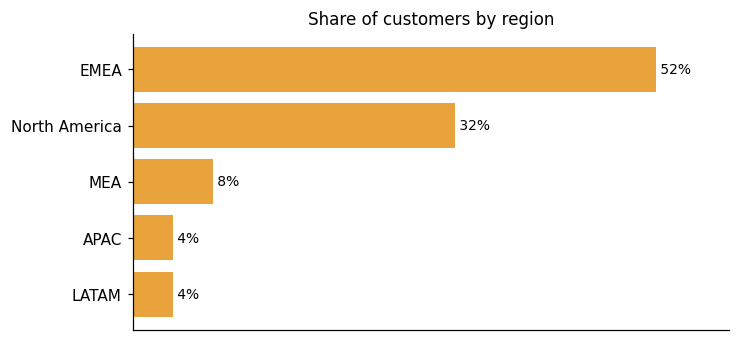
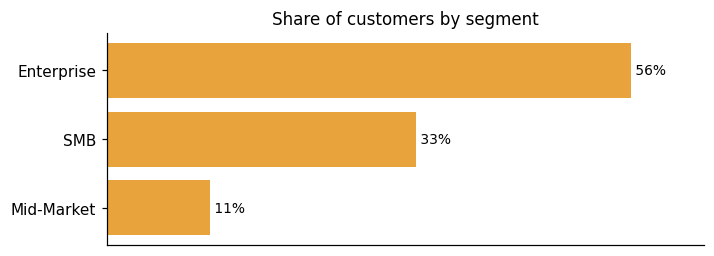
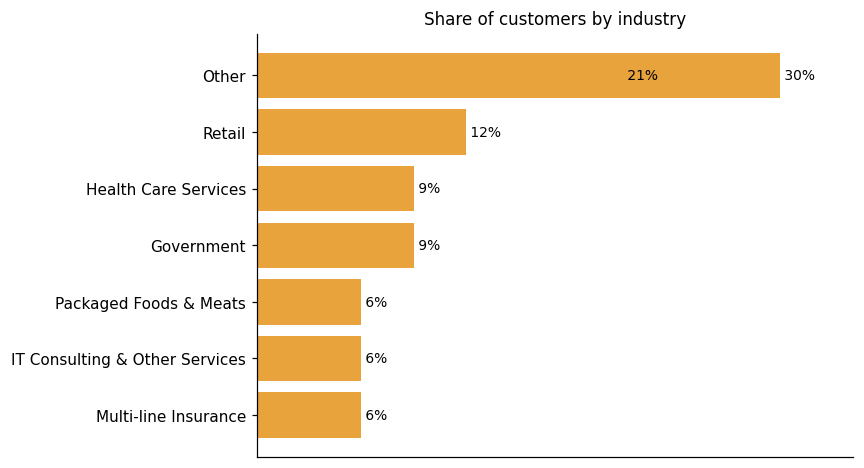
Representative customers: ABB, Barmer GEK, Cloverleaf Analytics, DataOrbis, East of England Co-op, EMC Software C.A., Empyrean Solutions
How Pyramid Decision Intelligence Platform uses AI in practice
The Pyramid Decision Intelligence Platform applies AI across several core capabilities, including automated analytics, natural language querying, machine learning model building, and Generative BI. The platform is AI at its core to augment and automate analytics for non-technical users. Beyond its AI features, it also delivers governed self-service, data preparation, visualization, and reporting as standalone value. Generative BI extends this further: as Pyramid describes it, Gen BI makes analytics accessible to anyone and impactful when it actually matters by combining generative AI with analytics capabilities.
Predictive ML
Read detailsThe Pyramid Decision Intelligence Platform covers the full ML lifecycle in one place. Users can build, train, apply, and deploy machine learning models to discover patterns, make predictions, and optimize decisions. Two interaction styles are available: a no-code drag-and-drop interface for those who prefer it, and Python or R scripting for those who want direct control.
Generative AI
Read detailsPyramid Decision Intelligence Platform combines generative AI directly with its analytics engine to cover data exploration, dashboard creation, report generation, and query authoring in one environment. Users can work in plain language, whether typed or spoken. That natural-language input can produce SQL, DAX, MDX queries, and Python or R logic. The platform handles all of this without sending actual data to third-party LLM providers.
Anomaly / Pattern Detection
Read detailsPyramid Decision Intelligence Platform automatically surfaces correlations, anomalies, and trends across data using AI and ML algorithms. It also provides AI-driven Explain features that reach into the data model to deliver both descriptive and diagnostic analysis. Data drivers can be identified in a single click.
Pyramid Decision Intelligence Platform pricing and value: quote-based costs, ROI and fit
Pyramid Decision Intelligence Platform is priced on a custom-quote basis, tailored to who is using the platform and how, with no published price list. The ROI evidence from customers points in a consistent direction: lower total cost of ownership and a simpler analytics stack. One customer saved $350,000 per year after switching to Pyramid and gained flexibility that opened new revenue possibilities. Another described needing a partner that was cost-effective while still offering design and build flexibility. A third framed ROI differently — identifying inactive students and intervening when device access was limited was costly, but the payoff was student success. On the vendor side, the platform is positioned as reducing the complexity and total cost of ownership associated with a layered analytics stack.
ROI evidence from 3 customers
- The analytics stack is simplified and less complex, with a lower total cost of ownership.
- Identifying inactive students and intervening when they had limited access to devices was costly, but the ROI is student success.
- We needed to find a partner and supplier that gave us that flexibility in terms of the design and the build — and that's also cost-effective.
- The switch to Pyramid saved $350,000/year and enhanced flexibility, enabling better decision-making and uncovering new revenue possibilities.
Time-to-value: what implementations take
- ABB | Standardized on Pyramid for financial planning and analysis. Replaced outdated tools in less than three months and empowered 4,000 users worldwide.
Who it fits: value by company size
Pricing for Pyramid Decision Intelligence Platform is tailored to each organization rather than set at a fixed public rate. As the platform's pricing page puts it, "Unlike "one-size-fits-all" solutions, your investment is based on who's using your platform and how. No surprise fees. No sudden price hikes." To find out what a deployment would cost, buyers need to get a quote tailored to your organization. The facts available do not break down pricing by company size, so no size-based fit signal can be drawn from them.
The pricing page routes visitors to request a custom quote with no specific prices published; pricing is tailored based on who is using the platform and how.
Pyramid Decision Intelligence Platform enterprise readiness: security, compliance, migration, and support
Pyramid Decision Intelligence Platform covers four enterprise-readiness dimensions: security, compliance, migration, and customer support. Pyramid Analytics addresses each of these areas as part of its enterprise offering.
Security controls and assurance
Self-hosting keeps confidential data contained, with no avenue for exposure and control of the analytics framework staying with the organization rather than a third party. The built-in multitenancy framework lets separate tenants coexist in a single instance, making it straightforward to onboard and secure multiple use cases or customers without sacrificing isolation between them. On the AI side, the platform never shares actual data with a large language model. Instead, it passes only the plain-language request and the context the LLM needs to generate the recipe needed to answer your question. For its full governance and security capability, the platform is designed to deliver sophisticated analytics use cases super quickly, with full governance and security. SAP integrations preserve an additional layer of data integrity, as certified connections ensure that queries retain SAP business logic, rules, and hierarchies through to visualization and reporting.
Compliance and data protection
Pyramid Decision Intelligence Platform approaches compliance on a few distinct fronts. For data governance, the platform's business logic library centralizes approved calculations and metric definitions so that consistent, standardized logic is reused across the organization rather than recreated ad hoc. On cross-border data protection, personal data transferred outside the EEA is covered by European Commission Standard Contractual Clauses. For SAP-heavy environments, Pyramid Analytics holds full SAP certification across SAP BW/4HANA, SAP HANA, and SAP NetWeaver as a member of the SAP PartnerEdge open ecosystem, with the platform also available through the SAP Store.
Migration from competing platforms
The Pyramid Decision Intelligence Platform connects to your existing data infrastructure without requiring you to move or duplicate data first. It reaches across over 250 built-in connectors, covering a wide range of data sources, and the vendor describes its approach as eliminating the need for data duplication or complex migrations. For teams consolidating analytics tooling, a joint path with Datavard supports migrating to one analytics platform for all your data. SAP environments get dedicated attention as well. As SAP helps customers move their data estate to the cloud, Pyramid supports RISE Transformations by delivering a cloud-ready, SAP-optimized analytics platform on day one.
Support and success
Pyramid Decision Intelligence Platform reaches customers through several support channels: a ticketing system, a knowledge base, a community forum with video tutorials and product announcements, and regular live webinars through Pyramid Learning Live. The Pyramid Learning Hub is a centralized learning management system. It provides self-paced e-learning and expert-led training courses. A certification program covers all user types, from Viewer and Analyst license holders to Pro users and Administrators, and every training license includes the full certification package at no additional cost. Customer feedback on support responsiveness is positive. As vdek puts it, the customer service team responds promptly, handles your requirements in the most effective way, and always finds the right solution quickly. Cloverleaf Analytics notes that training is quick and easy, taking as little as one hour. Grand Rapids Community College has noted in their review: "Training on the product (I think they are coming out with this soon) - Bootcamp for users to attend".
Pyramid Decision Intelligence Platform vs. Microsoft, Oracle, Qlik and other platforms
Pyramid Decision Intelligence Platform competes in Analytics and Business Intelligence Platforms, a category where organizations model, analyze, and visualize data to support decision making — drawing on data preparation, interactive dashboards, reports, and visualizations, and optionally semantic modeling with business rules. Built-in no-code data preparation lets users of all skill levels clean, blend, and prepare data without extracting or duplicating it, including self-service model creation. Business Analytics capability covers data exploration and visualization for descriptive analysis across the platform, with content building for multiple user skill levels. AI-Powered Analytics includes Auto Discover and machine learning capabilities to automate data analysis and deliver actionable insights using AI and NLP. Generative BI combines generative AI with the analytics engine, enabling users to explore data and create content using plain language queries. The comparison table that follows shows where Pyramid Decision Intelligence Platform, Microsoft, Oracle, and Qlik differ most — it is a differentiation view across selected dimensions, not a complete feature-by-feature comparison, and should be read accordingly. Where Pyramid Decision Intelligence Platform trails the broader category, those differences are visible in the table ratings rather than in this summary.
Analytics and Business Intelligence Platforms
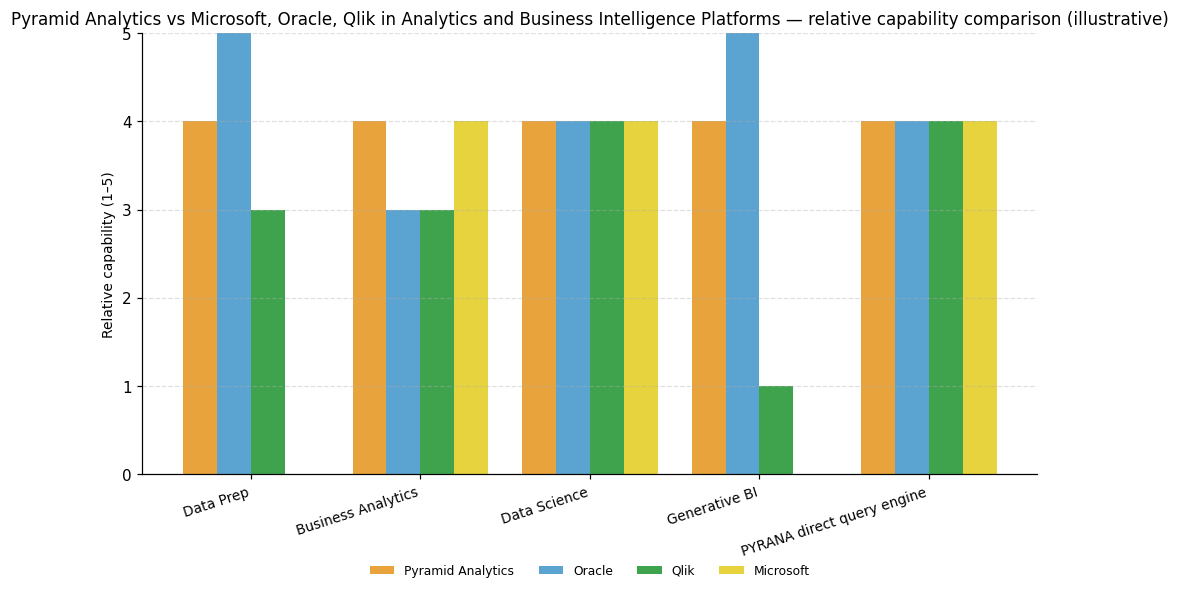
| Capability | Pyramid Analytics | Microsoft | Oracle | Qlik |
|---|---|---|---|---|
| Data Prep | 4 | — | 5 | 3 |
| Business Analytics | 4 | 4 | 3 | 3 |
| Data Science | 4 | 4 | 4 | 4 |
| Generative BI | 4 | — | 5 | 1 |
| PYRANA direct query engine | 4 | 4 | 4 | 4 |
Pyramid Analytics
Data Prep: Built-in no-code data preparation enables users of all skill levels to clean, blend, and prepare data without extracting or duplicating it, including self-service model creation.; Business Analytics: Business Analytics capability covers data exploration and visualization for descriptive analysis across the platform, with content building for multiple user skill levels.; Data Science: AI-Powered Analytics includes Auto Discover and machine learning capabilities to automate data analysis and deliver actionable insights using AI and NLP.; Generative BI: Generative BI combines generative AI with the analytics engine enabling users to explore data and create content using plain language queries.; PYRANA direct query engine: PYRANA direct query engine enables in-place analytics by querying data where it lives across multiple sources without moving or copying data, supporting superior direct querying.
Microsoft
Business Analytics: Dominant market presence makes finding skills and training easy, and Power BI is rated strong on visualization relative to other ABI platforms.; Data Science: Copilot for Power BI provides AI assistance for visualization, calculating metrics, documenting metadata, and insight discovery, rated strong.; PYRANA direct query engine: Part of Microsoft Fabric ecosystem including OneLake, Data Integration, Data Warehouse, Apache Spark, and Data Science, rated strong.
Oracle
Data Prep: Autogenerates statistics on data quality and distribution, uses semantic profiling, and provides automated repair recommendations, rated strong and called out as a key strength.; Data Science: Platform is infused with AI and ML capabilities providing Auto Insights and advanced tools for analysis and visualization, rated strong and cited as a key strength.; Generative BI: Oracle Analytics AI Assistant enables users to leverage natural language for insights, complex visualizations, and dashboard assembly, rated strong and cited as a key strength.; PYRANA direct query engine: Integration with Fusion Data Intelligence provides packaged data integration and data models for horizontal business functions, rated strong.
Qlik
Data Science: New agentic AI framework enables conversational analytics, automated authoring, and autoML features, rated strong.; PYRANA direct query engine: Offered as a service across all major clouds and integrates with many major enterprise cloud applications, rated strong.


Connect Pyramid Decision Intelligence Platform with your stack: integrations and partner ecosystem
Pyramid Decision Intelligence Platform supports 5 native integrations and 101 integration partnerships spanning 31 partner categories. Those categories range from cloud platform and cloud data platform to ERP and enterprise software, reflecting broad coverage across the technology landscape businesses typically run.
The Pyramid Decision Intelligence Platform connects data from over 200 data connectors, spanning categories like Big Data & NoSQL, CRM & ERP, Marketing, and E-Commerce. Beyond connectors, the platform also reaches local files, relational databases, unstructured databases, web sources, and scripted sources. On-premises systems and cloud sources are both supported, and data can be blended across them within a governed analytics environment. For SAP environments specifically, the platform can connect to Datavard Glue via an API to consolidate SAP sources into a centralized analytics environment without fragmenting them. For its PYRANA direct query engine capability, the platform issues direct queries against almost any SQL or MDX compliant data technology. This means existing data can be queried in place, with no ingestion or restructuring required before analysis begins.
| Partner category | Integration partners | Native count | Flow direction |
|---|---|---|---|
| cloud platform | Amazon Web Services | 0 | Upstream |
| cloud data platform | Snowflake | 0 | Bidirectional |
| ERP / enterprise software | SAP | 0 | Upstream |
| cloud platform / data services | Microsoft Azure | 0 | Upstream |
| cloud data warehouse | Google BigQuery | 0 | Bidirectional |
| AI / large language model | OpenAI | 1 | Upstream |
| AI / large language model platform | IBM Watsonx | 1 | Upstream |
| Artificial Intelligence | Camden AI | 0 | Unknown |
| Business Intelligence | Align BI, Bicycle, Bismart, PrecisionPoint Software, bi smart | 0 | Unknown |
| Compliance Software | Regscape | 0 | Unknown |
| Consulting | ANIS Group, Adastra (adastracorp.com), Adastra (adastragrp.com), Areto, BAIT Consulting Ltd, BKM Consultants Ltd, Capco, DATA MART Consulting, Empyrean Solutions, Experis Ciber, Groupe Cegi, INFOSUPPORT SA, Kabel Information Systems, Managing Information Systems 3 Inc., Millennial Informatics, Mind The Value, OPITZ CONSULTING Deutschland GmbH, One Six Solutions, Red Desert Consulting, Reply, Scadea Solutions, Sopra Steria, The Honest Consultants, VISEO, areto consulting gmbh, b.telligent, cimt ag, delaware, q.beyond AG | 0 | Unknown |
| Data Analytics | Advance Your Data, Artha Data Solutions, Clarke Analytics, Dataciders, Datawise, Evolution Analytics, Hopton Analytics, KYKO Data Solutions, Logan Data, Mavent Analytics, Praescient Analytics, dataZED Associates | 0 | Unknown |
| Data Integration | Stitch | 0 | Unknown |
| Data Management | Veracity by DNV | 0 | Unknown |
| Field Marketing | Smollan | 0 | Unknown |
| Mapping & Location Services | Mapbox | 0 | Unknown |
| Marketing Software | Amplifi | 0 | Unknown |
| Other | ADD d.o.o., AZEO, AdvantageGo, Alligator Company, Aptaworks, Artizen, Axxonet, Cologne Intelligenct, Conspect, Domain Development Corporation, Drighna Technology, Evitec Solutions, Friedhelm Selbach, Hopewell Group of Companies, Innfuturum, K-42, KASH Tech, Kaleido, MagnaVersum, Minburn Communications, Nogamy, PRODATO, Qontrol Devices, SAPIMSA, Solicon Private Limited, Sterling, SynerLeap, TIGMA, Tachyon Technologies, V3Gate | 0 | Unknown |
| Professional Services | PricewaterhouseCoopers | 0 | Unknown |
| Risk & Compliance Software | RIMES Technologies | 0 | Unknown |
| SAP data management / ETL | Datavard | 0 | Upstream |
| Software | EMC, Profit Software Ltd, Stellar Information Technology | 0 | Unknown |
| Software Development | dev2prod | 0 | Unknown |
| Software Reseller | Carahsoft, SoftwareOne | 0 | Unknown |
| Training & Learning | CCW Learning Consultants | 0 | Unknown |
| analytical database | Exasol | 0 | Upstream |
| container orchestration | Kubernetes | 0 | Upstream |
| data connectivity / JDBC drivers | CData | 0 | Upstream |
| data lakehouse platform | Databricks | 1 | Bidirectional |
| database / enterprise software | Oracle | 1 | Upstream |
| distributed data processing | Apache Spark | 1 | Upstream |
| education technology / LMS | Blackboard | 0 | Unknown |
What's new in Pyramid Decision Intelligence Platform
Pyramid Decision Intelligence Platform has received 5 awards in the last 24 months, recognition that Pyramid Analytics has earned across that period.
Recent awards for Pyramid Decision Intelligence Platform
Pyramid Decision Intelligence Platform has earned 5 awards in the last 24 months, spanning analyst recognition across both Magic Quadrant and Critical Capabilities reports, as well as independent BI and analytics survey recognition.
- 2024 Gartner Critical Capabilities for ABI Platforms — Ranked Highest for All Use Cases (2024-12-31) →
- 2025 Gartner Critical Capabilities for Analytics and Business Intelligence Platforms — Ranked #1 for Metrics Creation and Data Storytelling Use Cases (2025-12-31) →
- 2025 Gartner Magic Quadrant for Analytics and Business Intelligence Platforms — Visionary (2025-06-18) →
- BARC BI & Analytics Survey 26 (2025-12-31) →
- Visionary in 2025 Gartner Magic Quadrant for ABI platforms (2025-06-16) →
ServiceNow Acquires Pyramid Analytics to Close the Insight-to-Action ...
ServiceNow has agreed to acquire Pyramid Analytics, a decision intelligence platform that integrates data preparation, business analytics, and data science. This acquisition aims to bridge the gap between analytical insight and operational action by embedding Pyramid's capabilities into ServiceNow's platform, allowing users to trigger workflows seamlessly.
Pyramid Analytics Fuels ServiceNow's Business Automation Ambitions
ServiceNow has acquired Pyramid Analytics to enhance its business automation capabilities. Pyramid's decision intelligence platform, known for its natural language querying and embedded analytics, will integrate with ServiceNow's workflow tools. This acquisition aims to streamline the transition from insights to action, enabling ServiceNow to become a central operating system for AI-driven enterprise operations.
ServiceNow Pursues Pyramid Analytics To Deepen AI Workflow Integration ...
ServiceNow announced its acquisition of Pyramid Analytics to integrate AI-powered analytics into its enterprise workflows. This move aims to enhance ServiceNow's platform by embedding advanced data analysis, allowing AI agents to handle complex tasks. The acquisition aligns with ServiceNow's strategy to deepen its role in AI-driven workflow automation.
Pyramid Analytics. Profile
Company Name
Pyramid Analytics.
Company Website
https://www.pyramidanalytics.com/HQ Location
151 Kingfordsweg, 1043 GR, Amsterdam, 1043, NL
Employees
101-250
Social


Financials
SERIES B