


Striim Overview
Striim facilitates real-time data integration and streaming, crucial for analytics and business intelligence. The platform builds data pipelines capable of streaming trillions of events instantly, which supports businesses in making timely, data-driven decisions. Striim's versatility is evident in its ability to connect with hundreds of data sources, offering deployment flexibility through Striim Cloud and Striim Platform. This adaptability makes it a preferred choice for Fortune 500 companies across diverse industries. By enabling real-time data flow, Striim enhances the immediacy and accuracy of business insights, directly impacting strategic decision-making and market positioning.
Use Cases
Customers recommend Social Media Analytics, Competitive Intelligence, Funnel Analysis, as the business use cases that they have been most satisfied with while using Striim.
Business Priorities
Improve Efficiency and Enter New Markets Internationally Or Locally are the most popular business priorities that customers and associates have achieved using Striim.
Striim Use-Cases and Business Priorities: Customer Satisfaction Data
Striim works with different mediums / channels such as Website. Offline. Events etc.
Striim's features include Capture Information, Alerts: Popups & Notifications, Dashboard, etc. and Striim support capabilities include AI Powered, 24/7 Support, Chat Support, etc. also Striim analytics capabilities include Analytics, and Custom Reports.
Reviews
"We chose Striim as it provides continuous access to the data in our MySQL database without impacting its performance, and without taking the data out of the Google Cloud environment." - Paolo Giangiacomo
Peer review evidence (same sources as the product rating summary)
"...Today Ciena uses Snowflake for internal operational reporting and analytics, but eventually they plan to build new applications and expand to include external data...." Case Study Ciena
"...By feeding real-time operational data with Striim, Inspyrus now leverages Snowflake as a scalable cloud platform driving their business intelligence reports in Looker. ..." Case Study Inspyrus
"...Striim combines real-time data integration, stream analytics, and visualization in a single platform...." Peer review from Striim
Striim, CARTO Platform, Hevo, Skyvia Platform, Phocas, etc., all belong to a category of solutions that help Business Intelligence. Each of them excels in different abilities. Therefore, determining the best platform for your business will depend on your specific needs and requirements.
Striim enables real-time data integration and streaming for analytics and business intelligence. It builds data pipelines to stream trillions of events in real-time.
Popular Business Setting
for Striim
Top Industries
- Telecommunications
- Computer Software
- Consumer Services
Popular in
- Enterprise
Striim is popular in Telecommunications, Computer Software, and Consumer Services and is widely used by Enterprise,
Striim Customer wins, Customer success stories, Case studies
How can Striim optimize your Competitive Intelligence Workflow?
What solutions does Striim provide for Funnel Analysis?
What benefits does Striim offer for Collaboration?
How can Striim optimize your Lead Analytics Workflow?
| CUSTOMERS | TESTIMONIALS |
|---|---|

|
We chose Striim as it provides continuous access to the data in our MySQL database without impacting its performance, and without taking the data out of the Google Cloud environment. Testimonial By Paolo Giangiacomo |

|
Offline data has lots of value, but you can’t affect it. What you can actually affect is the data that just happen in the last 5-10 minutes. You can affect both margin and quality. Quality in network business is very important, company may see you not operating well, it will switch to someone else ...and getting them back is very difficult. |

|
The choice to use Snowflake was part of our platform’s evolution. We needed Striim to complete the vision. Testimonial By Rajesh Raju |
| CUSTOMERS | TESTIMONIALS |
|---|---|
|
Paolo Giangiacomo Systems Integration Manager HomeServe |
We chose Striim as it provides continuous access to the data in our MySQL database without impacting its performance, and without taking the data out of the Google Cloud environment. Testimonial By Paolo Giangiacomo |
|
Leon Shaigorodsky Director of Business Solutions iBasis |
Offline data has lots of value, but you can’t affect it. What you can actually affect is the data that just happen in the last 5-10 minutes. You can affect both margin and quality. Quality in network business is very important, company may see you not operating well, it will switch to someone else ...and getting them back is very difficult. |
|
Rajesh Raju Designer Ciena |
The choice to use Snowflake was part of our platform’s evolution. We needed Striim to complete the vision. Testimonial By Rajesh Raju |
Leading logistics technology provider (digital venture within a global consulting firm) - Information Technology And Services - Large
Global financial data provider - Financial Services - Very Large
Striim Overview
Frequently Asked Questions (FAQ)
What buyers ask before choosing Striim
Integrations What CRM integrations are available with Striim?
Striim offers several CRM integrations that enhance data management and analytics capabilities for businesses. Notably, it integrates seamlessly with platforms like Salesforce, enabling real-time data synchronization and analytics that empower sales and marketing teams to make informed decisions. Additionally, Striim supports integration with HubSpot, allowing users to unify customer data across various channels for improved engagement and insights. These integrations facilitate the automation of data flows, ensuring that CRM systems are always updated with the latest information, which can lead to enhanced customer experiences and operational efficiency. By leveraging Striim's CRM integrations, organizations can optimize their data strategies and drive better business outcomes.
Integrations How does Striim connect to Salesforce for data integration?
Striim connects to Salesforce for data integration through its robust ETL capabilities, allowing businesses to seamlessly extract, transform, and load data between Salesforce and other systems. By utilizing Striim's pre-built connectors, users can easily integrate Salesforce data with various databases and cloud platforms, ensuring real-time data synchronization. This integration supports change data capture, enabling organizations to track updates in Salesforce and reflect them in their data warehouses or analytics platforms without delay. Additionally, Striim's architecture allows for bi-directional data streaming, which enhances data consistency and accessibility across applications. This capability not only streamlines operations but also empowers businesses to make informed decisions based on up-to-date insights from their Salesforce data.
Integrations What are the setup steps for integrating Striim with HubSpot?
To integrate Striim with HubSpot, start by ensuring you have access to both platforms and the necessary permissions to create integrations. First, log into your Striim account and navigate to the integration section. Select HubSpot from the list of available connectors. You will need to provide your HubSpot API key, which can be found in your HubSpot account settings under "Integrations" and then "API Key." Once the API key is entered, configure the data flow by selecting the specific data you want to sync between Striim and HubSpot, such as contacts or marketing data. Finally, test the integration to ensure data is flowing correctly, and set up any necessary schedules for data updates. This integration allows for real-time data synchronization, enhancing your marketing and sales efforts.
Integrations Can Striim sync data with Marketo, and if so, how does that work?
Yes, Striim can sync data with Marketo, enabling seamless integration for marketing automation and customer engagement. This integration works by utilizing Striim's real-time data streaming capabilities, which allow for the continuous flow of data between your existing databases and Marketo. Striim provides out-of-the-box connectors that facilitate the extraction of data from various sources, such as SQL and Oracle databases, and then transforms and loads this data into Marketo. This ensures that your marketing teams have access to the most up-to-date customer information, allowing for timely and targeted marketing campaigns. By leveraging Striim's capabilities, businesses can enhance their marketing strategies and improve customer interactions through real-time insights and data-driven decision-making.
Integrations Can Striim sync data with Marketo, and what is the sync behavior?
Yes, Striim can sync data with Marketo, enabling seamless integration for marketing automation and customer engagement. The sync behavior typically involves real-time data integration, allowing for immediate updates between your data sources and Marketo. This means that any changes made in your databases, such as customer interactions or transaction updates, can be reflected in Marketo without delay, ensuring that your marketing campaigns are based on the most current data. Striim's out-of-the-box connectors facilitate this integration, and its change data capture feature ensures that only the modified data is synced, optimizing performance and reducing unnecessary data transfer. This capability enhances your marketing efforts by providing timely insights and improving overall campaign effectiveness.
Integrations What are the limitations of data flow between Striim and external data providers?
While Striim offers robust capabilities for real-time data integration and streaming, there are some limitations when it comes to data flow between Striim and external data providers. One notable limitation is the dependency on the availability and compatibility of connectors for various data sources; while Striim provides out-of-the-box adapters, custom development may be necessary for legacy systems, which can increase implementation time and complexity. Additionally, latency issues may arise during high-volume data transfers, potentially impacting real-time analytics. Furthermore, while Striim supports bi-directional data streaming, ensuring data consistency and integrity across multiple platforms can be challenging, especially during migrations or when integrating with cloud services like Google Cloud or Snowflake. Understanding these limitations is crucial for businesses to effectively plan their data integration strategies.
Integrations What limitations should I be aware of when integrating Striim with data providers?
When integrating Striim with data providers, there are several limitations to consider. While Striim offers out-of-the-box adapters and the ability to develop custom connectors for legacy data sources, the effectiveness of these integrations can vary based on the specific data provider's architecture and compatibility. Additionally, while Striim excels in real-time data streaming and change data capture, users may encounter challenges with the web interface and real-time dashboard, which have been noted for needing improvement. Furthermore, the integration process may require careful planning to ensure minimal disruption, especially when migrating from on-premises systems to cloud environments. It's essential to evaluate the specific requirements of your data sources and the capabilities of Striim to ensure a smooth integration experience.
Integrations Does Striim offer API access for custom integrations, and what is the configuration process?
Yes, Striim offers API access for custom integrations, allowing businesses to connect their existing systems and applications seamlessly. To configure API access, users should first review the Striim API documentation, which provides detailed guidelines on authentication, endpoints, and data formats. Next, you will need to generate an API key through the Striim platform, which will be used to authenticate your requests. After setting up the API key, you can begin making calls to the Striim API to perform operations such as data ingestion, streaming, and management of data pipelines. It’s advisable to test your integrations in a development environment before deploying them in production to ensure everything functions as expected. This flexibility enhances Striim's capability to integrate with various data sources and applications, supporting tailored solutions for specific business needs.
Integrations How does the data flow between Striim and external systems like Snowflake?
Data flow between Striim and external systems like Snowflake is facilitated through Striim's real-time data integration capabilities, which include Change Data Capture (CDC) and automated data streaming. Striim connects to various data sources, such as MySQL databases or Oracle systems, and continuously captures changes in the data. This data is then transformed and streamed directly into Snowflake, ensuring that the information is always up-to-date and accessible for analytics. The integration allows for bi-directional data flow, meaning that not only can data be sent to Snowflake, but it can also be pulled back to on-premises systems if needed. This seamless flow enhances operational efficiency, reduces manual intervention, and supports real-time decision-making across business operations.
Features What does the Striim monitoring dashboard do?
The Striim monitoring dashboard is a powerful tool designed to provide real-time visibility into data integration and streaming processes. It allows users to track the performance and health of data pipelines, ensuring that data flows smoothly and efficiently across various systems. With features such as customizable alerts and visualizations, the dashboard helps organizations quickly identify and resolve issues, minimizing downtime and optimizing data operations. This capability is particularly valuable for businesses that rely on timely data for decision-making, as it enhances operational efficiency and supports proactive management of data workflows. By leveraging the Striim monitoring dashboard, companies can ensure their data integration processes are reliable and effective, ultimately driving better business outcomes.
Features How do I configure the Striim alerting system?
To configure the Striim alerting system, start by accessing the Striim dashboard and navigating to the "Alerts" section. Here, you can create a new alert by selecting the specific data stream or process you want to monitor. Define the conditions that will trigger the alert, such as thresholds for data latency or error rates. You can customize the notification settings to determine how alerts are communicated, whether via email, SMS, or integration with other tools like Slack. Once you’ve set your parameters, save the alert configuration. It’s also advisable to test the alert to ensure it functions as expected. Regularly review and adjust your alert settings based on evolving business needs to maintain effective monitoring of your data streams.
Features What features are included in Striim's IoT data processing?
Striim's IoT data processing features are designed to facilitate real-time data integration and management from various IoT devices. Key functionalities include seamless data ingestion from diverse sources, enabling organizations to capture and process data streams efficiently. Striim supports change data capture, which allows for the continuous monitoring of data changes, ensuring that insights are based on the most current information. Additionally, it offers robust data governance and security features, including customer-managed key encryption through Striim Shield, enhancing data protection. The platform also provides analytics and visualization tools to help businesses derive actionable insights from their IoT data, ultimately driving better decision-making and operational efficiency. These capabilities make Striim a valuable solution for organizations looking to leverage IoT data effectively.
Features How do I use Striim for data visualization?
To use Striim for data visualization, start by integrating your data sources using Striim's out-of-the-box connectors or by developing custom adapters for legacy systems. Once your data is ingested, leverage Striim's real-time data streaming capabilities to ensure that your visualizations reflect the most current information. Utilize the platform's built-in data transformation features to prepare your data for analysis, ensuring it is clean and structured. After preparing your data, you can create visualizations using Striim's dashboard tools, which allow you to design interactive charts and graphs that provide insights into your data. Finally, share these visualizations with stakeholders to facilitate data-driven decision-making across your organization.
Features What is Striim's latency optimization feature and how does it work?
Striim's latency optimization feature is designed to enhance the speed and efficiency of data streaming and processing, significantly reducing the time it takes for data to be available for analysis and decision-making. This feature works by utilizing advanced techniques such as real-time data integration, change data capture, and autonomous data pipelines, which allow for near-instantaneous updates from various data sources, including cloud platforms like Google Cloud and Snowflake. By minimizing latency, Striim enables businesses to make faster, data-driven decisions, improve operational efficiency, and enhance customer experiences through real-time insights. This capability is particularly valuable for organizations that rely on timely data for critical operations, such as network management and inventory control, ultimately supporting better business outcomes.
Features How can I set up high availability in Striim?
To set up high availability in Striim, you need to configure a cluster of Striim instances that work together to ensure continuous data processing and minimize downtime. Start by deploying multiple Striim nodes across different servers or data centers to create redundancy. Utilize Striim's built-in load balancing features to distribute workloads evenly among the nodes. Implement failover mechanisms so that if one node goes down, another can take over without interrupting data streaming or processing. Additionally, regularly monitor the health of your Striim instances using the monitoring dashboard to quickly identify and address any issues. This setup not only enhances reliability but also ensures that your data integration processes remain uninterrupted, providing consistent access to real-time data for your business operations.
ROI & pricing What measurable business value can Striim provide for my organization?
Striim provides measurable business value by enabling real-time data integration and analytics, which significantly enhances operational efficiency and decision-making capabilities. Organizations using Striim can automate data streaming and schema management, reducing manual work and errors, as seen in cases like Clover, which unified data from 23 MySQL databases into Snowflake, processing millions of transactions daily. This real-time capability allows businesses to gain instant insights, optimize operations, and respond swiftly to market changes, ultimately driving revenue growth. Additionally, Striim's scalable architecture supports future integrations and innovation, as demonstrated by companies like Macy's and MineralTree, which improved customer satisfaction and reduced costs by migrating to cloud-based solutions. Overall, Striim empowers organizations to leverage their data effectively, fostering a culture of data-driven decision-making.
ROI & pricing How does Striim impact ROI and cost savings for businesses?
Striim significantly impacts ROI and cost savings for businesses by modernizing data infrastructure and enabling real-time data integration, which reduces operational inefficiencies and maintenance costs. For instance, Macy's leveraged Striim to migrate from legacy systems to Google Cloud, resulting in unified inventory data that improved decision-making and reduced out-of-stock situations, ultimately boosting profitability. Similarly, Clover automated schema changes across 23 MySQL databases, allowing for millions of daily transactions with real-time analytics, which minimized manual work and enhanced innovation. By streamlining data processes and facilitating cloud migrations, Striim helps organizations cut costs associated with legacy systems, improve operational efficiency, and accelerate application deployment, leading to a higher return on investment.
ROI & pricing What are the different pricing plans and tiers available for Striim?
Striim offers a variety of pricing plans tailored to meet the needs of different businesses, although specific pricing details are not publicly disclosed on their website. Typically, Striim's pricing structure is based on factors such as the scale of data integration, the number of data sources, and the specific features required, such as real-time data streaming or advanced analytics capabilities. Businesses can choose from options like Striim Cloud, which provides scalable solutions, or on-premise deployments that may include additional features like SSO support. For precise pricing information and to determine the best plan for your organization, it is recommended to contact Striim directly for a customized quote based on your specific use case and requirements.
ROI & pricing What is the total cost of ownership when using Striim for data integration?
The total cost of ownership (TCO) when using Striim for data integration encompasses several factors, including licensing fees, implementation costs, maintenance expenses, and potential savings from improved operational efficiency. Striim offers a cloud-based platform that can reduce maintenance and licensing costs compared to traditional on-premise solutions, as evidenced by case studies like Macy's, which modernized its data infrastructure. Additionally, Striim's real-time data integration capabilities can lead to significant time savings and reduced manual work, further lowering operational costs. Organizations should also consider the scalability of Striim, which allows for future growth without substantial additional investment. Ultimately, while the initial costs may vary based on specific needs and configurations, the long-term benefits often justify the investment, making Striim a cost-effective choice for data integration.
ROI & pricing How quickly can I expect to see value from implementing Striim?
When implementing Striim, businesses can expect to see value relatively quickly, often within a few weeks to a couple of months, depending on the complexity of their data environment and specific use cases. For instance, companies like Clover and MineralTree have reported significant improvements in operational efficiency and real-time analytics shortly after deployment. Striim's capabilities, such as real-time data streaming and change data capture (CDC), enable organizations to streamline processes and reduce manual workloads, leading to faster insights and decision-making. Additionally, the platform's scalable architecture supports ongoing growth and integration, ensuring that as your data needs evolve, Striim continues to deliver value. Overall, the speed at which you see results will largely depend on your existing infrastructure and the specific goals you aim to achieve with Striim.
ROI & pricing What are the implementation costs associated with deploying Striim in my company?
The implementation costs associated with deploying Striim can vary significantly based on several factors, including the scale of deployment, the complexity of your existing data infrastructure, and the specific use cases you intend to address. While Striim does not publicly disclose fixed pricing, companies typically incur costs related to licensing, cloud infrastructure, and potential consulting services for integration and customization. For instance, organizations like Macy's and Clover have leveraged Striim for substantial migrations and real-time data integration, which may involve initial investments in cloud services like Google Cloud or Snowflake. Additionally, ongoing operational costs should be considered, including maintenance and support. To get a precise estimate tailored to your company's needs, it's advisable to consult directly with Striim's sales team for a detailed quote based on your specific requirements.
ROI & pricing What are the implementation costs associated with deploying Striim in my business?
The implementation costs associated with deploying Striim in your business can vary significantly based on several factors, including the scale of deployment, the complexity of your existing data infrastructure, and specific use cases. While Striim does not publicly disclose fixed pricing, businesses typically incur costs related to licensing, cloud infrastructure, and potential consulting services for integration and customization. For instance, companies like Macy's and Clover have leveraged Striim to modernize their data systems, which involved migrating from legacy platforms to cloud solutions, thus incurring costs related to both the software and the migration process. It's advisable to consult with Striim's sales team for a tailored quote that considers your unique requirements and to explore potential ROI based on improved operational efficiency and reduced maintenance costs.
Capabilities What can Striim do for real-time data integration?
Striim is a powerful platform designed for real-time data integration, enabling businesses to seamlessly connect and stream data from various sources, including on-premises databases and cloud environments. With features like Change Data Capture (CDC), Striim allows organizations to capture and replicate data changes in real-time, ensuring that analytics and applications are always working with the most current information. This capability is particularly beneficial for enterprises looking to modernize their data infrastructure, as seen in case studies like Macy's and Clover, where Striim facilitated the migration to cloud platforms like Google Cloud and Snowflake. By eliminating data silos and reducing latency, Striim enhances operational efficiency, supports timely decision-making, and ultimately drives better business outcomes.
Capabilities Can Striim support high availability for data systems?
Yes, Striim can support high availability for data systems through its robust architecture designed for real-time data integration and streaming. By utilizing features such as autonomous data pipelines and bi-directional data streaming, Striim ensures that data is continuously available and minimizes downtime during migrations or system updates. This capability is crucial for businesses that require uninterrupted access to data for critical operations, as it allows for seamless transitions and reduces the risk of data loss. Additionally, Striim's high availability features enable organizations to scale their data processing needs while maintaining reliability, making it an ideal solution for enterprises looking to enhance their data infrastructure.
Capabilities Does Striim provide capabilities for data replication reliability?
Yes, Striim provides robust capabilities for data replication reliability, ensuring that data is consistently and accurately replicated across various systems. With features like change data capture, Striim can monitor and replicate changes in real-time from sources such as SQL Server and Oracle, which is crucial for maintaining data integrity. The platform's autonomous data pipelines are designed to handle high volumes of data, allowing organizations to replicate up to 100 million events daily, as demonstrated by clients like Ciena. This reliability not only supports timely access to data for critical business decisions but also minimizes the risk of data loss during migration or integration processes. Overall, Striim's focus on real-time data streaming and replication enhances operational efficiency and supports business growth.
Capabilities Can Striim handle bi-directional data streaming?
Yes, Striim can handle bi-directional data streaming, making it an effective solution for organizations that require real-time data synchronization between on-premises systems and cloud environments. This capability allows businesses to not only stream data from their existing databases, such as Oracle, to cloud platforms like Google Cloud or Snowflake but also to send data back to on-premises systems. For instance, Striim has successfully enabled a major global financial data provider to migrate over 80 siloed databases while minimizing disruption and supporting new product innovation through bi-directional streaming. This functionality enhances data integrity, reduces latency, and supports seamless operations, ultimately driving better business decisions and improving overall efficiency.
Capabilities What security features does Striim offer for data protection?
Striim offers several robust security features to ensure data protection, particularly with the release of version 5.0, which includes customer-managed key encryption through Striim Shield. This feature allows businesses to maintain control over their encryption keys, enhancing data security during real-time data integration. Additionally, Striim has implemented OAuth 2.0 for improved authentication and access control, streamlining user access while safeguarding sensitive information. The introduction of Single Sign-On (SSO) support for on-premise Striim further simplifies secure user access management. These features collectively enhance the platform's security posture, making it suitable for industries that require stringent data protection measures, such as finance and healthcare, while also supporting integrations with platforms like Google Cloud, BigQuery, and Snowflake for comprehensive data management.
Capabilities What security features does Striim offer for enterprise data?
Striim offers several robust security features designed to protect enterprise data, particularly with the introduction of Striim Shield in version 5.0, which includes customer-managed key encryption for enhanced data security. This allows businesses to maintain control over their encryption keys, ensuring that sensitive data remains secure. Additionally, Striim has implemented OAuth 2.0 to streamline user authentication and improve overall security and efficiency. The platform also supports Single Sign-On (SSO) for on-premise access, simplifying user management while enhancing security protocols. These features collectively enable enterprises to safeguard their data during real-time integration and streaming processes, ultimately supporting compliance and reducing the risk of data breaches.
Capabilities Does Striim support automated schema management for databases?
Yes, Striim supports automated schema management for databases, which is a key feature that enhances its data integration capabilities. This functionality allows organizations to streamline the process of managing schema changes across various databases, significantly reducing manual work and the potential for errors. For instance, Striim has successfully helped companies like Clover unify data from multiple MySQL databases into Snowflake by automating schema management and data streaming. This not only simplifies the integration process but also enables real-time analytics, allowing businesses to make informed decisions quickly. By leveraging Striim's automated schema management, organizations can focus more on innovation and less on maintenance, ultimately driving business growth and efficiency.
Capabilities Does Striim support automated schema management for data integration?
Yes, Striim supports automated schema management for data integration, which is a crucial feature for businesses dealing with dynamic data environments. This capability allows Striim to automatically detect and adapt to schema changes in the source databases, significantly reducing the manual effort required for data integration processes. For instance, in a case study involving Clover, Striim unified data from 23 MySQL databases into Snowflake while automating schema changes, enabling Clover to process millions of daily transactions with real-time analytics. This automation not only streamlines operations but also enhances the scalability of data integration efforts, allowing organizations to focus more on innovation rather than maintenance. Overall, Striim's automated schema management is designed to improve efficiency and support business growth in real-time data environments.
Use cases How can SDRs use Striim to improve real-time data access for lead generation?
Sales Development Representatives (SDRs) can leverage Striim to enhance real-time data access for lead generation by utilizing its Change Data Capture (CDC) capabilities to stream and integrate data from various sources, such as CRM systems and marketing platforms. By connecting these systems, SDRs can receive timely updates on lead interactions, engagement metrics, and demographic changes, allowing them to prioritize outreach efforts effectively. Striim's ability to deliver near real-time analytics means SDRs can act quickly on fresh insights, improving their chances of converting leads into customers. Additionally, with Striim's integration with platforms like Snowflake and Looker, SDRs can visualize data trends and performance metrics, enabling data-driven decision-making that optimizes lead generation strategies.
Use cases What are the best use cases for marketers leveraging Striim in their data-driven campaigns?
Marketers can leverage Striim in various impactful ways to enhance their data-driven campaigns. One of the best use cases is real-time data integration, which allows marketers to unify customer data from multiple sources, such as CRM systems and e-commerce platforms, ensuring consistent messaging across channels. Additionally, Striim's capabilities in clickstream analytics enable marketers to analyze user behavior on websites and apps, helping to optimize customer journeys and improve conversion rates. The platform also supports advanced analytics, allowing marketers to utilize machine learning for predictive insights, such as identifying potential customer churn or targeting high-value segments. By streamlining data flows and providing actionable insights, Striim empowers marketers to make informed decisions, enhance campaign effectiveness, and ultimately drive better business outcomes.
Use cases In what scenarios should RevOps teams implement Striim for optimizing data workflows?
RevOps teams should consider implementing Striim in scenarios where real-time data integration and analytics are critical for optimizing data workflows. For instance, if a company is dealing with multiple data sources, such as CRM systems, marketing platforms, and financial databases, Striim can unify this data seamlessly, enabling comprehensive insights and faster decision-making. Additionally, organizations looking to migrate to cloud platforms like Google Cloud can leverage Striim's capabilities for low-risk, real-time data streaming and replication, ensuring data integrity during the transition. Striim is particularly beneficial for businesses that require high availability and scalability, as it supports millions of transactions daily, allowing teams to focus on innovation rather than maintenance. By utilizing Striim, RevOps teams can enhance operational efficiency, reduce manual errors, and ultimately drive better business outcomes.
Use cases In what scenarios should RevOps teams implement Striim for data integration and analytics?
RevOps teams should implement Striim for data integration and analytics in scenarios where real-time data processing and unified analytics are critical for operational efficiency. For instance, if a company is transitioning from legacy systems to a cloud-based infrastructure, like Macy's did by migrating to Google Cloud, Striim can facilitate this process by ensuring seamless data integration across various platforms. Additionally, when organizations need to consolidate data from multiple sources, such as integrating numerous databases into a single analytics platform like Snowflake, Striim's capabilities can automate schema changes and reduce manual workloads. This is particularly beneficial for businesses aiming to enhance decision-making, optimize inventory management, and improve customer insights through real-time analytics, ultimately driving revenue growth and operational agility.
Use cases How can sales leaders utilize Striim to enhance decision-making with real-time analytics?
Sales leaders can utilize Striim to enhance decision-making by leveraging its real-time data integration and analytics capabilities. By streaming data from various sources, such as CRM systems and sales databases, Striim provides a unified view of sales performance and customer interactions. This enables sales leaders to access up-to-the-minute insights on sales trends, customer behavior, and inventory levels, allowing for quicker and more informed decisions. For instance, companies like Macy's have successfully used Striim to prevent out-of-stock situations and optimize inventory management during peak shopping periods. Additionally, Striim's Change Data Capture (CDC) feature ensures that sales teams can react promptly to changes in data, improving responsiveness and operational efficiency. By adopting Striim, sales leaders can drive better outcomes and enhance overall business performance through data-driven strategies.
Use cases How can sales leaders utilize Striim to enhance decision-making with real-time data insights?
Sales leaders can utilize Striim to enhance decision-making by leveraging its real-time data integration capabilities, which allow for the seamless flow of information from various sources into a unified platform. By implementing Striim, sales teams can access up-to-date insights on customer behavior, inventory levels, and sales performance, enabling them to make informed decisions quickly. For instance, Striim's Change Data Capture (CDC) technology can provide immediate updates on sales transactions and customer interactions, helping leaders identify trends and respond to market changes proactively. Additionally, integrating Striim with analytics tools like Looker or Power BI can further enhance data visualization, making it easier for sales leaders to interpret complex data and drive strategic initiatives. This real-time approach not only improves operational efficiency but also fosters a data-driven culture within the sales organization.
Use cases What specific problems does Striim solve for healthcare organizations looking to improve patient care?
Striim addresses several critical challenges faced by healthcare organizations aiming to enhance patient care. By leveraging its Change Data Capture technology, Striim enables real-time data integration across disparate systems, significantly reducing data processing delays from hours to seconds. This rapid data flow allows healthcare providers, like Discovery Health, to make timely decisions that directly impact patient outcomes. Additionally, Striim's platform supports predictive analytics, helping organizations engage members and promote healthier lifestyles through data-driven insights. The solution also minimizes operational costs by eliminating data silos and outdated systems, as demonstrated by the General Medical Council's modernization efforts. Ultimately, Striim empowers healthcare organizations to improve operational efficiency, enhance patient care, and foster higher customer loyalty through informed decision-making.
Use cases What workflows benefit from Striim's Change Data Capture in the healthcare industry?
Striim's Change Data Capture (CDC) significantly enhances various workflows in the healthcare industry by enabling real-time data integration and analytics. For instance, healthcare organizations can streamline patient care workflows by connecting disparate systems, allowing for immediate access to patient records and treatment histories. This capability reduces data processing delays, as seen with Discovery Health, which cut processing times from 24 hours to seconds, facilitating quicker decision-making. Additionally, CDC supports predictive modeling to engage patients in healthier lifestyles, ultimately improving health outcomes. By minimizing data silos and enhancing operational efficiency, Striim's CDC empowers healthcare providers to deliver timely and effective care, thereby increasing patient satisfaction and loyalty.
Use cases How can teams in the telecommunications industry benefit from Striim's real-time data streaming capabilities?
Teams in the telecommunications industry can significantly benefit from Striim's real-time data streaming capabilities by enhancing operational efficiency and decision-making processes. For instance, Ciena utilized Striim to replicate up to 100 million events daily, drastically reducing data replication time from hours to near real-time updates, which supports critical functions like sales and accounting. Similarly, Virgin Media O2 leveraged Striim with Google Cloud to cut data latency from hours to seconds, enabling instant network management and AI-driven operations. This capability allows telecommunications companies to deliver real-time personalization, optimize network investments, and improve customer satisfaction. By integrating Striim's autonomous data pipelines, teams can access timely insights, streamline processes, and ultimately drive better business outcomes in a highly competitive market.
Use cases When is it most effective for financial services teams to adopt Striim for cloud migration projects?
Financial services teams should consider adopting Striim for cloud migration projects when they need to streamline data integration and enhance operational efficiency. Striim is particularly effective during migrations involving multiple siloed databases, as it enables real-time data streaming and bi-directional data flow, minimizing disruption and risk. For instance, Striim successfully assisted a major global financial data provider in migrating over 80 databases to Google Cloud, significantly reducing batch processing times from 100 hours to about an hour. Additionally, teams should leverage Striim when they aim to improve data security, cut costs, and support new product innovations, as demonstrated by Clover's unification of 23 MySQL databases into Snowflake, which facilitated real-time analytics and operational optimization. Adopting Striim during these critical phases can lead to substantial improvements in data management and business agility.
Alternatives What are the best alternatives to Striim for real-time data integration?
When considering alternatives to Striim for real-time data integration, two prominent options are Apache Kafka and Talend. Apache Kafka is a widely-used open-source platform that excels in handling real-time data streams, providing high throughput and scalability, making it suitable for large-scale data processing. On the other hand, Talend offers a comprehensive suite of data integration tools, including real-time capabilities, with a user-friendly interface and extensive connectors for various data sources. While Striim focuses on autonomous data pipelines and seamless cloud integration, Kafka is ideal for event-driven architectures, and Talend is known for its robust ETL functionalities. Each option has its strengths, so the best choice depends on your specific business needs, existing infrastructure, and desired features for data integration.
Alternatives How does Striim compare to Talend in terms of data streaming capabilities?
Striim and Talend both offer robust data streaming capabilities, but they cater to different needs and use cases. Striim excels in real-time data streaming and integration, particularly for enterprises looking to migrate data to the cloud while maintaining low latency and high availability. Its platform supports bi-directional data streaming and change data capture, making it ideal for environments requiring immediate data updates. In contrast, Talend provides a broader suite of data integration tools, including batch processing and ETL capabilities, which may be more suitable for organizations focused on comprehensive data management rather than just streaming. Ultimately, the choice between Striim and Talend depends on whether a business prioritizes real-time streaming or a more extensive data integration framework.
Alternatives What are the key differences between Striim and Informatica for data management?
Striim and Informatica are both prominent data management platforms, but they cater to different needs and use cases. Striim excels in real-time data integration and streaming analytics, offering features like change data capture and seamless integration with cloud and on-premise systems, making it ideal for businesses requiring immediate insights. In contrast, Informatica is known for its robust ETL capabilities and extensive data quality tools, which are beneficial for complex data transformations and large-scale data warehousing projects. While Striim focuses on real-time processing and operational analytics, Informatica provides a comprehensive suite for data governance and management, making it suitable for enterprises with intricate data landscapes. Ultimately, the choice between Striim and Informatica depends on whether a business prioritizes real-time data streaming or comprehensive data management capabilities.
Alternatives Is Apache Kafka a better choice than Striim for data streaming solutions?
When comparing Apache Kafka and Striim for data streaming solutions, both have distinct advantages depending on your specific needs. Apache Kafka is renowned for its high throughput and scalability, making it ideal for handling large volumes of real-time data streams. It excels in scenarios requiring robust message queuing and event-driven architectures. On the other hand, Striim offers a more integrated approach with features like change data capture (CDC), real-time analytics, and seamless integration with cloud and on-premise data sources, which can simplify data management and reduce manual work. Striim's user-friendly interface and out-of-the-box connectors can be advantageous for organizations looking for quick deployment and ease of use. Ultimately, the choice between Kafka and Striim should be guided by your organization's specific requirements for scalability, integration, and operational complexity.
Alternatives What are the unique strengths of Striim compared to its competitors?
Striim stands out among its competitors, such as Talend and Informatica, due to its robust capabilities in real-time data integration and streaming, which are essential for modern enterprise applications. One of Striim's unique strengths is its ability to seamlessly integrate both cloud and on-premise data, enabling businesses to unify their data infrastructure efficiently. Additionally, Striim offers advanced features like change data capture, which allows for real-time updates from various databases, enhancing data accuracy and reducing latency. Its scalable architecture supports high availability and reliability, making it suitable for large enterprises with complex data needs. Furthermore, Striim's user-friendly monitoring dashboard and alerting system provide businesses with actionable insights, ensuring optimal performance and quick response to data issues, setting it apart in the competitive landscape of data integration solutions.
Alternatives What are the strengths of Striim compared to other ETL tools?
Striim stands out among ETL tools due to its real-time data streaming capabilities, which enable businesses to process and analyze data as it arrives, rather than relying on batch processing. This feature is particularly beneficial for enterprises that require immediate insights for decision-making. Additionally, Striim offers seamless integration with various platforms, including Salesforce, AWS, and Azure, enhancing its versatility in diverse environments. Its focus on cloud data integration and IoT data processing further distinguishes it from competitors like Talend and Informatica, which may not emphasize real-time capabilities to the same extent. Striim's robust data validation and replication features also contribute to its reliability, making it a strong choice for organizations looking to maintain high data quality and availability.
Alternatives Why should a business consider switching from Striim to another data integration tool?
A business might consider switching from Striim to another data integration tool for several reasons, including specific feature needs, cost considerations, or performance issues. For instance, if a company requires more advanced data transformation capabilities or a more user-friendly interface, they might explore alternatives like Talend or Informatica, which offer robust ETL functionalities and extensive support for various data sources. Additionally, if a business finds that Striim's real-time data streaming does not meet their latency requirements or if they face challenges with scalability, they may look into Apache Kafka for its high throughput and flexibility. Ultimately, the decision to switch should be based on a thorough evaluation of the organization's unique data integration needs, budget constraints, and the specific strengths of competing tools.
Alternatives Why should businesses consider switching from Striim to another data integration tool?
Businesses may consider switching from Striim to another data integration tool for several reasons, including specific feature needs, cost considerations, or integration capabilities. While Striim excels in real-time data streaming and cloud integration, some organizations might find that alternatives like Talend or Informatica offer more robust data transformation features or better support for complex ETL processes. Additionally, if a business requires extensive customization or has unique legacy systems, they may prefer tools that provide more out-of-the-box connectors or easier development of custom adapters. Cost is another factor; companies may find that other solutions offer more competitive pricing or better align with their budget constraints. Ultimately, evaluating the specific requirements of the business and comparing them against the strengths and weaknesses of Striim and its competitors can guide the decision to switch.
Striim Competitors


Striim Features
- Low
- Medium
- High
| FEATURE | RATINGS AND REVIEWS |
|---|---|
| AI Powered | Read Reviews (34) |
| Analytics | Read Reviews (271) |
| Custom Reports | Read Reviews (294) |
| CAPABILITIES | RATINGS AND REVIEWS |
|---|---|
| AI Powered | Read Reviews (34) |
| Analytics | Read Reviews (271) |
| Custom Reports | Read Reviews (294) |
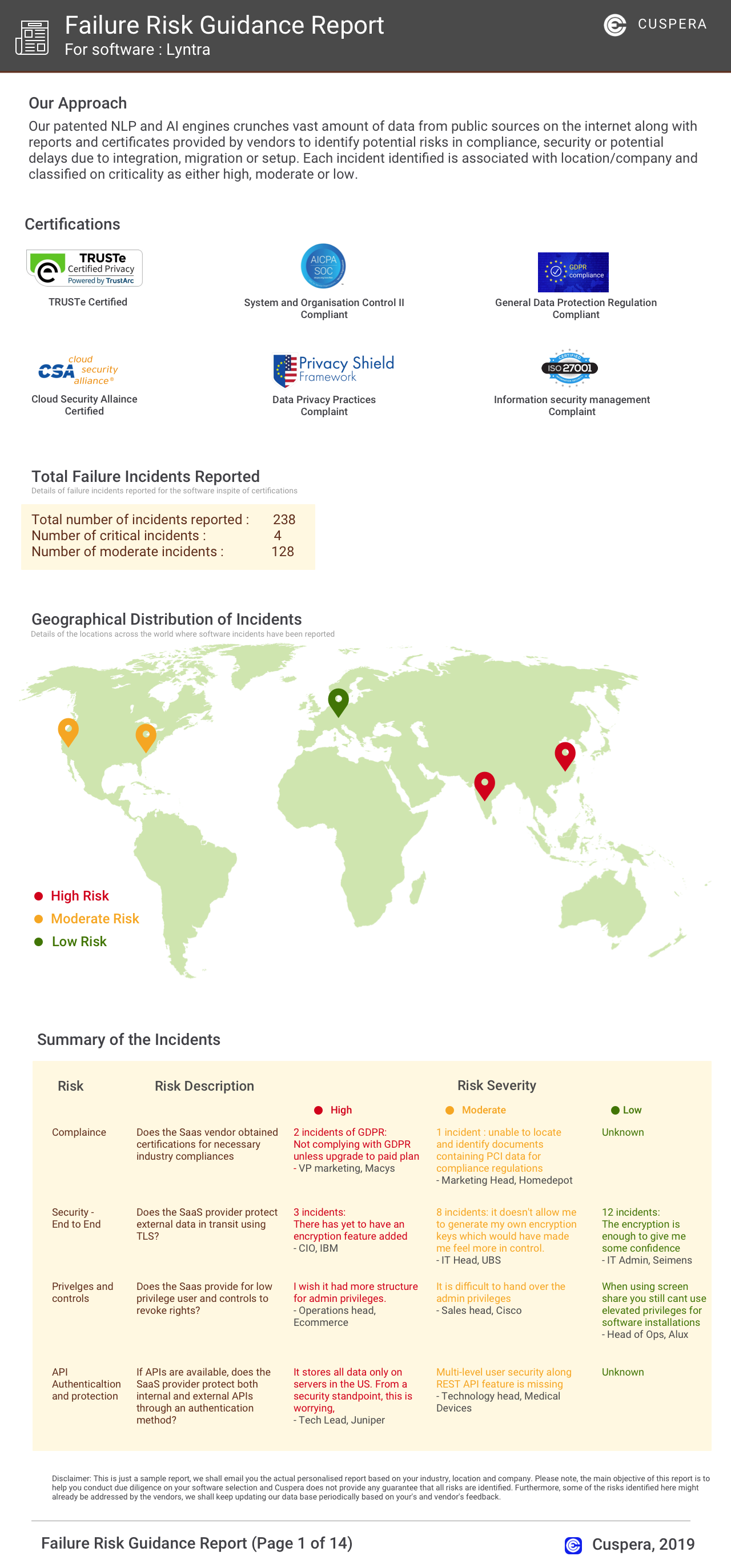
Software Failure Risk Guidance
?for Striim
Overall Risk Meter
Top Failure Risks for Striim
Striim, Inc News
Delivering real-time context for retail AI with Striim and Microsoft Azure.
Striim and Microsoft Azure have integrated to deliver real-time data context for retail AI, enhancing decision-making and customer engagement. This collaboration enables continuous data streaming, supporting AI use cases in retail environments.
Oracle to Microsoft Fabric: Real-Time Data Integration with Striim
Striim enhances Oracle-to-Microsoft Fabric data integration with three Oracle readers and three Fabric writers, offering real-time data transfer and transformation. The solution supports various Oracle environments and Fabric workloads, enabling seamless analytics, AI, and business intelligence operations. Striim's AI agents and monitoring tools ensure data governance and operational reliability, bridging the gap between Oracle databases and Microsoft Fabric without custom ETL projects.
Striim Enables a New Wave of Enterprise AI Innovation on Google Cloud ...
Striim has launched new capabilities on Google Cloud, including Validata AI Cloud, AI Agents, and MCP AgentLink, to support real-time data integration for enterprise AI systems. These innovations enable seamless data streaming, validation, and reconciliation, enhancing AI-driven analytics and applications. Striim's platform supports various industries, ensuring data accuracy and operational efficiency for AI environments.
Striim Enables a New Wave of Enterprise AI Innovation on Google Cloud with Validata Cloud, AI Agents, and MCP AgentLink
Striim has launched new capabilities on Google Cloud, including Validata AI Cloud, AI Agents, and MCP AgentLink, to support AI-driven enterprise systems with real-time data. Validata AI Cloud offers high-performance data validation and reconciliation, ensuring data accuracy across platforms like Oracle and BigQuery. These advancements enable enterprises to modernize without disruption, supporting real-time AI applications in industries like fintech and healthcare.
Striim, Inc Profile
Company Name
Striim, Inc
Company Website
https://www.striim.com/HQ Location
575 Middlefield Road Palo Alto, CA 94301 United States
Employees
51-100
Social


Financials
SERIES C

What solutions does Striim provide for Social Media Analytics?