


dotCMS Overview
dotCMS tackles the challenge of managing content across multiple platforms and sites. It offers a multi-site, multi-tenant CMS that simplifies content creation, management, and delivery. This system reduces reliance on developers, allowing teams to independently handle digital experiences across various channels. Businesses can consolidate their digital presence, ensuring consistent and efficient content delivery. The platform's flexibility supports scaling and optimizing content, making it a practical solution for organizations looking to streamline their content operations. With dotCMS, managing complex digital ecosystems becomes more straightforward and less resource-intensive.
Use Cases
Customers recommend Content Management, Workflow Management, Sending & Publishing Communications, as the business use cases that they have been most satisfied with while using dotCMS.
Business Priorities
Acquire Customers and Improve ROI are the most popular business priorities that customers and associates have achieved using dotCMS.
dotCMS Use-Cases and Business Priorities: Customer Satisfaction Data
dotCMS works with different mediums / channels such as Website. Offline. and Point Of Sale.
dotCMS's features include Personalization, Templates, Widgets, etc. and dotCMS support capabilities include 24/7 Support, Chat Support, AI Powered, etc. also dotCMS analytics capabilities include Analytics, and Custom Reports.
Reviews
"...Intuitive interface for creating web pages and reusable or structured content; ease of adding JQuery plugins; custom workflow designer; theme-based templates that support responsive design; built-in personalization and rule-based targeting; effective multilingual support; RESTful API; push publishing across servers...." Peer review by Steve Chalastra
Peer review evidence (same sources as the product rating summary)
"...dotCMS is so flexible and easy to use from a business perspective we don't need to undertake complex IT projects to create new content or programs in dotCMS, we can go in and do it ourselves, it's fantastic...." Peer review by Kris Livingstone, Senior Developer Analyst, Telus
"...Intuitive interface for creating web pages and reusable or structured content; ease of adding JQuery plugins; custom workflow designer; theme-based templates that support responsive design; built-in personalization and rule-based targeting; effective multilingual support; RESTful API; push publishing across servers...." Peer review by Steve Chalastra
"...Separation of authoring and production servers with the ability to push publish between environments...." Peer review by Kasey H., Web Developer
dotCMS, Strapi, DialogsCMS, Butter CMS, AgilityCMS, etc., all belong to a category of solutions that help Content Management Systems. Each of them excels in different abilities. Therefore, determining the best platform for your business will depend on your specific needs and requirements.
dotCMS is a powerful universal content management system (uCMS) enabling a unified editor experience. It allows easy creation, management, and editing of web pages with a user-friendly interface.
Popular Business Setting
for dotCMS
Top Industries
- Education
- Internet
- Information Technology and Services
Popular in
- Enterprise
- Mid Market
- Large Enterprise
dotCMS is popular in Education, Internet, and Information Technology And Services and is widely used by Enterprise, Mid Market, and Large Enterprise.
dotCMS Customer wins, Customer success stories, Case studies
What benefits does dotCMS offer for Content Management?
How does dotCMS address your Workflow Management Challenges?
How does dotCMS address your Sending & Publishing Communications Challenges?
Why is dotCMS the best choice for Engaging And Following Up?
Why is dotCMS the best choice for Segmentation And Targeting?
The LeBron James Family Foundation - Non Profit Organization Management - Medium
Global financial institution - Financial Services - Very Large
Southern Phone - Telecommunications - Large
Great Clips - Consumer Services - Very Large
dotCMS Content Contributor 2.1: The Time Machine
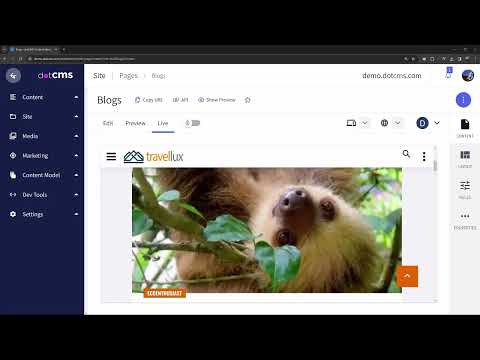
Frequently Asked Questions (FAQ)
What buyers ask before choosing dotCMS
Integrations What CRM integrations are available for dotCMS?
dotCMS offers several CRM integrations to enhance your content management experience and streamline your marketing efforts. Notable integrations include Salesforce, which allows for seamless data synchronization between your CRM and dotCMS, enabling personalized content delivery based on customer insights. Additionally, dotCMS supports integrations with other CRM platforms, enhancing your ability to manage customer relationships effectively. These integrations facilitate the flow of information, allowing marketing teams to leverage customer data for targeted campaigns while reducing the dependency on IT for content updates. By connecting dotCMS with your existing CRM, you can create a more cohesive digital experience that drives engagement and improves customer satisfaction.
Integrations How does dotCMS connect with Salesforce and HubSpot?
dotCMS connects seamlessly with Salesforce and HubSpot through its robust API integrations, allowing businesses to synchronize data and streamline workflows between their content management system and customer relationship management platforms. By integrating with Salesforce, dotCMS enables users to manage customer interactions and content delivery more effectively, enhancing lead generation and nurturing processes. Similarly, the HubSpot integration allows for the automatic sharing of content and marketing assets, facilitating targeted campaigns and improving customer engagement. These integrations empower teams to leverage the strengths of both dotCMS and these CRM platforms, ensuring a cohesive digital experience that enhances productivity and drives better business outcomes.
Integrations What are the setup steps for integrating dotCMS with Marketo?
To integrate dotCMS with Marketo, start by ensuring you have administrative access to both platforms. First, in dotCMS, navigate to the "Integrations" section and select Marketo from the list of available integrations. You will need to enter your Marketo API credentials, which can be obtained from your Marketo account under the Admin section. Next, configure the integration settings, such as defining the data fields you want to sync between dotCMS and Marketo, including lead information and campaign data. After saving your settings, test the integration by creating a sample lead in dotCMS and verifying that it appears in Marketo. Finally, monitor the integration for any issues and adjust the settings as necessary to ensure seamless data flow between the two platforms.
Integrations Can I access the dotCMS API for custom integrations?
Yes, you can access the dotCMS API for custom integrations, as dotCMS is built on an API-first architecture that facilitates seamless connectivity with various applications in your technology stack. This architecture allows developers to create custom integrations tailored to their specific business needs, enhancing the functionality of dotCMS within your existing systems. By leveraging the dotCMS API, you can connect with third-party tools, automate workflows, and extend the capabilities of your content management system. Additionally, dotCMS provides comprehensive documentation and support to assist you in implementing these integrations effectively, ensuring that you can maximize the value of your dotCMS experience while maintaining flexibility and control over your content delivery processes.
Integrations What is the data flow between dotCMS and external data providers?
The data flow between dotCMS and external data providers is facilitated through its robust API-first architecture, which allows seamless integration with various data sources. When external data is needed, dotCMS can pull in content via APIs, enabling real-time access to information from third-party systems. This integration supports various formats and protocols, ensuring that data is accurately retrieved and displayed within the dotCMS environment. Additionally, dotCMS can push data back to external providers, allowing for updates and synchronization of content across platforms. This bi-directional flow enhances the overall content management process, enabling businesses to leverage external data effectively while maintaining control over their content within dotCMS. This capability is particularly valuable for organizations looking to create dynamic, data-driven experiences for their users.
Integrations Are there any limitations to the integrations available with dotCMS?
While dotCMS offers extensive integration capabilities through its API-first architecture, there are some limitations to consider. The integrations depend on the existing technology stack and may require additional development resources for custom connections. Although dotCMS can connect with a multitude of applications, the complexity of certain integrations can vary based on the specific systems involved. Additionally, while dotCMS supports integration with enterprise-grade CDNs for enhanced content delivery, the performance and scalability of these integrations may be influenced by the chosen CDN provider. It's essential for businesses to evaluate their specific needs and consult with dotCMS implementation partners to ensure that the desired integrations can be effectively achieved without significant hurdles.
Features What does the content modeling feature in dotCMS do?
The content modeling feature in dotCMS allows users to create structured content types that define how content is organized, stored, and delivered across various channels. This feature enables businesses to tailor their content architecture to meet specific needs, ensuring consistency and reusability of content. By utilizing content modeling, organizations can establish custom fields, taxonomies, and workflows that align with their unique processes, making it easier to manage large volumes of content efficiently. This structured approach not only enhances collaboration between developers and content creators but also accelerates the publishing process, ultimately improving the overall digital experience for users. With dotCMS's content modeling, businesses can achieve greater agility and scalability in their content management strategies.
Features How do I configure custom workflows in dotCMS?
To configure custom workflows in dotCMS, start by accessing the NoCode workflow builder within the platform. This intuitive tool allows you to create multi-step approval processes tailored to your specific content governance needs. Begin by defining the workflow stages, such as content creation, review, and approval, and then assign roles to team members responsible for each stage. You can easily customize notifications and deadlines to ensure timely progress. Once your workflow is set up, test it to ensure it functions as intended, making adjustments as necessary. This streamlined approach not only enhances collaboration among your team but also accelerates the content publishing process, empowering business users to move faster without relying heavily on IT support.
Features What is the purpose of the Time Machine feature in dotCMS?
The Time Machine feature in dotCMS serves as a powerful tool for content management, allowing users to track and manage changes made to their content over time. This feature provides a comprehensive audit trail, enabling users to view the history of modifications, including who made changes and when they occurred. The primary purpose of the Time Machine is to enhance content governance by ensuring that organizations can maintain compliance with brand and regulatory standards. It allows users to revert to previous versions of content if needed, thereby minimizing the risk of errors and ensuring that the most accurate and compliant content is published. Overall, the Time Machine feature empowers teams to maintain control over their content lifecycle, fostering a more organized and efficient content management process.
Features How can I use the digital asset management tools in dotCMS?
To effectively use the digital asset management tools in dotCMS, start by leveraging its intuitive interface to upload and organize your digital assets, such as images, videos, and documents. You can create custom content types and templates to categorize these assets, ensuring easy retrieval and management. Utilize the built-in version control to track changes and maintain compliance across your assets. Additionally, take advantage of dotCMS's integration capabilities with other platforms, such as eCommerce systems, to streamline asset usage across your digital ecosystem. By employing these tools, you can enhance content delivery, improve collaboration among teams, and ensure that your digital assets are always up-to-date and accessible, ultimately driving better engagement and efficiency in your content management processes.
Features What does the role-based access control feature in dotCMS allow me to do?
The role-based access control feature in dotCMS allows you to define granular permissions tailored to specific user roles, regions, brands, or teams, ensuring that each stakeholder only sees content relevant to their responsibilities. This capability enhances security and governance by restricting access to sensitive information and functionalities, thereby minimizing the risk of unauthorized changes. Additionally, it supports multi-step approval workflows, ensuring that content passes through necessary governance gates before publication, which is crucial for maintaining brand and regulatory compliance. By implementing role-based access control, organizations can streamline their content management processes while empowering users to work efficiently without compromising security or oversight.
Features How do I create and manage multi-lingual content in dotCMS?
To create and manage multilingual content in dotCMS, start by configuring the language settings within the platform to customize content based on geolocation or allow users to switch languages manually. You can publish content in multiple languages by creating separate language versions of your articles and assets, ensuring that each version is tailored to the specific audience. Utilize dotCMS's powerful content governance features to organize and manage these multilingual assets efficiently, maintaining compliance and consistency across all versions. Additionally, leverage the Content Style Editor to customize the presentation of your content without needing developer assistance, enabling faster updates and improved user experience. By centralizing your multilingual content management in dotCMS, you can deliver a seamless and engaging experience for users worldwide.
ROI & pricing What measurable business benefits can I expect from using dotCMS?
Using dotCMS can yield several measurable business benefits that enhance operational efficiency and content management. Firstly, organizations can expect a significant reduction in time to market, as dotCMS empowers teams to publish content faster with fewer dependencies on developers, allowing for quicker updates and content reuse. This agility can lead to improved responsiveness to market changes. Additionally, dotCMS enhances compliance and governance by providing a unified platform to manage content across multiple sites, reducing compliance risks. The intuitive interface and powerful visual editing tools also facilitate easier content management, leading to increased productivity and lower training costs. Furthermore, businesses can achieve performance improvements, such as faster website load times, which can enhance user experience and engagement, ultimately driving better business outcomes.
ROI & pricing How does dotCMS help in achieving a positive ROI for my organization?
dotCMS helps organizations achieve a positive ROI by streamlining content management and enhancing operational efficiency. Its intuitive interface allows marketing teams to create, manage, and publish content without relying on IT, significantly reducing time-to-market. The platform's headless architecture enables content reuse across multiple channels, maximizing the value of each asset created. Additionally, dotCMS integrates seamlessly with enterprise-grade CDNs, ensuring fast content delivery and improved user experiences, which can lead to higher conversion rates. With built-in personalization tools, organizations can tailor content to specific audiences, driving engagement and demonstrating measurable ROI. Case studies, such as CITY Furniture's 150% revenue growth after re-platforming to dotCMS, illustrate the tangible business impact of leveraging this powerful CMS.
ROI & pricing What are the pricing plans available for dotCMS and how do they impact total cost of ownership?
dotCMS offers a transparent and flexible pricing structure designed to keep the total cost of ownership low. Unlike some competitors, such as Contentful, which have variable pricing based on usage metrics like API calls and environments, dotCMS provides clear, all-in-one pricing that includes enterprise support, cloud hosting, and feature upgrades without hidden fees or overage charges. This predictability allows businesses to budget effectively and avoid unexpected costs. Additionally, dotCMS can be deployed in various ways—either as a SaaS solution or on-premise—giving organizations the freedom to choose the option that best fits their security and operational needs. Overall, dotCMS's pricing plans are structured to deliver a strong return on investment by minimizing reliance on third-party services and ensuring easy upgrades and proactive support.
ROI & pricing What cost savings can be realized by switching to dotCMS from other CMS platforms?
Switching to dotCMS from other CMS platforms can lead to significant cost savings due to its transparent, all-in-one pricing model, which includes enterprise support, cloud hosting, and feature upgrades without hidden fees. Unlike platforms such as WordPress, where costs can escalate with additional plugins, hosting, and support, dotCMS reduces reliance on third-party tools, minimizing maintenance costs and unexpected expenses. Additionally, dotCMS offers an easier learning curve for both developers and content contributors, which can result in faster adoption and reduced training costs. This streamlined approach not only enhances productivity but also allows businesses to allocate resources more efficiently, ultimately leading to a lower total cost of ownership compared to other CMS options.
ROI & pricing How quickly can I expect to see value from implementing dotCMS in my business?
When implementing dotCMS, businesses can expect to see significant value relatively quickly, often within a few weeks of deployment. Users have reported transformative results, including a 10x performance improvement in website load times, with public-facing sites running up to 4x faster than before. This rapid enhancement in performance can lead to improved user engagement and satisfaction. Additionally, dotCMS streamlines operational efficiency by managing infrastructure and upgrade cycles, allowing internal teams to focus on strategic initiatives rather than maintenance tasks. The platform's ability to facilitate content reusability also accelerates time to market, enabling teams to publish content faster and with fewer dependencies on IT. Overall, businesses can leverage dotCMS to achieve immediate operational benefits and enhanced content delivery capabilities.
ROI & pricing What factors contribute to the predictable pricing structure of dotCMS?
The predictable pricing structure of dotCMS is primarily driven by its transparent all-in-one pricing model, which includes enterprise support, cloud hosting, and feature upgrades without hidden fees. Unlike other platforms that may impose variable costs based on usage metrics such as API calls or environments, dotCMS eliminates overage fees and limits, ensuring that organizations can accurately forecast their total cost of ownership. This approach reduces reliance on third-party services, which often lead to unexpected expenses, and allows for easier budgeting. Additionally, dotCMS’s built-in scalability and compliance features provide a cost-effective solution that enhances long-term ROI, making it a compelling choice for businesses looking for a reliable content management system.
Capabilities What compliance features does dotCMS offer for regulated industries?
dotCMS offers a robust suite of compliance features specifically designed for regulated industries such as finance, healthcare, and government. Key functionalities include detailed audit trails that track content changes, version control to maintain historical records, and multi-step approval workflows that ensure all content meets internal and regulatory standards before publication. Additionally, dotCMS provides granular, role-based permissions that allow organizations to control who can access and modify content, thereby enhancing security and compliance. These features enable compliance-led enterprises to enforce content governance at scale without hindering operational efficiency, ultimately supporting their need for security, performance, and adherence to strict regulatory requirements.
Capabilities Can dotCMS support multi-site content management for large enterprises?
Yes, dotCMS is specifically designed to support multi-site content management for large enterprises. It offers a centralized master project that ensures brand consistency and corporate identity across numerous sites, allowing individual business units to quickly spin up new sites while reusing templates and widgets. This flexibility is crucial for organizations that need to maintain compliance and governance across various digital properties. Additionally, dotCMS provides both headless and traditional content management options, enabling enterprises to manage their content dynamically and efficiently. With its robust features tailored for compliance-led industries, dotCMS empowers large organizations to streamline their content operations while ensuring scalability and performance.
Capabilities Does dotCMS provide granular role-based permissions for content governance?
Yes, dotCMS provides granular role-based permissions for content governance, allowing organizations to define specific access controls based on user roles, regions, brands, or teams. This feature ensures that each stakeholder only sees content relevant to their responsibilities, enhancing security and compliance. With built-in workflows, dotCMS facilitates multi-step approvals, ensuring that content passes through necessary governance gates before publication. This capability is particularly beneficial for compliance-led enterprises, such as those in finance, healthcare, and government, where regulatory adherence is critical. Additionally, dotCMS includes audit trails and version history, providing complete visibility into changes made, which further supports effective content governance and management across high-volume environments.
Capabilities Can dotCMS handle high performance and scalability for global content delivery?
Yes, dotCMS is specifically designed to handle high performance and scalability for global content delivery. It is built on a foundation of trusted enterprise technologies that ensure stability and efficiency, making it suitable for demanding use cases. With its enterprise-grade Content Delivery Network (CDN), dotCMS provides instant access and maximum content performance worldwide, allowing businesses to scale effortlessly. The platform eliminates downtime and vendor lock-in, ensuring seamless content delivery across various channels. Additionally, dotCMS's architecture supports multi-tenant environments, enabling organizations to manage hundreds or thousands of sites under a single governance model while maintaining top performance. This combination of features empowers businesses to deliver content quickly and reliably to a global audience.
Capabilities Does dotCMS include version control and audit trails for content management?
Yes, dotCMS includes robust version control and audit trails as integral features of its content management system. Version control allows users to track changes made to content over time, enabling easy comparisons between different versions and ensuring that the most current and compliant content is published. This is particularly valuable for organizations in regulated industries, where maintaining accurate records is crucial. Additionally, the audit trail feature provides complete visibility into every change made, documenting who made the changes and when, which enhances accountability and compliance. Together, these features empower teams to manage content effectively while adhering to governance standards, ultimately streamlining workflows and reducing the risk of errors in content delivery.
Capabilities Can business users utilize dotCMS without relying on IT for content updates?
Yes, business users can utilize dotCMS without relying on IT for content updates. dotCMS is designed with user-friendly features that empower non-technical content authors to create, manage, and publish content independently. The platform includes a Universal Visual Editor, which allows users to make design and copy changes through a drag-and-drop interface, eliminating the need for developer intervention. This capability not only streamlines workflows but also accelerates the go-to-market strategy by enabling faster content updates and reducing bottlenecks typically associated with IT dependencies. Additionally, dotCMS supports robust content governance, ensuring that business users can maintain compliance and brand consistency while managing content across various channels and sites.
Use cases How can SDRs leverage dotCMS to streamline their content management workflows?
Sales Development Representatives (SDRs) can leverage dotCMS to streamline their content management workflows by utilizing its intuitive interface and reusable content blocks, which allow for quick creation and modification of marketing materials. With dotCMS's headless capabilities, SDRs can easily access and deliver personalized content across various channels without relying on IT, enabling faster responses to customer inquiries. The platform's robust API integrations facilitate seamless connections with CRM tools like Salesforce and marketing automation platforms such as HubSpot, ensuring that SDRs have the most up-to-date content at their fingertips. Additionally, the Universal Visual Editor empowers SDRs to visually build and preview content, enhancing collaboration with marketing teams and improving overall efficiency in managing customer communications. This streamlined approach ultimately leads to a more responsive sales process and better engagement with prospects.
Use cases What are the best practices for marketers using dotCMS to create personalized content?
To create personalized content effectively using dotCMS, marketers should first leverage the platform's intuitive interface to segment their audience based on personas, geolocation, and behavior. This allows for targeted content delivery that resonates with specific user needs. Utilizing dotCMS's built-in personalization tools, marketers can create dynamic content that adapts to different user profiles without requiring coding skills. Additionally, it's essential to regularly analyze performance metrics to identify high-performing content and refine strategies accordingly. Marketers should also take advantage of dotCMS's content reuse capabilities, ensuring consistency across multiple channels while reducing redundancy. Finally, maintaining strong content governance practices will help ensure compliance and brand consistency, ultimately enhancing the overall user experience.
Use cases In what scenarios should RevOps teams implement dotCMS for improved compliance and governance?
RevOps teams should consider implementing dotCMS in scenarios where compliance and governance are critical, particularly in regulated industries such as finance, healthcare, and government. dotCMS offers robust features like multi-step workflows, granular role-based permissions, version control, and detailed audit trails, which are essential for meeting strict regulatory requirements. This platform enables organizations to enforce content governance at scale without hindering operational efficiency, allowing teams to focus on strategic initiatives. Additionally, dotCMS's flexible deployment options, including on-premise and cloud solutions, cater to diverse infrastructure needs, making it suitable for organizations looking to modernize their digital ecosystems while ensuring compliance. By leveraging dotCMS, RevOps teams can enhance their content management processes, reduce compliance risks, and maintain brand consistency across multiple sites.
Use cases How can sales leaders utilize dotCMS to enhance their digital experiences and improve team collaboration?
Sales leaders can utilize dotCMS to enhance their digital experiences and improve team collaboration by leveraging its intuitive content management capabilities and headless architecture. With dotCMS, sales teams can create, manage, and publish personalized content quickly without relying on IT, allowing for faster go-to-market strategies. The platform's ability to consolidate and reuse content across various channels ensures that sales teams have access to up-to-date and relevant materials, enhancing customer interactions. Additionally, dotCMS supports collaboration by enabling multiple users to work on content simultaneously, streamlining communication and reducing bottlenecks. By integrating dotCMS with other tools like CRM systems, sales leaders can create a unified digital experience that not only engages customers but also empowers their teams to work more efficiently and effectively.
Use cases What specific workflows can business users customize in dotCMS to optimize content approval processes?
In dotCMS, business users can customize a variety of workflows to optimize content approval processes, leveraging features like the Workflow Builder, which offers a drag-and-drop interface for creating tailored multi-step approval schemes. Users can define specific actions, assign tasks to individual users or groups, and incorporate Four-Eyes Approval to ensure that multiple approvals are required for critical actions, enhancing oversight and reducing risk. Additionally, custom actions can be integrated with third-party systems or extended through dotCMS plugins to meet unique compliance needs. By utilizing Action Groups, users can streamline the approval process by triggering multiple subactions with a single approval step, ensuring efficient content governance while maintaining security and compliance across digital campaigns.
Use cases How does dotCMS support technical teams in managing content across multiple delivery channels?
dotCMS supports technical teams in managing content across multiple delivery channels by providing a robust, API-first architecture that allows seamless integration with various platforms and services. This flexibility enables developers to create and manage content types and templates efficiently while leveraging dotCMS's capabilities to deliver content to any channel, whether traditional or headless. The platform's drag-and-drop design features and universal visual editor empower technical teams to collaborate with non-technical users, ensuring that content can be updated and published quickly without constant developer intervention. Additionally, dotCMS's integration with enterprise-grade Content Delivery Networks (CDNs) ensures that content is delivered instantly and performs optimally across global audiences, enhancing the overall user experience. This combination of features allows technical teams to streamline workflows and maintain consistency across all digital touchpoints.
Alternatives What are the key differences between dotCMS and Sitecore?
The key differences between dotCMS and Sitecore primarily revolve around their architecture, user experience, and target audience. dotCMS is an API-first, headless content management system that offers flexibility across various frameworks and channels, making it suitable for teams seeking a modern, user-friendly solution. It features drag-and-drop design capabilities and universal visual editing, allowing non-technical users to manage content easily. In contrast, Sitecore is a composable Digital Experience Platform (DXP) that integrates multiple modules, which can lead to complexity and requires specialized technical expertise for effective use. While Sitecore excels in providing advanced personalization and marketing automation for large enterprises, dotCMS offers a more cost-effective and accessible option for organizations looking for a straightforward content management experience. Ultimately, the choice between the two will depend on your specific business needs and technical capabilities.
Alternatives Why should I choose dotCMS over SharePoint for content management?
Choosing dotCMS over SharePoint for content management offers several advantages, particularly in terms of ease of use and flexibility. dotCMS provides a more intuitive learning experience for both developers and content contributors, which can lead to faster adoption and reduced training costs. Unlike SharePoint, which is primarily designed for organizations deeply integrated into the Microsoft ecosystem, dotCMS allows for flexible content organization that is separate from display, enabling dynamic web construction. This open-source CMS empowers teams to build intranets, websites, and other projects without the steep learning curve associated with SharePoint. Additionally, dotCMS supports a wide range of integrations and offers robust tools for collaboration, making it a more versatile choice for businesses looking to enhance their content management capabilities.
Alternatives How does dotCMS compare to Storyblok in terms of features and usability?
When comparing dotCMS to Storyblok in terms of features and usability, dotCMS offers a more comprehensive solution that caters to both technical and non-technical users. While Storyblok is a pure headless CMS designed primarily for developers, providing strong API capabilities and a visual editor, it can create complexities for marketing teams and non-technical users due to its focus on the content layer. In contrast, dotCMS combines headless APIs with a user-friendly interface, advanced workflows, and enterprise-level security, making it suitable for organizations with diverse needs. Additionally, dotCMS supports hybrid deployment options, allowing for greater flexibility in content management and delivery, which can enhance scalability for enterprises. Overall, dotCMS is positioned as a more versatile choice for businesses looking to balance developer flexibility with user accessibility.
Alternatives What makes dotCMS a better option than Magnolia for enterprise content management?
dotCMS is often considered a better option than Magnolia for enterprise content management due to its modern, API-first approach that emphasizes visual editing and flexibility. While Magnolia excels in Java-heavy environments, it typically requires deep technical expertise and partner involvement for deployment and scaling, which can slow down processes. In contrast, dotCMS empowers marketers with a Universal Visual Editor and content preview tools, allowing for true visual headless capabilities without compromising developer freedom. Additionally, dotCMS includes built-in features like native personalization, A/B testing, and real-time analytics, reducing the need for separate modules or integrations, which can complicate implementation and increase costs. This streamlined approach enables compliance-led teams to move faster while maintaining control, making dotCMS a more efficient choice for enterprises looking to optimize their content management processes.
Alternatives What are the best alternatives to dotCMS for businesses looking for a flexible CMS?
For businesses seeking flexible CMS alternatives to dotCMS, several options stand out. Sitecore is a robust choice, particularly for large enterprises needing complex functionalities like advanced personalization and marketing automation, although it can be more costly. Contentful is another alternative, offering a strictly headless approach that allows for API-first development, but it may create dependencies on developers for non-technical users. Magnolia CMS provides flexibility in Java-heavy environments but often requires deep technical expertise for deployment. Lastly, Builder.io offers a low-code visual builder ideal for rapid web experience creation, though it may lack the governance and scalability needed for larger organizations. Each of these alternatives has unique strengths, so the best choice will depend on your specific business needs and technical capabilities.
Alternatives How does dotCMS stack up against Liferay in terms of deployment options and cost?
When comparing dotCMS and Liferay in terms of deployment options and cost, dotCMS offers greater flexibility, allowing businesses to deploy the platform in the cloud or on-premise based on their specific security and operational needs. This adaptability can lead to a more tailored solution for organizations with varying requirements. In contrast, Liferay may have more rigid deployment structures, which could limit options for some users. Regarding cost, dotCMS is designed to provide a better return on investment with no hidden fees or artificial limits, making it a more economical choice compared to Liferay, which can involve higher implementation and maintenance costs. Overall, dotCMS's flexible deployment and cost-effective model make it an attractive option for businesses looking for a scalable content management solution.
dotCMS Competitors


dotCMS Features
- Low
- Medium
- High
| FEATURE | RATINGS AND REVIEWS |
|---|---|
| AI Powered | Read Reviews (6) |
| Analytics | Read Reviews (18) |
| Custom Reports | Read Reviews (67) |
| CAPABILITIES | RATINGS AND REVIEWS |
|---|---|
| AI Powered | Read Reviews (6) |
| Analytics | Read Reviews (18) |
| Custom Reports | Read Reviews (67) |
dotCMS Integrations
dotCMS integrates with a wide range of software applications through its robust data import and export capabilities.


Few API Integrations for dotCMS


Software Failure Risk Guidance
?for dotCMS
Overall Risk Meter
Top Failure Risks for dotCMS
dotCMS, LLC News
dotCMS Setting the New Standard for Visual Editing in Compliance�Led ...
dotCMS introduces its Universal Visual Editor (UVE), enhancing visual content editing for compliance-led industries. The UVE supports both headless and natively rendered applications, offering a unified editing experience. It integrates governance, design control, and real-time previews, ensuring content accuracy and compliance. This positions dotCMS as a leader in providing robust content management solutions for regulated sectors.
dotCMS Launches Real-Time Canvas for Faster, In-Context Visual Editing
dotCMS has launched the Real-Time Canvas, enhancing its Universal Visual Editor with features like layout management, a Quick Edit panel, and Canvas Zoom. These updates streamline visual content editing and layout management, reducing edit times and improving workflow efficiency for content teams. The Real-Time Canvas is now available to dotCMS customers.
dotCMS Advances Toward an Agent-Ready CMS Built for the Agentic AI Era
dotCMS introduces a two-layer AI architecture designed for the agentic AI era, integrating AI within its CMS for enhanced content generation and exposing CMS functions as callable tools for autonomous agents. This architecture supports AI-assisted content creation, semantic search, and workflow automation, positioning dotCMS as a leader in AI-driven content management.
dotCMS on Java 25: Faster, Leaner, More Secure Containers
dotCMS has released a new container image built on Java 25, enhancing speed, memory efficiency, and security for its platform. This milestone marks the beginning of dotCMS's migration to Java 25, offering users a more robust environment for testing and development. The new image is available for testing, with a full production-ready recommendation expected later in the year.
dotCMS, LLC Profile
Company Name
dotCMS, LLC
Company Website
https://dotcms.com/HQ Location
Miami, Florida
Employees
11-50
Social


Financials
PRIVATE

