


Hopper Instagram marketing Overview
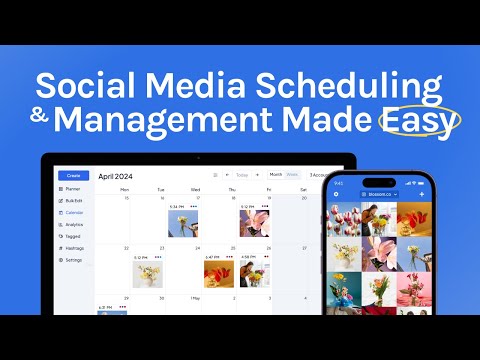
Hopper HQ addresses the challenge of managing multiple social media platforms by offering a fully automated scheduling solution. It supports a wide range of networks including Instagram, Twitter, Facebook, LinkedIn, YouTube, TikTok, and Pinterest, allowing businesses to efficiently plan and post content. This tool enhances market positioning by enabling consistent and timely social media presence, a critical component for audience growth and engagement. The platform's easy-to-use interface provides a strategic advantage by simplifying post, story, and reel scheduling, crucial for maximizing reach and ROI. Businesses can leverage Hopper HQ for streamlined social media operations, effectively addressing the need for cohesive and integrated marketing efforts across diverse channels.
Use Cases
Customers recommend Social Media Management, Sending & Publishing Communications, Social Media Marketing, as the business use cases that they have been most satisfied with while using Hopper Instagram marketing.
Business Priorities
Improve ROI and Acquire Customers are the most popular business priorities that customers and associates have achieved using Hopper Instagram marketing.
Hopper Instagram marketing Use-Cases and Business Priorities: Customer Satisfaction Data
Hopper Instagram marketing works with different mediums / channels such as Social Media. and Instagram.
Hopper Instagram marketing's features include Alerts: Popups & Notifications, Personalization, and Dashboard. and Hopper Instagram marketing support capabilities include 24/7 Support, Chat Support, Email Support, etc. also Hopper Instagram marketing analytics capabilities include Custom Reports, and Analytics.
Reviews
"...I like being able to schedule & publish Instagram content directly from a computer, and not just receiving notifications to publish manually...." Peer review by User
Peer review evidence (same sources as the product rating summary)
"...Hopper HQ is a paid Social Media Management tool & suits the needs for both business & personal accounts. ..." How To Post On Instagram From PC & Mac: A Comprehensive Guide
"...Schedule your content to publish automatically with tools like Hopper HQ so you have more time to focus on the fun creative stuff! ..." How To Amplify Influencer Marketing Campaigns With Top Social Media Trends
"...Summary Hopper HQ is a great solution for any business or agency whose social media marketing strategy is focused on Instagram...." Hopper HQ Review Save time managing your Instagram accounts
Hopper Instagram marketing, Walls.io, Missinglettr, Statusbrew, Eclincher social media management, etc., all belong to a category of solutions that help Social Media Marketing. Each of them excels in different abilities. Therefore, determining the best platform for your business will depend on your specific needs and requirements.
Hopper HQ offers simple social media scheduling for Instagram, Twitter, Facebook, and more. Automated posts are now also supported for LinkedIn, YouTube, TikTok, and Pinterest.
Popular Business Setting
for Hopper Instagram marketing
Top Industries
- Marketing and Advertising
- Accounting
- Retail
Popular in
- Small Business
- Mid Market
- Enterprise
Hopper Instagram marketing is popular in Marketing And Advertising, Accounting, and Retail and is widely used by Small Business, Mid Market, and Enterprise.
Hopper Instagram marketing Customer wins, Customer success stories, Case studies
How can Hopper Instagram marketing optimize your Sending & Publishing Communications Workflow?
How can Hopper Instagram marketing optimize your Content Management Workflow?
How does Hopper Instagram marketing facilitate Engagement Management?
Easily manage your social media accounts with Hopper HQ
Frequently Asked Questions (FAQ)
What buyers ask before choosing Hopper Instagram marketing
Integrations What CRM integrations are available for Hopper Instagram marketing?
Hopper HQ offers several CRM integrations to enhance your Instagram marketing efforts, allowing for seamless management of customer relationships alongside your social media activities. While specific CRM integrations are not detailed in the provided context, Hopper HQ is designed to work efficiently with various platforms, enabling users to streamline their marketing processes. For businesses looking to integrate their CRM systems with Hopper HQ, it is advisable to explore popular options such as Salesforce and HubSpot, which are commonly used in conjunction with social media management tools. These integrations can help you track customer interactions, manage leads, and analyze engagement metrics, ultimately improving your marketing strategy and customer outreach on Instagram.
Integrations How does Hopper connect with Salesforce for Instagram marketing?
Hopper HQ connects with Salesforce to enhance Instagram marketing by integrating customer relationship management (CRM) capabilities with social media scheduling. This integration allows users to streamline their marketing efforts by syncing customer data from Salesforce with their social media campaigns in Hopper HQ. By leveraging Salesforce's robust analytics and customer insights, businesses can tailor their Instagram content to better engage their audience. Users can schedule posts, analyze performance metrics, and manage customer interactions all in one place, ensuring a cohesive marketing strategy. To set up this integration, users typically need to connect their Hopper HQ account with Salesforce through the platform's integration settings, allowing for seamless data flow and improved campaign effectiveness.
Integrations What API access does Hopper provide for integrating with other marketing tools?
Hopper HQ provides API access that allows users to integrate its social media scheduling and management features with other marketing tools, enhancing workflow efficiency. The API facilitates seamless connections with various platforms, enabling businesses to automate posting, retrieve analytics, and manage content across multiple social media accounts from a single interface. This integration capability is particularly valuable for marketing agencies and businesses that utilize tools like Salesforce, HubSpot, or Marketo, as it allows for better data synchronization and campaign management. By leveraging Hopper HQ's API, users can streamline their social media operations, ensuring that their marketing efforts are cohesive and data-driven, ultimately leading to improved engagement and performance across their social channels.
Integrations What are the setup steps for configuring Hopper with HubSpot?
To configure Hopper HQ with HubSpot, start by logging into your Hopper HQ account and navigating to the integrations section. From there, select HubSpot and click on the "Connect" button. You will be prompted to log into your HubSpot account to authorize the integration. Once connected, you can set up your social media campaigns in Hopper HQ and utilize HubSpot's CRM features to manage your leads and customer interactions effectively. Make sure to map your social media posts to the appropriate HubSpot campaigns for seamless tracking and analytics. After completing these steps, you can begin scheduling and managing your social media content while leveraging HubSpot's marketing tools to enhance your overall strategy.
Integrations How does data flow between Hopper and Marketo during integration?
When integrating Hopper HQ with Marketo, data flows seamlessly to enhance your social media management and marketing efforts. This integration allows you to synchronize your social media campaigns with your marketing automation processes. For instance, you can automatically import leads generated from your social media posts in Hopper HQ into Marketo, enabling targeted follow-up campaigns. Additionally, engagement metrics from Hopper HQ can be sent to Marketo, allowing you to analyze the effectiveness of your social media strategies alongside your marketing data. To set up this integration, you typically need to connect your Hopper HQ account with Marketo through API keys or integration settings within both platforms, ensuring that data is exchanged securely and efficiently. This streamlined data flow helps businesses optimize their marketing strategies and improve overall campaign performance.
Integrations Are there any limitations to the data sync between Hopper and other platforms?
Yes, there are some limitations to the data sync between Hopper HQ and other platforms. While Hopper HQ offers robust integration capabilities for social media management, including automated publishing and cross-posting across multiple platforms, the extent of data synchronization can vary depending on the specific social media network. For instance, certain platforms may restrict the types of data that can be accessed or synced, such as engagement metrics or historical post data. Additionally, users may need to provide specific permissions for Hopper HQ to access their social media accounts, which can affect the depth of data available for analysis. It's essential to review the integration capabilities of each platform you plan to connect with Hopper HQ to understand any potential limitations fully.
Features What does the automated publishing feature in Hopper for Instagram do?
The automated publishing feature in Hopper HQ for Instagram allows users to schedule and publish posts, Reels, and Stories automatically at their designated times without any manual intervention. This means that once you upload your content, arrange it, and set the desired publish time, Hopper HQ takes care of the rest, ensuring that your posts go live exactly when you want them to, even if you're not online. This feature eliminates the need for push notifications or last-minute uploads, saving you time and reducing the stress of manual posting. By automating your Instagram content, you can maintain a consistent posting schedule, focus on other important tasks, and ultimately enhance your brand's online presence.
Features How do I schedule posts on Instagram using Hopper?
To schedule posts on Instagram using Hopper HQ, first, sign up for a Hopper HQ account if you haven't already, as this is necessary for scheduling and auto-publishing. Once logged in, upload your images or videos, arrange them in your desired order, and write your captions. You can schedule various types of content, including posts, Reels, Stories, and Carousels. After setting your publish time, Hopper HQ will automatically publish your content at the scheduled time without any manual intervention or push notifications. Additionally, you can manage multiple Instagram accounts from a single dashboard, making it easy to switch between them. For those new to Hopper HQ, a free 14-day trial is available to explore its features before committing.
Features What is the process for uploading and arranging images for carousel posts in Hopper?
The process for uploading and arranging images for carousel posts in Hopper HQ is straightforward and user-friendly. First, log into your Hopper HQ account and navigate to the content creation section. You can upload up to 50 images and videos directly from your computer or cloud storage. Once your images are uploaded, you can easily drag and drop them into the desired order for your carousel. After arranging the images, you can write your caption and set the publish time. Hopper HQ will then automatically publish your carousel post at the scheduled time, ensuring a seamless experience without any manual steps required. This feature allows you to maintain a consistent posting schedule while enhancing your Instagram engagement through visually appealing carousel posts.
Features How can I manage multiple Instagram accounts from the Hopper dashboard?
To manage multiple Instagram accounts from the Hopper dashboard, simply log into your Hopper HQ account and add each Instagram account you wish to manage. Once added, you can easily switch between accounts without the need to log out, allowing for seamless management of all your profiles from a single interface. The Hopper dashboard provides a visual calendar where you can view and schedule posts, Reels, and Stories for each account, ensuring that your content is organized and published at your desired times. Additionally, Hopper HQ supports bulk scheduling, enabling you to upload and arrange multiple posts in advance, streamlining your social media workflow. This centralized approach not only saves time but also enhances collaboration if you have team members involved in managing the accounts.
Features What functionality does the content planning feature provide in Hopper for Instagram?
The content planning feature in Hopper HQ for Instagram provides a dynamic and intuitive way to organize and schedule your social media posts. Users can visually plan their content using a drag-and-drop interface, allowing for easy arrangement of posts in calendar, feed, or grid views. This functionality enables businesses, creators, and agencies to strategically map out their social media strategy, ensuring a cohesive and visually appealing Instagram presence. Additionally, Hopper HQ's content planning tools facilitate collaboration among team members by allowing role assignments and post reviews, which enhances workflow efficiency. By utilizing this feature, users can save time, maintain consistency, and optimize their content for better engagement with their audience.
Features How do I use the drag and drop calendar feature to plan my Instagram posts in Hopper?
To use the drag and drop calendar feature in Hopper HQ for planning your Instagram posts, first log into your Hopper HQ account and navigate to the social media planner dashboard. Here, you can view your content calendar, which displays all your scheduled posts. To plan a new post, simply upload your images or videos and drag them into the desired date on the calendar. You can rearrange posts by dragging them to different dates or times, allowing you to visualize your feed layout and ensure a cohesive aesthetic. Once you’re satisfied with the arrangement, you can set captions and schedule the posts to auto-publish at your chosen times. This intuitive feature helps streamline your planning process, making it easier to maintain a consistent posting schedule without the hassle of manual updates.
ROI & pricing What measurable business value can I expect from using Hopper for Instagram marketing?
Using Hopper for Instagram marketing can deliver significant measurable business value by enhancing your social media presence and engagement. With its hashtag research tool, you can discover relevant hashtags that increase the visibility of your posts, leading to a broader audience reach. The platform's scheduling capabilities allow for consistent posting, which is crucial for maintaining audience engagement and improving brand awareness. Additionally, Hopper HQ's analytics features enable you to track post performance, providing insights into what content resonates with your audience, thus informing future strategies. By streamlining your content planning and automating publishing, you save time and resources, allowing you to focus on other critical business areas. Overall, Hopper HQ can help drive higher engagement rates, increase follower growth, and ultimately contribute to your business's bottom line.
ROI & pricing How does Hopper Instagram marketing contribute to cost savings for my business?
HopperHQ's Instagram marketing capabilities contribute to cost savings for your business by streamlining social media management and reducing the time spent on manual posting. With features like automated publishing and a visual Instagram planner, businesses can schedule posts across multiple platforms, including Instagram, Facebook, and Twitter, all from one interface. This efficiency minimizes the need for additional staff or resources dedicated to social media, allowing your team to focus on strategic initiatives rather than repetitive tasks. Additionally, HopperHQ's hashtag research tool helps optimize post visibility, potentially increasing engagement without incurring extra advertising costs. By leveraging these tools, businesses can maximize their social media impact while minimizing operational expenses, ultimately leading to a more cost-effective marketing strategy.
ROI & pricing What is the ROI of implementing Hopper for my Instagram marketing strategy?
The ROI of implementing Hopper HQ for your Instagram marketing strategy can be significant, as it streamlines social media management and enhances content visibility. By utilizing Hopper HQ's features, such as automated publishing, hashtag research tools, and a visual grid planner, businesses can save time and ensure consistent posting, which is crucial for audience engagement. The ability to analyze performance metrics allows users to refine their strategies based on real-time insights, leading to improved engagement rates and follower growth. Additionally, the tool's scheduling capabilities enable businesses to post at optimal times, maximizing reach and visibility. Overall, the efficiency gained and the potential for increased audience interaction can lead to a higher return on investment, making Hopper HQ a valuable asset for Instagram marketing.
ROI & pricing What are the different pricing plans available for Hopper Instagram marketing?
HopperHQ offers several pricing plans tailored to meet the needs of different users, including businesses, creators, and agencies. The plans typically include a free trial option, allowing users to explore the platform's features before committing. The paid plans vary based on the number of social media accounts and features required, such as advanced analytics, team collaboration tools, and automated publishing capabilities. While specific pricing details may change, users can generally expect tiered pricing that accommodates both individual users and larger teams. For the most accurate and up-to-date information on HopperHQ's pricing plans, it is recommended to visit their official website or contact their support team directly.
ROI & pricing How quickly can I see results after implementing Hopper for Instagram marketing?
The speed at which you can see results after implementing Hopper HQ for Instagram marketing largely depends on your current audience engagement and content strategy. Generally, users may start noticing improvements in their post engagement, follower growth, and overall reach within a few weeks of consistent use. Hopper HQ's features, such as the Instagram Grid Planner and hashtag research tool, help optimize your content for better visibility and interaction. By scheduling posts at optimal times and utilizing effective hashtags, you can enhance your marketing efforts. However, significant results may take longer, as building a loyal audience and increasing engagement often requires ongoing effort and strategic planning. Regularly analyzing your Instagram Insights will also help you adjust your strategy for better outcomes over time.
ROI & pricing What is the total cost of ownership for using Hopper Instagram marketing over time?
The total cost of ownership for using HopperHQ for Instagram marketing over time includes several factors. First, there is the subscription fee, which varies based on the plan you choose, with options for individuals, businesses, and agencies. HopperHQ offers a free 14-day trial, allowing users to evaluate the platform before committing. Additionally, consider the time saved through automated publishing and scheduling, which can translate into cost savings by reducing the need for manual posting and content management. While there may be initial costs associated with onboarding and training, the efficiency gained can lead to a higher return on investment as your social media presence grows. Overall, the total cost of ownership should be assessed against the benefits of streamlined social media management and enhanced audience engagement.
Capabilities Can Hopper schedule Instagram Reels and Stories automatically?
Yes, Hopper HQ can schedule Instagram Reels and Stories automatically. With Hopper HQ's Instagram scheduler, you can plan and set your Reels and Stories to auto-publish at your chosen time without needing to be present on your phone. This feature allows you to upload your content, arrange it, write captions, and select the publish time, ensuring that everything goes live seamlessly. The platform eliminates the need for push notifications or manual posting, making it ideal for busy marketers and brands looking to maintain a consistent social media presence. Additionally, Hopper HQ supports bulk uploads and offers a visual calendar to help you manage multiple accounts efficiently, enhancing your overall Instagram marketing strategy.
Capabilities Does Hopper support bulk scheduling for Instagram posts?
Yes, Hopper HQ supports bulk scheduling for Instagram posts, allowing users to create and schedule multiple posts simultaneously. With Hopper HQ, you can upload up to 50 images and videos at a time, arrange them as needed, add captions, and set a publish time for each post. This feature is designed to save time and ensure consistency in your content strategy, making it ideal for businesses and agencies managing multiple accounts. Additionally, the platform offers a CSV importer, enabling you to bulk create hundreds of posts quickly, streamlining your social media management process. By automating the scheduling of your Instagram content, Hopper HQ helps you maintain an active presence without the need for manual posting.
Capabilities Can Hopper provide analytics and insights for Instagram engagement?
Yes, Hopper HQ provides comprehensive analytics and insights specifically designed to track Instagram engagement. With its social media analytics tools, users can monitor key performance metrics such as engagement rates, reach, and overall post performance. This data allows businesses and creators to identify what content resonates with their audience, enabling them to optimize their social media strategies effectively. By analyzing these insights, users can make informed decisions to enhance their content, improve audience interaction, and ultimately grow their following on Instagram. Hopper HQ's analytics are tailored for small teams and brands, ensuring that the insights are actionable and relevant, helping users to track what’s working and adjust their approach accordingly.
Capabilities Does Hopper allow collaboration and approval workflows for Instagram content?
Hopper HQ is designed with collaboration in mind, making it an excellent choice for teams managing Instagram content. The platform allows multiple users to access and manage accounts from a single dashboard, facilitating seamless collaboration among team members. Users can schedule posts, Reels, and Stories while also utilizing features like the visual planner to organize content effectively. Additionally, Hopper HQ supports approval workflows, enabling team members to review and approve content before it goes live. This ensures that all posts align with brand guidelines and messaging. By streamlining the approval process, Hopper HQ enhances productivity and maintains consistency across multiple Instagram accounts, making it ideal for agencies and larger brands.
Capabilities Can Hopper manage multiple Instagram accounts from a single dashboard?
Yes, Hopper HQ can manage multiple Instagram accounts from a single dashboard, making it an ideal solution for businesses, creators, and agencies that handle various brands or clients. With Hopper HQ, users can easily switch between different Instagram accounts without the hassle of logging in and out repeatedly. The platform provides a unified calendar view, allowing you to plan, schedule, and organize posts, Reels, and Stories for all accounts in one place. This streamlined approach not only saves time but also enhances collaboration among team members, as you can invite others to manage accounts and control permissions within the same dashboard. By utilizing Hopper HQ, you can efficiently oversee your social media strategy across multiple accounts, ensuring consistent and timely content delivery.
Capabilities Does Hopper offer demographic insights for Instagram audiences?
Hopper HQ does not specifically provide demographic insights for Instagram audiences within its platform. However, it does offer social media analytics tools that allow users to track engagement, reach, and performance across their posts. While these analytics can help you understand how your content is performing, they do not delve into detailed demographic data about your audience. For demographic insights, users are encouraged to utilize Instagram Insights directly, which provides information on follower demographics, including age, gender, and location. By combining Hopper HQ's performance analytics with Instagram's demographic data, businesses can gain a more comprehensive understanding of their audience and tailor their content strategy accordingly.
Use cases How can SDRs use Hopper for Instagram audience segmentation to improve lead generation?
Sales Development Representatives (SDRs) can leverage Hopper HQ's audience segmentation features to enhance lead generation on Instagram by analyzing follower demographics and engagement patterns. By utilizing Hopper HQ's insights, SDRs can identify specific audience segments that are most likely to engage with their content, allowing for tailored messaging and targeted campaigns. To effectively use this tool, SDRs should first access the audience analytics within Hopper HQ to gather data on follower interests and behaviors. Next, they can create segmented lists based on this data, enabling them to craft personalized posts and stories that resonate with each group. This targeted approach not only improves engagement rates but also increases the likelihood of converting followers into leads, ultimately driving more effective lead generation efforts on Instagram.
Use cases What are the best practices for marketers to schedule Instagram posts using Hopper for maximum engagement?
To maximize engagement when scheduling Instagram posts using Hopper HQ, marketers should first analyze their audience's activity patterns through Instagram Insights to determine the optimal posting times. Consistency is key, so establish a regular posting schedule that aligns with when followers are most active. Utilize Hopper HQ's features to plan a diverse content mix, including posts, Reels, and Stories, ensuring that the content is visually appealing and relevant to your audience. Incorporate engaging captions and relevant hashtags to enhance discoverability. Additionally, leverage Hopper HQ's automated publishing feature to ensure posts go live without manual intervention, allowing marketers to focus on real-time engagement with their audience. Regularly review performance analytics to refine strategies and adapt to changing audience preferences, ensuring continuous improvement in engagement rates.
Use cases In what scenarios should RevOps teams utilize Hopper's cross-platform analytics for Instagram marketing?
RevOps teams should utilize Hopper's cross-platform analytics for Instagram marketing in scenarios where they need to track and optimize their social media performance across multiple platforms. This includes analyzing engagement metrics, reach, and audience demographics to inform strategic decisions. For instance, if a team is launching a new product, they can use Hopper's analytics to assess which types of content resonate best with their audience and adjust their marketing strategies accordingly. Additionally, when evaluating the effectiveness of different campaigns or promotional efforts, Hopper's insights can help identify trends and areas for improvement, ensuring that resources are allocated efficiently. By leveraging these analytics, RevOps teams can enhance their overall marketing effectiveness and drive better results from their Instagram initiatives.
Use cases How can sales leaders leverage Hopper's competitor analysis features to refine their Instagram marketing strategies?
Sales leaders can leverage Hopper's competitor analysis features to refine their Instagram marketing strategies by gaining insights into their competitors' performance and engagement metrics. By analyzing the content types, posting frequency, and audience interactions of competitors, sales leaders can identify successful tactics and trends within their industry. Hopper provides analytics that highlight what works well for similar brands, allowing sales leaders to adjust their own content strategies accordingly. Additionally, they can utilize Hopper's hashtag research tool to discover effective hashtags used by competitors, enhancing their own post visibility. This data-driven approach enables sales leaders to make informed decisions, optimize their Instagram campaigns, and ultimately drive better engagement and conversions.
Use cases What workflows should marketers follow when implementing Hopper's Instagram ads integration for campaign success?
When implementing Hopper's Instagram ads integration for campaign success, marketers should follow a structured workflow that begins with defining clear campaign objectives, such as brand awareness or lead generation. Next, utilize Hopper HQ's content planning features to create visually appealing ads that resonate with your target audience. Schedule these ads strategically based on insights from Instagram Analytics to maximize engagement during peak activity times. Additionally, leverage Hopper's hashtag research tool to identify relevant hashtags that can enhance visibility. Monitor ad performance through Hopper HQ's analytics dashboard, allowing for real-time adjustments to optimize results. Finally, engage with your audience by responding to comments and messages promptly, fostering a community around your brand. This comprehensive approach ensures that your Instagram ad campaigns are well-planned, executed, and continuously improved for better outcomes.
Use cases How can teams automate Instagram direct messaging with Hopper to enhance customer engagement?
Hopper HQ currently does not support direct messaging automation for Instagram, as its primary focus is on scheduling and automating posts across various social media platforms, including Instagram, Facebook, LinkedIn, TikTok, and more. However, teams can enhance customer engagement by utilizing Hopper HQ's robust scheduling features to ensure consistent posting and timely content delivery, which can drive more interactions on their posts. By maintaining an active presence and utilizing the platform's content planning and creation tools, teams can create engaging posts that encourage followers to reach out via direct messages. For direct messaging automation, businesses may need to explore other tools specifically designed for that purpose, such as ManyChat or MobileMonkey, which can integrate with Instagram to facilitate automated responses and enhance customer engagement directly through messaging.
Alternatives Agorapulse vs Hopper Instagram marketing: Which is better for scheduling posts?
When comparing Agorapulse and Hopper for Instagram marketing, both platforms offer unique strengths for scheduling posts. Agorapulse is known for its robust social media management features, including comprehensive analytics, social listening, and team collaboration tools, making it ideal for larger teams and agencies. It also supports scheduling across multiple platforms, which can be beneficial for businesses with diverse social media needs. On the other hand, Hopper specializes in Instagram scheduling with a user-friendly visual planner that allows for easy drag-and-drop post organization, automated publishing of posts, Reels, and Stories, and bulk upload capabilities. If your primary focus is on Instagram, Hopper may provide a more streamlined experience, while Agorapulse is better suited for those needing extensive multi-platform management and analytics. Ultimately, the choice depends on your specific scheduling needs and team structure.
Alternatives How does Hopper Instagram marketing compare to Iconosquare in terms of user experience?
Hopper Instagram marketing and Iconosquare both offer robust tools for social media management, but they differ in user experience. Hopper HQ is known for its clean, user-friendly interface that simplifies the scheduling and planning of Instagram posts, allowing users to visually manage their content with features like drag-and-drop functionality and a queue view for easy oversight. In contrast, Iconosquare focuses more on analytics and performance tracking, providing in-depth insights into engagement metrics and audience growth, which can be beneficial for data-driven strategies. While Hopper HQ emphasizes ease of use and automation for content scheduling, Iconosquare caters to users who prioritize detailed analytics and reporting. Ultimately, the choice between the two depends on whether a user values a straightforward scheduling experience or comprehensive analytical capabilities.
Alternatives What are the key differences between Hopper Instagram marketing and SocialBee?
Hopper Instagram Marketing and SocialBee are both robust social media management tools, but they cater to different user needs and preferences. Hopper Instagram Marketing excels with its visual Instagram planner, allowing users to schedule and preview posts specifically for Instagram, along with features like automated publishing and AI-driven suggestions for optimal posting times. In contrast, SocialBee offers a more comprehensive content categorization system, enabling users to organize posts into different categories for better content management across various platforms. While Hopper focuses heavily on Instagram-specific features, SocialBee provides a broader approach to social media management, including content recycling and audience targeting. Ultimately, the choice between the two depends on whether a user prioritizes Instagram-centric tools or a more generalized social media management solution.
Alternatives Why should I choose Hopper Instagram marketing over its competitors like Agorapulse?
Choosing Hopper Instagram marketing over competitors like Agorapulse can be beneficial for several reasons. Hopper HQ offers a user-friendly interface that simplifies social media management, allowing users to visually plan and schedule posts across multiple platforms, including Instagram. Its bulk scheduling and automated publishing features save time and ensure consistency, which is crucial for maintaining an active social media presence. Additionally, Hopper HQ provides built-in collaboration tools, enabling teams to manage permissions and post approvals seamlessly. While Agorapulse also offers robust social media management features, Hopper HQ's focus on visual planning and ease of use may appeal more to businesses and creators looking for a streamlined approach. Ultimately, the choice depends on your specific needs, but Hopper HQ's unique features can enhance your Instagram marketing strategy effectively.
Alternatives What are the best alternatives to Hopper Instagram marketing for small businesses?
When considering alternatives to Hopper Instagram marketing for small businesses, two notable options are Agorapulse and Iconosquare. Agorapulse offers comprehensive social media management features, including scheduling, analytics, and engagement tools, making it suitable for businesses looking to streamline their social media efforts. On the other hand, Iconosquare specializes in Instagram analytics and management, providing in-depth insights into performance metrics and audience engagement, which can be invaluable for businesses focused on optimizing their Instagram strategy. Additionally, SocialBee is another competitor that emphasizes content recycling and scheduling, allowing businesses to maintain a consistent posting schedule. Each of these platforms has unique strengths, so the best choice will depend on your specific needs, such as analytics depth, ease of use, or content management capabilities.
Alternatives Hopper Instagram marketing vs Iconosquare: Which tool offers better analytics features?
When comparing Hopper Instagram marketing and Iconosquare in terms of analytics features, both tools offer valuable insights but cater to different user needs. Hopper HQ provides clear engagement, reach, and performance metrics specifically designed for small teams and creators, making it user-friendly for those who may not be data experts. Its focus is on simplifying social media management with actionable insights. In contrast, Iconosquare offers more in-depth analytics, including competitor analysis and advanced reporting features, which may be more suitable for larger brands or agencies seeking comprehensive data. Ultimately, the choice depends on your specific requirements: if you prioritize ease of use and straightforward insights, Hopper HQ is ideal, while Iconosquare is better for detailed analytics and competitive benchmarking.
Hopper Instagram marketing Competitors


Hopper Instagram marketing Features
- Low
- Medium
- High
| FEATURE | RATINGS AND REVIEWS |
|---|---|
| Custom Reports | Read Reviews (78) |
| Analytics | Read Reviews (24) |
| CAPABILITIES | RATINGS AND REVIEWS |
|---|---|
| Custom Reports | Read Reviews (78) |
| Analytics | Read Reviews (24) |
Software Failure Risk Guidance
?for Hopper Instagram marketing
Overall Risk Meter
Top Failure Risks for Hopper Instagram marketing
Hopper Hq Profile
HQ Location
Holt Street, Birmingham, West Midlands, B7 4BB
Employees
1-10
Social


Financials
NA


How can Hopper Instagram marketing enhance your Social Media Management process?