


Close CRM Overview
Close is a CRM tailored for startups and SMBs, focusing on enhancing inside sales operations. It enables teams to increase call volume, streamline email outreach, and accelerate deal closures. Close distinguishes itself with seamless integrations, allowing businesses to connect with any tool in their tech stack effortlessly. The platform is designed to eliminate the clutter and inefficiencies of traditional CRMs, offering a faster, more intuitive user experience. A notable feature is its ability to support small businesses with ambitious growth targets, providing tools that scale alongside business needs. Close is trusted by numerous small businesses aiming for significant growth, making it a preferred choice for those looking to optimize their sales processes.
Use Cases
Customers recommend Engagement Management, Sales Call Management, Communication Management, as the business use cases that they have been most satisfied with while using Close CRM.
Business Priorities
Increase Sales & Revenue and Acquire Customers are the most popular business priorities that customers and associates have achieved using Close CRM.
Close CRM Use-Cases and Business Priorities: Customer Satisfaction Data
Close CRM works with different mediums / channels such as E-Mail. and Phone Calls.
Close CRM's features include Recording, Personalization, Templates, etc. and Close CRM support capabilities include Phone Support, Email Support, AI Powered, etc. also Close CRM analytics capabilities include Analytics, and Custom Reports.
Reviews
"Combining email inboxes and task lists in the same place is the saviour of my workday!" - Brinna Smith
Peer review evidence (same sources as the product rating summary)
"...Close is very cool because setting up a personalized workflow & follow-up sequence got me focused on what I need to do next without wasting mental energy on figuring it all out anew every week...." Peer review by Joe G., VP of Marketing & International Business Development, Financial Services
"...They do not need to manually do the sorting and recording of calls made and everything can be done in settings just one time. ...." Peer review by Varun K., System Administrator, Information Technology and Services
"...This is a great product to help you reach out and manage communication with the people you are working with...." Peer review by Tyler Rhoton
Close CRM, Less Annoying CRM, Teamgate CRM, Freshsales, NetHunt CRM, etc., all belong to a category of solutions that help CRM. Each of them excels in different abilities. Therefore, determining the best platform for your business will depend on your specific needs and requirements.
Close CRM accelerates sales with integrated calling, two-way email sync, powerful search, and custom reporting. Inside Sales Software Product Tour showcases these features.
Popular Business Setting
for Close CRM
Top Industries
- Computer Software
- Information Technology and Services
- Marketing and Advertising
Popular in
- Small Business
- Mid Market
- Enterprise
Close CRM is popular in Computer Software, Information Technology And Services, and Marketing And Advertising and is widely used by Small Business, Mid Market, and Enterprise.
Close CRM Customer wins, Customer success stories, Case studies
How can Close CRM optimize your Engagement Management Workflow?
How does Close CRM address your Sales Call Management Challenges?
What makes Close CRM ideal for Communication Management?
How can Close CRM enhance your Workflow Management process?
How can Close CRM enhance your Lead Management process?
| CUSTOMERS | TESTIMONIALS |
|---|---|

|
Combining email inboxes and task lists in the same place is the saviour of my workday! Testimonial By Brinna Smith |

|
With the Close Starter Plan, we're able to keep track of hundreds of deals and clients over the span of multiple months while simultaneously unifying our team's communication. Testimonial By Nick Parker |

|
So much friendlier and more streamlined than many CRMs. It has a lot of flexibility for power users, but not at the cost of regular users' ability to just get work done. The new reporting is also great, way more customizable and more visually clear and informative at the same time. Keep up the grea...t work! |
| CUSTOMERS | TESTIMONIALS |
|---|---|
|
Brinna Smith Account Manager Showbie |
Combining email inboxes and task lists in the same place is the saviour of my workday! Testimonial By Brinna Smith |
|
Nick Parker Founder FTOCloud |
With the Close Starter Plan, we're able to keep track of hundreds of deals and clients over the span of multiple months while simultaneously unifying our team's communication. Testimonial By Nick Parker |
|
Jackson E. Account Executive Badger Mapping |
So much friendlier and more streamlined than many CRMs. It has a lot of flexibility for power users, but not at the cost of regular users' ability to just get work done. The new reporting is also great, way more customizable and more visually clear and informative at the same time. Keep up the grea...t work! |
Trufan - Retail
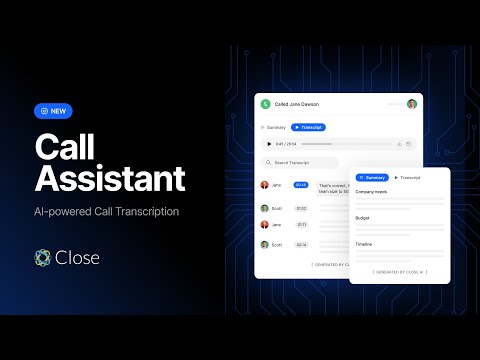
Never take notes again with Call Assistant by Close CRM
Frequently Asked Questions (FAQ)
What buyers ask before choosing Close CRM
Integrations What CRM integrations are available for Close CRM?
Close CRM offers a variety of integrations to enhance its functionality and streamline sales processes. Notable integrations include LiveAgent, which provides an all-in-one help desk solution for managing customer support tickets, and Reply, an AI-powered sales engagement platform that facilitates efficient customer relations and outreach. Additionally, the Outgrow integration allows users to create interactive content like quizzes and calculators, automatically updating Close contacts with enriched lead data. Other popular integrations include Calendly for scheduling and syncing bookings directly into Close. Users can also leverage Close's API for custom integrations tailored to their specific needs, ensuring that the CRM can connect seamlessly with their favorite applications and tools.
Integrations How does Close CRM connect with HubSpot for data synchronization?
Close CRM connects with HubSpot through a seamless two-way synchronization feature that allows data to flow automatically between the two platforms. This integration enables sales teams to leverage HubSpot's advanced marketing automation capabilities while working within the Close CRM environment. Users can set up the integration easily, with default field mappings that eliminate the need for manual data management or third-party tools like Zapier. As a result, lead data can be passed back and forth effortlessly, ensuring that both marketing and sales teams have access to the most up-to-date information. This synchronization not only streamlines workflows but also enhances collaboration between teams, ultimately driving better sales outcomes and improving overall productivity.
Integrations What are the setup steps for integrating Close CRM with Salesforce?
To integrate Close CRM with Salesforce, start by accessing the Close API documentation to understand the necessary endpoints and authentication methods. First, ensure you have admin access to both Close and Salesforce accounts. In Close, navigate to the integrations section and select Salesforce. You will need to generate an API key from Close, which you will then input into Salesforce to establish the connection. Next, configure the data mapping between the two platforms, specifying which fields in Close correspond to those in Salesforce. Test the integration by syncing a small batch of data to ensure everything is functioning correctly. Finally, monitor the integration for any issues and adjust settings as needed to optimize data flow between Close and Salesforce, ensuring a seamless experience for your sales team.
Integrations Can I use the API to customize integrations with Close CRM?
Yes, you can use the API to customize integrations with Close CRM, allowing you to tailor the software to meet your specific business needs. The Close API provides a flexible way to connect with various applications and automate workflows, enabling you to create unique integrations that enhance your sales processes. For instance, you can integrate Close with task management tools, social media platforms, or even spreadsheets to streamline operations. This capability empowers your sales team to manage leads more efficiently, enrich lead data, and automate repetitive tasks, ultimately improving productivity. Additionally, if you prefer a no-code solution, Close offers ready-to-use integrations with popular applications, making it easy to connect without extensive technical knowledge.
Integrations What limitations should I be aware of when syncing data between Close CRM and other platforms?
When syncing data between Close CRM and other platforms, there are a few limitations to consider. Close CRM excels in integrating with various tools, but users may encounter challenges with data mapping and synchronization frequency, which can lead to delays in data updates. Additionally, while Close offers robust integrations with platforms like AppInsights and Avina, some users may find that certain custom fields or specific data types do not sync seamlessly, requiring manual adjustments. Furthermore, if you're using third-party applications that have complex data structures, you might face difficulties in ensuring that all relevant information is accurately transferred. It's essential to review the integration capabilities of both Close and the other platforms to ensure compatibility and to plan for any necessary data cleanup or migration efforts.
Integrations How does the two-way sync between Close CRM and marketing automation tools work?
The two-way sync between Close CRM and marketing automation tools, such as HubSpot, allows seamless data exchange to enhance sales and marketing efforts. This integration enables automatic updates of lead information, ensuring that any changes made in Close, like new leads or deal stage updates, are reflected in HubSpot and vice versa. This eliminates the need for manual data entry, reducing errors and saving time. The setup is straightforward, with default field mappings that facilitate easy synchronization without requiring complex configurations or third-party tools like Zapier. By leveraging this integration, sales teams can focus on closing deals while benefiting from HubSpot's marketing automation capabilities, ultimately streamlining workflows and improving overall efficiency.
Features What does the Close CRM automation feature do?
The Close CRM automation feature streamlines and enhances your sales processes by automating repetitive tasks that typically consume valuable time. This includes intelligent follow-up reminders, automated email sequences, and customizable workflows that ensure no lead falls through the cracks. With Close, you can trigger specific actions based on predefined criteria, allowing your sales team to focus on closing deals rather than managing busywork. Additionally, the automation tools are integrated directly into the platform, meaning you don’t need to rely on external applications or add-ons. This comprehensive approach not only boosts productivity but also provides a clear view of your sales pipeline, enabling teams to operate more efficiently and effectively. Overall, Close's automation features are designed to help sales teams maximize their efforts and drive better results.
Features How do I create a workflow in Close CRM?
To create a workflow in Close CRM, start by navigating to the "Workflows" section within the platform. Click on "Create New Workflow" and choose the type of workflow you want to build, such as task assignments or automated email sequences. You can then define the triggers for your workflow, like when a new lead is created or a deal moves stages. Customize the actions that should occur when these triggers are activated, such as sending follow-up emails or notifying sales reps. Once you've configured your workflow, save it and test it to ensure it operates as intended. Close also provides hints on whether workflows run once per contact or every time they are triggered, making it easier to manage your automation effectively.
Features What is the purpose of the opportunity management feature in Close CRM?
The opportunity management feature in Close CRM is designed to streamline the sales process by providing sales teams with a clear view of their sales pipeline. This feature allows users to track and manage potential sales opportunities effectively, ensuring that every lead is nurtured and followed up on appropriately. By organizing opportunities based on their stage in the sales cycle, teams can prioritize their efforts, allocate resources efficiently, and ultimately close more deals. The business value lies in its ability to enhance visibility into sales activities, improve forecasting accuracy, and facilitate better collaboration among team members. With Close's integrated communication tools, users can also log interactions and updates directly within the opportunity management system, creating a comprehensive record that supports informed decision-making and strategic planning.
Features How do I use email sequences in Close CRM?
To use email sequences in Close CRM, start by navigating to the email section within the platform. Here, you can create a new sequence by selecting "Email Workflows" and then choosing "Create Sequence." Customize your sequence by adding multiple email templates that will be sent automatically based on your specified timing and triggers. You can set conditions for when each email should be sent, such as after a lead is added or following a specific action taken by the recipient. Additionally, utilize the built-in tracking features to monitor open rates and responses, allowing you to refine your approach over time. This automation not only saves time but also ensures consistent follow-up, helping you close more deals efficiently.
Features What functionalities are included in the activity overview of Close CRM?
The activity overview in Close CRM provides a comprehensive snapshot of all sales activities, enabling teams to track interactions and engagement with leads effectively. This functionality includes detailed logs of calls, emails, and SMS communications, allowing users to see the history of interactions with each contact. Additionally, it features insights into scheduled tasks, reminders, and follow-ups, ensuring that no opportunity is missed. The activity overview also integrates seamlessly with Close's automation tools, helping to streamline workflows and enhance productivity. By consolidating all these elements in one place, Close empowers sales teams to stay organized, prioritize their outreach efforts, and ultimately close more deals efficiently.
Features How can I customize the lead page in Close CRM?
To customize the lead page in Close CRM, start by accessing the settings within your Close account. Navigate to the "Lead Page" customization options where you can modify various elements such as fields, layout, and design to align with your branding. Utilize the drag-and-drop builder to add or rearrange fields, ensuring you capture all necessary information from leads. You can also set up Smart Views to filter and display leads based on specific criteria, enhancing your team's focus on high-potential prospects. Additionally, consider integrating your lead intake forms directly with Close to streamline data entry and ensure that all lead information is automatically updated in real-time. This customization not only improves user experience but also enhances lead management efficiency, ultimately driving better sales outcomes.
ROI & pricing What measurable business outcomes can I expect from using Close CRM?
Using Close CRM can lead to several measurable business outcomes that significantly enhance your sales performance. By integrating calling, texting, and emailing within a single platform, Close eliminates the need for multiple applications, streamlining communication and reducing time spent on manual data entry. This efficiency can double the productivity of your sales team, allowing them to handle a higher volume of leads effectively. Additionally, Close's straightforward pricing and fast onboarding process mean that your team can start seeing results quickly, often before the end of the first day of use. With features designed specifically for sales, such as lead management and performance tracking, businesses can expect improved conversion rates and ultimately, increased revenue. Overall, Close CRM empowers teams to close more deals and achieve their sales goals faster.
ROI & pricing How does Close CRM help in achieving a positive ROI for my business?
Close CRM helps businesses achieve a positive ROI by streamlining the sales process and enhancing productivity through its integrated features. With built-in calling, SMS, and email capabilities, Close eliminates the need for multiple applications, allowing sales teams to focus on closing deals rather than managing disparate tools. The automation features reduce time spent on repetitive tasks, enabling teams to engage with more leads efficiently. Businesses that have switched to Close, such as Hownd, reported significant time savings—up to 150 hours per month—and doubled their revenue, demonstrating the platform's effectiveness in driving sales growth. Additionally, Close's straightforward pricing and fast onboarding process ensure that businesses can quickly realize the benefits, making it a valuable investment for those looking to enhance their sales performance and achieve a strong return on investment.
ROI & pricing What are the pricing plans available for Close CRM and what do they include?
Close CRM offers simple and transparent pricing plans starting at $9 per month, with no contracts or hidden fees. The plans include unlimited contacts and leads, multiple pipelines, advanced lead and activity filters, built-in forms, email, calling, and SMS capabilities, as well as a centralized inbox and task lists. Additionally, users benefit from automated workflows, a Power Dialer, an AI Email Assistant, and custom activities. Close also provides role-based access and permissions, lead visibility rules, and a predictive dialer to enhance sales productivity. For early-stage companies, Close offers a special discounted rate through its "Close for Startups" program, which can provide 30-60% off the first year, depending on eligibility criteria. A 14-day free trial is available to help potential users evaluate the platform without any credit card requirement.
ROI & pricing How can Close CRM contribute to cost savings for my organization?
Close CRM can significantly contribute to cost savings for your organization by streamlining your sales processes and reducing operational expenses. With its all-in-one platform that integrates calling, texting, and emailing, Close eliminates the need for multiple tools, which can lead to substantial savings on software subscriptions. For instance, companies like Hownd reported an 80% reduction in CRM costs after switching to Close, along with saving $110,000 annually on CRM administration. Additionally, Close's fast onboarding and adoption rates mean that your team can start using the platform effectively within weeks, minimizing downtime and maximizing productivity. By enhancing your sales team's efficiency and reducing administrative burdens, Close CRM not only helps you close more deals but also optimizes your overall operational costs.
ROI & pricing What is the typical time-to-value when implementing Close CRM?
The typical time-to-value when implementing Close CRM is impressively quick, often achieved within just two weeks. This rapid onboarding process is designed to ensure that sales teams can start leveraging the platform's features—such as integrated calling, two-way email sync, and automation—almost immediately. Close CRM focuses on simplifying the tech stack by combining essential tools into one platform, which not only accelerates adoption but also enhances productivity. Users frequently report significant improvements in sales performance and efficiency shortly after implementation, making Close an attractive option for fast-moving teams looking to maximize their sales efforts without prolonged downtime.
ROI & pricing How does Close CRM impact revenue growth for businesses that adopt it?
Close CRM significantly impacts revenue growth for businesses by streamlining sales processes and enhancing team productivity. Companies that adopt Close often experience rapid improvements in their sales performance, as evidenced by case studies where businesses like Underground Ecom doubled their revenue and saved over 150 hours monthly after full adoption within just two weeks. Close's all-in-one platform integrates calling, emailing, and SMS functionalities, eliminating the need for multiple tools and reducing operational complexity. This leads to faster onboarding, improved lead qualification, and ultimately, higher conversion rates. Additionally, businesses switching from other CRMs, such as Salesforce, have reported substantial cost savings and increased ROI, further underscoring Close's effectiveness in driving revenue growth for scaling teams.
Capabilities What features does Close CRM offer for lead management?
Close CRM offers a robust suite of features specifically designed for lead management, making it an ideal choice for sales teams. It provides a unified view of your entire sales pipeline, allowing users to track every lead, activity, call, email, and note in one place, ensuring no opportunity is missed. With built-in communication tools, including calling, SMS, and email, Close simplifies outreach and follow-ups. The platform also includes automation features to streamline repetitive tasks, enhancing productivity. Users can manage leads effectively by qualifying large lead lists quickly and utilizing opportunity management tools to assess the total and expected value of deals in their pipelines. Additionally, Close's no-code form builder allows for seamless lead capture, ensuring that new leads are instantly integrated into the CRM. Overall, these features empower sales teams to manage leads efficiently and close deals faster.
Capabilities Can Close CRM track opportunities and their expected values?
Yes, Close CRM can effectively track opportunities and their expected values through its Opportunity Pipeline feature. This tool allows sales teams to manage and visualize their sales opportunities, providing insights into the status and potential revenue of each deal. Users can categorize opportunities based on various stages of the sales process, assign expected values, and set reminders for follow-ups, ensuring that no opportunity is overlooked. Additionally, Close's reporting capabilities enable teams to analyze their pipeline performance, forecast revenue, and make data-driven decisions to optimize their sales strategies. By centralizing opportunity tracking within the CRM, Close helps sales teams stay organized and focused on closing deals efficiently.
Capabilities Does Close CRM support GDPR compliance for data protection?
Yes, Close CRM supports GDPR compliance for data protection. Close has implemented robust measures to ensure that it adheres to the General Data Protection Regulation (GDPR), which is crucial for businesses operating in or with clients in the European Union. This compliance includes strong data protection controls to prevent unintended disclosure or misuse of personal data, as well as rigorous testing to identify and fix vulnerabilities. Close also maintains transparency regarding data usage and sharing, ensuring that customer data is only accessible to authorized members within an organization. By prioritizing security and privacy, Close not only protects user data but also helps businesses build trust with their customers, making it a reliable choice for organizations concerned about data protection regulations.
Capabilities Can I automate communication workflows using Close CRM?
Yes, you can automate communication workflows using Close CRM. Close offers robust workflow automation features that allow you to create multi-channel sequences incorporating email, SMS, and task reminders. You can set up templates, define timing, and establish triggers to manage follow-ups automatically, ensuring that your outreach remains both personal and timely. This means you can streamline your sales process by automating repetitive tasks, such as sending follow-up emails or reminders, which helps your team focus on closing deals rather than getting bogged down in manual processes. With Close's built-in communication tools, you can manage all interactions directly within the CRM, enhancing efficiency and productivity in your sales efforts.
Capabilities What security measures does Close CRM have in place to protect my data?
Close CRM implements robust security measures to ensure the protection of your data. It is SOC2 Type 2 compliant, adhering to industry-standard best practices for information security. Close employs strong data protection controls to prevent unauthorized access and unintended disclosure, alongside rigorous testing to identify and fix vulnerabilities. Additionally, it features two-factor authentication (2FA) and Google Single Sign-On (SSO) for enhanced security during user access. Close also has incident response and notification processes that are reviewed and tested annually, ensuring that any potential data breaches are promptly addressed. Furthermore, Close complies with the California Consumer Privacy Act (CCPA) and the General Data Protection Regulation (GDPR), prioritizing the privacy of your data and ensuring it is only shared with authorized members within your organization.
Capabilities Does Close CRM provide tools for identifying and re-engaging inactive deals?
Yes, Close CRM provides tools specifically designed to identify and re-engage inactive deals, enhancing your sales team's efficiency. With features like the Opportunity Pipeline, you can easily track the status of deals and identify those that have gone cold. Close also offers automated follow-up reminders and intelligent notifications, ensuring that your team can reach out to these inactive leads at the right time. Additionally, the built-in communication tools, including email and SMS, allow for seamless re-engagement efforts without needing to switch between multiple applications. By leveraging these capabilities, businesses can effectively revive stalled deals and improve overall sales performance, making Close an invaluable asset for managing your sales pipeline.
Use cases How can SDRs use Close CRM to prioritize high-quality leads effectively?
Sales Development Representatives (SDRs) can effectively prioritize high-quality leads using Close CRM by leveraging its built-in tools designed for lead management and automation. First, SDRs can create Smart Views to segment leads based on specific criteria such as engagement level, lead source, or demographic information, allowing them to focus on the most promising prospects. Additionally, the Opportunity Pipeline feature helps visualize the sales process, enabling SDRs to track where each lead stands and prioritize follow-ups accordingly. By utilizing the Power Dialer and Predictive Dialer, SDRs can efficiently reach out to leads, ensuring that they spend more time on high-value interactions. Furthermore, the integration of calling, emailing, and SMS within Close streamlines communication, making it easier for SDRs to engage with leads quickly and effectively, ultimately driving better conversion rates.
Use cases What are the best practices for marketers to automate email sequences in Close CRM?
To automate email sequences effectively in Close CRM, marketers should start by defining clear goals for their campaigns, such as lead nurturing or re-engagement. Utilize Close's built-in email templates to create high-converting messages that resonate with your audience. Segment your contacts based on criteria like behavior or demographics to ensure personalized outreach. Leverage the automation features to set up triggers for follow-ups based on recipient actions, such as opening an email or clicking a link. Regularly analyze the performance of your email sequences using Close's reporting tools to refine your approach and improve engagement rates. Finally, ensure that your sequences are compliant with email regulations by including opt-out options and respecting user preferences. By following these best practices, marketers can streamline their outreach efforts and enhance their overall sales process.
Use cases In what scenarios should RevOps teams utilize the Opportunity Pipeline feature in Close CRM?
RevOps teams should utilize the Opportunity Pipeline feature in Close CRM when they need to gain clear visibility into their sales processes and track the progress of deals through various stages. This feature is particularly beneficial for identifying bottlenecks that could slow down the sales cycle, allowing teams to take proactive measures to address issues before they impact revenue. Additionally, the Opportunity Pipeline enables teams to analyze deal volume trends, forecast revenue accurately, and assess the performance of individual sales reps across calls, emails, and tasks. By leveraging this feature, RevOps teams can enhance their coaching strategies, ensuring that all team members are aligned and driving consistent activity, ultimately leading to improved sales outcomes and productivity.
Use cases How can sales leaders implement call recording in Close CRM to enhance coaching and training?
Sales leaders can implement call recording in Close CRM by utilizing its built-in features designed specifically for coaching and training. To start, enable automatic call recording within the settings, ensuring that every sales call is captured for review. After calls are recorded, leaders can access these recordings to analyze conversations, identify strengths and weaknesses, and provide targeted feedback to their sales reps. Additionally, Close offers searchable call transcripts and summaries, allowing leaders to quickly find specific coaching opportunities. By leveraging these tools, sales leaders can enhance their coaching sessions, facilitate real-time feedback during calls with Live Call Listening, and ultimately improve the overall performance of their sales team. This structured approach to call recording not only aids in training but also fosters a culture of continuous improvement within the team.
Use cases What workflows can be built in Close CRM to manage deal tracking for a small sales team?
In Close CRM, small sales teams can build various workflows to effectively manage deal tracking, enhancing their sales processes. For instance, you can create automated email sequences to follow up with leads based on their engagement levels, ensuring timely communication. Additionally, task reminders can be set up to prompt team members to check in on specific deals or leads, preventing any opportunities from slipping through the cracks. Customizable workflows allow you to trigger actions based on specific criteria, such as moving a deal to the next stage in the pipeline when a lead responds positively. By utilizing these features, Close CRM helps streamline deal tracking, enabling your team to focus on closing sales rather than getting bogged down in manual tasks.
Use cases How can Close CRM help sales reps identify and re-engage cold deals before they are lost?
Close CRM helps sales reps identify and re-engage cold deals through its powerful automation and communication tools. By utilizing features like the Opportunity Pipeline, sales teams can easily track the status of leads and identify those that have gone cold. Close’s built-in call, SMS, and email functionalities allow reps to reach out to these leads directly from the platform, streamlining the re-engagement process. Additionally, the Smart View feature enables users to create customized views of their pipeline, highlighting deals that require attention. With these tools, sales reps can efficiently prioritize their outreach efforts, ensuring that no potential deal slips through the cracks, ultimately driving higher conversion rates and revenue growth.
Alternatives What are the key differences between Close and Pipedrive?
The key differences between Close and Pipedrive lie in their features, pricing structure, and overall user experience. Close is designed with built-in sales workflow automation tools, such as predictive dialing and AI call transcription, which aim to double the productivity of sales reps, making it particularly suitable for small businesses and startups. In contrast, Pipedrive is often described as a more basic CRM, lacking the advanced automation capabilities that Close offers. Additionally, Close has a transparent pricing model that avoids hidden costs, while Pipedrive's pricing can feel misleading due to necessary add-ons and upgrades that can lead to higher overall expenses. Furthermore, Close has been rated superior in 70 out of 73 categories on G2, highlighting its performance and reliability compared to Pipedrive.
Alternatives Why should I choose Close over Salesforce for my CRM needs?
Choosing Close over Salesforce for your CRM needs can be advantageous, especially for small to medium-sized businesses or sales teams under 100 people. Close is designed as an all-in-one sales platform that integrates calling, texting, and emailing, eliminating the need for multiple applications, which can streamline your sales processes and enhance productivity. Users often cite its fast onboarding and ease of use, allowing new salespeople to become proficient quickly, unlike the more complex Salesforce system that may require extensive training and additional third-party applications for essential functionalities. While Salesforce excels in scalability and advanced features for larger organizations, Close offers straightforward pricing and built-in tools that can significantly boost sales team efficiency, making it a compelling choice for businesses focused on immediate sales performance and simplicity.
Alternatives What makes Close a better option than Zoho for small businesses?
Close is often considered a better option than Zoho for small businesses due to its user-friendly interface and built-in features that streamline sales processes. Unlike Zoho, which requires significant customization and can be overwhelming for smaller teams, Close offers a lightweight solution that allows for quick implementation—often completed before your morning coffee. Close integrates calling, texting, and emailing directly into the platform, eliminating the need for multiple disparate tools, which enhances productivity. Additionally, Close provides free support and migrations, making it easier for small businesses to adopt without the need for a dedicated CRM admin. While Zoho may suit larger enterprises with extensive resources, Close is tailored for smaller teams looking to maximize efficiency without the complexity.
Alternatives How does Close compare to Apollo in terms of features and usability?
Close and Apollo serve different purposes in the sales ecosystem, which significantly impacts their features and usability. Close is an all-in-one CRM designed to enhance sales team productivity with built-in functionalities like call coaching, VoIP, and power dialing, making it ideal for businesses that prefer a comprehensive solution without needing multiple tools. In contrast, Apollo is primarily a prospecting tool that lacks extensive customer management features and automation capabilities, which can limit its usability for teams needing a full-fledged CRM. While Close excels in providing a seamless user experience with fast onboarding and integrated communication tools, Apollo may be more suitable for businesses focused solely on lead generation. Ultimately, the choice between them depends on whether a business prioritizes an all-in-one CRM experience or a specialized prospecting tool.
Alternatives What are the advantages of using Close instead of HubSpot?
Close offers several advantages over HubSpot, particularly for sales teams focused on high-volume outreach. Its all-in-one platform integrates calling, emailing, and SMS functionalities, eliminating the need for multiple tools, which can streamline workflows and enhance productivity. Close is designed for quick onboarding, allowing new salespeople to start using the system effectively within a day, which is beneficial for fast-growing teams. Additionally, Close excels in qualifying large lead lists rapidly and provides straightforward, transparent pricing, making it easier for small to medium-sized businesses to manage costs. In contrast, HubSpot may be more complex and better suited for organizations needing advanced marketing features like proposal generation and landing pages. Therefore, for teams prioritizing sales efficiency and simplicity, Close is often the preferred choice.
Alternatives What are the best alternatives to Close CRM for sales teams?
When considering alternatives to Close CRM for sales teams, two prominent options are Salesforce and HubSpot. Salesforce is ideal for larger organizations with complex CRM needs, offering extensive customization and advanced features, but it often requires additional third-party applications for key functionalities, which can increase costs. On the other hand, HubSpot is well-suited for businesses that prioritize inbound marketing and have less reliance on a dedicated sales team, providing a user-friendly interface and a range of marketing tools. While Close excels in simplifying sales processes with built-in calling, texting, and emailing, Salesforce and HubSpot may be better choices for teams needing advanced reporting or marketing capabilities. Ultimately, the best alternative depends on your team's size, budget, and specific sales requirements.
Close CRM Competitors


Close CRM Features
- Low
- Medium
- High
| FEATURE | RATINGS AND REVIEWS |
|---|---|
| AI Powered | Read Reviews (21) |
| Analytics | Read Reviews (81) |
| Custom Reports | Read Reviews (312) |
| CAPABILITIES | RATINGS AND REVIEWS |
|---|---|
| AI Powered | Read Reviews (21) |
| Analytics | Read Reviews (81) |
| Custom Reports | Read Reviews (312) |
Close CRM Integrations
Close CRM integrates with a wide range of software applications through its robust data import and export capabilities.


Few API Integrations for Close CRM


Software Failure Risk Guidance
?for Close CRM
Overall Risk Meter
Top Failure Risks for Close CRM
Close News
Close embeds Chloe AI calling agent inside its CRM
Close has launched Chloe, an AI sales agent embedded in its CRM, available in the U.S. and Canada. Chloe automates sales tasks like calling, qualifying, and scheduling, integrating seamlessly with existing CRM workflows. This integration aims to enhance efficiency for SMB sales teams by reducing operational complexity and improving time-to-value.
Close Launches Chloe, an AI Sales Agent Built Directly Into the CRM
Close CRM has launched Chloe, an AI sales agent integrated directly into its CRM platform. Chloe automates tasks like calling leads, qualifying prospects, and booking meetings, enhancing sales efficiency. It leverages customer data within Close, eliminating the need for additional tools. Chloe is now available to U.S. and Canada customers, with plans for expanded capabilities and markets.
Close Launches Chloe, an AI Sales Agent Built Directly Into the CRM
Close has launched Chloe, an AI sales agent integrated directly into its CRM, available for U.S. and Canada customers. Chloe automates tasks like calling leads, qualifying prospects, and booking meetings, enhancing small businesses' sales processes without additional tools. Tested with 306 businesses, Chloe made over 818,000 calls and improved meeting bookings by 50%.
Introducing Close Forms: Capture Leads Instantly, Close Deals Faster
Close has launched Close Forms, a no-code form builder integrated into its CRM, designed to capture website leads instantly. This tool eliminates the need for third-party integrations, ensuring immediate follow-up and clean data flow. Available for free on all plans, it offers features like customizable forms, spam protection, and compliance checkboxes, enhancing lead management efficiency.
Close Profile
HQ Location
Palo Alto, CA
Employees
11-50
Social


Financials
SEED

