


What customers say about ActiveCollab: ratings, outcomes and feedback
ActiveCollab's customer experience centers on two documented dimensions: what customers value in day-to-day use and where customers see room for improvement. Together, these two dimensions cover how the product performs once it is in the hands of working teams.
What works well
Customers working with ActiveCollab report productivity gains that outpaced their own forecasts. In one customer's words: "We were predicting maybe a 20-30% increase in productivity at best, so the results totally eclipsed our expectations." Workload planning draws similar feedback. One customer describes using the feature for forward scheduling: "In Workload, we can forecast up to 12 months in the future. When we def re planning any new work, understanding a client def s schedule, seasonality, and things like that, we have a really strong degree of accuracy." Task delegation is also noted as quick, with users pointing to 2 clicks to delegate tasks to other team members.
Where customers see room for improvement
ActiveCollab draws recurring criticism across a handful of specific workflow gaps rather than any single sweeping flaw. Customers value the communication improvements the tool brings — in one customer's words: "Long and confusing email threads are now a thing of the past as we can ask questions, comment, and sign off on projects in ActiveCollab." Yet the notification system undercuts that same goal: "Notifications are not sent when tasks are updated, so you have to leave comments and tag people each time" — adding manual overhead to stay in sync. Task assignment is restricted to a single person, so teams that share ownership of work have to find workarounds. The Kanban view that many teams rely on for personal task management shows a list rather than a true board. The mobile experience compounds this for anyone juggling multiple projects at once. Capacity planning is where the friction becomes most consequential for flexible teams. Part-time staff cannot be flagged as such — every day they are unavailable must be entered manually as out-of-office. Hours cannot be set individually per person, so anyone working non-standard hours is treated the same as a full-time colleague, which makes the capacity planner unreliable for flexible working arrangements. Subtasks carry no individual hours or deadlines, so they fall outside the capacity planner's calculations entirely unless each one is rebuilt as a standalone task. Cross-project visibility is limited as well. There is no native way to view all tasks of a particular type — say, all copywriting work — across multiple campaigns at once; the suggested workaround is exporting data to a spreadsheet. Task categories also do not persist as defaults, and sharing project information with people outside ActiveCollab requires extra steps.
ActiveCollab Customer wins, Case studies
Frequently Asked Questions (FAQ)
What buyers ask before choosing ActiveCollab
Integrations What CRM integrations are available for ActiveCollab?
ActiveCollab offers several CRM integrations to enhance your project management and client relationship processes. Notably, it integrates seamlessly with popular tools like QuickBooks for financial management, allowing you to sync invoicing and time tracking data without manual entry. Additionally, ActiveCollab connects with Zapier, which provides extended flexibility to integrate with various niche CRM tools that your agency may be using. This means you can automate workflows and ensure that your CRM data flows smoothly into ActiveCollab, helping you maintain organized project timelines and client communications. By leveraging these integrations, you can tailor your workflow to meet your specific business needs, ultimately improving efficiency and collaboration across your teams.
Integrations How does ActiveCollab connect with Salesforce and HubSpot?
ActiveCollab connects with Salesforce and HubSpot through direct integrations, allowing users to streamline their project management and customer relationship management processes. By integrating with Salesforce, ActiveCollab enables teams to manage client interactions and sales data alongside their project tasks, ensuring that all relevant information is accessible in one place. Similarly, the HubSpot integration allows users to synchronize marketing efforts with project timelines, facilitating better collaboration between marketing and project management teams. These integrations help businesses maintain a cohesive workflow, improve communication, and enhance productivity by ensuring that all tools work seamlessly together. Additionally, if your organization uses niche tools, you can leverage Zapier for extended integration options, further customizing your ActiveCollab experience to fit your specific needs.
Integrations What are the setup steps for integrating ActiveCollab with Google Drive?
To integrate ActiveCollab with Google Drive, start by verifying the Google Drive API as mandated by Google. First, visit the Google API Console and select or create a new project. After naming your project, navigate to the Credentials section and select "OAuth client ID." Choose "Web application" as the application type, then enter "ActiveCollab" as the name and add your ActiveCollab Self-Hosted URL. Copy the generated Client ID and Client Secret. Next, return to ActiveCollab, go to the integrations settings, and paste the Client ID and Client Secret into the appropriate fields. Finally, click "Connect" to establish the integration, and you should receive a notification confirming the successful connection. This integration allows for seamless file management and collaboration within your projects.
Integrations Can I automate workflows in ActiveCollab using Zapier?
Yes, you can automate workflows in ActiveCollab using Zapier, which enhances the platform's flexibility by allowing you to connect it with a wide range of third-party applications. By setting up Zaps, you can automate repetitive tasks such as creating projects, updating tasks, or sending notifications based on specific triggers in ActiveCollab. For instance, when a task is completed in ActiveCollab, you can configure a Zap to automatically notify your team via Slack or update a Google Sheet. This integration not only streamlines your processes but also reduces manual work, ensuring that your team stays aligned and focused on high-priority tasks. Overall, leveraging Zapier with ActiveCollab can significantly boost your agency's efficiency and productivity.
Integrations What is the data flow between ActiveCollab and external calendars like Google Calendar?
The data flow between ActiveCollab and external calendars like Google Calendar is designed to ensure seamless synchronization of tasks, deadlines, and milestones. When you integrate ActiveCollab with Google Calendar, any updates made in ActiveCollab automatically reflect in your Google Calendar, allowing you to view all your commitments in one place. This integration helps prevent missed deadlines and keeps your scheduling organized, as events from ActiveCollab are exported to Google Calendar via an iCalendar format. Additionally, you can import your Google Calendar into ActiveCollab, enabling you to manage your projects alongside personal appointments. This two-way data flow enhances productivity by reducing the need to switch between applications, ensuring that your team remains aligned and informed about upcoming tasks and events.
Integrations Are there any limitations to the integrations available with ActiveCollab?
ActiveCollab offers a robust range of integrations with popular tools such as Google Drive, Dropbox, QuickBooks, Slack, and Zapier, allowing users to streamline workflows and enhance project management efficiency. While there are no strict limitations on the number of integrations, the primary consideration is the compatibility of the tools your agency uses. ActiveCollab's direct integrations cover many widely-used applications, but for niche tools, users can leverage Zapier to create custom connections, ensuring flexibility in their workflows. Additionally, users can import projects from platforms like Trello or Asana, further expanding their integration capabilities. However, it's essential to manage these integrations effectively to avoid overwhelming your systems and ensure smooth data exchange.
Features What does the time tracking feature in ActiveCollab do?
The time tracking feature in ActiveCollab allows users to log billable and non-billable hours across various tasks and projects, providing a comprehensive record of work performed. This functionality eliminates guesswork when it comes to tracking time spent on projects, ensuring that agencies can accurately bill clients based on actual hours worked. By capturing detailed time logs, ActiveCollab enables teams to analyze productivity, manage project budgets, and assess profitability effectively. Additionally, users can set time estimates for tasks and compare them with actual logged hours, helping to identify overruns and improve future project planning. Overall, this feature enhances transparency and accountability, fostering better client relationships and more efficient project management.
Features How do I assign roles to team members in ActiveCollab?
To assign roles to team members in ActiveCollab, first log into your account and navigate to the "People" tab on the left-side menu. From there, select the user you want to assign a role to and click on their profile. You will see an option to edit their role, where you can choose from various roles such as Owner, Member, Member+ with specific permissions, or Client. Each role has different access levels and permissions, allowing you to control what users can do or see within the platform. After selecting the appropriate role, save your changes to ensure the user has the correct permissions to collaborate effectively on projects. This structured role assignment enhances team collaboration and project management efficiency in ActiveCollab.
Features What functionalities does the assignment dashboard provide in ActiveCollab?
The Assignment Dashboard in ActiveCollab offers a comprehensive suite of functionalities designed to enhance project management and team collaboration. It allows users to keep tabs on ongoing tasks by providing a sleek, customizable interface where reports and segments can be tailored to specific needs. This dashboard enables project managers to assign responsibilities effectively, track progress, and monitor individual and team workloads, ensuring optimal resource allocation. Additionally, it facilitates communication among team members by allowing them to comment on tasks and share updates, which helps maintain transparency and accountability. Overall, the Assignment Dashboard serves as a central hub for managing tasks and responsibilities, ultimately contributing to more efficient project execution and improved team performance.
Features How can I create and manage projects and tasks in ActiveCollab?
To create and manage projects and tasks in ActiveCollab, start by logging into your account and navigating to the Projects tab in the top menu. Click the “+ Start a New Project” button, enter a name for your project, and set it up according to your needs. Once your project is created, you can assign tasks by clicking on the Tasks tab within the project, then selecting “+ Add a Task.” Enter the task name, add an optional description, and assign it to a team member. You can also organize tasks into lists, set due dates, and track progress. ActiveCollab's features allow for discussions, file attachments, and time tracking, ensuring that your projects stay on track and organized from start to finish.
Features What insights can I gain from the capacity and utilization reports in ActiveCollab?
ActiveCollab's capacity and utilization reports provide valuable insights into your team's workload and resource allocation, enabling you to optimize project management effectively. The capacity report allows you to see how much work your team can realistically handle, highlighting any potential mismatches between planned workload and available capacity. This early detection helps you adjust assignments or deadlines proactively. Meanwhile, the utilization report offers a detailed view of how effectively your team is using their time, showing which projects or tasks consume the most resources. By analyzing these reports, you can identify high-value projects, improve overall productivity, and make informed decisions about resource allocation, ensuring that your team remains focused on the most impactful work while avoiding burnout.
Features How do I use the dashboard to monitor my team's performance in ActiveCollab?
To monitor your team's performance in ActiveCollab using the dashboard, start by accessing the Reports and Dashboards section, where you can view a comprehensive overview of your team's activities. Utilize the Assignment Dashboard to track individual and team assignments, ensuring you can see who is busy and who has capacity for more work. Leverage Capacity Reports to optimize resource allocation by identifying team members' workloads, and use Utilization Reports to prepare for future projects and potential growth. Customize your dashboard to highlight key metrics that matter most to your business, allowing you to make informed decisions quickly. By regularly reviewing these insights, you can effectively manage workloads, enhance productivity, and keep projects on track.
ROI & pricing What measurable business value can I expect from using ActiveCollab?
Using ActiveCollab can deliver significant measurable business value by enhancing productivity, improving project organization, and streamlining communication. With its centralized platform, teams can manage tasks, budgets, and progress in one place, reducing time spent on chasing updates through emails or spreadsheets. This clarity allows for better prioritization of work, leading to increased individual productivity and more efficient project completion. Additionally, ActiveCollab's reporting features provide insights into project performance and resource allocation, enabling data-driven decision-making. By establishing clear workflows and responsibilities, businesses can expect to save time and money, ultimately leading to improved client satisfaction and long-term growth. Overall, ActiveCollab helps organizations focus on what truly matters, driving better results across projects.
ROI & pricing How does ActiveCollab help in tracking ROI and cost savings for projects?
ActiveCollab helps track ROI and cost savings for projects by providing real-time insights into project budgets and expenses. As teams log hours and expenses directly within the platform, ActiveCollab instantly updates budget figures, allowing managers to see how much is being spent versus what is being earned. This immediate visibility enables agencies to identify potential cost overruns early, ensuring they can make informed decisions to optimize profitability. Additionally, by tracking both billable and non-billable hours, ActiveCollab offers a comprehensive view of all costs associated with a project, helping teams understand the true financial impact of their work. This level of transparency not only aids in measuring ROI but also fosters better financial planning and resource allocation, ultimately leading to significant cost savings.
ROI & pricing What are the different pricing plans available for ActiveCollab and what do they include?
ActiveCollab offers several pricing plans tailored to different team sizes and needs. The Plus Plan is ideal for small teams managing a few projects, allowing unlimited client users at no extra cost, and includes integrated project and task time tracking, three task views (List, Kanban, Gantt), and the ability to edit time entries. For growing teams needing more advanced features, the Pro Plan provides additional capabilities such as advanced reporting and expense management. Both plans can be subscribed to on a monthly or yearly basis, with the yearly option offering up to 15% off. Additionally, the Pro Plan can be enhanced with the Get Paid Bundle, which includes invoicing and estimates features, but this bundle is not available for the Plus Plan.
ROI & pricing How can ActiveCollab improve revenue impact for my business?
ActiveCollab can significantly improve revenue impact for your business by streamlining project management and enhancing team collaboration. By centralizing tasks, budgets, and progress tracking, ActiveCollab eliminates the inefficiencies of scattered communication through emails and spreadsheets, allowing your team to focus on high-value work. The platform's ability to generate professional invoices and estimates directly from your account ensures timely billing and clearer pricing proposals, which can lead to improved cash flow. Additionally, the powerful reporting features provide insights into project performance, enabling better decision-making and resource allocation. Overall, ActiveCollab helps you maintain organized workflows and fosters effective collaboration, ultimately driving productivity and revenue growth for your business.
ROI & pricing What is the total cost of ownership for using ActiveCollab over time?
The total cost of ownership (TCO) for using ActiveCollab over time includes several factors that contribute to the overall investment in the platform. Initially, you will incur subscription fees based on the selected plan, which can vary depending on the number of users and features required. ActiveCollab offers different pricing tiers, making it suitable for small teams and growing agencies. Additionally, if you opt for the self-hosted version, there is a one-time license fee and an optional annual renewal fee for support and upgrades. Other costs may include training for team members, potential integration with other tools, and any additional expenses related to project management and collaboration. By providing real-time budget tracking and time management features, ActiveCollab can help mitigate costs by improving efficiency and productivity, ultimately contributing to a favorable TCO.
ROI & pricing How quickly can I expect to see value from implementing ActiveCollab in my organization?
When implementing ActiveCollab in your organization, you can expect to see value relatively quickly, often within the first few weeks. Many users report that the intuitive interface and straightforward setup allow teams to start organizing projects and collaborating effectively almost immediately. As you begin to utilize features such as task assignments, project milestones, and time tracking, you'll likely notice improvements in productivity and communication among team members. Additionally, the centralized management of projects helps streamline workflows, which can lead to faster decision-making and enhanced project visibility. Overall, the combination of ease of use and powerful features makes ActiveCollab a valuable tool for achieving immediate organizational benefits.
Capabilities What project management features does ActiveCollab offer?
ActiveCollab offers a comprehensive suite of project management features designed to streamline collaboration and enhance productivity. Key functionalities include the ability to manage both internal and external collaborators through the People section, create professional invoices directly from your account, and propose services and pricing using Estimates. Additionally, ActiveCollab provides powerful reporting tools that offer insights into project progress, helping teams stay on track. Users can set up project spaces, break projects down into tasks, assign responsibilities, and establish milestones with due dates to ensure clarity and accountability. This combination of features allows teams to effectively organize their work from inception to completion, making ActiveCollab a valuable tool for managing client work and internal projects alike.
Capabilities Can ActiveCollab handle time tracking for billing purposes?
Yes, ActiveCollab can effectively handle time tracking for billing purposes, making it an essential tool for agencies that rely on hourly billing models. The platform tracks every billable hour across tasks and projects, providing a comprehensive log of work that eliminates guesswork when it comes time to invoice clients. This feature allows you to generate accurate invoices based on the tracked time, ensuring clients see exactly what they are paying for, which helps avoid disputes and undercharging. Additionally, ActiveCollab integrates seamlessly with external billing systems, allowing for smooth data synchronization without the need for manual updates. This streamlining of time tracking and invoicing not only enhances accuracy but also improves overall productivity, making it easier for teams to manage their workload and client relationships effectively.
Capabilities Does ActiveCollab support role assignment for team members?
Yes, ActiveCollab supports role assignment for team members, allowing you to customize user permissions based on their responsibilities within your projects. You can assign various roles such as Owner, Member, and Member+ with specific permissions tailored to their needs. For instance, the Member role is designed for internal team members who actively collaborate on projects but have limited access to sensitive data and administrative settings. In contrast, the Member+ role offers more control and flexibility, enabling users to manage projects and people or work with invoices and estimates, depending on the permissions granted. This role assignment feature enhances collaboration and ensures that team members have the appropriate access to tools and information necessary for their tasks while maintaining data security.
Capabilities Can ActiveCollab be configured to meet specific project needs?
Yes, ActiveCollab can be configured to meet specific project needs, making it a versatile tool for various teams. Users can customize workflows and project views to align with their unique processes, choosing from task lists, Kanban boards, or Gantt charts depending on the complexity of the project. This flexibility allows teams to adapt the workspace to their preferred style, whether they require straightforward task management or a more visual approach to track progress. Additionally, ActiveCollab enables the creation of custom categories and labels, further tailoring the project environment to specific requirements. This level of customization not only enhances team collaboration but also ensures that all project elements are organized in a way that best supports the team's objectives.
Capabilities Is ActiveCollab secure for managing sensitive client data?
Yes, ActiveCollab is designed with a "secure by default" approach, ensuring that sensitive client data is well-protected. The platform prioritizes data security, recognizing the importance of trust in client relationships. ActiveCollab allows you to manage client access effectively, enabling clients to view project progress and updates without accessing internal discussions or sensitive information. This separation of client-facing collaboration from internal communications helps maintain control over confidential data while fostering transparency. Additionally, the platform's security measures are in place to safeguard your data, allowing you to focus on project management without compromising client confidentiality. Overall, ActiveCollab provides a secure environment for managing sensitive client data while enhancing collaboration and trust.
Capabilities Does ActiveCollab provide effective notifications for pending tasks?
Yes, ActiveCollab provides effective notifications for pending tasks, ensuring that users stay informed about their project progress. The platform offers multiple notification options, including Email notifications, Daily report emails, and Bell notifications, which alert users to any updates or tasks that require attention. By customizing these notifications through the Personal Settings menu, users can choose how and when they receive alerts about pending tasks, helping them prioritize their workload effectively. This feature enhances productivity by ensuring that no important deadlines are missed and that team members are always aware of their responsibilities, ultimately contributing to smoother project management and collaboration.
Use cases How can SDRs use ActiveCollab to manage their sales pipeline more effectively?
Sales Development Representatives (SDRs) can leverage ActiveCollab to manage their sales pipeline more effectively by utilizing its project management features to streamline their workflow. SDRs can create dedicated tasks for each lead, moving them through various stages of the sales process, such as initial contact, follow-up, and closing. By organizing leads in a visual task board, SDRs can easily track the status of each prospect and prioritize their outreach efforts. ActiveCollab also allows for collaboration with team members, enabling SDRs to share insights and updates on leads, which enhances communication and accountability. Additionally, the platform's reporting features provide valuable insights into sales activities, helping SDRs identify trends and optimize their strategies for better results. Overall, ActiveCollab centralizes the sales process, making it easier for SDRs to focus on converting leads into customers.
Use cases What are the best practices for marketing teams to streamline their project workflows using ActiveCollab?
To streamline project workflows using ActiveCollab, marketing teams should adopt several best practices. First, create dedicated projects for each campaign to centralize discussions, timelines, and documents, ensuring all team members have access to relevant information. Break down projects into manageable tasks, assigning clear responsibilities and due dates to enhance accountability. Utilize milestones to track progress and celebrate key achievements, which can motivate the team. Leverage ActiveCollab's communication features to keep conversations organized and reduce reliance on multiple platforms, minimizing misunderstandings. Regularly review project reports to gain insights into performance and budget adherence, allowing for timely adjustments. Finally, encourage team members to utilize the calendar and reminders to stay on top of deadlines, ensuring a smooth workflow from start to finish.
Use cases In what scenarios should RevOps teams implement ActiveCollab for better collaboration and reporting?
RevOps teams should implement ActiveCollab in scenarios where streamlined collaboration and efficient reporting are essential for success. For instance, when managing multiple projects across departments, ActiveCollab centralizes communication, tasks, and documents, reducing the need for disparate tools and minimizing misunderstandings. It is particularly beneficial for teams that require real-time updates and feedback loops, as it allows stakeholders to access project statuses and voice concerns quickly, enhancing responsiveness. Additionally, when workload management is crucial, ActiveCollab's reporting features provide insights into team capacity, enabling leaders to adjust workloads effectively. By using ActiveCollab, RevOps teams can improve transparency, foster collaboration, and ensure that projects stay on track, ultimately driving better business outcomes.
Use cases How can sales leaders leverage ActiveCollab to improve team communication and project tracking?
Sales leaders can leverage ActiveCollab to enhance team communication and project tracking by utilizing its centralized workspace that consolidates conversations, tasks, and files in one place. This eliminates the need for multiple chat apps and scattered emails, allowing team members to engage in discussions directly related to their work. By creating dedicated project spaces for sales initiatives, leaders can assign tasks, set milestones, and track progress in real-time, ensuring everyone is aligned on objectives and deadlines. ActiveCollab also provides advanced reporting features that offer insights into team availability and project statuses, enabling sales leaders to make informed decisions and optimize workflows. Overall, this streamlined approach fosters collaboration and accountability, ultimately driving sales performance and efficiency.
Use cases What specific features of ActiveCollab can help digital marketing agencies enhance their productivity?
ActiveCollab offers several features that can significantly enhance productivity for digital marketing agencies. Its all-in-one workspace centralizes tasks, budgets, and project progress, eliminating the need to chase updates through emails or spreadsheets. The platform allows agencies to create dedicated project spaces for each client, facilitating organized discussions and document sharing. Key features include time tracking, which measures team performance on specific activities like keyword research, and invoicing capabilities that streamline billing based on actual hours worked. Additionally, ActiveCollab supports task assignment and milestone tracking, ensuring that responsibilities are clear and deadlines are met. By providing a structured approach to project management, ActiveCollab helps teams focus on delivering results efficiently and collaboratively.
Use cases How can teams in the advertising industry adopt ActiveCollab to centralize their project management processes?
Teams in the advertising industry can adopt ActiveCollab to centralize their project management processes by creating dedicated project spaces for each campaign or client. This allows for the organization of discussions, timelines, and documents in one accessible location, ensuring that all team members are aligned and informed. To get started, teams should set up their projects by breaking them down into manageable tasks, assigning responsibilities, and establishing milestones to track progress. ActiveCollab's features, such as task management, file sharing, and integrated communication tools, help eliminate the chaos of scattered emails and chat apps, fostering collaboration and efficiency. By utilizing ActiveCollab, advertising teams can streamline their workflows, improve communication, and ultimately deliver better results for their clients.
Alternatives Asana vs ActiveCollab: Which project management tool is better for teams?
When comparing Asana and ActiveCollab for project management, both tools offer unique strengths tailored to different team needs. Asana is known for its user-friendly interface and simplicity, making it ideal for teams that prioritize ease of use and quick onboarding. However, some users find it can become too simplistic for complex projects. In contrast, ActiveCollab provides a more robust feature set, including budget management and time tracking, which can be advantageous for agencies and teams managing multiple projects simultaneously. ActiveCollab also emphasizes client collaboration, making it a strong choice for businesses that require client-facing project management. Ultimately, the better tool depends on your team's specific requirements: if you need straightforward task management, Asana may be preferable, while ActiveCollab is better suited for teams needing comprehensive project oversight and client interaction.
Alternatives Trello vs ActiveCollab: What are the key differences between these two tools?
Trello and ActiveCollab are both popular project management tools, but they cater to different needs and workflows. Trello is known for its visual Kanban-style boards, making it ideal for teams that prefer a straightforward, card-based approach to task management. It excels in simplicity and ease of use, allowing users to quickly create boards and lists. In contrast, ActiveCollab offers a more comprehensive project management solution with features like task assignments, milestones, time tracking, and invoicing, making it suitable for teams that require a structured workflow from project initiation to completion. While Trello is great for smaller projects or teams, ActiveCollab is better suited for agencies and businesses that need robust project tracking and collaboration capabilities. Ultimately, the choice between the two depends on your team's specific project management needs and complexity.
Alternatives Basecamp vs ActiveCollab: Which platform offers better task management features?
When comparing Basecamp and ActiveCollab for task management features, both platforms offer unique strengths. Basecamp is known for its simplicity and ease of use, making it suitable for teams that prefer a straightforward approach to project management. However, it may lack advanced task management capabilities, such as detailed task assignments and tracking. In contrast, ActiveCollab provides a more robust task management system, allowing users to break projects into tasks, assign responsibilities, set due dates, and track progress through milestones. This structured approach helps teams maintain clarity and accountability throughout the project lifecycle. Ultimately, if your focus is on comprehensive task management with customizable features, ActiveCollab may be the better choice, while Basecamp could be ideal for those seeking a more minimalist solution.
Alternatives ActiveCollab vs Wrike: What unique strengths does each tool bring to project management?
ActiveCollab and Wrike are both powerful project management tools, each with unique strengths tailored to different user needs. ActiveCollab excels in its simplicity and ease of use, making it ideal for small to medium-sized teams that require a straightforward setup without extensive training. It offers features like task assignment, milestone tracking, and integrated invoicing, which streamline project workflows from inception to completion. On the other hand, Wrike is known for its robust customization options and advanced reporting capabilities, making it suitable for larger organizations that need detailed analytics and complex project structures. Wrike also supports extensive integrations with tools like Salesforce and HubSpot, enhancing its functionality for diverse business environments. Ultimately, the choice between ActiveCollab and Wrike depends on the specific requirements of your team and the complexity of your projects.
Alternatives Monday.com vs ActiveCollab: Why should I consider switching to ActiveCollab?
When considering a switch from Monday.com to ActiveCollab, it's essential to evaluate the specific needs of your team and projects. ActiveCollab offers a more streamlined approach to project management, emphasizing simplicity and ease of use, which can reduce the learning curve for new users. Unlike Monday.com, which can become complex with its extensive customization options, ActiveCollab provides a clear structure for organizing projects from start to finish, making it easier to track tasks, timelines, and responsibilities. Additionally, ActiveCollab integrates features like milestone tracking and invoicing within the same platform, enhancing workflow efficiency. If your team values straightforward collaboration without the clutter, ActiveCollab may be the better fit for maintaining focus and productivity.
Alternatives ActiveCollab vs Jira: Which tool is more suitable for agile project management?
When comparing ActiveCollab and Jira for agile project management, both tools offer unique strengths tailored to different user needs. ActiveCollab is known for its user-friendly interface and simplicity, making it ideal for teams seeking a straightforward solution to manage tasks, budgets, and timelines without extensive training. It provides a clear structure for projects, which can enhance overall productivity. On the other hand, Jira is specifically designed for software development teams and excels in handling complex workflows, offering advanced features like customizable scrum boards and detailed reporting capabilities. If your focus is on agile methodologies and software development, Jira may be more suitable, while ActiveCollab is better for teams looking for a versatile project management tool that balances ease of use with essential features.
Who uses ActiveCollab: customer base, geography, and verticals
Among the 28 customers we looked at, adoption is concentrated in SMB companies, which account for 13 of the 15 customers where segment is known. Regionally, where region is known, EMEA is the top cluster at 12 customers, with North America accounting for 3 and APAC 1. Communication Services is the leading industry, followed by Consumer Discretionary and Industrials. Representative customers include Bright Bookkeeping, Flyte Creative Media, Future Forward, and Do It Tennis.
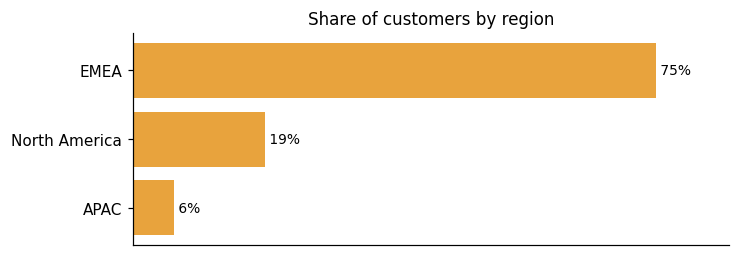
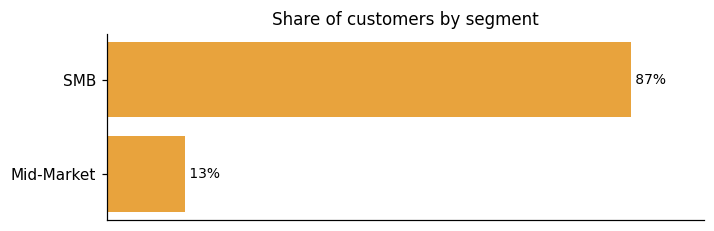
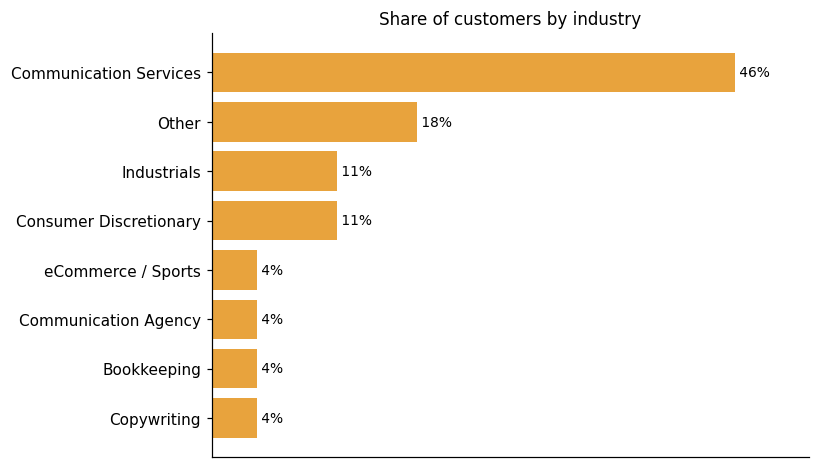
Representative customers: Anita Lovett & Associates, AnitaLovett.com, Bright Bookkeeping, Christian Schirmers, Do It Tennis, Flyte Creative Media, Future Forward
How ActiveCollab uses AI in practice
ActiveCollab is a project management platform that uses an MCP server to let external AI assistants act directly inside your workspace. MCP stands for Model Context Protocol. It allows AI assistants to securely connect to your ActiveCollab workspace and interact with your data directly. Once connected, an AI can log hours, comment in your name, mark tasks as done, and more. The AI acts on a user's behalf within the workspace rather than operating as a standalone feature built into the product itself.
Agentic AI
Read detailsActiveCollab lets external AI assistants plug directly into its workspace through MCP (Model Context Protocol). Once connected, as the vendor puts it, they can autonomously perform actions on behalf of the user. Those actions include logging hours, commenting on tasks, and marking tasks as done.
ActiveCollab pricing and value: plans, costs and ROI
ActiveCollab offers subscription pricing on both monthly and annual terms, with add-on costs published and base plan pricing available by comparing plans or starting a free trial. Annual plans come with up to 15% off, and nonprofits receive 50% off. The Get Paid Bundle add-on costs an additional 3 USD per month per user on annual plans, or 4 USD per month per member on monthly plans. Work can be imported from spreadsheets or tools like Asana, Trello, or Wrike in minutes.
ROI evidence from 4 customers
- Keep your productivity up while prices go down!
- The pricing is lower for a yearly subscription, and it gives you up to 15% off of the price if you commit to the annual subscription for both Plus and Pro plans.
- 50% off for nonprofits!
- We offer a 50% discount to educational institutions and nonprofit organizations making the world a better place.
Who it fits: value by company size
ActiveCollab spans small teams running multiple projects up to larger organizations using a single shared workspace. The Plus plan, ideal for smaller teams, caps chargeable users at three seats and covers collaboration and communication features. Clients can be brought in for free. As teams grow, the focus shifts toward clarity on expenses, time, and advanced reporting. The product is also designed to start with a single team and spread through the rest of the organization over time.
Specific prices are published for the Get Paid Bundle add-on ("an additional 3 USD per month, per user, for the annual plans" / "4 USD per month per member" monthly), and up to 15% off for annual plans is stated, but the base prices for the Plus and Pro plans themselves are not explicitly published on the page, with the page routing visitors to try for free or compare plans rather than stating per-seat base prices; however, enough numeric pricing detail is present to classify as mixed.
Plus
The Plus plan is ideal for smaller teams and offers a set of features for collaboration and communication. It holds up to three seats for chargeable users.
Pro
The Pro plan includes all the features that ActiveCollab offers in the core package, and you can extend the list of features by getting the Get Paid Bundle on top of the Pro plan.
Pro+ Get paid
Compare all features Plan and Organize Plus Pro Pro+Get paid
Plans as published by the vendor on ActiveCollab Plans and Pricing.
ActiveCollab enterprise readiness: security, compliance, migration, and support
ActiveCollab's enterprise readiness spans four dimensions: security, compliance, migration, and customer support. These are the areas a buying team can examine when evaluating the product for organizational deployment.
Security controls and assurance
We've designed our cloud platform to offer a "secure by default" experience. We're aware that you entrust us with your data. We also know that trust is not only hard to gain, but also easy to lose. That's why we've done everything to keep ActiveCollab as safe as possible. source
Compliance and data protection
ActiveCollab is fully GDPR compliant and has built a compliance program aimed at supporting both customers and vendors in their own GDPR efforts. All staff have completed GDPR guidance training issued by regulatory authorities, with ongoing learning around privacy by design and default. Third-party processors located in the US are also required to be GDPR compliant, extending that readiness to US-based processors. Breach response procedures are in place: ActiveCollab has established procedures to detect, report and investigate a personal data breach, with commitments to notify regulators, customers, and end-users promptly. Several organizational measures are actively underway. These include periodic evaluation for organisational and technical measures, security incident response templates, and regulated internal access to personal data. On the user-facing consent side, capabilities such as user opt-in mechanism and consent logging are in progress. Others — including exposing or deleting user information and platform audit logs — are still to be implemented. Buyers evaluating ActiveCollab should note that a portion of the technical consent and data-subject rights layer remains on the roadmap rather than fully delivered.
Migration from competing platforms
ActiveCollab supports importing work from spreadsheets or from dedicated project tools, with Trello or Asana named as specific sources. The process is described as taking minutes, covering tools like Asana, Trello or Wrike. The goal is to let teams pick up where you left off without interrupting ongoing work. Dev and Customer Success teams are available to help make the transfer easy.
Customer support experience
ActiveCollab reports that 93% of customers gave the highest happiness score. Yearly plan subscribers receive a dedicated customer success agent along with complementary onboarding services.
ActiveCollab vs. Airtable, Asana, monday.com and other platforms
Collaborative Work Management software gives teams a single platform to plan, coordinate, and automate work — covering everything from task tracking and reporting to workflow automation and intelligent assistance. Buyers use it to bring project execution and team communication under one roof. ActiveCollab competes in this category with project management, collaboration, and time-tracking capabilities. On the project management side, it supports multiple views including List and Kanban, task dependencies, timelines, and capacity planning oriented toward service businesses. Teams, freelancers, and clients can share ideas, exchange feedback, and manage files within a unified project workspace. Customizable dashboards cover real-time profitability and team productivity alongside project progress. The grounding on ActiveCollab covers these three capability areas. The broader CWM category definition also calls for workflow automation and intelligent assistance; the facts available here do not describe ActiveCollab's capabilities in those areas, so how it stacks up there against Airtable, Asana, monday.com, or Smartsheet is not something this evidence can answer directly. The comparison table alongside this text shows where these vendors differ most — treat it as a differentiation view, not a complete feature-by-feature breakdown.
Collaborative Work Management
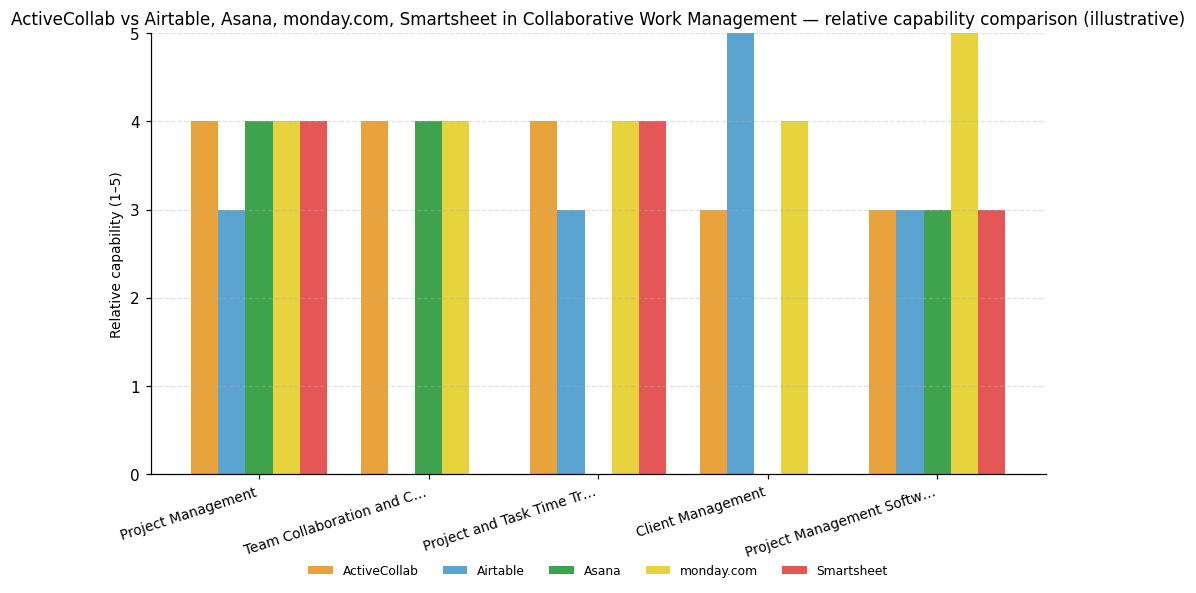
| Capability | ActiveCollab | Airtable | Asana | monday.com | Smartsheet |
|---|---|---|---|---|---|
| Project Management | 4 | 3 | 4 | 4 | 4 |
| Team Collaboration and Communication | 4 | — | 4 | 4 | — |
| Project and Task Time Tracking | 4 | 3 | — | 4 | 4 |
| Client Management | 3 | 5 | — | 4 | — |
| Project Management Software for Designers | 3 | 3 | 3 | 5 | 3 |
ActiveCollab
Project Management: Supports multiple project views (List, Kanban, and others), task dependencies, timelines, resource planning, and capacity planning for service businesses.; Team Collaboration and Communication: Unified workspace for teams, freelancers, and clients to share ideas, give feedback, manage files, and conduct discussions within projects.; Project and Task Time Tracking: Customizable dashboards and reports covering project progress, real-time profitability, and team productivity are explicitly described.
Airtable
Client Management: New library of customizable apps with centrally managed shared data and bidirectional syncing across applications, rated strong and a key strength.
Asana
Project Management: Work Graph enables flexible planning with AI-driven work planning capabilities rated strong.; Team Collaboration and Communication: Platform targets in-context collaboration needs for operations and program managers with centralized inbox, rated strong.
monday.com
Project Management: Key use cases explicitly include work planning and execution with team objectives management, rated strong.; Team Collaboration and Communication: Mission centers on a work hub that drives collaboration around visible work, rated strong.; Project and Task Time Tracking: Real-time dynamic dashboards with AI integration for task generation highlighted as innovative, rated strong.; Client Management: Significant platform investments include enhanced data lifecycle management and improved performance for large deployments, rated strong.; Project Management Software for Designers: Productized versions sold for marketing, software development, CRM, and service management compete with specialized business applications, rated strong.
Smartsheet
Project Management: Key use cases include project and portfolio management and strategic transformation, rated strong.; Project and Task Time Tracking: AI-powered tools generate charts and reports and track metrics, rated strong.


Connect ActiveCollab with your stack: integrations and partner ecosystem
ActiveCollab supports 14 native integrations across 11 partner categories, including Accounting Software, Calendar Application, and Cloud Storage.
ActiveCollab connects to external software through both native integrations and automation layers, covering everything from accounting to niche tools your team may already rely on. At the technical level, ActiveCollab offers a direct API and webhooks. The API supports deeper integrations with other software and systems. Webhooks send automated messages to your apps whenever an event occurs in ActiveCollab. For teams using niche tools, ActiveCollab also reaches a wider ecosystem through Zapier for extended flexibility, so a connection is still possible through third-party automation. On the financial side, ActiveCollab syncs tracked time and invoicing data with external billing systems, so data flows into the tools you already use rather than requiring spreadsheet exports and manual updates. Specifically, ActiveCollab integrates with accounting tools like QuickBooks, letting time tracking, expenses, and invoices logged in ActiveCollab export directly into your accounting system.
| Partner category | Integration partners | Native count | Flow direction |
|---|---|---|---|
| Accounting Software | QuickBooks | 1 | Bidirectional |
| Calendar Application | iCal | 1 | Downstream |
| Cloud Storage | Dropbox, Google Drive | 2 | Upstream |
| Document Collaboration | Google Docs | 1 | Bidirectional |
| Email Client | Microsoft Outlook | 1 | Bidirectional |
| Payment Gateway | PayPal, Stripe | 2 | Upstream |
| Productivity Suite | 1 | Bidirectional | |
| Project Management Software | Asana, Basecamp, Trello | 3 | Upstream |
| Team Messaging | Slack | 1 | Downstream |
| Test Management Software | TestLodge | 1 | Bidirectional |
| Workflow Automation / iPaaS | Zapier | 0 | Bidirectional |


A51 doo. News
January Recap: ActiveCollab self-hosted 8, Invoices and Payments reports, improved client payment interface
ActiveCollab has released updates to its self-hosted version 8, enhancing productivity and collaboration with over 100 new features, a streamlined interface, and improved data management. The updates include enhanced Invoices and Payments reports with better filtering and sorting, and a redesigned client payment interface supporting card and PayPal payments. These improvements aim to optimize financial management and client interactions.
Control and manage your entire business with ActiveCollab Self-Hosted 8
ActiveCollab announced the release of its self-hosted version 8, set for February 3, 2026. This update introduces over 100 new features to enhance project management, client communication, and financial tracking. Key improvements include advanced time tracking, workload management, and customizable reporting tools, all designed to boost productivity and maintain data control.
Apps & Integrations ?? ActiveCollab
ActiveCollab has enhanced its platform with integrations for popular tools like Google Drive, Dropbox, QuickBooks, Slack, and Zapier. These integrations streamline workflows by allowing seamless data exchange and automation, improving efficiency in project management, communication, and financial processes. Users can import projects from Trello or Asana, automate tasks, and sync with external calendars, enhancing productivity and collaboration.
A51 doo. Profile
Company Name
A51 doo.
Company Website
https://activecollab.com/HQ Location
101 West Main St, Suite 101, Norfolk, Virginia 23510, US
Employees
11-50
Social


Financials
PRIVATE