Adobe Workfront Overview
Adobe Workfront is a cloud-based work management tool that integrates people and data across the enterprise, managing projects from start to finish. Key features include strategic planning, resource management, and real-time executive insights.
Use Cases
Customers recommend Collaboration, Workflow Management, Helpdesk Management, as the business use cases that they have been most satisfied with while using Adobe Workfront.
Business Priorities
Improve Internal Communications and Improve Visibility are the most popular business priorities that customers and associates have achieved using Adobe Workfront.
Adobe Workfront Use-Cases and Business Priorities: Customer Satisfaction Data
Adobe Workfront works with different mediums / channels such as User Generated Content. and Blogs.
Adobe Workfront's features include Dashboard, Alerts: Popups & Notifications, Templates, etc. and Adobe Workfront support capabilities include 24/7 Support, Email Support, Phone Support, etc. also Adobe Workfront analytics capabilities include Analytics, and Custom Reports.
Reviews
"At Poly, we’ve always said that work isn’t somewhere you go, it’s something you do. The COVID-19 pandemic has made that abundantly clear for businesses and their employees alike, and our company is ideally placed to help them transition to a new way... of working" - Jenifer Salzwedel
Peer review evidence (same sources as the product rating summary)
"...Collaboration via the Updates tab - this kills a lot of emails...." Peer review by Alison Mathieu, Workfront Design Consultant, LeapPoint
"...The system automates our workflows so that we stay on deadline and don't let anything fall through the cracks...." Peer review by Lindsey Salmony, Account Manager, Blackbaud
"...AtTask also allows groups such as our IT Help Desk to manage and prioritize incoming requests for assistance...." Peer review by Matthew Estes, Director of Strategic Initiatives, TaxAudit.com
Adobe Workfront, Prism PPM (formerly WorkOtter), TeamGantt, ClickUp, MeisterTask, etc., all belong to a category of solutions that help Project Management. Each of them excels in different abilities. Therefore, determining the best platform for your business will depend on your specific needs and requirements.
Popular Business Setting
for Adobe Workfront
Top Industries
- Marketing and Advertising
- Information Technology and Services
- Telecommunications
Popular in
- Enterprise
- Large Enterprise
- Mid Market
Adobe Workfront is popular in Marketing And Advertising, Information Technology And Services, and Telecommunications and is widely used by Enterprise, Large Enterprise, and Mid Market.
Adobe Workfront Customer wins, Customer success stories, Case studies
Why is Adobe Workfront the best choice for Collaboration?
What benefits does Adobe Workfront offer for Workflow Management?
How does Adobe Workfront facilitate Helpdesk Management?
How can Adobe Workfront enhance your Engagement Management process?
Why is Adobe Workfront the best choice for Onboarding?
11 buyers and buying teams have used Cuspera to assess how well Adobe Workfront solved their Project Management needs. Cuspera uses 12566 insights from these buyers along with peer reviews, customer case studies, testimonials, expert blogs and vendor provided installation data to help you assess the fit for your specific Project Management needs.
| CUSTOMERS | TESTIMONIALS |
|---|---|
|
|
At Poly, we’ve always said that work isn’t somewhere you go, it’s something you do. The COVID-19 pandemic has made that abundantly clear for businesses and their employees alike, and our company is ideally placed to help them transition to a new way of working Testimonial By Jenifer Salzwedel |

|
As our products and brands expand year to year, and the expectation by consumers and customers increases to see and learn more, it’s essential to organize, automate and utilize all of our assets so that we have more time to focus on creative quality versus administration. Testimonial By Brennan Swing |

|
Every industry is reimagining their role within the digital economy, and looking to IBM for cloud and AI technologies that will give their transformation journey greater speed and efficiency. Testimonial By Ari Sheinkin |
| CUSTOMERS | TESTIMONIALS |
|---|---|
|
Jenifer Salzwedel senior director of marketing operations and enablement Poly |
At Poly, we’ve always said that work isn’t somewhere you go, it’s something you do. The COVID-19 pandemic has made that abundantly clear for businesses and their employees alike, and our company is ideally placed to help them transition to a new way of working Testimonial By Jenifer Salzwedel |
|
Brennan Swing vice president of creative media and creative director Mohawk |
As our products and brands expand year to year, and the expectation by consumers and customers increases to see and learn more, it’s essential to organize, automate and utilize all of our assets so that we have more time to focus on creative quality versus administration. Testimonial By Brennan Swing |
|
Ari Sheinkin vice president of Experience Engine IBM |
Every industry is reimagining their role within the digital economy, and looking to IBM for cloud and AI technologies that will give their transformation journey greater speed and efficiency. Testimonial By Ari Sheinkin |
Workfront + Adobe Creative Cloud

Frequently Asked Questions (FAQ)
What buyers ask before choosing Adobe Workfront
What is Adobe Workfront?
Adobe Workfront is an Online Work Management Software that connects strategy to delivery, integrating people and data across the enterprise, and manages work from start to finish for the delivery of measurable outcomes, all in one collaborative platform. It helps teams work the way they want with support for multiple methodologies and integrations with their favorite tools.
It provides a system of record for coordinating work across organizations, giving executives real-time insight into programs, projects, people, resources, and work. A single view of work streamlines intake and demand management with automated workflows, custom forms, and reporting. Decisioning dashboards and reports help accurately prioritize work and allocate resources.
Key features include connecting strategy to delivery, keeping teams and work aligned, strategically planning work, resource management, configurable dashboards, and native integrations, and more.
What is Adobe Workfront used for?
What are the top features of Adobe Workfront?
Who uses Adobe Workfront?
What are Adobe Workfront alternatives?
Where is Adobe Workfront located?

Peers used Adobe Workfront for collaboration and workflow management
Adobe Workfront Competitors


Adobe Workfront Features
- Low
- Medium
- High
| FEATURE | RATINGS AND REVIEWS |
|---|---|
| AI Powered | Read Reviews (3) |
| Analytics | Read Reviews (194) |
| Custom Reports | Read Reviews (2919) |
| CAPABILITIES | RATINGS AND REVIEWS |
|---|---|
| AI Powered | Read Reviews (3) |
| Analytics | Read Reviews (194) |
| Custom Reports | Read Reviews (2919) |
Adobe Workfront Integrations
Adobe Workfront integrates with a wide range of software applications through its robust data import and export capabilities.


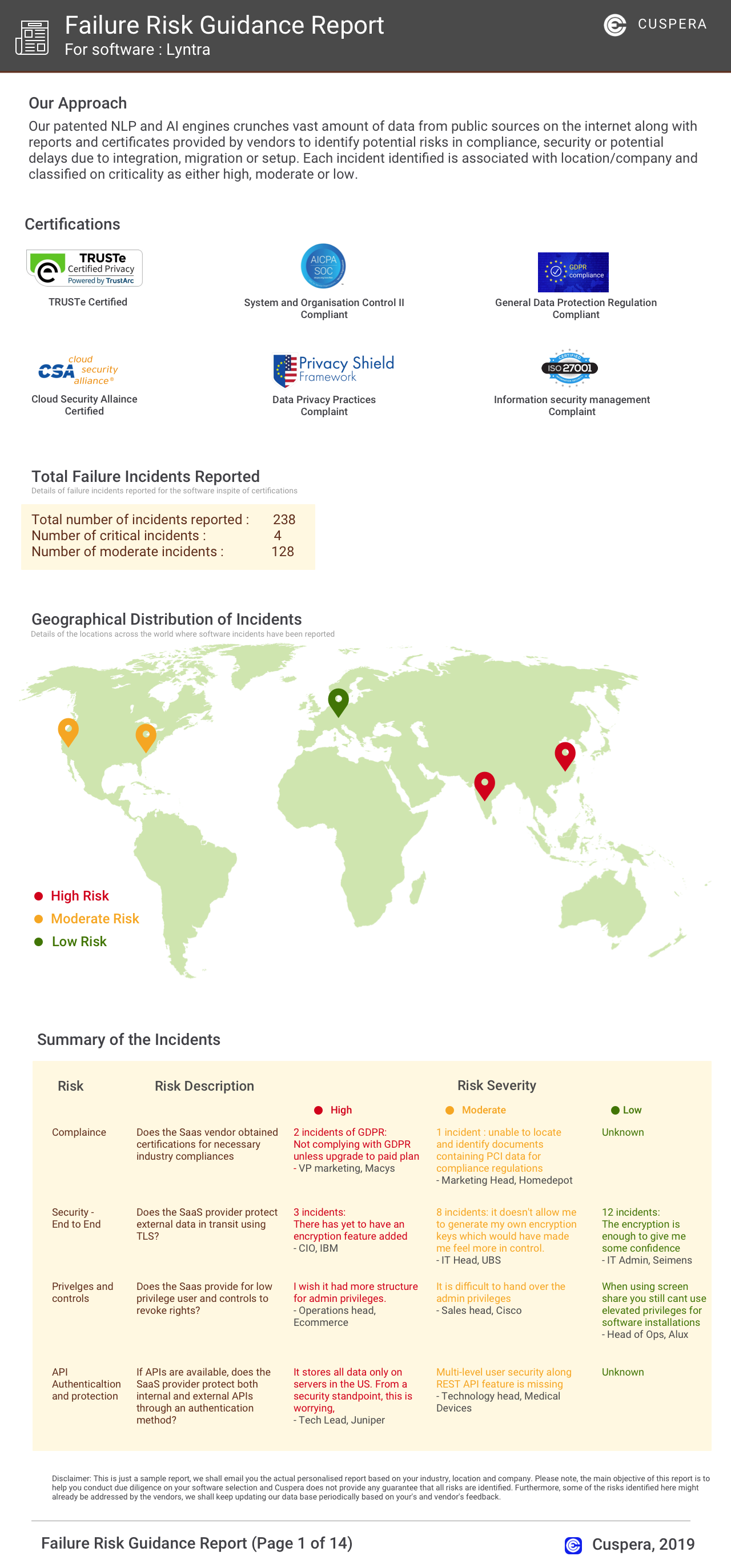
Software Failure Risk Guidance
?for Adobe Workfront
Overall Risk Meter
Top Failure Risks for Adobe Workfront
Adobe Inc. News
Adobe Firefly Reveals Top Fashion Trends in AI-Driven Insights
Adobe's Firefly AI studio analyzed consumer prompts to reveal fashion trends, highlighting the popularity of Y2K styles and quiet luxury. The Virtual Try On feature allows users to experiment with styles before committing, offering insights into consumer preferences and aiding retailers in understanding emerging trends.
Adobe Acrobats New Tools Help You Show Up Sharper, Faster
Adobe has introduced new features in Acrobat to enhance document presentation and accessibility. The Stylize feature allows users to apply professional templates to existing documents, while Interactive Reports help transform dense information into more digestible formats. These tools aim to improve the efficiency and professionalism of documents like sales proposals and marketing briefs.
Adobe CEO Shantanu Narayen steps down after 18 years as AI pressure mounts
Adobe CEO Shantanu Narayen steps down after 18 years, with Anil Chakravarthy set to take over in December. Chakravarthy's appointment aims to enhance Adobe's AI strategy, particularly around its Firefly AI offering. This leadership change occurs amid stock declines and the departure of another executive, David Wadhwani.
Adobe Announces Anil Chakravarthy to Become President and CEO and Shantanu Narayen to Become Executive Chair on December 1, 2026 - Adobe Newsroom
Adobe announced that Anil Chakravarthy will become the new President and CEO, effective December 1, 2026, succeeding Shantanu Narayen, who will transition to Executive Chair. Chakravarthy, currently leading Adobe's Customer Experience Orchestration business, is recognized for his transformational leadership and innovation-driven growth. This leadership change aims to drive Adobe's growth in the AI-driven era.
Adobe Inc. Profile
HQ Location
345 Park Avenue, San Jose, CA 95110-2704
Employees
10001+
Social


Financials
SERIES A