


BigTime PSA overview: capabilities, features, use cases, and value by role
BigTime PSA is a professional services automation (PSA) platform built for growing, single-entity firms that need end-to-end services lifecycle management. It is designed to cover the full range of PSA workflows with fast setup, scalable configuration, and an all-in-one approach to running a professional services business.
Top capabilities of BigTime PSA
Project Management
Read detailsBigTime PSA connects delivery, finance, and resource planning in one platform — covering budget-vs-actuals monitoring, WIP accounting, multi-entity budgeting, AI-powered demand planning, and scenario modeling across a firm's full project portfolio. Isaman Design says "BigTime is a great solution for us because we are able to do the project management, invoicing, the timecard, and everything all in one place. And the addition of Wallet has really helped save time." STR Resource & Associates notes that "the visuals of the project management [adds} a layer of data gathering that we didn't have before. It shows each live project's revenue, expenses, and how much time we're spending!" — and credits that visibility with slashing administrative workload by 75%.
Reporting
Read detailsBigTime PSA's Reporting capability brings together project, people, and financial metrics through ready-to-use templates, configurable role-based dashboards, and an in-app AI assistant that answers questions against live data. External BI tools and data warehouses connect through BigTime Data Hub. Drill-down reporting spans portfolio, project, client, and staff dimensions for both operational guidance and board-level presentations. The dashboards surface numbers that previously took months to find. Wacek & Associates describes it directly: "we spent two to three months just trying to pull up an unbilled Time & Expense report to correctly represent where we stood as a firm and when we log into BigTime now, we just see the number right there on our dashboard". Revenue tracking for 120+ staff is now automated through BigTime PSA's reporting exports. As STR Resource & Associates, LLC puts it, "We haven't even dipped our toes into all the robust reporting that you can do. It's kind of like being good at Excel, but never really using all of the functions. We're still exploring BigTime, but we're loving it."
BigTime Services CPQ & Quotes Software
Read detailsThe Quote Builder Wizard and SOW Generator at the heart of BigTime PSA's Services CPQ & Quotes capability let professional services firms assemble margin-aware proposals and convert them into statements of work in minutes, pulling data directly from quotes rather than rebuilding it manually. Approved quotes flow automatically into active projects with resource assignments, supported by flexible billing structures and built-in approval guardrails — delivered either through the PSA-embedded BigTime Quotes or the standalone, highly configurable BigTime Services CPQ. Gainsight says, "BigTime Services CPQ has significantly improved our SOW turnaround time, reducing it from days to minutes. The ability to standardize offerings while maintaining flexibility has been a game-changer for our team." The time savings compound at scale: Anthology used BigTime Services CPQ to generate over 1,365 quotes, saving approximately 1,365 hours. Dayforce adds, "BigTime Services CPQ has helped us optimize how we interact with our customers. We've reduced the time from request to signature, eliminated manual steps, and reclaimed hours we now invest in improving engagement and experience."
Time and Expense Software for Professional Services
Read detailsBigTime PSA's Time and Expense capability captures billable and non-billable time and project expenses in real time across any device, using auto-fill, auto-save, and smart lookup functions to cut administrative work. Every entry ties directly to live project financials, giving teams immediate visibility into budget burn, utilization, and profitability. Native QuickBooks integration keeps reconciliation straightforward.
BigTime AI
Read detailsBigTime PSA embeds AI directly into professional services workflows through BigTime AI, a capability suite that pairs real-time data with advanced language models to deliver intelligence and automation. The AI Assistant provides instant how-to guidance, the Resourcing Agent automates best-fit staff matching to project demands, and the Analytics Agent generates dynamic data visualizations and insights on demand.
Billing & Invoicing
Read detailsBigTime PSA's Billing & Invoicing capability automates the full invoice lifecycle — from approved time and expense data through to payment collection. Approved time and expense data flows directly into client-ready invoices. Those invoices then route through multi-level approval workflows before clients pay via ACH or credit card through a secure portal. The engine supports T&M, fixed fee, milestone-based, and mixed billing models. It syncs directly with QuickBooks, Xero, and Sage Intacct, which eliminates manual re-entry. The results show up in the numbers: 91% of invoices paid on time, and customers report that days sales outstanding dropped nearly six days across their organizations.
Resource Management Software for Professional Services
Read detailsResource Management in BigTime PSA allocates staff, forecasts capacity, and maximizes utilization through AI-driven staffing recommendations, drag-and-drop scheduling, scenario planning tied to financial outcomes, and demand planning — all with real-time visibility into team availability and skills that can reduce planning delays by up to 40%.
BigTime Enterprise PSA
Read detailsBigTime Enterprise PSA serves scaling and mature professional services firms that need multi-entity and multi-currency support, complex billing models, advanced reporting, and enterprise-grade compliance. It integrates with Services CPQ and connects to ERP, CRM, and project management tools. Together, these connections form a unified quote-to-cash architecture. Customers report up to 30% improvement in revenue forecast accuracy and an average 5% margin improvement in the first year.
project execution integration
Read detailsBigTime PSA connects delivery teams to the project tracking, scheduling, and resourcing tools they already use. Supported integrations include BambooHR, Jira, Google Calendar, Outlook Calendar, Smartsheet, Microsoft Project, and Zendesk. Together, these connections pull project execution, time tracking, and resource utilization into one integrated environment.
Top features of BigTime PSA
BigTime Wallet Payment Processing
Read detailsBigTime Wallet Payment Processing lets clients pay outstanding invoices online via credit card or ACH bank transfer directly from their inbox or a secure client portal, where they can view invoices, save preferred payment methods, and schedule payments. With the reports that I get from BigTime Payments, I have everything I need to really quickly go through and reconcile my stuff. It takes me about 10 minutes to reconcile my operating account at the end of a period. That's amazing.
BigTime Quotes
Read detailsBigTime Quotes, built directly into BigTime PSA, enables services firms to scope, price, and build proposals in minutes using guided workflows, with built-in approval flows and a full quote history and audit trail — and approved quotes automatically generate new projects with associated tasks, budgets, and staff assignments, eliminating duplicate data entry and manual handoffs.
Billable Hours Tracker
Read detailsBigTime PSA's Billable Hours Tracker captures every billable and non-billable minute in real time from any device. Customizable timesheets, automated submission reminders, and mobile time tracking keep entries current. Each time entry links directly to project cost and income metrics for live profitability monitoring. Approved entries convert into client-ready invoices in one click. 68% of BigTime customers say it takes one hour or less to gather and approve team expenses.
Top use cases for BigTime PSA
Deliver projects on time and on budget
Read detailsBigTime PSA gives project managers and portfolio leaders a single platform to monitor budget vs. actuals, track utilization, surface profitability trends, and apply AI-powered scenario planning — helping teams catch overspending early, manage WIP, and keep the full book of business aligned to financial targets.
Staff projects with the right people at the right time
Read detailsBigTime PSA handles the full resource management lifecycle, from matching people to projects through forecasting future hiring needs. AI-driven staffing recommendations sit at the center of the system. Managers layer those recommendations with drag-and-drop scheduling and scenario planning to test different staffing options before committing. Utilization reports surface how capacity is actually being consumed, giving delivery leaders the visibility they need to protect margins.
Win and scope new client engagements faster
Read detailsBigTime PSA keeps the entire path from proposal to active project inside one platform. Services sellers and delivery leaders can build margin-aware proposals in minutes and auto-generate branded SOWs without leaving the platform. Approval routing happens there too. Once a quote is approved, it converts directly into an active project with resource assignments already in place — no manual handoffs between sales and delivery.
Automate invoicing and accelerate client payments
Read detailsFinance leaders and CFOs use BigTime PSA's billing and invoicing tools to auto-generate client-ready invoices from approved time and expenses. Those invoices move through multi-level approval workflows before reaching clients. Payment collection happens through a secure portal supporting ACH and credit card options. Records then sync automatically with QuickBooks, Xero, or Sage Intacct, cutting days sales outstanding and accelerating cash flow.
Gain firm-wide financial and operational visibility
Read detailsBigTime PSA brings project, people, and financial data together in one place for CFOs, project managers, and executive stakeholders. The reporting and analytics tools that make this possible include role-based dashboards, an AI assistant for instant data queries, and pre-built utilization and profitability reports. BigTime Data Hub handles BI integration for teams that need to connect to external tools. Together, these capabilities support evidence-backed strategic decisions across the business.
Capture time and expenses accurately across the firm
Read detailsBigTime PSA connects time and expense tracking directly to live project finances. Team members log billable hours and costs in real time using auto-fill timesheets and mobile capture. QuickBooks integration and AI-driven risk alerts then feed that data straight to finance leaders, giving them accurate visibility into project health and cash flow.
Accelerate decisions with embedded AI assistance
Read detailsBigTime PSA puts AI tools directly inside existing workflows so users across roles can act on data without leaving the platform. The AI Assistant handles instant how-to answers. The Resourcing Agent automates staff-to-project matching, and the Analytics Agent generates real-time data visualizations on demand. Together, these capabilities reduce manual analysis, speed up resource planning, and support faster, data-backed operational decisions.
Scale multi-entity and global services operations
Read detailsBigTime PSA unifies projects, resources, and financials across multiple entities and currencies for enterprise operations and finance teams. AI-powered forecasting, automated inter-company cost sharing, and e-invoicing compliance are built in. Integrations with ERP, CRM, and project management tools let organizations grow global operations without the rigidity of legacy PSA systems.
Value delivered by role with BigTime PSA
Project Delivery Teams
Read detailsBigTime PSA gives project delivery teams a single place to manage assignments, track work in progress, and keep tabs on timelines and team availability — replacing manual spreadsheet work with AI staffing recommendations and real-time dashboards. As Priority Designs puts it, "I was spending so much time in the weeds trying to make sure that each project ran successfully, but I didn't have time to actually do CFO things. PMs didn't feel like they had the ability to be good project managers because they weren't comfortable with the information they were getting" TAI Engineering puts the operational shift concretely: "It's freed up a lot of our project managers' time because they no longer have to input staff information manually into spreadsheets — giving them more time for other managing duties or billable engineering work."
Operations Teams
Read detailsBigTime PSA brings project portfolio management, resource allocation, and financial forecasting together in one place. Operations teams move from hours of manual data collection to real-time dashboards and on-demand reporting. That shift frees capacity for strategic decision-making rather than administrative overhead. The platform scales with the business, covering everything from managing projects and processing payments to monitoring utilization and reacting quickly to unforeseen obstacles.
Finance Teams
Read detailsFinance teams using BigTime PSA get real-time visibility into revenue leakage, underbilled time, and overdue invoices before they affect cash flow. Billing cycle time drops by 50% or more, moving time card data through manager review and out to clients in days rather than weeks. Days sales outstanding falls by nearly six days across the company. CFOs and finance directors recover $35,000–$50,000 annually in previously missed revenue and reconcile accounts in minutes rather than hours.
What customers say about BigTime PSA: ratings, outcomes and feedback
BigTime PSA customer experience covers two threads: what customers value in day-to-day use, and where they see room for improvement. Both reflect direct input from the people using BigTime PSA in practice.
What works well
Customers describe BigTime PSA as doing more than solving the problem they came in with. As C2 Company puts it, "BigTime not only met our requirements but opened our eyes to 20 other features that we could use to enhance productivity". Adroit North America frames the product as foundational to how their entire operation runs. In their words, "BigTime is literally the DNA of our professional services organization. everything from taking the sales demand and projecting out the forecast based on probabilities of deals through to the actual engagement, onboarding, and planning out the full lifecycle of the engagements...". Adroit North America also notes that time and materials data collected weekly enables faster billing cycles and accelerates cash flow. Their view is that any professional services organization looking to scale should build in the software and business processes from the start, and that BigTime PSA can support that.
Where customers see room for improvement
BigTime PSA draws recurring criticism around printing, reporting, invoice formatting, and data display. On the printing side, Isaman design, Inc. flags printing to paper w/out having to export a PDF first as a gap, along with printing options in general (formatting, date ranges, details, etc.). The same customer points to more customization in invoice formatting (that I have control over) as a needed improvement, and notes a preference for the old reporting layout: Reports - I definitely prefer the old layout view. Reporting limitations come up in several other ways too — some reporting functions are not available, filters and additional details on approvals fall short, and creating a payroll or expense report presents difficulty. The reporting area is described as lacking in options, and daily tracking breakdowns are not supported at the granularity some users need. Project managers are noted as not getting enough detail from the tool. Data display is another area customers flag: the categories are not always clear to understand, what is what and/or how they are calculated can create extra work, and the clients account information needs to be displayed better. It's not as clear cut as it should be. Syncing with Sage Intacct is also raised as a recurring pain point.
BigTime Software Customer wins, Case studies
Frequently Asked Questions (FAQ)
What buyers ask before choosing BigTime Software
Integrations What CRM integrations are available for BigTime Software?
BigTime Software offers several CRM integrations to enhance its functionality for consulting firms and other businesses. Notably, it integrates seamlessly with Salesforce and Salesforce CPQ, allowing users to manage customer relationships and sales processes efficiently. Additionally, BigTime connects with Microsoft Dynamics, providing another robust option for CRM management. Other integrations include Conga, Smartsheet, Certinia, and HighSpot, which further extend the capabilities of BigTime by enabling users to streamline workflows and improve data accuracy across platforms. These integrations help businesses leverage their existing CRM tools while benefiting from BigTime's project management and time tracking features, ultimately leading to improved operational efficiency and better client service.
Integrations How does BigTime connect with Salesforce for project management?
BigTime connects with Salesforce to streamline project management by integrating sales and project teams, ensuring seamless communication from the initial proposal to the final invoice. This integration allows users to automate the conversion of Salesforce opportunities into BigTime projects, effectively reducing manual data entry and minimizing errors. By syncing data between Salesforce and BigTime, teams can maintain a single source of truth, which enhances visibility into project status and financials. This alignment not only improves workflow efficiency but also enables real-time updates on project progress, budgets, and resource allocation, ultimately leading to better decision-making and increased profitability. With this integration, organizations can bridge the gap between sales and delivery, ensuring that client relationships are managed effectively throughout the project lifecycle.
Integrations What are the setup steps for integrating HubSpot with BigTime?
To integrate HubSpot with BigTime, start by ensuring you have administrative access to both platforms. First, log into your HubSpot account and navigate to the App Marketplace to find BigTime, then select "Install App." Follow the prompts to authorize the integration, allowing BigTime to access your HubSpot data. Next, log into your BigTime account and go to the integrations section to configure the HubSpot settings. Here, you can map important deal data from HubSpot to projects in BigTime, ensuring a seamless flow of information. Finally, set up triggers to create projects at specific lifecycle stages in HubSpot, which will help automate your workflows. Once completed, test the integration to confirm that data syncs correctly between the two platforms, streamlining your sales and project management processes.
Integrations Can I sync data between BigTime and Marketo, and how does it work?
BigTime does not natively integrate with Marketo; however, you can achieve data synchronization between the two platforms through third-party integration tools or middleware solutions like Zapier or Integromat. These tools allow you to create automated workflows that can transfer data between BigTime and Marketo based on specific triggers or schedules. For instance, you can set up a workflow to sync client information or project updates from BigTime to Marketo, ensuring that your marketing campaigns are informed by the latest project data. This integration can enhance your marketing efforts by providing a more comprehensive view of client interactions and project statuses, ultimately leading to more targeted and effective marketing strategies.
Integrations What is the data flow between BigTime and Microsoft Dynamics CRM?
The data flow between BigTime and Microsoft Dynamics CRM facilitates seamless integration of sales and project management processes. When connected, BigTime allows for the automatic synchronization of client information, project details, and financial data between the two platforms. This means that any updates made in Microsoft Dynamics CRM, such as new leads or changes in client information, are reflected in BigTime, ensuring that project teams have access to the most current data. Conversely, project progress, resource assignments, and billing information from BigTime can be sent back to Microsoft Dynamics CRM, providing sales teams with insights into project status and financial health. This integration helps bridge the gap between sales and delivery, enhancing collaboration and improving overall operational efficiency.
Integrations Are there any limitations to the BigTime integration with Salesforce?
While BigTime's integration with Salesforce offers significant benefits, such as aligning sales and project teams and automating the conversion of Salesforce opportunities into BigTime projects, there are some limitations to consider. For instance, the integration may require initial setup and configuration to ensure seamless data flow, which could be time-consuming for some users. Additionally, users may encounter challenges if their Salesforce workflows are highly customized, as this could complicate the integration process. Furthermore, while BigTime provides a unified source of truth, discrepancies in data entry or system updates can lead to inconsistencies if not monitored closely. Overall, while the integration enhances collaboration and efficiency, firms should assess their specific needs and workflows to ensure compatibility and optimal use of the integration features.
Features What does the quoting feature in BigTime do?
The quoting feature in BigTime, specifically through BigTime Quotes, streamlines the proposal process by allowing users to create tailored, accurate quotes in minutes. Integrated directly into the BigTime Delivery platform, this feature eliminates the need for spreadsheets and reduces manual errors, ensuring a seamless transition from quote to cash. Users benefit from intelligent, auto-generated proposals that are customized based on their firm's size, goals, and workflow complexity. Additionally, BigTime Quotes includes built-in approval flows and maintains a comprehensive quote history and audit trail, which enhances visibility and accountability. This functionality not only speeds up the quoting process but also helps protect profit margins by providing accurate pricing right from the start, ultimately enabling teams to win work faster and more efficiently.
Features How do I configure custom dashboards in BigTime?
To configure custom dashboards in BigTime, start by accessing the dashboard feature within the platform. You can create a new dashboard by selecting the "Add Dashboard" option, where you can choose from various widgets that display key metrics relevant to your consulting firm. Customize each widget by selecting the specific data points you want to track, such as financial performance, staff utilization, or project progress. You can also arrange the layout to prioritize the information most critical to your operations. Once your dashboard is set up, you can save it for easy access and share it with team members based on their roles and permissions. This flexibility allows you to tailor the dashboard to meet your firm's unique needs, ensuring that you have the insights necessary for effective decision-making.
Features What functionalities does the project portfolio management feature offer in BigTime?
BigTime's project portfolio management feature offers a comprehensive suite of functionalities designed to optimize the entire book of business. It centralizes project data, providing full visibility into project progress, which is crucial for ensuring bottom-line success. Users can manage financial health across multiple projects, moving away from siloed decision-making to an integrated strategy. The platform allows for real-time adjustments to project scope and needs, enabling leaders to respond swiftly to changing circumstances. Additionally, BigTime facilitates scenario planning and what-if modeling, leveraging live project data to forecast how specific engagements impact overall financial goals. This holistic approach empowers organizations to balance resourcing, planning, billing, and reporting effectively, ultimately driving profitability and growth.
Features How can I use BigTime to control pricing and discounts effectively?
BigTime provides robust tools to help you control pricing and discounts effectively by allowing you to configure pricing structures tailored to your firm's specific needs. You can set up different pricing tiers based on client types, project complexity, or service offerings, ensuring that you maintain profitability while remaining competitive. The software integrates seamlessly with your staffing and resource data, giving you real-time visibility into costs and margins, which helps in making informed pricing decisions. Additionally, you can apply discounts strategically based on predefined criteria, enabling you to incentivize clients without compromising your bottom line. By leveraging BigTime's customizable quoting solutions, you can streamline the process of generating proposals that reflect your pricing strategy, ultimately enhancing your sales efficiency and client satisfaction.
Features What reporting capabilities are available in BigTime for IT consulting firms?
BigTime offers a robust suite of reporting capabilities tailored for IT consulting firms, featuring both out-of-the-box reports and customizable dashboards. These reporting tools allow firms to access critical insights such as key financial takeaways, utilization metrics, and demand projections, enabling informed decision-making. The dashboards are designed to be board-ready, significantly reducing the time spent on preparing documentation for various stakeholders. Additionally, firms can configure reports to focus on specific metrics that matter most to their operations, ensuring they have the exact level of detail needed to optimize performance. With these capabilities, IT consulting firms can enhance their operational efficiency and drive profitability by making data-driven decisions.
Features How do I set up workflows in BigTime to align with my firm's operations?
To set up workflows in BigTime that align with your firm's operations, start by accessing the BigTime platform and navigating to the "Settings" section. From there, you can customize your workflows by defining key processes such as time tracking, resource management, and invoicing. Utilize the hands-on tour provided by BigTime experts to understand how to tailor these workflows to your specific needs. You can create templates for common tasks and set up automated notifications to keep your team informed. Additionally, ensure that your workflows integrate seamlessly with other tools you may be using, such as QuickBooks for invoicing, to streamline operations further. By following these steps, you can enhance efficiency and ensure that your workflows support your firm's unique operational requirements.
ROI & pricing What measurable business outcomes can we expect from using BigTime Software?
Using BigTime Software can lead to several measurable business outcomes that significantly enhance operational efficiency and financial performance. Users have reported an increase in operational efficiency by up to 91%, which translates to streamlined processes and reduced administrative burdens. Additionally, firms utilizing BigTime have experienced a reduction in their sales cycle by up to six weeks, allowing for quicker revenue generation. The software also helps improve service margins by approximately 15% in the first year, contributing to overall profitability. Furthermore, nearly 91% of invoices generated through BigTime are paid on time, ensuring better cash flow management. By leveraging customizable reporting and real-time tracking, businesses can stay ahead of budget overruns and optimize resource allocation, ultimately driving growth and enhancing client satisfaction.
ROI & pricing How does BigTime Software improve ROI for professional services firms?
BigTime Software enhances ROI for professional services firms by streamlining operations and improving efficiency. With features like Professional Services Automation (PSA), BigTime enables firms to track time, manage resources, and invoice faster, which can lead to an operational efficiency increase of up to 91%. By reducing the sales cycle by up to six weeks and growing service margins by 15% in the first year, firms can see a significant boost in revenue. Additionally, BigTime's tools help reduce client churn and accelerate service sales, further contributing to a healthier bottom line. Overall, by optimizing workflows and providing actionable insights, BigTime Software empowers firms to maximize their profitability and achieve a higher return on investment.
ROI & pricing What are the different pricing plans available for BigTime Software?
BigTime Software offers several pricing plans tailored to meet the needs of various professional services firms. The entry-level plan, BigTime Essentials, starts at $20 per user per month and includes essential features such as time tracking, invoicing, expense management, and payments through BigTime Delivery. As firms grow or require more advanced functionalities, they can explore higher-tier plans that provide additional tools and insights, including AI-powered features and automation capabilities. BigTime's pricing structure is transparent and published online, allowing businesses to easily compare options and select a plan that aligns with their specific requirements without hidden fees, ensuring they only pay for what they use. This flexibility makes BigTime an attractive choice for both small and rapidly scaling teams.
ROI & pricing How can BigTime Software help reduce operational costs for our business?
BigTime Software can significantly reduce operational costs for your business by streamlining processes and enhancing efficiency. With features designed for Professional Services Automation, BigTime enables firms to track time, manage resources, and invoice faster, which can lead to an increase in operational efficiency by up to 91%. By automating time tracking and billing, businesses can minimize manual errors and reduce the time spent on administrative tasks, ultimately shortening the sales cycle by up to six weeks. Additionally, BigTime's customizable invoicing solutions help ensure that nearly 91% of invoices are paid on time, reducing the risk of cash flow issues. By leveraging these capabilities, your business can focus more on core activities, leading to improved margins and overall cost savings.
ROI & pricing What is the total cost of ownership for implementing BigTime Software?
The total cost of ownership (TCO) for implementing BigTime Software includes several factors that contribute to the overall investment. BigTime offers transparent pricing that is published online, allowing businesses to understand the costs upfront without hidden fees. The TCO encompasses subscription fees based on usage, which means you only pay for what you need, making it a cost-effective solution for firms of various sizes. Additionally, consider potential costs for training, customization, and ongoing support, which are essential for maximizing the software's benefits. By streamlining workflows and improving efficiency, BigTime can lead to significant savings over time, ultimately enhancing your firm's profitability and reducing administrative burdens.
ROI & pricing How quickly can we see value from BigTime Software after implementation?
After implementing BigTime Software, many users report seeing significant value within a short timeframe, often within weeks. The platform is designed to streamline quoting processes, which can lead to increased operational efficiency by up to 91% and a reduction in the sales cycle by as much as six weeks. However, the speed at which you realize these benefits can depend on your team's adaptability to the new system. It's recommended to take a gradual approach to implementation, ensuring that staff are comfortable with the changes to maximize buy-in and effectiveness. By focusing on training and support during the transition, businesses can quickly leverage BigTime's capabilities to enhance their service margins and overall productivity.
Capabilities What project management capabilities does BigTime Software offer?
BigTime Software offers a robust suite of project management capabilities tailored for professional services firms. Key features include multi-project management, which allows users to efficiently allocate resources, track budgets, and manage tasks across various projects. The platform provides a portfolio dashboard for comprehensive project visibility, enabling teams to monitor timelines, resource utilization, and task progress in real-time. Additionally, BigTime integrates seamlessly with tools like QuickBooks and Salesforce, enhancing its functionality and allowing for streamlined financial management. Users can also leverage AI-driven insights to optimize project performance and profitability, making it easier to forecast budgets and cash flow. Overall, BigTime equips organizations with the tools necessary to manage complex projects effectively and improve operational efficiency.
Capabilities Can BigTime Software support flexible billing models for different service types?
Yes, BigTime Software can support flexible billing models for various service types, making it an ideal choice for businesses with diverse billing needs. It accommodates multiple billing structures, including fixed fee, time and materials (T&M), retainers, and custom rules tailored to your specific business model. This flexibility allows firms to bill clients in a way that aligns with their services and client expectations. Additionally, BigTime enhances the billing process with automation features and integrates seamlessly with QuickBooks, streamlining invoicing and reducing manual work. This capability not only improves efficiency but also helps ensure accurate and timely billing, ultimately contributing to better cash flow management for your business.
Capabilities Does BigTime Software provide role-based permissions for data access?
Yes, BigTime Software provides role-based permissions for data access, allowing firms to customize user roles and permissions according to their specific operational needs. This highly configurable feature ensures that team members have access only to the data and functionalities relevant to their roles, enhancing security and streamlining workflows. By implementing role-based permissions, organizations can maintain control over sensitive information while promoting collaboration among team members. This capability not only helps in safeguarding data but also improves efficiency by ensuring that users can easily access the tools and information necessary for their tasks. Overall, BigTime's role-based permissions contribute to a more organized and secure working environment.
Capabilities Can BigTime Software handle enterprise-level security and compliance requirements?
Yes, BigTime Software is designed to handle enterprise-level security and compliance requirements effectively. It incorporates robust security measures, including data encryption, user authentication, and role-based access controls, ensuring that sensitive information is protected. Additionally, BigTime is compliant with industry standards and regulations, which is crucial for firms operating in regulated sectors. The software's customizable workflows and permissions allow organizations to tailor security settings to meet their specific compliance needs. This adaptability not only helps in maintaining data integrity but also supports audit processes, making it easier for IT firms to demonstrate compliance with various regulatory frameworks. Overall, BigTime provides a secure environment that aligns with the stringent demands of enterprise-level operations.
Capabilities What types of workflows can be customized in BigTime Software?
BigTime Software offers extensive customization options for various workflows to align with your firm's specific needs. Users can tailor project management workflows, time tracking processes, billing procedures, and reporting functionalities. The platform allows for the creation of custom roles and permissions, enabling you to define who can access and modify different aspects of the workflow. Additionally, you can customize dashboards to display the most relevant metrics for your team, ensuring that everyone has the information they need at their fingertips. This flexibility not only enhances operational efficiency but also allows your firm to adapt to changing business requirements, ultimately leading to improved productivity and better resource management.
Capabilities Does BigTime Software include business intelligence reporting features?
Yes, BigTime Software includes robust business intelligence reporting features that empower IT consulting firms to gain valuable insights into their operations. The platform offers out-of-the-box reports and customizable dashboards that allow users to track key financial metrics, utilization rates, and demand projections. With the ability to create custom reports and filter data, firms can tailor their reporting to meet specific business needs. Additionally, BigTime's reporting functionality is integrated directly into the platform, ensuring that users can access reports immediately without requiring extensive training. This seamless integration not only enhances decision-making but also minimizes the time spent preparing documentation for stakeholders, making it an efficient tool for driving business performance.
Use cases How can SDRs use BigTime Software to streamline their quoting process?
Sales Development Representatives (SDRs) can leverage BigTime Software to streamline their quoting process by utilizing its integrated scoping, pricing, and quoting tools. With BigTime, SDRs can quickly generate tailored proposals in minutes, thanks to the software's ability to access real-time staffing and resource data, ensuring accurate and profitable pricing. This reduces the need for extensive back-and-forth communication with clients. Additionally, once a quote is approved, BigTime automatically creates a new project with associated tasks and budgets, eliminating manual entry and minimizing errors. By centralizing the quoting process within BigTime, SDRs can enhance efficiency, improve response times, and ultimately drive more sales, all while aligning with the firm's revenue goals.
Use cases What are the best practices for marketers to implement BigTime Software in their campaign workflows?
To effectively implement BigTime Software in marketing campaign workflows, marketers should start by clearly defining their goals and aligning them with the software's capabilities, such as time tracking and resource management. Begin with a tailored setup guided by a BigTime expert to ensure the software fits seamlessly into existing processes. It's crucial to involve the team early in the implementation to foster buy-in and minimize resistance; consider taking a gradual approach to avoid overwhelming staff. Regularly review and adjust workflows based on feedback and performance metrics to optimize efficiency. Additionally, integrating BigTime with other tools like Salesforce or HubSpot can enhance data flow and campaign tracking, ultimately leading to improved productivity and better campaign outcomes.
Use cases In what scenarios should RevOps teams leverage BigTime Software for financial management?
RevOps teams should leverage BigTime Software for financial management in scenarios where they need to integrate project data with billing and revenue tracking seamlessly. BigTime connects project entries, resource assignments, and billing data into one cohesive system, allowing for real-time updates that reflect in forecasts, budgets, and cash flow. This is particularly beneficial when managing multiple projects, as it enables teams to monitor utilization, track expenses, and ensure timely invoicing, which can lead to improved cash flow and nearly 91% of invoices being paid on time. Additionally, the customizable reporting features allow RevOps teams to generate insights tailored to their specific needs, enhancing decision-making and strategic planning. By utilizing BigTime, RevOps can streamline financial processes and maximize profitability across projects.
Use cases How can sales leaders utilize BigTime Software to avoid scope creep during client engagements?
Sales leaders can utilize BigTime Software to avoid scope creep during client engagements by leveraging its integrated project management and quoting tools. BigTime allows for precise scoping and pricing, ensuring that all project parameters are clearly defined and agreed upon before work begins. By using BigTime's real-time visibility into staffing and resource data, sales leaders can set accurate expectations with clients and monitor project progress against the original scope. Additionally, the software facilitates automatic project creation and flexible billing, which helps maintain alignment with client goals and reduces the likelihood of unapproved changes. With these features, sales leaders can effectively manage client relationships, ensuring that any adjustments to the scope are documented and approved, thereby minimizing the risk of scope creep and enhancing overall project profitability.
Use cases What specific features of BigTime Software can help project managers improve team collaboration?
BigTime Software offers several features that enhance team collaboration for project managers. The platform includes real-time staff utilization dashboards, allowing managers to see team availability and workload, which helps in effectively allocating resources and matching skills to project needs. Additionally, BigTime's integrated quoting and project management tools streamline communication by providing a centralized location for project updates, billing, and time tracking, ensuring that all team members are on the same page. The software also supports live chat and video call features for immediate assistance, fostering a collaborative environment where team members can quickly resolve issues and share insights. By connecting project-related work directly to billing and utilization data, BigTime enables project managers to make informed decisions that enhance teamwork and project outcomes.
Use cases When is the ideal time for service-based businesses to adopt BigTime Software for project management?
The ideal time for service-based businesses to adopt BigTime Software for project management is when they experience growth that leads to increased project complexity, client demands, or resource management challenges. If your firm is struggling with timely invoicing, tracking project budgets, or managing team workloads effectively, transitioning to BigTime can streamline these processes. Additionally, if you find that your current project management tools do not cater to service-specific workflows, it's a clear sign to consider BigTime, which offers customizable invoicing and real-time tracking features. Implementing BigTime during periods of growth or operational strain can enhance efficiency, improve cash flow with nearly 91% of invoices paid on time, and ultimately support your team's focus on delivering high-quality services.
Alternatives How does BigTime Software compare to BQE Core in terms of project management features?
BigTime Software and BQE CORE both offer project management features, but they cater to different needs and user experiences. BigTime is designed with a modern, intuitive interface that simplifies workflows, making it easier for teams to adopt without requiring an accounting background. It provides robust project tracking, real-time resource management, and AI-driven insights, which enhance visibility and control over projects. In contrast, BQE CORE is known for helping small firms get started quickly but may lack the advanced automation and long-term profitability features that BigTime offers. For professional services firms focused on growth and efficiency, BigTime's capabilities in project management can provide a competitive advantage, making it a preferred choice for maximizing profitability and improving operational performance.
Alternatives Is Replicon a better choice than BigTime Software for time tracking?
When comparing Replicon and BigTime Software for time tracking, both platforms offer unique strengths tailored to different business needs. Replicon is known for its robust time tracking capabilities, particularly in managing complex project requirements and compliance, making it ideal for larger organizations with intricate time management needs. On the other hand, BigTime Software excels in providing a user-friendly interface and seamless integration with accounting systems like QuickBooks, which can be advantageous for small to medium-sized businesses looking for straightforward time tracking and invoicing solutions. Ultimately, the choice between Replicon and BigTime Software depends on your organization's specific requirements, such as the complexity of projects, team size, and integration needs.
Alternatives What makes Deltek Vision a strong competitor to BigTime Software?
Deltek Vision is a strong competitor to BigTime Software primarily due to its comprehensive project management and resource planning capabilities tailored for professional services firms. Deltek Vision offers robust features such as advanced financial management, project tracking, and resource allocation, which are essential for firms managing complex projects. Its integration with various accounting and CRM systems enhances its functionality, making it a versatile choice for businesses looking to streamline operations. Additionally, Deltek Vision's focus on compliance and reporting can be particularly appealing to firms in regulated industries. While BigTime Software excels in user-friendly interfaces and quick implementation, Deltek Vision's depth of features and established reputation in the market make it a formidable alternative for organizations seeking extensive project management solutions.
Who uses BigTime PSA: customer base, geography, and industries
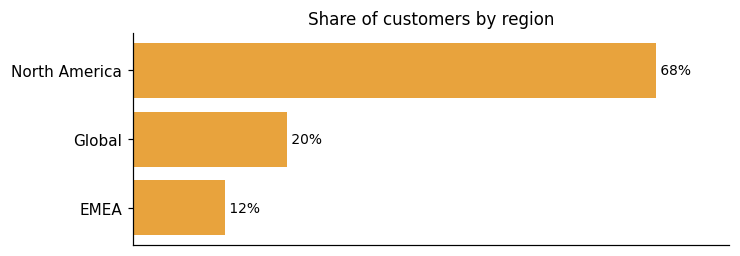
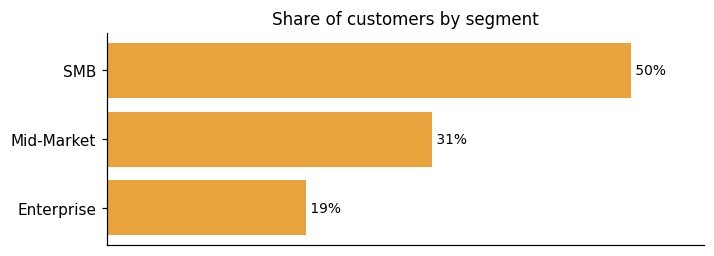
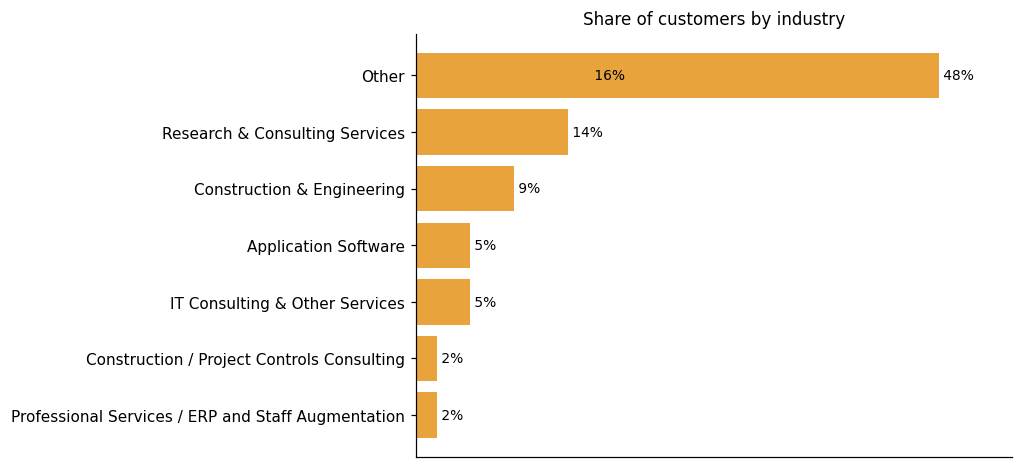
Among the 44 customers we looked at, North America leads where the region is known, followed by Global and EMEA. The segment picture, where known, has SMB as the largest group at 13 of 26, ahead of Mid-Market and Enterprise. Industries covered include Research & Consulting Services as the top category, followed by Construction & Engineering and IT Consulting & Other Services, with representative customers such as 415 Group, Adroit North America, Aegis Project Controls, Amatech Inc., Anthology, Ardalyst, and Avasant. BigTime Software itself markets to Accounting, Architecture, Consulting, Engineering, IT Services, Government Contracting, Municipal and Government Accounting Software.
Representative customers: 415 Group, Adroit North America, Aegis Project Controls, Amatech Inc., Anthology, Ardalyst, Avasant
How BigTime PSA uses AI in practice
BigTime PSA brings AI into the day-to-day workflows where professional services teams already spend their time — staffing, forecasting, demand planning, risk alerting, and answering ad hoc data questions. The platform combines real-time data with advanced language models to surface insights inside the workflows users already follow each day. The AI Assistant answers live data questions on the spot. The Resourcing Agent handles something more involved: identifying best-fit team members based on availability, skills, and utilization, then assigns them to projects against demand requirements. The AI layer is one part of a broader platform. Time tracking, invoicing, and project management all remain substantial functions in BigTime PSA on their own.
Generative AI
Read detailsBigTime PSA gives users plain-language access to live data through a built-in AI Assistant. The assistant runs on large language models and works directly against live data, so answers are data-driven rather than queued behind a support ticket. Teams can ask questions and get answers on the spot. The assistant also supports services quoting workflows, delivering how-to guidance at the moment teams need it.
Recommendation / Matching
Read detailsBigTime PSA's Resourcing Agent matches staff to projects automatically, drawing on availability, skills, and utilization to identify the best-fit team members. Those three signals work together to make staffing recommendations data-backed and fast.
Predictive ML
Read detailsBigTime PSA forecasts profits, demand, and utilization, factoring in currency fluctuations and cross-entity cost structures. That forecast layer feeds directly into demand planning, where teams can run scenario models and make resource assignment decisions.
Anomaly / Pattern Detection
Read detailsBigTime PSA catches delivery risks before they hit the bottom line by continuously watching project and financial data with AI-driven analytics. The system surfaces specific signals: underutilization, billing delays, and budget overruns. When it detects a potential roadblock, it alerts users early — while there is still time to act.
Agentic AI
Read detailsBigTime PSA bundles two AI agents directly into the platform: a Resourcing Agent and an Analytics Agent. The Resourcing Agent automatically assigns staff to projects based on demand requirements. The Analytics Agent generates dynamic data visualizations and insights on demand. BigTime PSA describes both agents as operating autonomously within the platform.
BigTime PSA pricing and value: plans, costs and ROI
pricing state: The Essentials plan starts at a published price of $20 per user/month, while higher tiers (mid-sized, international, and Enterprise) have no published prices and appear to be sales-gated.
ROI evidence from 5 customers
- "With over 20 years of experience, BigTime combines powerful software with a team of experts who understand your most critical business challenges. That insight helps drive adoption,maximizesROI, andpositionsus as more than a vendor—we're a true partner in your firm's growth."
- Adroit has more than doubled revenue over the past 2+ years, the BigTime solution has provided the scalability required to meet this demand without adding extra finance resources
- hundreds of saved precious hours that would otherwise be wasted on managing Excel spreadsheets
- each project resulted in an average ROI increase of over 350%
Time-to-value: what implementations take
- For most customers, BigTime Enterprise PSA delivers full go-live in 4-6 months. We offer structured implementation playbooks, live training, and dedicated success teams to help you launch quickly and kick off a long-term plan for success.
- It's been three months since we started to research the topic until the tool was introduced – and this is an implementation time for over 1500 people in three locations, all with complicated billing models
Who it fits: value by company size
BigTime PSA addresses four distinct segments. Small, fast-growing teams are one target. Scaling mid-sized organizations are another. The product also targets firms with international customers who need multi-currency invoicing and margin tracking. At the upper end, it serves organizations with established systems and evolving complexity, offering an Enterprise PSA tier built for the office of the CFO, alongside Services CPQ and Resource Management.
The Essentials plan starts at a published price of $20 per user/month, while higher tiers (mid-sized, international, and Enterprise) have no published prices and appear to be sales-gated.
Essentials
BigTime Essentials starts at$20 per user/month.All plans includetime tracking, invoicing, expense management, and payments with BigTime Delivery
Enterprise
For organizations with established systems and evolving complexity. Get custom solutions that integrate with your tech stack. From Enterprise PSA—a finance-first solution built for the office of the CFO—to Services CPQ and Resource Management
Plans as published by the vendor on Pricing - Professional Services Automation Software.
BigTime PSA enterprise readiness: security, compliance, migration, and support
BigTime PSA covers enterprise readiness across four dimensions: security, compliance, migration, and customer support. BigTime Software addresses each of these areas within the product.
Security controls and assurance
BigTime PSA holds a SOC 2 Type II attestation, which is often a procurement gate for enterprise buyers. The product's contractual commitment covers technical, administrative, and physical safeguards designed to protect customer data against unauthorized access, loss, or destruction. Data is encrypted at rest and in transit, and access is managed through role-based permissions, SSO/SAML authentication, and granular audit trails that keep sensitive financial and client data protected. Regular security audits and trusted cloud providers are part of the security posture, alongside strict regulatory compliance.
Compliance and data protection
BigTime PSA holds SOC 2 Type II certification and pairs it with GDPR readiness and e-invoicing support to cover global compliance needs. For U.S. government contractors, BigTime PSA addresses DCAA requirements directly. The Defense Contract Audit Agency does not officially certify software, but BigTime PSA meets all the functional requirements in accordance with government standards. The accounting module arrives pre-configured with tools and settings aligned to DCAA regulations and generally accepted accounting principles, so contractors can hit the ground running. One boundary worth noting: the service agreement explicitly prohibits storing, maintaining, processing, or transmitting any protected health information, or otherwise using the Service in a manner that would require BigTime or the Service to be compliant with the Health Insurance Portability and Accountability Act, as amended (HIPAA), meaning HIPAA compliance is outside the product's scope.
Migration from competing platforms
BigTime PSA onboarding typically wraps up in a few weeks, with an expert team handling setup, data migration, and training. Migration covers project, client, and financial records, and historical data is preserved throughout. For firms moving from BQE CORE, the implementation team securely migrates essential data so that prior history remains intact. For Kantata migrations, onboarding specialists preserve historical records and maintain continuity through the switch. Once teams are up and running, day-to-day work moves faster too — in one customer's words, it's taking me five to ten minutes to set up any given project, compared to an hour with alternatives they had evaluated.
Customer support experience
BigTime PSA provides telephone and email support Monday through Friday, 9 AM to 5 PM Eastern, excluding company holidays. Response commitments are tied to defect severity: critical defects are addressed within two business hours, and severe defects within four. Moderate defects carry a one-business-day response window.
BigTime PSA alternatives and competitive landscape


Connect BigTime PSA with your stack: integrations and partner ecosystem
BigTime PSA supports both native integrations and third-party integration partnerships across 17 partner categories. The 12 native integrations sit alongside 13 integration partnerships. Those categories range from Accounting Software and CRM to Team Communication Platforms, covering a broad spread of business functions.
BigTime PSA connects to the tools consulting firms already run on — accounting platforms, CRMs, and project delivery systems — through a combination of named integrations and open API access. The REST-based API lets technical teams pull BigTime data into any back-end system without disrupting existing workflows. For reporting, BigTime DataHub centralizes data so it can flow directly into Power BI, Tableau, or a custom analytics environment. On the pre-built side, BigTime PSA connects to widely used platforms including QuickBooks, Salesforce, and Sage Intacct, plus dozens of other tools common in consulting firms. The QuickBooks connection carries particular depth: as an official Intuit-Integrated Application, BigTime syncs with both QuickBooks Online and Desktop automatically, with no re-entry or reconfiguration required. For its Services CPQ & Quotes Software capability, BigTime Services CPQ extends those connections further, covering CPQs, CRMs, PSAs, and ERPs that sales teams depend on — including Salesforce CPQ, MS Dynamics, Conga, and Smartsheet, among others.
| Partner category | Integration partners | Native count | Flow direction |
|---|---|---|---|
| Accounting Software | QuickBooks, Sage Intacct, Xero | 1 | Bidirectional |
| CRM | HubSpot, Salesforce | 0 | Bidirectional |
| Team Communication Platform | Slack | 0 | Unknown |
| Business Intelligence / Analytics | Microsoft Power BI, Tableau | 2 | Downstream |
| Calendar / Productivity | Google Calendar | 0 | Bidirectional |
| Customer Support Software | Zendesk | 1 | Upstream |
| Digital Marketing Agency | KlientBoost | 0 | Unknown |
| ERP / Accounting Software | NetSuite | 1 | Bidirectional |
| HR Software | BambooHR | 1 | Upstream |
| IT Service Management | ServiceNow | 1 | Upstream |
| Identity & Access Management | Okta, OneLogin | 2 | Upstream |
| Integration Platform | ApiX-Drive | 0 | Unknown |
| Other | Versori | 0 | Unknown |
| Payment Processing | Stax | 0 | Unknown |
| Project Management Software | Atlassian, Jira, Smartsheet | 2 | Bidirectional, Unknown |
| Tax Preparation Software | Lacerte (intuit.com) | 1 | Upstream |
| Tax Software | Lacerte (lacerte.com) | 0 | Unknown |
| Workflow Automation / iPaaS | Zapier | 0 | Bidirectional |
BigTime Software News
Amerykanie z BigTime przejmujÄ… polski startup Primetric
BigTime has acquired Polish SaaS startup Primetric to enhance its professional services automation offerings. The acquisition aims to create a leading PSA software for small and medium-sized service firms globally. Primetric's tools for employee workload management and financial forecasting will integrate with BigTime's project management and billing solutions, expanding their market reach and functionality.
BigTime Appoints Jerry Cosmas as CFO
BigTime Software has appointed Jerry Cosmas as the new Chief Financial Officer. Cosmas will lead financial operations and strategy, supporting BigTime's growth and AI-powered initiatives. His experience from high-growth firms will aid in enhancing efficiencies and sustainable growth. CEO Don India highlights Cosmas's role in strategizing intelligent growth and expanding the product portfolio.
BigTime Names Jerry Cosmas as Chief Financial Officer
BigTime Software has appointed Jerry Cosmas as Chief Financial Officer. Cosmas will oversee financial operations and strategic planning, supporting BigTime's expansion and AI investments in PSA software. His experience in scaling technology companies will aid BigTime's growth and operational efficiency. The appointment aligns with BigTime's focus on empowering professional services firms through AI-enhanced capabilities.
BigTime Software Profile
Company Name
BigTime Software
Company Website
https://www.bigtime.net/HQ Location
311 South Wacker Drive, Suite 2300, Chicago, IL 60606
Employees
51-100
Social


Financials
SERIES B